Introducing Strada Signals, our new report series on AI for insurance operations. Read our whitepaper →
Introducing Strada Signals, our new report series on AI for insurance operations.
Read our whitepaper →
Introducing Strada Signals, our new report series on AI for insurance operations. Read our whitepaper →
Automated Insurance Payment Reminders With Voice AI in 2026

Amir Prodensky
CEO
15 min read
Simple Voice AI workflows for timely insurance payment reminders
Late and overdue payments are a big headache in insurance. They disrupt cash flow and strain customer relationships.
You’ve probably seen how chasing payments drains time and patience. Automated payment reminders offer a simple fix by sending timely nudges that reduce late payments.
And Voice AI takes this to the next level. It makes reminders sound natural and conversational, so customers feel genuinely cared for, not bothered.
But let’s start with the basics. Before diving into tools and tactics, you need a clear picture of what automated payment reminders actually are and why insurers rely on them.
Automated insurance payment reminders: what they are and why they matter
Automated insurance payment reminders are smart notifications sent to customers when their insurance payments are due, overdue, or need follow-up.
Unlike general bill reminders, these focus specifically on insurance policies and are often personalized based on each customer’s situation.
They use triggers like invoice status, due dates, or missed payments, making sure reminders go out exactly when needed – without anyone having to lift a finger.
How automated insurance payment reminders work
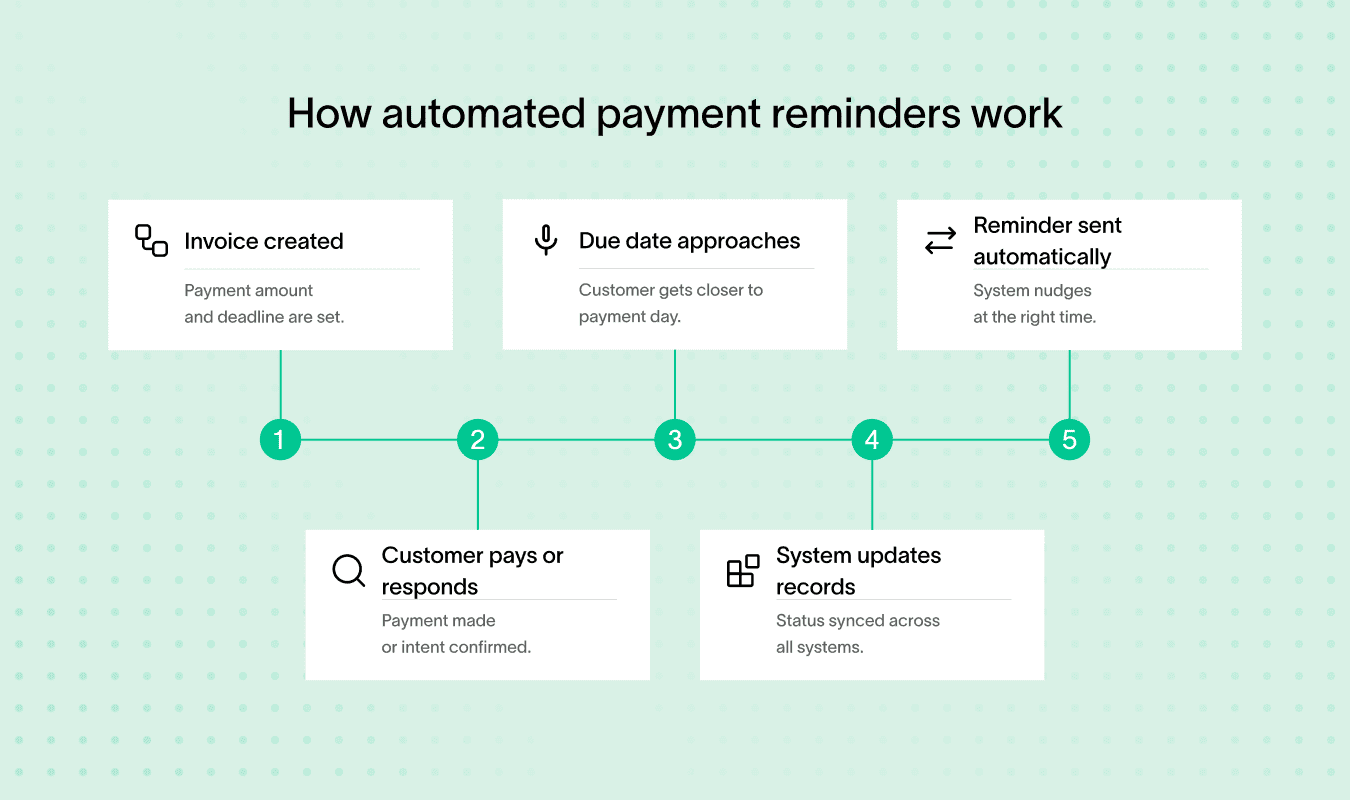
These reminders work by linking your insurer’s system with Voice AI technology, which can place calls or send messages automatically.
When an invoice is generated or a payment becomes overdue, the system springs into action, sending reminders or even handling simple customer responses.
This reduces the need for manual chasing, lowers days sales outstanding (DSO), and keeps customers happy by giving timely, clear communication.
Platforms and integrations behind automated payment reminders
You’ll find popular platforms like Strada, Upflow, PayStand, EngageLab, and Dexatel leading the way with automated payment collection reminders and Voice AI features.
They effortlessly integrate with your favorite CRMs like Salesforce, HubSpot, or Zoho CRM, plus accounting tools such as QuickBooks and Xero. This unifies your payment process, making it smoother and more efficient.
Developers appreciate API access and SDKs these platforms offer, letting them tailor reminder workflows within existing insurer tech stacks.
For example, Strada’s platform shines here. It connects seamlessly with CRMs, AMS, and insurance management systems to automate calls, follow-ups, and updates through APIs.
Strada Workflows takes it further by turning call outcomes into immediate actions like re-triggering reminders or updating customer records in real time. You can create intelligent rules based on call results and policy data, customizing reminders to fit your needs perfectly.
Still, technology helps, but it doesn’t explain the human side. To design better reminders, you need to understand why payments get delayed in the first place.
How payment delays happen and why polite reminders work
Late insurance payments usually aren’t intentional. Common reasons include forgetfulness, unclear policy terms, financial constraints, and internal delays within companies. Most people simply overlook due dates or misunderstand payment instructions.
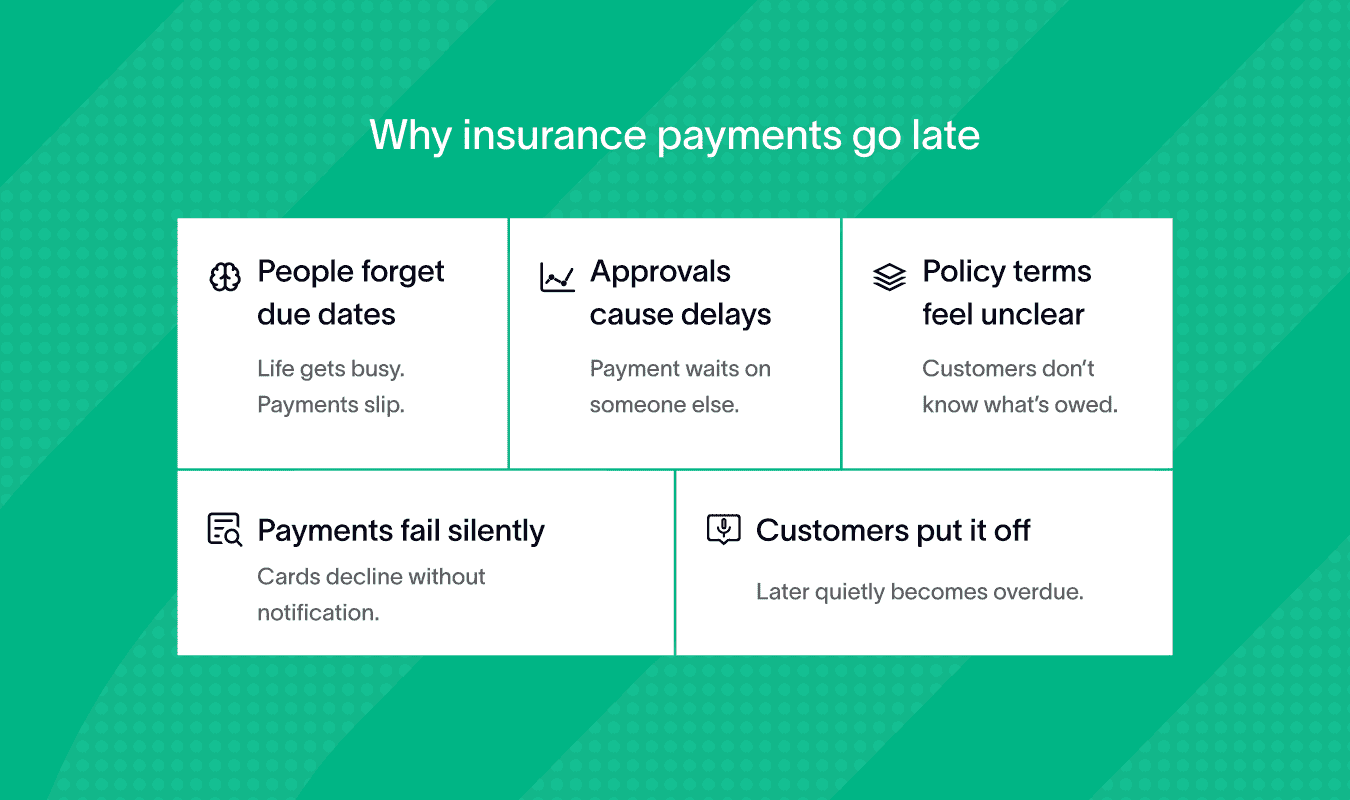
That’s why polite reminders are key: they gently nudge customers without creating friction.
To be effective, reminders need the right balance between friendly tone and firm communication. Early notices should be warm and helpful, while messages after the due date can become firmer and clearer.
You can follow a simple framework for tone variation:
Before due date → Gentle, friendly reminders.
After due date → Clear, firm notices that highlight consequences.
Escalation → Final warnings with necessary legal language.
It’s also important to observe laws like GDPR and CAN-SPAM while sending automated late payment reminders. These laws protect customer data and regulate communication, so your messages must include opt-out options and use data responsibly.
When scripting reminders, keep language simple and avoid legal jargon except in final notices. Use empathy to connect, like “We understand life gets busy.”
Applying communication frameworks like AIDA (Attention, Interest, Desire, Action) or PAS (Problem, Agitation, Solution) helps craft reminders that motivate timely payments.
For example, you can first grab attention by stating the due date, then explain the issue, and finish with a clear call to action.
Strada’s conversational AI uses natural language processing to deliver these smart payment reminders with empathy and clarity.
It adapts tone based on how customers respond, keeping conversations polite but firm.
Plus, Strada’s AI evaluation tools check scripts for accuracy, reducing errors and liability while building positive customer relationships, which is why platforms are often mentioned among the best apps for automated payment reminders.
Once customer behavior is clear, delivery becomes the deciding factor. The next step is choosing the channels and tools that bring reminders to customers at the right moment.
Channels and tools for automated insurance payment reminders with Voice AI
When sending payment reminders, choosing the right communication channels is key. You’ll want to use channels that are fast, reliable, and engaging to your customers.
Email, SMS, and voice calls
Email is widely used but often less effective – many emails remain unopened. SMS for payment reminders, on the other hand, boasts open rates above 90%, making it great for quick alerts.
Voice calls using Voice AI add immediacy and personal touch that text can’t match. Automated voice reminders can capture attention and even handle simple interactions, which boosts engagement.
Push notifications and messaging apps
Push notifications pop up instantly on devices and work well as gentle nudges. Messaging apps like WhatsApp and Telegram are gaining popularity thanks to their conversational style and rich media support.
Platforms like OneSignal and Twilio Conversations help you manage these channels smoothly.
Multichannel approach and escalation
Using multiple channels together improves your reach and response rates. For example, start with SMS for payment reminders, then follow up with voice calls if needed.
If automated messages don’t work, escalate to personalized outreach like direct phone calls or official letters. This stepwise approach keeps communication effective without overwhelming customers.
Top automation and Voice AI platforms
Several tools make automation easier. Look into Dexatel and Twilio for SMS and voice APIs. Google Dialogflow, Amazon Polly, and IBM Watson Assistant offer advanced Voice AI functions.
Strada can combine voice and chat for smooth customer interactions.
Integrating these with your CRM, payment gateways like Stripe or PayPal, and insurance management software creates a seamless workflow.
And here’s what this looks like in real life, step by step:
Pros and cons of channels
Choosing the right reminder channel is about balancing reach, cost, and customer response. Every channel comes with clear trade-offs:
Email → Low cost, good for detailed info, but lower open rates.
SMS → High delivery and open rates, more personal, but may incur costs and character limits.
Voice AI calls → Highly engaging and immediate, but pricier and depends on call acceptance.
Push Notifications → Instant, low-cost reminders, but may be ignored if overused.
Messaging Apps → Great for conversations and rich content, but adoption varies by customer.
Always keep compliance and regional regulations in mind when choosing channels.
Fallback and retry strategies
Still, not every message will get through at once. That’s why fallback and retry strategies matter.
For example, if an SMS fails, try sending an email or schedule a Voice AI call. Setting up retries at different times boosts your chances without annoying customers.
One standout player in this space is Strada, a specialized Voice AI platform that excels in scalable phone call reminders. Strada smartly manages retries, optimizes call scheduling, and uses caller ID tricks to improve pickup rates.
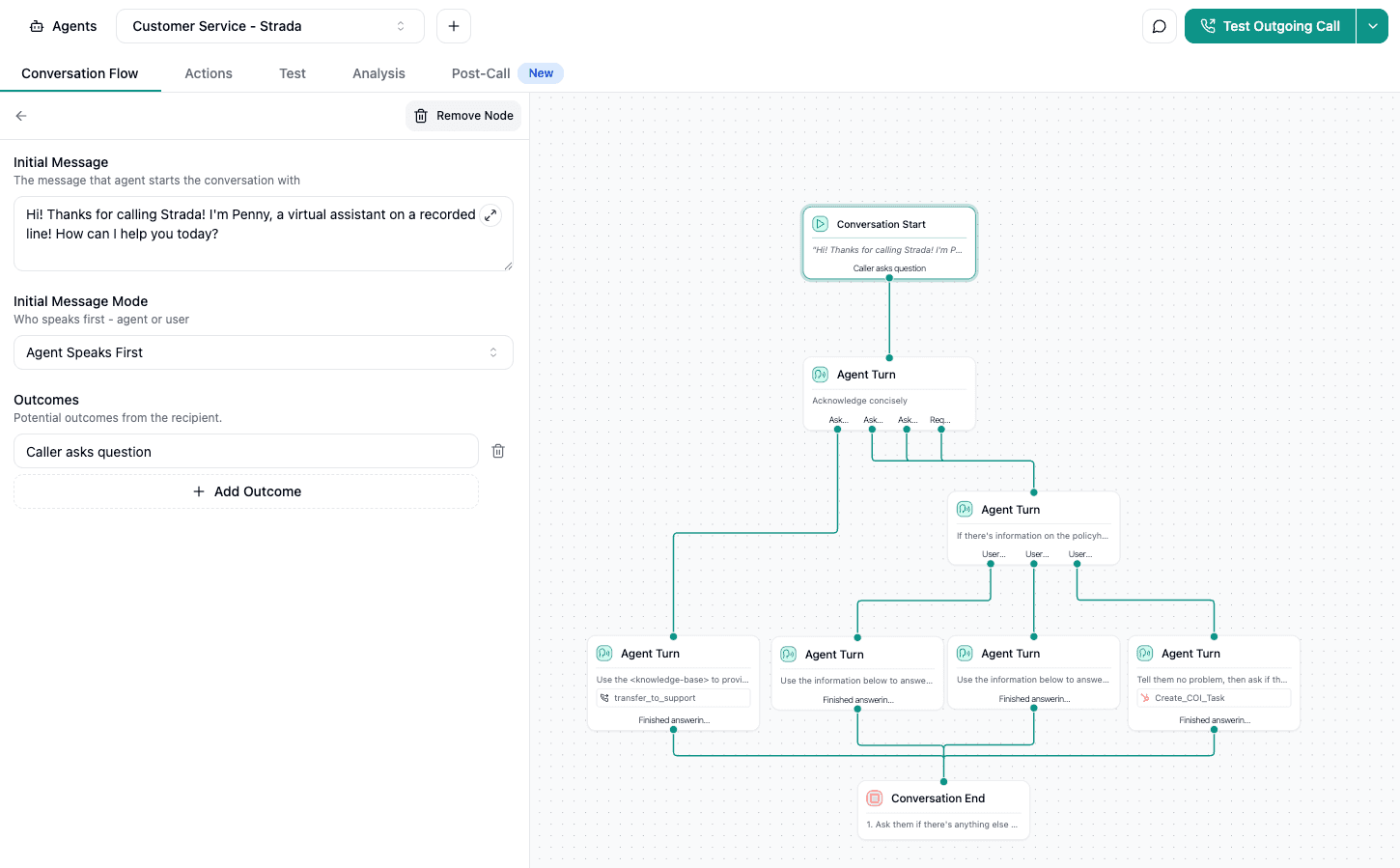
It also supports live actions like sending SMS or email follow-ups directly from calls. Plus, you can handle appointment scheduling or smoothly transfer calls for quick, personalized service.
Strada integrates easily with your existing CRM and communication tools, so you can build unified workflows that combine SMS for payment reminders, emails, calls, and more automatically.
Basically, channels are only part of the equation. Timing plays an equally important role in whether reminders work or get ignored.
When and how often should automated insurance payment reminders be sent?
You’ll want to send automated payment reminders at carefully chosen times to boost payment rates while keeping customers happy.
Here’s a practical timing schedule that works well:
On invoice issuance → Send a reminder as soon as the invoice goes out to get the payment on their radar.
7-10 days before the due date → Use advance reminders to gently nudge customers ahead of time.
On the due date → A friendly prompt on the day payment is due keeps things on track.
Recurring weekly follow-ups after the due date → Keep reminders going weekly until payment comes through.
Escalation reminders after 14-30 days overdue → Increase urgency but stay respectful to avoid annoying your customers.
Timing and frequency matter because too few reminders risk late payments, while too many can frustrate clients.
Automating reminder timing and escalation
With Voice AI and automation platforms, you can schedule and trigger reminders automatically.
You don’t need to lift a finger! Many tools, like engageLab and upflow, come with built-in scheduling options and allow manual overrides for special cases.
For example, if a customer promises to pay but misses their deadline, Strada Workflows can re-trigger reminders based on real-time call outcomes, automating complex escalation rules seamlessly.
Dynamic scheduling and compliance considerations
Dynamic scheduling is where machine learning shines. Models predict payment behavior so you can adjust reminder timing and frequency on the fly.
Strada uses this approach to optimize call timing and message cadence, improving conversions while respecting compliance limits on reminder frequency.
Plus, their system lets you customize tone and send rates based on client segmentation and payment history, giving each customer a tailored experience.
Compliance is key, too. Different regions limit how often you can send reminders, so your system must follow those rules strictly.
Once timing is set, content does the heavy lifting. What you say matters just as much as when you say it.
How to write effective payment reminder content
The key here is to be clear, polite, and direct, helping your customers understand what’s due and how to pay it quickly.
Start by including must-have info in your message: invoice or policy number, amount due, due date, outstanding balance, and any late fees if they apply. This avoids confusion and keeps the reminder focused. Next, give clear payment instructions.
Whether you embed direct payment links or buttons in emails or use voice prompts, make it super easy for customers to take action without hunting for details.
Tone, personalization, and urgency
Personalization is a game changer. Use the client’s name, mention your company, and even touch on recent interactions. It makes reminders feel less robotic and more like a helpful nudge from someone who cares.
Also, don’t forget to add contact info for your insurer’s representative. If questions pop up, your customer should know exactly who to reach out to.
Your tone matters. Keep it polite but assertive. If this is the second or final reminder, make sure to mention it clearly – phrases like “2nd reminder” or “final notice” gently raise the urgency.
Adapting reminder content to different channels
At this stage, the difference isn’t what you say – it’s how the message is delivered. Some parts of reminder content work better in voice, others don’t.
Reminder element | Works best in text | Works best in Voice AI |
Payment details (amount, date) | Clear and scannable | Can feel overloaded |
Payment links | One-click action | Not clickable |
Policy explanations | Easy to miss | Easier to explain verbally |
Empathy and reassurance | Often feels generic | Sounds human and natural |
Urgency for overdue cases | Easy to ignore | Harder to dismiss |
Handling objections | Not interactive | Real-time responses |
Serious terms like “legal action” or “urgent” work well when you need to stress consequences but avoid sounding threatening.
To boost engagement, consider email gamification techniques. Adding small rewards for prompt payments or interactive elements can motivate customers.
For example, use progress bars to show payment status or quizzes related to policy benefits. These tactics increase clicks and friendly responses.
Here’s a quick list of sample message templates:
Friendly pre-due reminder → A gentle nudge before the due date.
First overdue reminder → Polite notice that payment is late.
Final notice → Clear, urgent warning before escalation.
Payment failure alert → Inform the customer of failed transactions.
Escalation message → Addressed to management if unpaid too long.
Voice AI scripts should match these emails. Keep calls natural, conversational, and polite but clear. Strada’s AI scripts shine here – they use insurance terms and empathetic language that make calls sound real and engaging, not robotic.
Testing, localization, and compliance considerations
Legal disclaimers and opt-out instructions are essential for compliance. You must add these to every channel, whether email or voice. This protects your company and respects customer choices.
Also, using A/B testing tools available in platforms like Mailchimp and SendGrid can help optimize your subject lines and message content, improving open and payment rates over time.
This ensures your customers get a consistent experience across channels, aligned with their preferences and responses, making automated late payment reminders smoother and more successful.
With content and delivery in place, let’s zoom out and look at the bigger impact of automation and Voice AI.
How automation and Voice AI improve payment collections
You’ll learn how automation and Voice AI can make collecting insurance payments easier, faster, and more effective.
These tools bring clear benefits like reducing errors, tailoring communication, and boosting customer engagement.
Benefits of automation: accuracy, consistency, and efficiency
To see the real value, compare old-school collections with automation:
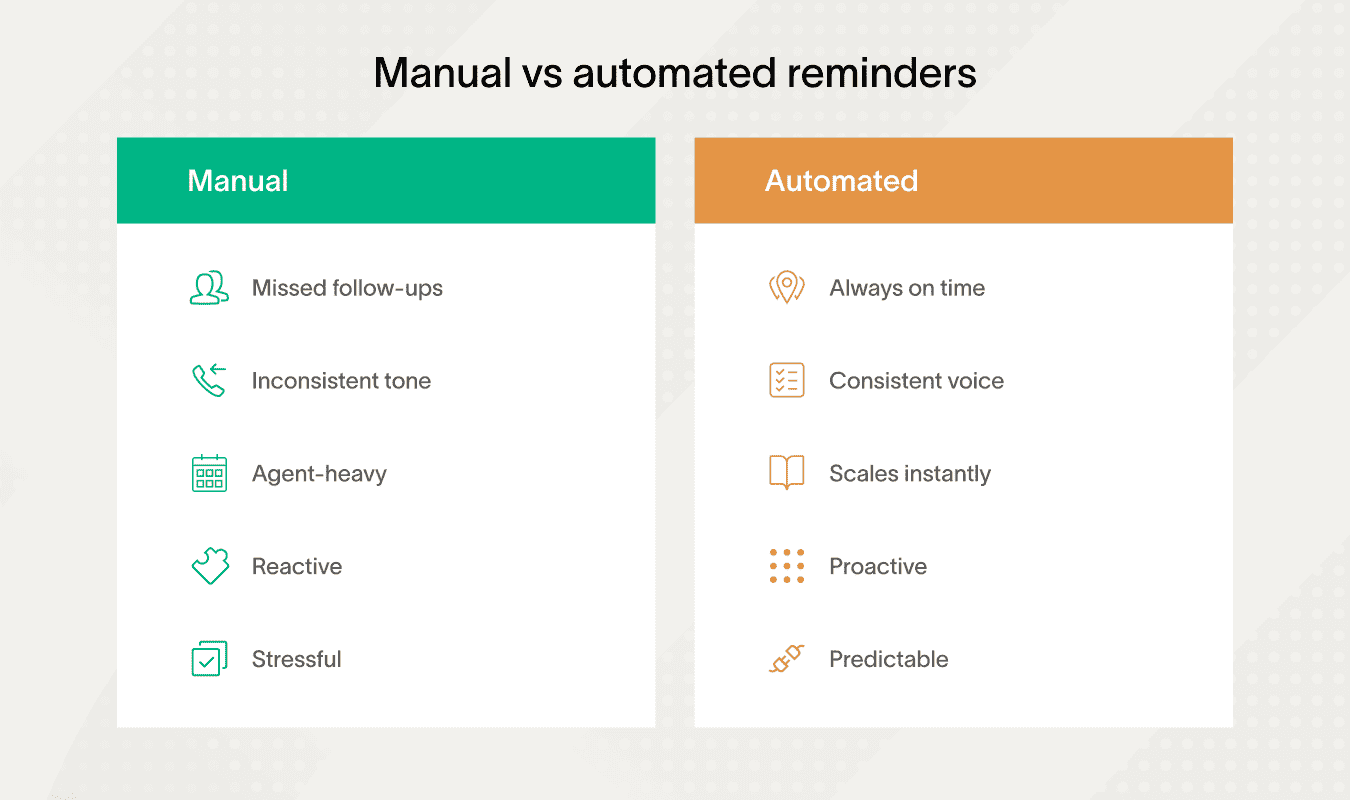
First off, automated payment collection reminders mean fewer mistakes. Unlike manual calls or emails, automation sends timely, consistent, and accurate payment reminders without missing a beat.
It’s also scalable: no matter how many clients you have, the system keeps up. This reduces the need for manual labor, freeing your team to focus on more complex tasks.
With automation, you can group clients by payment method, direct debit, credit card, bank transfer, and design specific workflows for each. You can also segment customers by type or behavior.
Tailored workflows and real-time monitoring
Setting up tailored workflows is easier than you think. Here’s how it works:
Create client groups based on payment method or customer type.
Assign different reminder schedules and message styles.
Automate escalation for overdue accounts.
Plus, dashboards and analytics give you real-time insights. You can see who’s overdue, how many messages are opened, and payment conversion rates at a glance.
This helps you spot trouble early and adjust your strategies fast.
Customer self-service portals add to the convenience. They allow clients to check payment status and complete transactions online anytime. Integrating these portals with your automated reminders makes the whole process smoother for everyone.
Making payment collections conversational and smarter with Voice AI
Voice AI adds a whole new level of interaction. Instead of robotic calls, clients engage in natural conversations. Voice AI understands and responds in real-time, checking payment status, answering questions, and guiding users through the process with interactive prompts.
Personalized voice messages make each call feel tailored to the client. You can automate follow-ups on payments or missed reminders with a friendly voice, reducing the need for live agents.
Tools like Strada integrate these features seamlessly. For example, its voice API’s real-time capabilities support interactive payment facilitation, confirming amounts and methods during calls without manual agent help.
If you want even more flexibility, developer resources and SDKs let you customize these tools to fit your specific needs.
Instant help with chatbots and AI predictions
Chatbots and predictive AI add an extra layer of speed and intelligence to payment support.
They help insurers respond instantly, reduce manual work, and act before payments become overdue:
AI-powered chatbots → Answer payment-related questions in real time and send reminders automatically through insurance websites.
24/7 self-service support → Handles routine inquiries without hold times, improving availability and customer experience.
Predictive risk detection → Uses AI models to identify customers likely to miss payments and trigger early, priority reminders.
Payment processor integrations → Confirm payments instantly and generate receipts automatically, ensuring a smooth end-to-end flow.
Together, these capabilities allow insurers to move from reactive follow-ups to proactive payment management.
Faster responses, early risk detection, and seamless payment confirmation help reduce late payments while building customer trust.
Revolutionizing insurance payment collections with Strada
Strada is a standout player in this space. As a comprehensive conversational AI platform, Strada handles thousands of calls with zero hold times. It creates dynamic, personalized interactions that feel natural and engaging.
Strada Workflows take automation to the next level by managing follow-ups, escalating complex cases, and updating CRM systems based on call conversations. This approach improves recovery rates and reduces days sales outstanding.
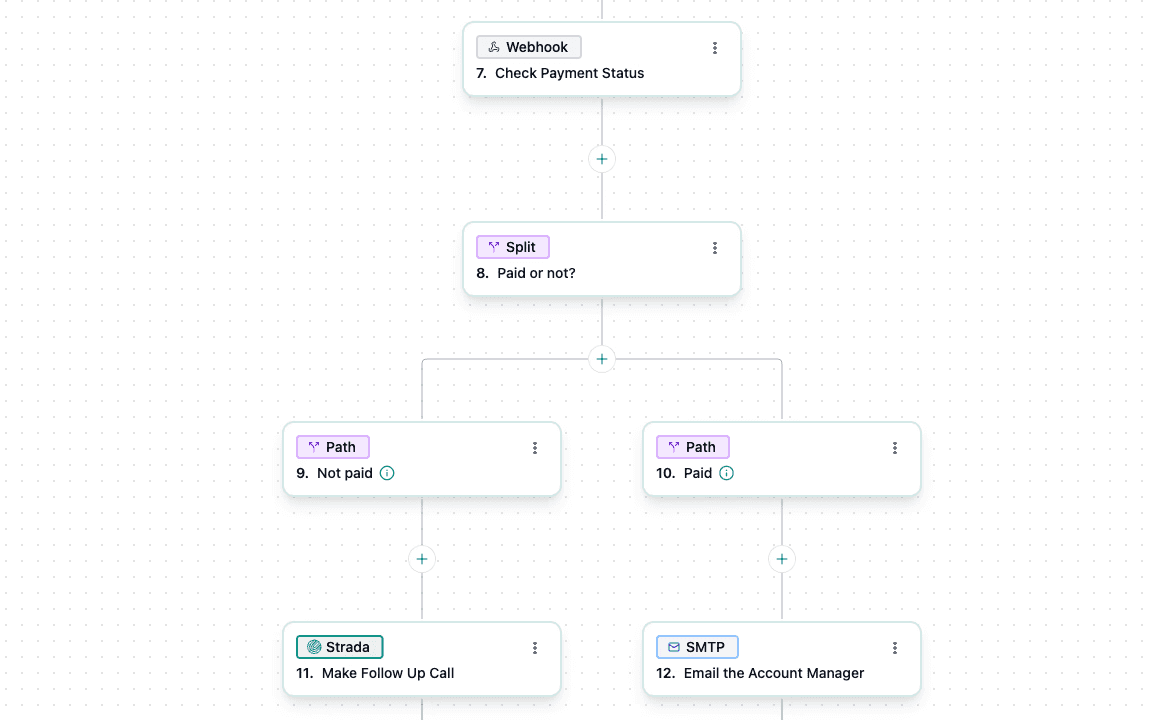
Their dashboards provide real-time visibility into call outcomes, payment promises, and engagement metrics. This transparency helps you make smarter collection decisions faster.

During calls, Strada’s Voice AI supports interactive payment facilitation, letting customers confirm amounts and payment methods without agent intervention.
Plus, insurers can use Strada’s extensible APIs and SDKs to integrate this AI smoothly into self-service portals and chatbot systems.
The result? Seamless omnichannel payment collections that meet customers where they are.
By combining automated payment collection reminders with Voice AI and smart analytics, you get a full toolkit to boost efficiency, reduce errors, and improve customer experience – all while speeding up payment collections. It’s a win-win you can start building today.
Seeing how a platform works in practice makes the tools clear. The next step is understanding how to use them without harming customer relationships.
Best practices for managing reminders and customer relationships
You’ll learn how to keep your payment reminders effective and relationships with customers positive.
The key is balancing automation and personal touch while following clear processes everyone understands.
Balancing automation, escalation, and human follow-up
First, maintain consistent processes and assign responsibilities clearly among your sales, account managers, and collections teams. This keeps everyone on the same page and prevents reminders from slipping through the cracks.
Use smart payment reminders to initiate contact, but back them up with personal outreach when needed.
It helps to apply escalation strategies thoughtfully. Start with gentle reminders that nudge customers kindly. If payments remain late, step up the firmness gradually.
Only involve senior management after repeated non-payment. This avoids alienating customers early and gives you a chance to resolve issues without escalating tension.
While automation saves time, never rely on it alone. Balance reminders with calls or manual contact, especially for those consistently late payers. Personal outreach shows you care and can uncover issues simple texts can’t.
Also, always include all relevant payment info, amount due, due date, payment methods, right in your reminders. Clear details reduce confusion and speed up payments.
Using empathy and flexibility to preserve customer trust
Payment reminders work best when they combine clarity with respect for the customer. Empathy and flexibility help resolve late payments without damaging long-term relationships:
Promoting automated payments → Encourages reliable options like direct debit or credit cards to reduce missed payments.
Keeping communication empathetic → Uses polite, solution-focused language to maintain trust during follow-ups.
Offering flexible payment options → Allows partial payments or deadline extensions to resolve difficult cases.
Adjusting based on response data → Refines scripts, timing, and channels using real performance signals.
Handled this way, reminders remain effective while preserving customer trust and cooperation.
Compliance, documentation, and continuous optimization
Don’t forget legal compliance and data privacy. Make sure your reminders and collection processes meet regulations to avoid fines and protect customer trust.
Train your collections agents on empathetic communication and legal rules – this helps them navigate difficult conversations while keeping standards high.
Document every customer interaction and payment agreement in your CRM. This creates an audit trail that’s invaluable for disputes or reviews. Implement feedback loops from customer service teams to adjust your reminder policies and tone over time.
Customers’ feedback is a goldmine for improvement.
Strada supports consistent process enforcement through automation, making sure your payment reminders and escalations follow the exact business rules you set – no gaps, no slip-ups.
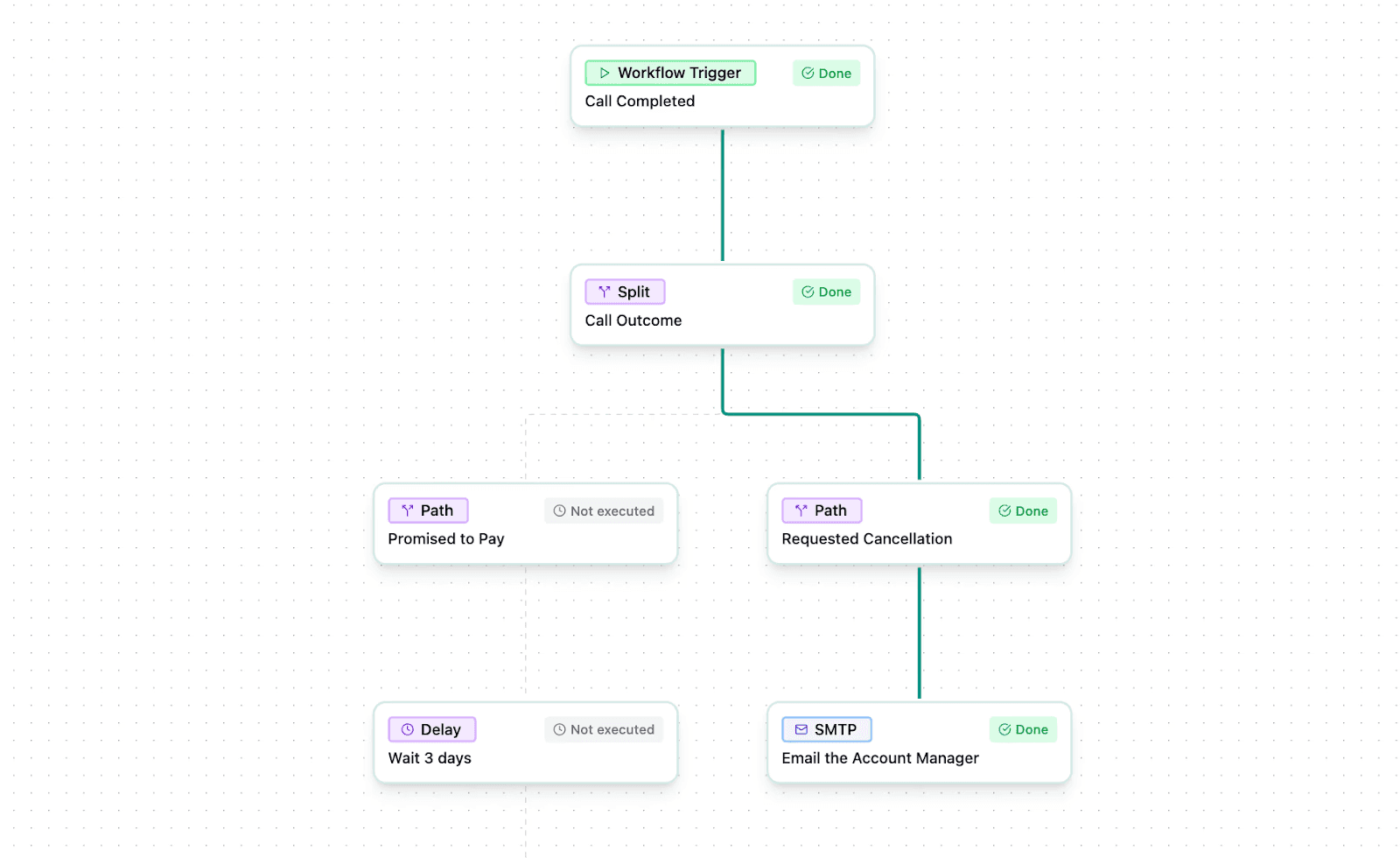
Its AI-driven conversational approach keeps interactions empathetic and solution-first, so customers feel heard, not hounded. Plus, Strada enables rapid escalation paths inside workflows, alerting senior staff when a customer is unresponsive or at risk of leaving.
Thanks to integrations, conversations and payment commitments can be automatically logged into CRMs, creating accurate records and helping you stay ready for audits.
Teach your teams to use these tools to complement their judgment and empathy – not replace it. This combination ensures your reminders are smart, timely, polite, and effective every time.
With compliance and optimization in place, the next step is putting these principles into practice through a structured implementation process.
How to implement automated payment reminders with Voice AI (step-by-step)
Let’s dive into the steps you’ll follow to get this up and running smoothly.
Pre-configuration: lay the groundwork
Before you jump into creating reminders, start by setting up the essentials:
Integrate payment systems like Paystand or Upflow with your existing platforms to access real-time payment data.
Sync customer data from your CRM or policy systems to keep contact info current.
Set up communication channels such as email, SMS, push notifications, and voice calls. Tools like Strada, Twilio, or Google Dialogflow work great here.
This groundwork ensures your reminders reach the right people, with the right info, through the right channels.
Step #1: Build your workflow or user journey
Next, create the flow your reminder campaigns will follow. Use marketing automation or accounts receivable tools. Map out how a payment reminder moves, for example:
Initial reminder a few days before due date.
Follow-up messages after missed payment.
Escalations for multiple failed attempts.
If you’re looking for an easier route, Strada Workflows offers a turnkey solution enabling rapid Voice AI campaign deployment without needing engineering resources.
It connects deeply to policy systems and CRMs so you don’t have to build integrations from scratch.
Step #2: Select or customize message templates
Now, choose or tweak your message scripts:
Write clear, friendly scripts for Voice AI to use.
Customize email, SMS, and push notification templates.
Make sure scripts sound natural and comply with legal guidelines.
If you use Strada’s low-code/no-code automation builder, designing and editing these reminders is simple.
You can add smart triggers, real-time responses, and compliance features with minimal effort.
Step #3: Define triggers based on payment data
Set the conditions that launch your reminders:
Trigger reminders based on due dates.
Activate follow-ups on failed payment attempts.
Use data-driven triggers like account status or payment history.
This keeps your reminders timely and relevant.
Step #4: Configure timing, frequency, and escalation rules
Decide when and how often messages go out:
Send first reminders at an optimal time before payment is due.
Schedule follow-ups at defined intervals after missed payments.
Set up escalation rules that increase urgency or change channels if payments remain overdue.
Finding the sweet spot here maximizes response without annoying customers.
Step #5: Test and activate campaigns
Before going live, fully test your setup:
Use sandbox environments like Strada’s or Google Dialogflow’s to simulate reminders.
Run pilot campaigns with small customer groups to check responses.
Validate message clarity, trigger accuracy, and delivery channels.
Testing catch problems early and boosts confidence.
This reduces risk and ensures a smooth campaign launch.
Step #6: Monitor and optimize performance
Once your reminders are active:
Watch analytics dashboards closely for open rates, call pickups, and payment completions.
Use AI evaluation tools in platforms like Strada for deeper insights.
Adjust message timing, content, or channels based on performance data.
This ongoing optimization improves results over time.
Step #7: Train staff on using the system and insights
Your team needs to know how to use the automation tools and interpret analytics effectively:
Provide training on campaign setup and management consoles, such as Strada’s dashboard.
Teach staff how to read payment and call data to spot trends.
Encourage feedback loops so your team helps refine your reminders continuously.
Well-trained teams drive better collection outcomes.
Step #8: Troubleshoot common integration issues
Keep an eye out for common snags, and tackle them like this:
API errors → Verify credentials and endpoint URLs.
Data sync problems → Check mapping rules and refresh schedules.
Message delivery failures → Confirm contact info accuracy and notification channel health.
Clean data and stable integrations keep your reminders running smoothly.
Step #9: Maintain data hygiene and contact updates
Regularly update customer info to avoid sending reminders to inactive numbers or emails. This prevents wasted efforts and customer frustration.
Set a recurring process to:
Clean and verify contact databases.
Remove duplicate or outdated entries.
Confirm opt-in status for communication channels.
Good data hygiene is the backbone of an effective reminder system.
Step #10: Reducing setup complexity with automation tools
To make setup even easier, consider Strada Workflows.
It’s one of the best apps for automated payment reminders by enabling insurers to build complex reminder journeys with no engineering lift.
You get deep native integrations with popular CRMs and policy systems, plus a low-code/no-code builder to customize triggers and messaging quickly. Strada supports pilot tests in their sandbox environment so you can roll out changes safely in stages before going full scale.
Plus, their built-in analytics and AI evaluation tools help you refine campaigns over time automatically.
By following this step-by-step process, you’ll create streamlined, polite, and effective automated payment reminders that keep cash flowing and reduce customer friction. Remember, testing, training, and continuous improvement are key to long-term success.
And with friendly tools like Strada and others mentioned, you'll have everything you need to start right – and upgrade effortlessly as you grow.
Once everything is live, measurement tells you what’s actually working.
How to measure success and optimize automated payment reminders
You’ll learn how to measure success and tweak your automated payment reminders for the best results.
Start by defining KPIs like on-time payment rate, days sales outstanding, reminder open rates, call answer rates, and payment conversion rate after a reminder.
These numbers tell you how well your payment reminders are working.
Metrics only matter if they lead to decisions. The real value comes from knowing how to act when numbers move up or down.
Metric changes | What it usually means | What to adjust next |
Open rates drop | Messages aren’t grabbing attention | Change subject lines or timing |
Call answer rate is low | Wrong time or channel | Shift calls to SMS-first flow |
Payments happen late | Reminders start too close to due date | Add earlier pre-due reminder |
High promises, low payments | Customers delay follow-through | Shorten follow-up interval |
Complaints increase | Too many reminders | Reduce frequency or soften tone |
Fast payments after calls | Voice channel works well | Prioritize Voice AI for overdue |
To act on these signals consistently, teams need visibility across channels and reminder flows.
Interpreting payment reminder metrics in practice
Next, gather and analyze data using built-in dashboards like Upflow and EngageLab. You can also integrate tools like Tableau or Power BI to dig deeper. These platforms give you clear visuals and real-time insights into performance.
Or, for example, Strada’s robust analytics dashboard offers real-time info on call success rates, customer engagement, payment promises, and overdue accounts.
It also captures conversational intelligence to measure customer satisfaction and sentiment, giving you richer feedback beyond just payment stats.
Plus, Strada includes built-in A/B testing tools for voice scripts and reminder timing, empowering you to refine your smart payment reminders based on data.
Improving results through testing and feedback
Speaking of A/B testing, set up experiments with subject lines, message tone, and channel mix (voice, SMS, email).
Track which combos get the best response and payment conversions. Alongside this, collect customer feedback through quick surveys right after payment.
This lets you assess their experience with your payment reminders and spot any friction points.
Try this simple two-step routine to optimize your reminders:
Analyze data and test → Review your KPIs and run A/B tests to identify what works best.
Adjust and repeat → Change timing, frequency, or message content based on what you learn.
Keep a close eye on legal compliance and monitor response rates so you don’t overwhelm customers or cause complaints. Regularly hold review meetings with teams from accounts, customer service, and IT to talk through the data and improve your strategy.
Finally, don’t forget how integrating Strada with BI tools lets you connect call data to bigger operational KPIs. This way, you can optimize collection efforts across teams smoothly and effectively, making your payment reminders work smarter, not harder.
Testing improves results, but it doesn’t eliminate all risks. Some challenges still require attention.
Overcoming challenges in automated insurance payment reminders with Voice AI
You’ll face some common bumps when using automated late payment reminders, but they’re manageable with the right approach. Issues like incorrect customer data, message delivery failures, and regulatory restrictions can slow you down.
Plus, customer pushback and technical integration might complicate things.
Here’s how to tackle these challenges head-on:
Keep your data clean by regularly updating and verifying customer info.
Build fallback messaging strategies – use alternative channels if one fails.
Conduct strict compliance audits to follow all regulations.
Manage customer opt-outs clearly and respectfully.
Roll out the system in phases to catch issues early.
Strada helps smooth the road with enterprise-grade security, including SOC 2 Type 2 compliance, data isolation, and strict LLM privacy controls, so your customer data stays safe in every payment reminders interaction.
It also offers fallback mechanisms like intelligent retries, alternate channel triggers, and escalation flags to reduce failed contacts and regulatory risks.
Plus, you can use its audit trails and conversation recordings to handle disputes transparently.
Don’t forget to invest in staff training, both on Strada’s technical tools and on empathetic customer engagement, to keep dissatisfaction low and resolution rates high.
Always have contingency plans ready, such as manual overrides in Strada’s workflows, for emergencies or system downtimes. This proactive mindset will protect your brand reputation and keep your reminders effective and customer-friendly.
With the right safeguards in place, automated reminders can be used confidently and consistently.
Why you should embrace automated payment reminders with Voice AI
You’ve seen how automated payment reminders powered by Voice AI can change the game for insurance companies. They speed up payments, improve cash flow, lighten the manual workload, and boost the customer experience.
These smart payment reminders don’t just save time, they make sure your customers feel cared for without feeling overwhelmed.
Here’s what you get with a solid system:
Faster, more reliable collections.
Happier customers who appreciate timely, clear reminders.
Teams freed up from repetitive calls, focusing on higher-value tasks.
To get these benefits, adopting an integrated automation platform with Voice AI is key. It lets you scale payment reminders efficiently and handle large volumes smoothly.
Plus, ongoing optimization and personalization keep your reminders relevant and effective over time.
Many tools can help you set this up – options like upflow, paystand, engageLab, dexatel, and twilio provide great starting points for building smart payment reminders.
But if you want a tool made specifically for insurance, Strada stands out. It’s a conversational AI platform designed to scale payment reminder calls, improve contact rates, and automate post-call workflows for maximum collections efficiency.
Want to see the impact firsthand? Get a demo of Strada and discover how AI-driven phone agents can transform your payment reminder process with minimal engineering effort and a clear return on investment.
Frequently Asked Questions
Can Voice AI handle real customer objections about payments?
Yes. Modern Voice AI can answer common questions, explain amounts and due dates, handle promises to pay, and route complex cases to agents when needed.
How long does it take to launch automated payment reminders?
Framer is a design tool that allows you to design websites on a freeform canvas, and then publish them as websites with a single click.
Can Voice AI replace human agents in payment collections?
Framer is a design tool that allows you to design websites on a freeform canvas, and then publish them as websites with a single click.
What payment channels work best for reminders?
Framer is a design tool that allows you to design websites on a freeform canvas, and then publish them as websites with a single click.
How does Voice AI know when to escalate reminders?
Framer is a design tool that allows you to design websites on a freeform canvas, and then publish them as websites with a single click.
Table of Contents
Carriers, MGAs, and brokers scale revenue-driving phone calls with Strada's conversational AI platform.
Start scaling with voice AI agents today
Join innovative carriers and MGAs transforming their calls with Strada.
Automated Insurance Payment Reminders With Voice AI in 2026
Amir Prodensky
CEO
15 min read
Simple Voice AI workflows for timely insurance payment reminders
Late and overdue payments are a big headache in insurance. They disrupt cash flow and strain customer relationships.
You’ve probably seen how chasing payments drains time and patience. Automated payment reminders offer a simple fix by sending timely nudges that reduce late payments.
And Voice AI takes this to the next level. It makes reminders sound natural and conversational, so customers feel genuinely cared for, not bothered.
But let’s start with the basics. Before diving into tools and tactics, you need a clear picture of what automated payment reminders actually are and why insurers rely on them.
Automated insurance payment reminders: what they are and why they matter
Automated insurance payment reminders are smart notifications sent to customers when their insurance payments are due, overdue, or need follow-up.
Unlike general bill reminders, these focus specifically on insurance policies and are often personalized based on each customer’s situation.
They use triggers like invoice status, due dates, or missed payments, making sure reminders go out exactly when needed – without anyone having to lift a finger.
How automated insurance payment reminders work
These reminders work by linking your insurer’s system with Voice AI technology, which can place calls or send messages automatically.
When an invoice is generated or a payment becomes overdue, the system springs into action, sending reminders or even handling simple customer responses.
This reduces the need for manual chasing, lowers days sales outstanding (DSO), and keeps customers happy by giving timely, clear communication.
Platforms and integrations behind automated payment reminders
You’ll find popular platforms like Strada, Upflow, PayStand, EngageLab, and Dexatel leading the way with automated payment collection reminders and Voice AI features.
They effortlessly integrate with your favorite CRMs like Salesforce, HubSpot, or Zoho CRM, plus accounting tools such as QuickBooks and Xero. This unifies your payment process, making it smoother and more efficient.
Developers appreciate API access and SDKs these platforms offer, letting them tailor reminder workflows within existing insurer tech stacks.
For example, Strada’s platform shines here. It connects seamlessly with CRMs, AMS, and insurance management systems to automate calls, follow-ups, and updates through APIs.
Strada Workflows takes it further by turning call outcomes into immediate actions like re-triggering reminders or updating customer records in real time. You can create intelligent rules based on call results and policy data, customizing reminders to fit your needs perfectly.
Still, technology helps, but it doesn’t explain the human side. To design better reminders, you need to understand why payments get delayed in the first place.
How payment delays happen and why polite reminders work
Late insurance payments usually aren’t intentional. Common reasons include forgetfulness, unclear policy terms, financial constraints, and internal delays within companies. Most people simply overlook due dates or misunderstand payment instructions.
That’s why polite reminders are key: they gently nudge customers without creating friction.
To be effective, reminders need the right balance between friendly tone and firm communication. Early notices should be warm and helpful, while messages after the due date can become firmer and clearer.
You can follow a simple framework for tone variation:
Before due date → Gentle, friendly reminders.
After due date → Clear, firm notices that highlight consequences.
Escalation → Final warnings with necessary legal language.
It’s also important to observe laws like GDPR and CAN-SPAM while sending automated late payment reminders. These laws protect customer data and regulate communication, so your messages must include opt-out options and use data responsibly.
When scripting reminders, keep language simple and avoid legal jargon except in final notices. Use empathy to connect, like “We understand life gets busy.”
Applying communication frameworks like AIDA (Attention, Interest, Desire, Action) or PAS (Problem, Agitation, Solution) helps craft reminders that motivate timely payments.
For example, you can first grab attention by stating the due date, then explain the issue, and finish with a clear call to action.
Strada’s conversational AI uses natural language processing to deliver these smart payment reminders with empathy and clarity.
It adapts tone based on how customers respond, keeping conversations polite but firm.
Plus, Strada’s AI evaluation tools check scripts for accuracy, reducing errors and liability while building positive customer relationships, which is why platforms are often mentioned among the best apps for automated payment reminders.
Once customer behavior is clear, delivery becomes the deciding factor. The next step is choosing the channels and tools that bring reminders to customers at the right moment.
Channels and tools for automated insurance payment reminders with Voice AI
When sending payment reminders, choosing the right communication channels is key. You’ll want to use channels that are fast, reliable, and engaging to your customers.
Email, SMS, and voice calls
Email is widely used but often less effective – many emails remain unopened. SMS for payment reminders, on the other hand, boasts open rates above 90%, making it great for quick alerts.
Voice calls using Voice AI add immediacy and personal touch that text can’t match. Automated voice reminders can capture attention and even handle simple interactions, which boosts engagement.
Push notifications and messaging apps
Push notifications pop up instantly on devices and work well as gentle nudges. Messaging apps like WhatsApp and Telegram are gaining popularity thanks to their conversational style and rich media support.
Platforms like OneSignal and Twilio Conversations help you manage these channels smoothly.
Multichannel approach and escalation
Using multiple channels together improves your reach and response rates. For example, start with SMS for payment reminders, then follow up with voice calls if needed.
If automated messages don’t work, escalate to personalized outreach like direct phone calls or official letters. This stepwise approach keeps communication effective without overwhelming customers.
Top automation and Voice AI platforms
Several tools make automation easier. Look into Dexatel and Twilio for SMS and voice APIs. Google Dialogflow, Amazon Polly, and IBM Watson Assistant offer advanced Voice AI functions.
Strada can combine voice and chat for smooth customer interactions.
Integrating these with your CRM, payment gateways like Stripe or PayPal, and insurance management software creates a seamless workflow.
And here’s what this looks like in real life, step by step:
Pros and cons of channels
Choosing the right reminder channel is about balancing reach, cost, and customer response. Every channel comes with clear trade-offs:
Email → Low cost, good for detailed info, but lower open rates.
SMS → High delivery and open rates, more personal, but may incur costs and character limits.
Voice AI calls → Highly engaging and immediate, but pricier and depends on call acceptance.
Push Notifications → Instant, low-cost reminders, but may be ignored if overused.
Messaging Apps → Great for conversations and rich content, but adoption varies by customer.
Always keep compliance and regional regulations in mind when choosing channels.
Fallback and retry strategies
Still, not every message will get through at once. That’s why fallback and retry strategies matter.
For example, if an SMS fails, try sending an email or schedule a Voice AI call. Setting up retries at different times boosts your chances without annoying customers.
One standout player in this space is Strada, a specialized Voice AI platform that excels in scalable phone call reminders. Strada smartly manages retries, optimizes call scheduling, and uses caller ID tricks to improve pickup rates.
It also supports live actions like sending SMS or email follow-ups directly from calls. Plus, you can handle appointment scheduling or smoothly transfer calls for quick, personalized service.
Strada integrates easily with your existing CRM and communication tools, so you can build unified workflows that combine SMS for payment reminders, emails, calls, and more automatically.
Basically, channels are only part of the equation. Timing plays an equally important role in whether reminders work or get ignored.
When and how often should automated insurance payment reminders be sent?
You’ll want to send automated payment reminders at carefully chosen times to boost payment rates while keeping customers happy.
Here’s a practical timing schedule that works well:
On invoice issuance → Send a reminder as soon as the invoice goes out to get the payment on their radar.
7-10 days before the due date → Use advance reminders to gently nudge customers ahead of time.
On the due date → A friendly prompt on the day payment is due keeps things on track.
Recurring weekly follow-ups after the due date → Keep reminders going weekly until payment comes through.
Escalation reminders after 14-30 days overdue → Increase urgency but stay respectful to avoid annoying your customers.
Timing and frequency matter because too few reminders risk late payments, while too many can frustrate clients.
Automating reminder timing and escalation
With Voice AI and automation platforms, you can schedule and trigger reminders automatically.
You don’t need to lift a finger! Many tools, like engageLab and upflow, come with built-in scheduling options and allow manual overrides for special cases.
For example, if a customer promises to pay but misses their deadline, Strada Workflows can re-trigger reminders based on real-time call outcomes, automating complex escalation rules seamlessly.
Dynamic scheduling and compliance considerations
Dynamic scheduling is where machine learning shines. Models predict payment behavior so you can adjust reminder timing and frequency on the fly.
Strada uses this approach to optimize call timing and message cadence, improving conversions while respecting compliance limits on reminder frequency.
Plus, their system lets you customize tone and send rates based on client segmentation and payment history, giving each customer a tailored experience.
Compliance is key, too. Different regions limit how often you can send reminders, so your system must follow those rules strictly.
Once timing is set, content does the heavy lifting. What you say matters just as much as when you say it.
How to write effective payment reminder content
The key here is to be clear, polite, and direct, helping your customers understand what’s due and how to pay it quickly.
Start by including must-have info in your message: invoice or policy number, amount due, due date, outstanding balance, and any late fees if they apply. This avoids confusion and keeps the reminder focused. Next, give clear payment instructions.
Whether you embed direct payment links or buttons in emails or use voice prompts, make it super easy for customers to take action without hunting for details.
Tone, personalization, and urgency
Personalization is a game changer. Use the client’s name, mention your company, and even touch on recent interactions. It makes reminders feel less robotic and more like a helpful nudge from someone who cares.
Also, don’t forget to add contact info for your insurer’s representative. If questions pop up, your customer should know exactly who to reach out to.
Your tone matters. Keep it polite but assertive. If this is the second or final reminder, make sure to mention it clearly – phrases like “2nd reminder” or “final notice” gently raise the urgency.
Adapting reminder content to different channels
At this stage, the difference isn’t what you say – it’s how the message is delivered. Some parts of reminder content work better in voice, others don’t.
Reminder element | Works best in text | Works best in Voice AI |
Payment details (amount, date) | Clear and scannable | Can feel overloaded |
Payment links | One-click action | Not clickable |
Policy explanations | Easy to miss | Easier to explain verbally |
Empathy and reassurance | Often feels generic | Sounds human and natural |
Urgency for overdue cases | Easy to ignore | Harder to dismiss |
Handling objections | Not interactive | Real-time responses |
Serious terms like “legal action” or “urgent” work well when you need to stress consequences but avoid sounding threatening.
To boost engagement, consider email gamification techniques. Adding small rewards for prompt payments or interactive elements can motivate customers.
For example, use progress bars to show payment status or quizzes related to policy benefits. These tactics increase clicks and friendly responses.
Here’s a quick list of sample message templates:
Friendly pre-due reminder → A gentle nudge before the due date.
First overdue reminder → Polite notice that payment is late.
Final notice → Clear, urgent warning before escalation.
Payment failure alert → Inform the customer of failed transactions.
Escalation message → Addressed to management if unpaid too long.
Voice AI scripts should match these emails. Keep calls natural, conversational, and polite but clear. Strada’s AI scripts shine here – they use insurance terms and empathetic language that make calls sound real and engaging, not robotic.
Testing, localization, and compliance considerations
Legal disclaimers and opt-out instructions are essential for compliance. You must add these to every channel, whether email or voice. This protects your company and respects customer choices.
Also, using A/B testing tools available in platforms like Mailchimp and SendGrid can help optimize your subject lines and message content, improving open and payment rates over time.
This ensures your customers get a consistent experience across channels, aligned with their preferences and responses, making automated late payment reminders smoother and more successful.
With content and delivery in place, let’s zoom out and look at the bigger impact of automation and Voice AI.
How automation and Voice AI improve payment collections
You’ll learn how automation and Voice AI can make collecting insurance payments easier, faster, and more effective.
These tools bring clear benefits like reducing errors, tailoring communication, and boosting customer engagement.
Benefits of automation: accuracy, consistency, and efficiency
To see the real value, compare old-school collections with automation:
First off, automated payment collection reminders mean fewer mistakes. Unlike manual calls or emails, automation sends timely, consistent, and accurate payment reminders without missing a beat.
It’s also scalable: no matter how many clients you have, the system keeps up. This reduces the need for manual labor, freeing your team to focus on more complex tasks.
With automation, you can group clients by payment method, direct debit, credit card, bank transfer, and design specific workflows for each. You can also segment customers by type or behavior.
Tailored workflows and real-time monitoring
Setting up tailored workflows is easier than you think. Here’s how it works:
Create client groups based on payment method or customer type.
Assign different reminder schedules and message styles.
Automate escalation for overdue accounts.
Plus, dashboards and analytics give you real-time insights. You can see who’s overdue, how many messages are opened, and payment conversion rates at a glance.
This helps you spot trouble early and adjust your strategies fast.
Customer self-service portals add to the convenience. They allow clients to check payment status and complete transactions online anytime. Integrating these portals with your automated reminders makes the whole process smoother for everyone.
Making payment collections conversational and smarter with Voice AI
Voice AI adds a whole new level of interaction. Instead of robotic calls, clients engage in natural conversations. Voice AI understands and responds in real-time, checking payment status, answering questions, and guiding users through the process with interactive prompts.
Personalized voice messages make each call feel tailored to the client. You can automate follow-ups on payments or missed reminders with a friendly voice, reducing the need for live agents.
Tools like Strada integrate these features seamlessly. For example, its voice API’s real-time capabilities support interactive payment facilitation, confirming amounts and methods during calls without manual agent help.
If you want even more flexibility, developer resources and SDKs let you customize these tools to fit your specific needs.
Instant help with chatbots and AI predictions
Chatbots and predictive AI add an extra layer of speed and intelligence to payment support.
They help insurers respond instantly, reduce manual work, and act before payments become overdue:
AI-powered chatbots → Answer payment-related questions in real time and send reminders automatically through insurance websites.
24/7 self-service support → Handles routine inquiries without hold times, improving availability and customer experience.
Predictive risk detection → Uses AI models to identify customers likely to miss payments and trigger early, priority reminders.
Payment processor integrations → Confirm payments instantly and generate receipts automatically, ensuring a smooth end-to-end flow.
Together, these capabilities allow insurers to move from reactive follow-ups to proactive payment management.
Faster responses, early risk detection, and seamless payment confirmation help reduce late payments while building customer trust.
Revolutionizing insurance payment collections with Strada
Strada is a standout player in this space. As a comprehensive conversational AI platform, Strada handles thousands of calls with zero hold times. It creates dynamic, personalized interactions that feel natural and engaging.
Strada Workflows take automation to the next level by managing follow-ups, escalating complex cases, and updating CRM systems based on call conversations. This approach improves recovery rates and reduces days sales outstanding.
Their dashboards provide real-time visibility into call outcomes, payment promises, and engagement metrics. This transparency helps you make smarter collection decisions faster.
During calls, Strada’s Voice AI supports interactive payment facilitation, letting customers confirm amounts and payment methods without agent intervention.
Plus, insurers can use Strada’s extensible APIs and SDKs to integrate this AI smoothly into self-service portals and chatbot systems.
The result? Seamless omnichannel payment collections that meet customers where they are.
By combining automated payment collection reminders with Voice AI and smart analytics, you get a full toolkit to boost efficiency, reduce errors, and improve customer experience – all while speeding up payment collections. It’s a win-win you can start building today.
Seeing how a platform works in practice makes the tools clear. The next step is understanding how to use them without harming customer relationships.
Best practices for managing reminders and customer relationships
You’ll learn how to keep your payment reminders effective and relationships with customers positive.
The key is balancing automation and personal touch while following clear processes everyone understands.
Balancing automation, escalation, and human follow-up
First, maintain consistent processes and assign responsibilities clearly among your sales, account managers, and collections teams. This keeps everyone on the same page and prevents reminders from slipping through the cracks.
Use smart payment reminders to initiate contact, but back them up with personal outreach when needed.
It helps to apply escalation strategies thoughtfully. Start with gentle reminders that nudge customers kindly. If payments remain late, step up the firmness gradually.
Only involve senior management after repeated non-payment. This avoids alienating customers early and gives you a chance to resolve issues without escalating tension.
While automation saves time, never rely on it alone. Balance reminders with calls or manual contact, especially for those consistently late payers. Personal outreach shows you care and can uncover issues simple texts can’t.
Also, always include all relevant payment info, amount due, due date, payment methods, right in your reminders. Clear details reduce confusion and speed up payments.
Using empathy and flexibility to preserve customer trust
Payment reminders work best when they combine clarity with respect for the customer. Empathy and flexibility help resolve late payments without damaging long-term relationships:
Promoting automated payments → Encourages reliable options like direct debit or credit cards to reduce missed payments.
Keeping communication empathetic → Uses polite, solution-focused language to maintain trust during follow-ups.
Offering flexible payment options → Allows partial payments or deadline extensions to resolve difficult cases.
Adjusting based on response data → Refines scripts, timing, and channels using real performance signals.
Handled this way, reminders remain effective while preserving customer trust and cooperation.
Compliance, documentation, and continuous optimization
Don’t forget legal compliance and data privacy. Make sure your reminders and collection processes meet regulations to avoid fines and protect customer trust.
Train your collections agents on empathetic communication and legal rules – this helps them navigate difficult conversations while keeping standards high.
Document every customer interaction and payment agreement in your CRM. This creates an audit trail that’s invaluable for disputes or reviews. Implement feedback loops from customer service teams to adjust your reminder policies and tone over time.
Customers’ feedback is a goldmine for improvement.
Strada supports consistent process enforcement through automation, making sure your payment reminders and escalations follow the exact business rules you set – no gaps, no slip-ups.
Its AI-driven conversational approach keeps interactions empathetic and solution-first, so customers feel heard, not hounded. Plus, Strada enables rapid escalation paths inside workflows, alerting senior staff when a customer is unresponsive or at risk of leaving.
Thanks to integrations, conversations and payment commitments can be automatically logged into CRMs, creating accurate records and helping you stay ready for audits.
Teach your teams to use these tools to complement their judgment and empathy – not replace it. This combination ensures your reminders are smart, timely, polite, and effective every time.
With compliance and optimization in place, the next step is putting these principles into practice through a structured implementation process.
How to implement automated payment reminders with Voice AI (step-by-step)
Let’s dive into the steps you’ll follow to get this up and running smoothly.
Pre-configuration: lay the groundwork
Before you jump into creating reminders, start by setting up the essentials:
Integrate payment systems like Paystand or Upflow with your existing platforms to access real-time payment data.
Sync customer data from your CRM or policy systems to keep contact info current.
Set up communication channels such as email, SMS, push notifications, and voice calls. Tools like Strada, Twilio, or Google Dialogflow work great here.
This groundwork ensures your reminders reach the right people, with the right info, through the right channels.
Step #1: Build your workflow or user journey
Next, create the flow your reminder campaigns will follow. Use marketing automation or accounts receivable tools. Map out how a payment reminder moves, for example:
Initial reminder a few days before due date.
Follow-up messages after missed payment.
Escalations for multiple failed attempts.
If you’re looking for an easier route, Strada Workflows offers a turnkey solution enabling rapid Voice AI campaign deployment without needing engineering resources.
It connects deeply to policy systems and CRMs so you don’t have to build integrations from scratch.
Step #2: Select or customize message templates
Now, choose or tweak your message scripts:
Write clear, friendly scripts for Voice AI to use.
Customize email, SMS, and push notification templates.
Make sure scripts sound natural and comply with legal guidelines.
If you use Strada’s low-code/no-code automation builder, designing and editing these reminders is simple.
You can add smart triggers, real-time responses, and compliance features with minimal effort.
Step #3: Define triggers based on payment data
Set the conditions that launch your reminders:
Trigger reminders based on due dates.
Activate follow-ups on failed payment attempts.
Use data-driven triggers like account status or payment history.
This keeps your reminders timely and relevant.
Step #4: Configure timing, frequency, and escalation rules
Decide when and how often messages go out:
Send first reminders at an optimal time before payment is due.
Schedule follow-ups at defined intervals after missed payments.
Set up escalation rules that increase urgency or change channels if payments remain overdue.
Finding the sweet spot here maximizes response without annoying customers.
Step #5: Test and activate campaigns
Before going live, fully test your setup:
Use sandbox environments like Strada’s or Google Dialogflow’s to simulate reminders.
Run pilot campaigns with small customer groups to check responses.
Validate message clarity, trigger accuracy, and delivery channels.
Testing catch problems early and boosts confidence.
This reduces risk and ensures a smooth campaign launch.
Step #6: Monitor and optimize performance
Once your reminders are active:
Watch analytics dashboards closely for open rates, call pickups, and payment completions.
Use AI evaluation tools in platforms like Strada for deeper insights.
Adjust message timing, content, or channels based on performance data.
This ongoing optimization improves results over time.
Step #7: Train staff on using the system and insights
Your team needs to know how to use the automation tools and interpret analytics effectively:
Provide training on campaign setup and management consoles, such as Strada’s dashboard.
Teach staff how to read payment and call data to spot trends.
Encourage feedback loops so your team helps refine your reminders continuously.
Well-trained teams drive better collection outcomes.
Step #8: Troubleshoot common integration issues
Keep an eye out for common snags, and tackle them like this:
API errors → Verify credentials and endpoint URLs.
Data sync problems → Check mapping rules and refresh schedules.
Message delivery failures → Confirm contact info accuracy and notification channel health.
Clean data and stable integrations keep your reminders running smoothly.
Step #9: Maintain data hygiene and contact updates
Regularly update customer info to avoid sending reminders to inactive numbers or emails. This prevents wasted efforts and customer frustration.
Set a recurring process to:
Clean and verify contact databases.
Remove duplicate or outdated entries.
Confirm opt-in status for communication channels.
Good data hygiene is the backbone of an effective reminder system.
Step #10: Reducing setup complexity with automation tools
To make setup even easier, consider Strada Workflows.
It’s one of the best apps for automated payment reminders by enabling insurers to build complex reminder journeys with no engineering lift.
You get deep native integrations with popular CRMs and policy systems, plus a low-code/no-code builder to customize triggers and messaging quickly. Strada supports pilot tests in their sandbox environment so you can roll out changes safely in stages before going full scale.
Plus, their built-in analytics and AI evaluation tools help you refine campaigns over time automatically.
By following this step-by-step process, you’ll create streamlined, polite, and effective automated payment reminders that keep cash flowing and reduce customer friction. Remember, testing, training, and continuous improvement are key to long-term success.
And with friendly tools like Strada and others mentioned, you'll have everything you need to start right – and upgrade effortlessly as you grow.
Once everything is live, measurement tells you what’s actually working.
How to measure success and optimize automated payment reminders
You’ll learn how to measure success and tweak your automated payment reminders for the best results.
Start by defining KPIs like on-time payment rate, days sales outstanding, reminder open rates, call answer rates, and payment conversion rate after a reminder.
These numbers tell you how well your payment reminders are working.
Metrics only matter if they lead to decisions. The real value comes from knowing how to act when numbers move up or down.
Metric changes | What it usually means | What to adjust next |
Open rates drop | Messages aren’t grabbing attention | Change subject lines or timing |
Call answer rate is low | Wrong time or channel | Shift calls to SMS-first flow |
Payments happen late | Reminders start too close to due date | Add earlier pre-due reminder |
High promises, low payments | Customers delay follow-through | Shorten follow-up interval |
Complaints increase | Too many reminders | Reduce frequency or soften tone |
Fast payments after calls | Voice channel works well | Prioritize Voice AI for overdue |
To act on these signals consistently, teams need visibility across channels and reminder flows.
Interpreting payment reminder metrics in practice
Next, gather and analyze data using built-in dashboards like Upflow and EngageLab. You can also integrate tools like Tableau or Power BI to dig deeper. These platforms give you clear visuals and real-time insights into performance.
Or, for example, Strada’s robust analytics dashboard offers real-time info on call success rates, customer engagement, payment promises, and overdue accounts.
It also captures conversational intelligence to measure customer satisfaction and sentiment, giving you richer feedback beyond just payment stats.
Plus, Strada includes built-in A/B testing tools for voice scripts and reminder timing, empowering you to refine your smart payment reminders based on data.
Improving results through testing and feedback
Speaking of A/B testing, set up experiments with subject lines, message tone, and channel mix (voice, SMS, email).
Track which combos get the best response and payment conversions. Alongside this, collect customer feedback through quick surveys right after payment.
This lets you assess their experience with your payment reminders and spot any friction points.
Try this simple two-step routine to optimize your reminders:
Analyze data and test → Review your KPIs and run A/B tests to identify what works best.
Adjust and repeat → Change timing, frequency, or message content based on what you learn.
Keep a close eye on legal compliance and monitor response rates so you don’t overwhelm customers or cause complaints. Regularly hold review meetings with teams from accounts, customer service, and IT to talk through the data and improve your strategy.
Finally, don’t forget how integrating Strada with BI tools lets you connect call data to bigger operational KPIs. This way, you can optimize collection efforts across teams smoothly and effectively, making your payment reminders work smarter, not harder.
Testing improves results, but it doesn’t eliminate all risks. Some challenges still require attention.
Overcoming challenges in automated insurance payment reminders with Voice AI
You’ll face some common bumps when using automated late payment reminders, but they’re manageable with the right approach. Issues like incorrect customer data, message delivery failures, and regulatory restrictions can slow you down.
Plus, customer pushback and technical integration might complicate things.
Here’s how to tackle these challenges head-on:
Keep your data clean by regularly updating and verifying customer info.
Build fallback messaging strategies – use alternative channels if one fails.
Conduct strict compliance audits to follow all regulations.
Manage customer opt-outs clearly and respectfully.
Roll out the system in phases to catch issues early.
Strada helps smooth the road with enterprise-grade security, including SOC 2 Type 2 compliance, data isolation, and strict LLM privacy controls, so your customer data stays safe in every payment reminders interaction.
It also offers fallback mechanisms like intelligent retries, alternate channel triggers, and escalation flags to reduce failed contacts and regulatory risks.
Plus, you can use its audit trails and conversation recordings to handle disputes transparently.
Don’t forget to invest in staff training, both on Strada’s technical tools and on empathetic customer engagement, to keep dissatisfaction low and resolution rates high.
Always have contingency plans ready, such as manual overrides in Strada’s workflows, for emergencies or system downtimes. This proactive mindset will protect your brand reputation and keep your reminders effective and customer-friendly.
With the right safeguards in place, automated reminders can be used confidently and consistently.
Why you should embrace automated payment reminders with Voice AI
You’ve seen how automated payment reminders powered by Voice AI can change the game for insurance companies. They speed up payments, improve cash flow, lighten the manual workload, and boost the customer experience.
These smart payment reminders don’t just save time, they make sure your customers feel cared for without feeling overwhelmed.
Here’s what you get with a solid system:
Faster, more reliable collections.
Happier customers who appreciate timely, clear reminders.
Teams freed up from repetitive calls, focusing on higher-value tasks.
To get these benefits, adopting an integrated automation platform with Voice AI is key. It lets you scale payment reminders efficiently and handle large volumes smoothly.
Plus, ongoing optimization and personalization keep your reminders relevant and effective over time.
Many tools can help you set this up – options like upflow, paystand, engageLab, dexatel, and twilio provide great starting points for building smart payment reminders.
But if you want a tool made specifically for insurance, Strada stands out. It’s a conversational AI platform designed to scale payment reminder calls, improve contact rates, and automate post-call workflows for maximum collections efficiency.
Want to see the impact firsthand? Get a demo of Strada and discover how AI-driven phone agents can transform your payment reminder process with minimal engineering effort and a clear return on investment.
Frequently Asked Questions
Can Voice AI handle real customer objections about payments?
Yes. Modern Voice AI can answer common questions, explain amounts and due dates, handle promises to pay, and route complex cases to agents when needed.
How long does it take to launch automated payment reminders?
Framer is a design tool that allows you to design websites on a freeform canvas, and then publish them as websites with a single click.
Can Voice AI replace human agents in payment collections?
Framer is a design tool that allows you to design websites on a freeform canvas, and then publish them as websites with a single click.
What payment channels work best for reminders?
Framer is a design tool that allows you to design websites on a freeform canvas, and then publish them as websites with a single click.
How does Voice AI know when to escalate reminders?
Framer is a design tool that allows you to design websites on a freeform canvas, and then publish them as websites with a single click.
Table of Contents
Carriers, MGAs, and brokers scale revenue-driving phone calls with Strada's conversational AI platform.
Start scaling with voice AI agents today
Join innovative carriers and MGAs transforming their calls with Strada.
Automated Insurance Payment Reminders With Voice AI in 2026
Amir Prodensky
CEO
15 min read
Simple Voice AI workflows for timely insurance payment reminders
Late and overdue payments are a big headache in insurance. They disrupt cash flow and strain customer relationships.
You’ve probably seen how chasing payments drains time and patience. Automated payment reminders offer a simple fix by sending timely nudges that reduce late payments.
And Voice AI takes this to the next level. It makes reminders sound natural and conversational, so customers feel genuinely cared for, not bothered.
But let’s start with the basics. Before diving into tools and tactics, you need a clear picture of what automated payment reminders actually are and why insurers rely on them.
Automated insurance payment reminders: what they are and why they matter
Automated insurance payment reminders are smart notifications sent to customers when their insurance payments are due, overdue, or need follow-up.
Unlike general bill reminders, these focus specifically on insurance policies and are often personalized based on each customer’s situation.
They use triggers like invoice status, due dates, or missed payments, making sure reminders go out exactly when needed – without anyone having to lift a finger.
How automated insurance payment reminders work
These reminders work by linking your insurer’s system with Voice AI technology, which can place calls or send messages automatically.
When an invoice is generated or a payment becomes overdue, the system springs into action, sending reminders or even handling simple customer responses.
This reduces the need for manual chasing, lowers days sales outstanding (DSO), and keeps customers happy by giving timely, clear communication.
Platforms and integrations behind automated payment reminders
You’ll find popular platforms like Strada, Upflow, PayStand, EngageLab, and Dexatel leading the way with automated payment collection reminders and Voice AI features.
They effortlessly integrate with your favorite CRMs like Salesforce, HubSpot, or Zoho CRM, plus accounting tools such as QuickBooks and Xero. This unifies your payment process, making it smoother and more efficient.
Developers appreciate API access and SDKs these platforms offer, letting them tailor reminder workflows within existing insurer tech stacks.
For example, Strada’s platform shines here. It connects seamlessly with CRMs, AMS, and insurance management systems to automate calls, follow-ups, and updates through APIs.
Strada Workflows takes it further by turning call outcomes into immediate actions like re-triggering reminders or updating customer records in real time. You can create intelligent rules based on call results and policy data, customizing reminders to fit your needs perfectly.
Still, technology helps, but it doesn’t explain the human side. To design better reminders, you need to understand why payments get delayed in the first place.
How payment delays happen and why polite reminders work
Late insurance payments usually aren’t intentional. Common reasons include forgetfulness, unclear policy terms, financial constraints, and internal delays within companies. Most people simply overlook due dates or misunderstand payment instructions.
That’s why polite reminders are key: they gently nudge customers without creating friction.
To be effective, reminders need the right balance between friendly tone and firm communication. Early notices should be warm and helpful, while messages after the due date can become firmer and clearer.
You can follow a simple framework for tone variation:
Before due date → Gentle, friendly reminders.
After due date → Clear, firm notices that highlight consequences.
Escalation → Final warnings with necessary legal language.
It’s also important to observe laws like GDPR and CAN-SPAM while sending automated late payment reminders. These laws protect customer data and regulate communication, so your messages must include opt-out options and use data responsibly.
When scripting reminders, keep language simple and avoid legal jargon except in final notices. Use empathy to connect, like “We understand life gets busy.”
Applying communication frameworks like AIDA (Attention, Interest, Desire, Action) or PAS (Problem, Agitation, Solution) helps craft reminders that motivate timely payments.
For example, you can first grab attention by stating the due date, then explain the issue, and finish with a clear call to action.
Strada’s conversational AI uses natural language processing to deliver these smart payment reminders with empathy and clarity.
It adapts tone based on how customers respond, keeping conversations polite but firm.
Plus, Strada’s AI evaluation tools check scripts for accuracy, reducing errors and liability while building positive customer relationships, which is why platforms are often mentioned among the best apps for automated payment reminders.
Once customer behavior is clear, delivery becomes the deciding factor. The next step is choosing the channels and tools that bring reminders to customers at the right moment.
Channels and tools for automated insurance payment reminders with Voice AI
When sending payment reminders, choosing the right communication channels is key. You’ll want to use channels that are fast, reliable, and engaging to your customers.
Email, SMS, and voice calls
Email is widely used but often less effective – many emails remain unopened. SMS for payment reminders, on the other hand, boasts open rates above 90%, making it great for quick alerts.
Voice calls using Voice AI add immediacy and personal touch that text can’t match. Automated voice reminders can capture attention and even handle simple interactions, which boosts engagement.
Push notifications and messaging apps
Push notifications pop up instantly on devices and work well as gentle nudges. Messaging apps like WhatsApp and Telegram are gaining popularity thanks to their conversational style and rich media support.
Platforms like OneSignal and Twilio Conversations help you manage these channels smoothly.
Multichannel approach and escalation
Using multiple channels together improves your reach and response rates. For example, start with SMS for payment reminders, then follow up with voice calls if needed.
If automated messages don’t work, escalate to personalized outreach like direct phone calls or official letters. This stepwise approach keeps communication effective without overwhelming customers.
Top automation and Voice AI platforms
Several tools make automation easier. Look into Dexatel and Twilio for SMS and voice APIs. Google Dialogflow, Amazon Polly, and IBM Watson Assistant offer advanced Voice AI functions.
Strada can combine voice and chat for smooth customer interactions.
Integrating these with your CRM, payment gateways like Stripe or PayPal, and insurance management software creates a seamless workflow.
And here’s what this looks like in real life, step by step:
Pros and cons of channels
Choosing the right reminder channel is about balancing reach, cost, and customer response. Every channel comes with clear trade-offs:
Email → Low cost, good for detailed info, but lower open rates.
SMS → High delivery and open rates, more personal, but may incur costs and character limits.
Voice AI calls → Highly engaging and immediate, but pricier and depends on call acceptance.
Push Notifications → Instant, low-cost reminders, but may be ignored if overused.
Messaging Apps → Great for conversations and rich content, but adoption varies by customer.
Always keep compliance and regional regulations in mind when choosing channels.
Fallback and retry strategies
Still, not every message will get through at once. That’s why fallback and retry strategies matter.
For example, if an SMS fails, try sending an email or schedule a Voice AI call. Setting up retries at different times boosts your chances without annoying customers.
One standout player in this space is Strada, a specialized Voice AI platform that excels in scalable phone call reminders. Strada smartly manages retries, optimizes call scheduling, and uses caller ID tricks to improve pickup rates.
It also supports live actions like sending SMS or email follow-ups directly from calls. Plus, you can handle appointment scheduling or smoothly transfer calls for quick, personalized service.
Strada integrates easily with your existing CRM and communication tools, so you can build unified workflows that combine SMS for payment reminders, emails, calls, and more automatically.
Basically, channels are only part of the equation. Timing plays an equally important role in whether reminders work or get ignored.
When and how often should automated insurance payment reminders be sent?
You’ll want to send automated payment reminders at carefully chosen times to boost payment rates while keeping customers happy.
Here’s a practical timing schedule that works well:
On invoice issuance → Send a reminder as soon as the invoice goes out to get the payment on their radar.
7-10 days before the due date → Use advance reminders to gently nudge customers ahead of time.
On the due date → A friendly prompt on the day payment is due keeps things on track.
Recurring weekly follow-ups after the due date → Keep reminders going weekly until payment comes through.
Escalation reminders after 14-30 days overdue → Increase urgency but stay respectful to avoid annoying your customers.
Timing and frequency matter because too few reminders risk late payments, while too many can frustrate clients.
Automating reminder timing and escalation
With Voice AI and automation platforms, you can schedule and trigger reminders automatically.
You don’t need to lift a finger! Many tools, like engageLab and upflow, come with built-in scheduling options and allow manual overrides for special cases.
For example, if a customer promises to pay but misses their deadline, Strada Workflows can re-trigger reminders based on real-time call outcomes, automating complex escalation rules seamlessly.
Dynamic scheduling and compliance considerations
Dynamic scheduling is where machine learning shines. Models predict payment behavior so you can adjust reminder timing and frequency on the fly.
Strada uses this approach to optimize call timing and message cadence, improving conversions while respecting compliance limits on reminder frequency.
Plus, their system lets you customize tone and send rates based on client segmentation and payment history, giving each customer a tailored experience.
Compliance is key, too. Different regions limit how often you can send reminders, so your system must follow those rules strictly.
Once timing is set, content does the heavy lifting. What you say matters just as much as when you say it.
How to write effective payment reminder content
The key here is to be clear, polite, and direct, helping your customers understand what’s due and how to pay it quickly.
Start by including must-have info in your message: invoice or policy number, amount due, due date, outstanding balance, and any late fees if they apply. This avoids confusion and keeps the reminder focused. Next, give clear payment instructions.
Whether you embed direct payment links or buttons in emails or use voice prompts, make it super easy for customers to take action without hunting for details.
Tone, personalization, and urgency
Personalization is a game changer. Use the client’s name, mention your company, and even touch on recent interactions. It makes reminders feel less robotic and more like a helpful nudge from someone who cares.
Also, don’t forget to add contact info for your insurer’s representative. If questions pop up, your customer should know exactly who to reach out to.
Your tone matters. Keep it polite but assertive. If this is the second or final reminder, make sure to mention it clearly – phrases like “2nd reminder” or “final notice” gently raise the urgency.
Adapting reminder content to different channels
At this stage, the difference isn’t what you say – it’s how the message is delivered. Some parts of reminder content work better in voice, others don’t.
Reminder element | Works best in text | Works best in Voice AI |
Payment details (amount, date) | Clear and scannable | Can feel overloaded |
Payment links | One-click action | Not clickable |
Policy explanations | Easy to miss | Easier to explain verbally |
Empathy and reassurance | Often feels generic | Sounds human and natural |
Urgency for overdue cases | Easy to ignore | Harder to dismiss |
Handling objections | Not interactive | Real-time responses |
Serious terms like “legal action” or “urgent” work well when you need to stress consequences but avoid sounding threatening.
To boost engagement, consider email gamification techniques. Adding small rewards for prompt payments or interactive elements can motivate customers.
For example, use progress bars to show payment status or quizzes related to policy benefits. These tactics increase clicks and friendly responses.
Here’s a quick list of sample message templates:
Friendly pre-due reminder → A gentle nudge before the due date.
First overdue reminder → Polite notice that payment is late.
Final notice → Clear, urgent warning before escalation.
Payment failure alert → Inform the customer of failed transactions.
Escalation message → Addressed to management if unpaid too long.
Voice AI scripts should match these emails. Keep calls natural, conversational, and polite but clear. Strada’s AI scripts shine here – they use insurance terms and empathetic language that make calls sound real and engaging, not robotic.
Testing, localization, and compliance considerations
Legal disclaimers and opt-out instructions are essential for compliance. You must add these to every channel, whether email or voice. This protects your company and respects customer choices.
Also, using A/B testing tools available in platforms like Mailchimp and SendGrid can help optimize your subject lines and message content, improving open and payment rates over time.
This ensures your customers get a consistent experience across channels, aligned with their preferences and responses, making automated late payment reminders smoother and more successful.
With content and delivery in place, let’s zoom out and look at the bigger impact of automation and Voice AI.
How automation and Voice AI improve payment collections
You’ll learn how automation and Voice AI can make collecting insurance payments easier, faster, and more effective.
These tools bring clear benefits like reducing errors, tailoring communication, and boosting customer engagement.
Benefits of automation: accuracy, consistency, and efficiency
To see the real value, compare old-school collections with automation:
First off, automated payment collection reminders mean fewer mistakes. Unlike manual calls or emails, automation sends timely, consistent, and accurate payment reminders without missing a beat.
It’s also scalable: no matter how many clients you have, the system keeps up. This reduces the need for manual labor, freeing your team to focus on more complex tasks.
With automation, you can group clients by payment method, direct debit, credit card, bank transfer, and design specific workflows for each. You can also segment customers by type or behavior.
Tailored workflows and real-time monitoring
Setting up tailored workflows is easier than you think. Here’s how it works:
Create client groups based on payment method or customer type.
Assign different reminder schedules and message styles.
Automate escalation for overdue accounts.
Plus, dashboards and analytics give you real-time insights. You can see who’s overdue, how many messages are opened, and payment conversion rates at a glance.
This helps you spot trouble early and adjust your strategies fast.
Customer self-service portals add to the convenience. They allow clients to check payment status and complete transactions online anytime. Integrating these portals with your automated reminders makes the whole process smoother for everyone.
Making payment collections conversational and smarter with Voice AI
Voice AI adds a whole new level of interaction. Instead of robotic calls, clients engage in natural conversations. Voice AI understands and responds in real-time, checking payment status, answering questions, and guiding users through the process with interactive prompts.
Personalized voice messages make each call feel tailored to the client. You can automate follow-ups on payments or missed reminders with a friendly voice, reducing the need for live agents.
Tools like Strada integrate these features seamlessly. For example, its voice API’s real-time capabilities support interactive payment facilitation, confirming amounts and methods during calls without manual agent help.
If you want even more flexibility, developer resources and SDKs let you customize these tools to fit your specific needs.
Instant help with chatbots and AI predictions
Chatbots and predictive AI add an extra layer of speed and intelligence to payment support.
They help insurers respond instantly, reduce manual work, and act before payments become overdue:
AI-powered chatbots → Answer payment-related questions in real time and send reminders automatically through insurance websites.
24/7 self-service support → Handles routine inquiries without hold times, improving availability and customer experience.
Predictive risk detection → Uses AI models to identify customers likely to miss payments and trigger early, priority reminders.
Payment processor integrations → Confirm payments instantly and generate receipts automatically, ensuring a smooth end-to-end flow.
Together, these capabilities allow insurers to move from reactive follow-ups to proactive payment management.
Faster responses, early risk detection, and seamless payment confirmation help reduce late payments while building customer trust.
Revolutionizing insurance payment collections with Strada
Strada is a standout player in this space. As a comprehensive conversational AI platform, Strada handles thousands of calls with zero hold times. It creates dynamic, personalized interactions that feel natural and engaging.
Strada Workflows take automation to the next level by managing follow-ups, escalating complex cases, and updating CRM systems based on call conversations. This approach improves recovery rates and reduces days sales outstanding.
Their dashboards provide real-time visibility into call outcomes, payment promises, and engagement metrics. This transparency helps you make smarter collection decisions faster.
During calls, Strada’s Voice AI supports interactive payment facilitation, letting customers confirm amounts and payment methods without agent intervention.
Plus, insurers can use Strada’s extensible APIs and SDKs to integrate this AI smoothly into self-service portals and chatbot systems.
The result? Seamless omnichannel payment collections that meet customers where they are.
By combining automated payment collection reminders with Voice AI and smart analytics, you get a full toolkit to boost efficiency, reduce errors, and improve customer experience – all while speeding up payment collections. It’s a win-win you can start building today.
Seeing how a platform works in practice makes the tools clear. The next step is understanding how to use them without harming customer relationships.
Best practices for managing reminders and customer relationships
You’ll learn how to keep your payment reminders effective and relationships with customers positive.
The key is balancing automation and personal touch while following clear processes everyone understands.
Balancing automation, escalation, and human follow-up
First, maintain consistent processes and assign responsibilities clearly among your sales, account managers, and collections teams. This keeps everyone on the same page and prevents reminders from slipping through the cracks.
Use smart payment reminders to initiate contact, but back them up with personal outreach when needed.
It helps to apply escalation strategies thoughtfully. Start with gentle reminders that nudge customers kindly. If payments remain late, step up the firmness gradually.
Only involve senior management after repeated non-payment. This avoids alienating customers early and gives you a chance to resolve issues without escalating tension.
While automation saves time, never rely on it alone. Balance reminders with calls or manual contact, especially for those consistently late payers. Personal outreach shows you care and can uncover issues simple texts can’t.
Also, always include all relevant payment info, amount due, due date, payment methods, right in your reminders. Clear details reduce confusion and speed up payments.
Using empathy and flexibility to preserve customer trust
Payment reminders work best when they combine clarity with respect for the customer. Empathy and flexibility help resolve late payments without damaging long-term relationships:
Promoting automated payments → Encourages reliable options like direct debit or credit cards to reduce missed payments.
Keeping communication empathetic → Uses polite, solution-focused language to maintain trust during follow-ups.
Offering flexible payment options → Allows partial payments or deadline extensions to resolve difficult cases.
Adjusting based on response data → Refines scripts, timing, and channels using real performance signals.
Handled this way, reminders remain effective while preserving customer trust and cooperation.
Compliance, documentation, and continuous optimization
Don’t forget legal compliance and data privacy. Make sure your reminders and collection processes meet regulations to avoid fines and protect customer trust.
Train your collections agents on empathetic communication and legal rules – this helps them navigate difficult conversations while keeping standards high.
Document every customer interaction and payment agreement in your CRM. This creates an audit trail that’s invaluable for disputes or reviews. Implement feedback loops from customer service teams to adjust your reminder policies and tone over time.
Customers’ feedback is a goldmine for improvement.
Strada supports consistent process enforcement through automation, making sure your payment reminders and escalations follow the exact business rules you set – no gaps, no slip-ups.
Its AI-driven conversational approach keeps interactions empathetic and solution-first, so customers feel heard, not hounded. Plus, Strada enables rapid escalation paths inside workflows, alerting senior staff when a customer is unresponsive or at risk of leaving.
Thanks to integrations, conversations and payment commitments can be automatically logged into CRMs, creating accurate records and helping you stay ready for audits.
Teach your teams to use these tools to complement their judgment and empathy – not replace it. This combination ensures your reminders are smart, timely, polite, and effective every time.
With compliance and optimization in place, the next step is putting these principles into practice through a structured implementation process.
How to implement automated payment reminders with Voice AI (step-by-step)
Let’s dive into the steps you’ll follow to get this up and running smoothly.
Pre-configuration: lay the groundwork
Before you jump into creating reminders, start by setting up the essentials:
Integrate payment systems like Paystand or Upflow with your existing platforms to access real-time payment data.
Sync customer data from your CRM or policy systems to keep contact info current.
Set up communication channels such as email, SMS, push notifications, and voice calls. Tools like Strada, Twilio, or Google Dialogflow work great here.
This groundwork ensures your reminders reach the right people, with the right info, through the right channels.
Step #1: Build your workflow or user journey
Next, create the flow your reminder campaigns will follow. Use marketing automation or accounts receivable tools. Map out how a payment reminder moves, for example:
Initial reminder a few days before due date.
Follow-up messages after missed payment.
Escalations for multiple failed attempts.
If you’re looking for an easier route, Strada Workflows offers a turnkey solution enabling rapid Voice AI campaign deployment without needing engineering resources.
It connects deeply to policy systems and CRMs so you don’t have to build integrations from scratch.
Step #2: Select or customize message templates
Now, choose or tweak your message scripts:
Write clear, friendly scripts for Voice AI to use.
Customize email, SMS, and push notification templates.
Make sure scripts sound natural and comply with legal guidelines.
If you use Strada’s low-code/no-code automation builder, designing and editing these reminders is simple.
You can add smart triggers, real-time responses, and compliance features with minimal effort.
Step #3: Define triggers based on payment data
Set the conditions that launch your reminders:
Trigger reminders based on due dates.
Activate follow-ups on failed payment attempts.
Use data-driven triggers like account status or payment history.
This keeps your reminders timely and relevant.
Step #4: Configure timing, frequency, and escalation rules
Decide when and how often messages go out:
Send first reminders at an optimal time before payment is due.
Schedule follow-ups at defined intervals after missed payments.
Set up escalation rules that increase urgency or change channels if payments remain overdue.
Finding the sweet spot here maximizes response without annoying customers.
Step #5: Test and activate campaigns
Before going live, fully test your setup:
Use sandbox environments like Strada’s or Google Dialogflow’s to simulate reminders.
Run pilot campaigns with small customer groups to check responses.
Validate message clarity, trigger accuracy, and delivery channels.
Testing catch problems early and boosts confidence.
This reduces risk and ensures a smooth campaign launch.
Step #6: Monitor and optimize performance
Once your reminders are active:
Watch analytics dashboards closely for open rates, call pickups, and payment completions.
Use AI evaluation tools in platforms like Strada for deeper insights.
Adjust message timing, content, or channels based on performance data.
This ongoing optimization improves results over time.
Step #7: Train staff on using the system and insights
Your team needs to know how to use the automation tools and interpret analytics effectively:
Provide training on campaign setup and management consoles, such as Strada’s dashboard.
Teach staff how to read payment and call data to spot trends.
Encourage feedback loops so your team helps refine your reminders continuously.
Well-trained teams drive better collection outcomes.
Step #8: Troubleshoot common integration issues
Keep an eye out for common snags, and tackle them like this:
API errors → Verify credentials and endpoint URLs.
Data sync problems → Check mapping rules and refresh schedules.
Message delivery failures → Confirm contact info accuracy and notification channel health.
Clean data and stable integrations keep your reminders running smoothly.
Step #9: Maintain data hygiene and contact updates
Regularly update customer info to avoid sending reminders to inactive numbers or emails. This prevents wasted efforts and customer frustration.
Set a recurring process to:
Clean and verify contact databases.
Remove duplicate or outdated entries.
Confirm opt-in status for communication channels.
Good data hygiene is the backbone of an effective reminder system.
Step #10: Reducing setup complexity with automation tools
To make setup even easier, consider Strada Workflows.
It’s one of the best apps for automated payment reminders by enabling insurers to build complex reminder journeys with no engineering lift.
You get deep native integrations with popular CRMs and policy systems, plus a low-code/no-code builder to customize triggers and messaging quickly. Strada supports pilot tests in their sandbox environment so you can roll out changes safely in stages before going full scale.
Plus, their built-in analytics and AI evaluation tools help you refine campaigns over time automatically.
By following this step-by-step process, you’ll create streamlined, polite, and effective automated payment reminders that keep cash flowing and reduce customer friction. Remember, testing, training, and continuous improvement are key to long-term success.
And with friendly tools like Strada and others mentioned, you'll have everything you need to start right – and upgrade effortlessly as you grow.
Once everything is live, measurement tells you what’s actually working.
How to measure success and optimize automated payment reminders
You’ll learn how to measure success and tweak your automated payment reminders for the best results.
Start by defining KPIs like on-time payment rate, days sales outstanding, reminder open rates, call answer rates, and payment conversion rate after a reminder.
These numbers tell you how well your payment reminders are working.
Metrics only matter if they lead to decisions. The real value comes from knowing how to act when numbers move up or down.
Metric changes | What it usually means | What to adjust next |
Open rates drop | Messages aren’t grabbing attention | Change subject lines or timing |
Call answer rate is low | Wrong time or channel | Shift calls to SMS-first flow |
Payments happen late | Reminders start too close to due date | Add earlier pre-due reminder |
High promises, low payments | Customers delay follow-through | Shorten follow-up interval |
Complaints increase | Too many reminders | Reduce frequency or soften tone |
Fast payments after calls | Voice channel works well | Prioritize Voice AI for overdue |
To act on these signals consistently, teams need visibility across channels and reminder flows.
Interpreting payment reminder metrics in practice
Next, gather and analyze data using built-in dashboards like Upflow and EngageLab. You can also integrate tools like Tableau or Power BI to dig deeper. These platforms give you clear visuals and real-time insights into performance.
Or, for example, Strada’s robust analytics dashboard offers real-time info on call success rates, customer engagement, payment promises, and overdue accounts.
It also captures conversational intelligence to measure customer satisfaction and sentiment, giving you richer feedback beyond just payment stats.
Plus, Strada includes built-in A/B testing tools for voice scripts and reminder timing, empowering you to refine your smart payment reminders based on data.
Improving results through testing and feedback
Speaking of A/B testing, set up experiments with subject lines, message tone, and channel mix (voice, SMS, email).
Track which combos get the best response and payment conversions. Alongside this, collect customer feedback through quick surveys right after payment.
This lets you assess their experience with your payment reminders and spot any friction points.
Try this simple two-step routine to optimize your reminders:
Analyze data and test → Review your KPIs and run A/B tests to identify what works best.
Adjust and repeat → Change timing, frequency, or message content based on what you learn.
Keep a close eye on legal compliance and monitor response rates so you don’t overwhelm customers or cause complaints. Regularly hold review meetings with teams from accounts, customer service, and IT to talk through the data and improve your strategy.
Finally, don’t forget how integrating Strada with BI tools lets you connect call data to bigger operational KPIs. This way, you can optimize collection efforts across teams smoothly and effectively, making your payment reminders work smarter, not harder.
Testing improves results, but it doesn’t eliminate all risks. Some challenges still require attention.
Overcoming challenges in automated insurance payment reminders with Voice AI
You’ll face some common bumps when using automated late payment reminders, but they’re manageable with the right approach. Issues like incorrect customer data, message delivery failures, and regulatory restrictions can slow you down.
Plus, customer pushback and technical integration might complicate things.
Here’s how to tackle these challenges head-on:
Keep your data clean by regularly updating and verifying customer info.
Build fallback messaging strategies – use alternative channels if one fails.
Conduct strict compliance audits to follow all regulations.
Manage customer opt-outs clearly and respectfully.
Roll out the system in phases to catch issues early.
Strada helps smooth the road with enterprise-grade security, including SOC 2 Type 2 compliance, data isolation, and strict LLM privacy controls, so your customer data stays safe in every payment reminders interaction.
It also offers fallback mechanisms like intelligent retries, alternate channel triggers, and escalation flags to reduce failed contacts and regulatory risks.
Plus, you can use its audit trails and conversation recordings to handle disputes transparently.
Don’t forget to invest in staff training, both on Strada’s technical tools and on empathetic customer engagement, to keep dissatisfaction low and resolution rates high.
Always have contingency plans ready, such as manual overrides in Strada’s workflows, for emergencies or system downtimes. This proactive mindset will protect your brand reputation and keep your reminders effective and customer-friendly.
With the right safeguards in place, automated reminders can be used confidently and consistently.
Why you should embrace automated payment reminders with Voice AI
You’ve seen how automated payment reminders powered by Voice AI can change the game for insurance companies. They speed up payments, improve cash flow, lighten the manual workload, and boost the customer experience.
These smart payment reminders don’t just save time, they make sure your customers feel cared for without feeling overwhelmed.
Here’s what you get with a solid system:
Faster, more reliable collections.
Happier customers who appreciate timely, clear reminders.
Teams freed up from repetitive calls, focusing on higher-value tasks.
To get these benefits, adopting an integrated automation platform with Voice AI is key. It lets you scale payment reminders efficiently and handle large volumes smoothly.
Plus, ongoing optimization and personalization keep your reminders relevant and effective over time.
Many tools can help you set this up – options like upflow, paystand, engageLab, dexatel, and twilio provide great starting points for building smart payment reminders.
But if you want a tool made specifically for insurance, Strada stands out. It’s a conversational AI platform designed to scale payment reminder calls, improve contact rates, and automate post-call workflows for maximum collections efficiency.
Want to see the impact firsthand? Get a demo of Strada and discover how AI-driven phone agents can transform your payment reminder process with minimal engineering effort and a clear return on investment.
Frequently Asked Questions
Can Voice AI handle real customer objections about payments?
Yes. Modern Voice AI can answer common questions, explain amounts and due dates, handle promises to pay, and route complex cases to agents when needed.
How long does it take to launch automated payment reminders?
Framer is a design tool that allows you to design websites on a freeform canvas, and then publish them as websites with a single click.
Can Voice AI replace human agents in payment collections?
Framer is a design tool that allows you to design websites on a freeform canvas, and then publish them as websites with a single click.
What payment channels work best for reminders?
Framer is a design tool that allows you to design websites on a freeform canvas, and then publish them as websites with a single click.
How does Voice AI know when to escalate reminders?
Framer is a design tool that allows you to design websites on a freeform canvas, and then publish them as websites with a single click.
Table of Contents
Carriers, MGAs, and brokers scale revenue-driving phone calls with Strada's conversational AI platform.
Start scaling with voice AI agents today
Join innovative carriers and MGAs transforming their calls with Strada.

Agentic AI for insurance operations
© 2026 Strada API, Inc.
Agentic AI for insurance operations
© 2026 Strada API, Inc.
Agentic AI for insurance operations
© 2026 Strada API, Inc.