Blog

/

Announcements

Introducing Email Agents on Strada

Amir Prodensky

Amir Prodensky

CEO, Strada

5 min. read

Read, respond, and act on customer emails automatically

Strada Now Handles Email

A lot of insurance operations live in the inbox. A billing question. A status update on an open auto claim. A loss run request. A certificate of insurance before a job starts. Each one means someone has to read it, find the answer, and reply. It's time-consuming work, and most of it follows a predictable pattern.

Strada Agents now handle this work.

How It Works

Connect an inbox and the Strada agent picks up incoming emails as they arrive. It reads the full thread and any attachments, figures out the right approach, acts across connected systems, and replies just like a human would.

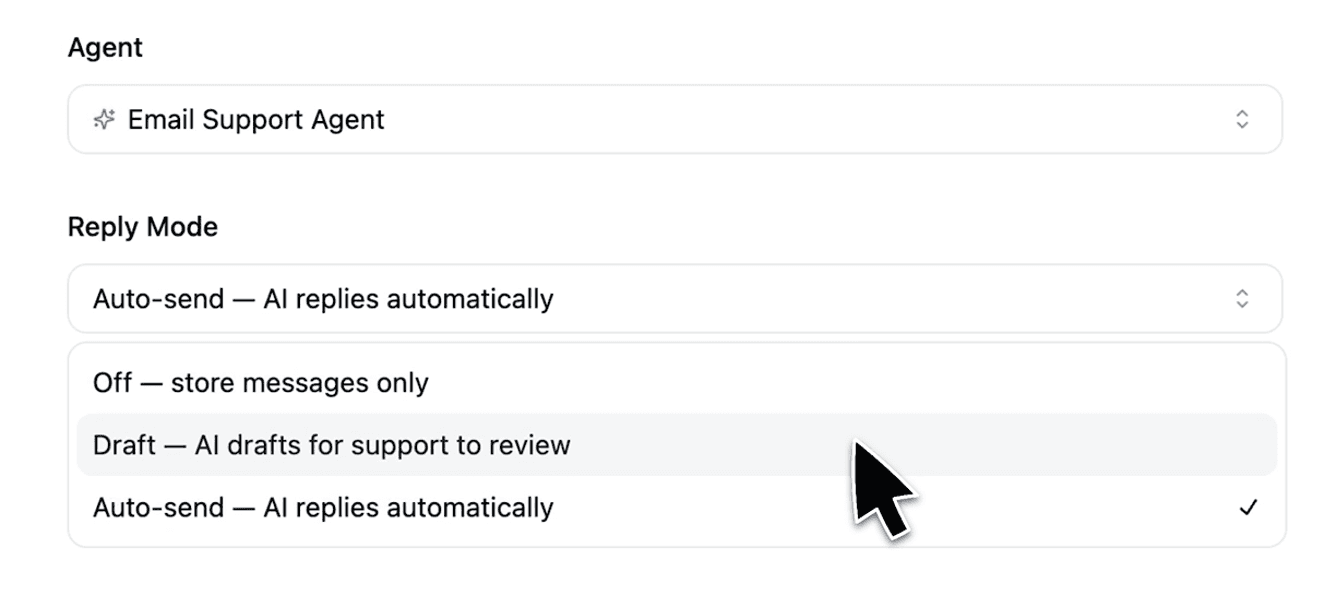
Two modes let teams decide how much autonomy the agent has: Auto-send for full end-to-end handling or Draft Mode to hold responses for human review before anything goes out.

The agent also knows when not to respond: spam, automated notifications, and out-of-office replies are recognized and skipped automatically, with a logged reason for each.
Reading Emails and Attachments

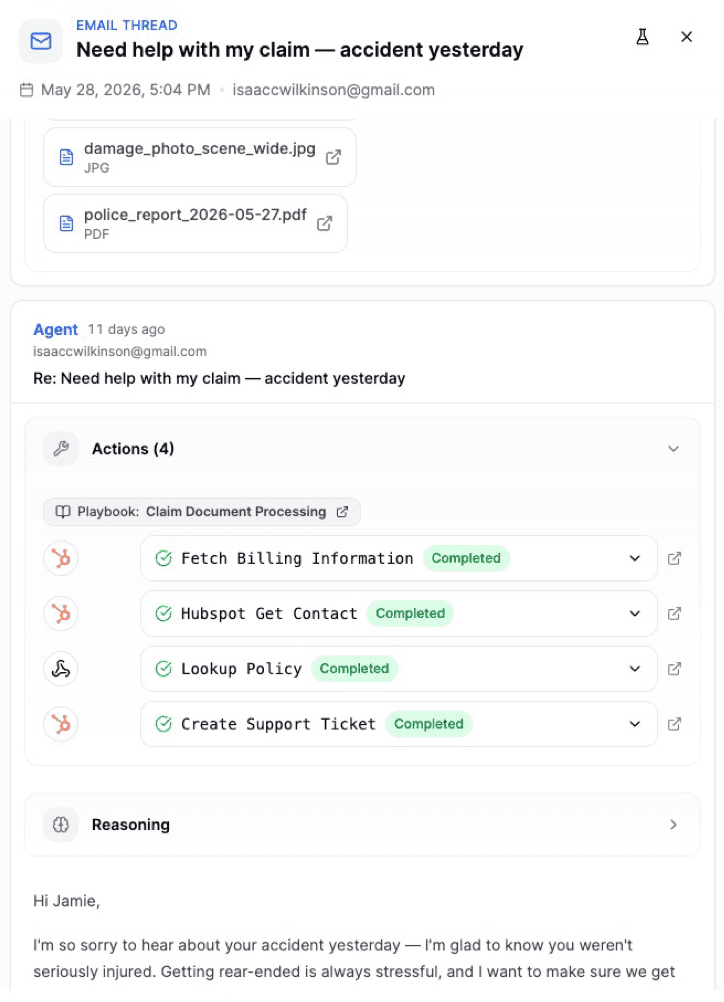
Most email work in insurance happens over documents. Customers attach proof of loss forms, invoices, police reports, photos of damage. Strada agents read full conversation threads and process attachments (PDFs, forms, images, documents), extracting relevant information and feeding it into its workflow. Capturing every detail, even in the messiest, hand-written attachments.

Actions, Not Just Replies

When an email arrives, the agent doesn't just draft a reply, it acts. It updates the policy in the core system, issues the certificate of insurance, pulls the loss run, or flags a human when something needs judgment.

For workflows that require specific knowledge, agents query connected documentation and policy libraries in real time, so responses reflect what's actually true rather than what sounds plausible.
Playbooks

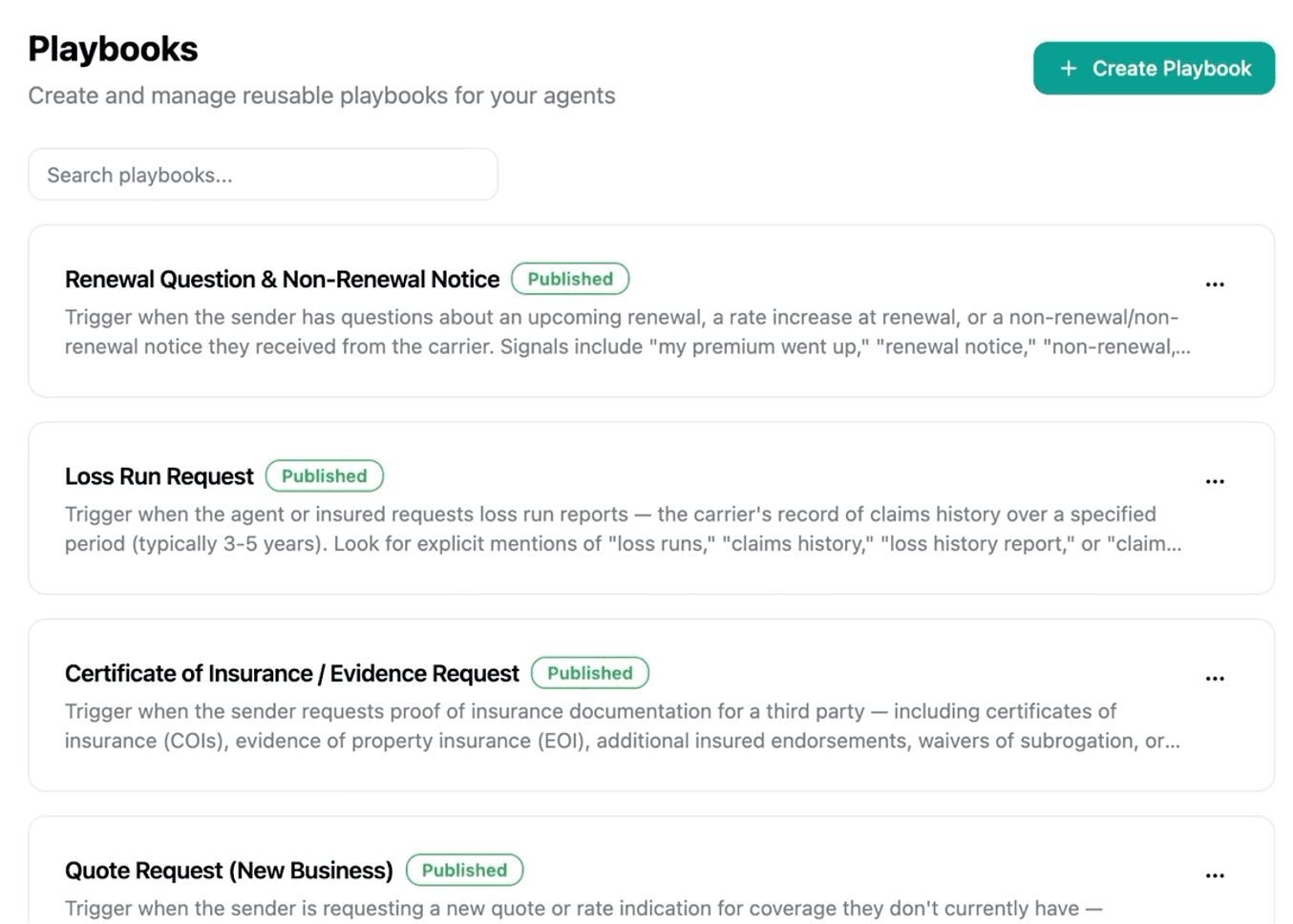
Strada ships with pre-built playbooks for the most common email processes in insurance, across claims, servicing, accounting, and new business. Each one works out of the box or can be adapted to fit your process. For teams running multiple workflows, the playbook library makes it easy to see what's deployed and how each one is configured.
Integrations

Strada connects with all major email providers and ticketing systems, including Outlook, Gmail, Salesforce, Hubspot, or custom SMTP. It can also be set up with simple forwarding. The same analytics, QA tooling, and conversation history that covers voice, text and chat extends to email: one place to monitor performance across every channel.

Every agent action is logged with a full execution traces, giving teams complete visibility and a clear audit trail for every conversation.

What Teams Are Using it For

Claims intake, policy updates, billing questions, document requests, certificate issuance, quote follow-up sequences. Any workflow that lands in the inbox and gets handled manually today is a candidate. The sweet spot is work that follows a predictable pattern, requires action in downstream systems, and needs a timely response.

One Platform, Every Channel

Voice, chat, text and now email. The same agents, the same knowledge base, the same workflow automation, across every channel a customer might use. However the conversation starts, the right actions follow automatically.

Email is available now for carriers, TPAs, wholesalers, and brokers. To get it set up, book a demo.

Start scaling with voice AI agents today

Join innovative carriers and MGAs transforming their calls with Strada.

Blog

/

Announcements

Introducing Email Agents on Strada

Amir Prodensky

Amir Prodensky

CEO, Strada

5 min. read

Read, respond, and act on customer emails automatically

Strada Now Handles Email

A lot of insurance operations live in the inbox. A billing question. A status update on an open auto claim. A loss run request. A certificate of insurance before a job starts. Each one means someone has to read it, find the answer, and reply. It's time-consuming work, and most of it follows a predictable pattern.

Strada Agents now handle this work.

How It Works

Connect an inbox and the Strada agent picks up incoming emails as they arrive. It reads the full thread and any attachments, figures out the right approach, acts across connected systems, and replies just like a human would.

Two modes let teams decide how much autonomy the agent has: Auto-send for full end-to-end handling or Draft Mode to hold responses for human review before anything goes out.

The agent also knows when not to respond: spam, automated notifications, and out-of-office replies are recognized and skipped automatically, with a logged reason for each.

Reading Emails and Attachments

Most email work in insurance happens over documents. Customers attach proof of loss forms, invoices, police reports, photos of damage. Strada agents read full conversation threads and process attachments (PDFs, forms, images, documents), extracting relevant information and feeding it into its workflow. Capturing every detail, even in the messiest, hand-written attachments.

Actions, Not Just Replies

When an email arrives, the agent doesn't just draft a reply, it acts. It updates the policy in the core system, issues the certificate of insurance, pulls the loss run, or flags a human when something needs judgment.

For workflows that require specific knowledge, agents query connected documentation and policy libraries in real time, so responses reflect what's actually true rather than what sounds plausible.

Playbooks

Strada ships with pre-built playbooks for the most common email processes in insurance, across claims, servicing, accounting, and new business. Each one works out of the box or can be adapted to fit your process. For teams running multiple workflows, the playbook library makes it easy to see what's deployed and how each one is configured.

Integrations

Strada connects with all major email providers and ticketing systems, including Outlook, Gmail, Salesforce, Hubspot, or custom SMTP. It can also be set up with simple forwarding. The same analytics, QA tooling, and conversation history that covers voice, text and chat extends to email: one place to monitor performance across every channel.

Every agent action is logged with a full execution traces, giving teams complete visibility and a clear audit trail for every conversation.

What Teams Are Using it For

Claims intake, policy updates, billing questions, document requests, certificate issuance, quote follow-up sequences. Any workflow that lands in the inbox and gets handled manually today is a candidate. The sweet spot is work that follows a predictable pattern, requires action in downstream systems, and needs a timely response.

One Platform, Every Channel

Voice, chat, text and now email. The same agents, the same knowledge base, the same workflow automation, across every channel a customer might use. However the conversation starts, the right actions follow automatically.

Email is available now for carriers, TPAs, wholesalers, and brokers. To get it set up, book a demo.

Start scaling with voice AI agents today

Join innovative carriers and MGAs transforming their calls with Strada.

Blog

/

Announcements

Introducing Email Agents on Strada

Amir Prodensky

Amir Prodensky

CEO, Strada

5 min. read

Read, respond, and act on customer emails automatically

Strada Now Handles Email

A lot of insurance operations live in the inbox. A billing question. A status update on an open auto claim. A loss run request. A certificate of insurance before a job starts. Each one means someone has to read it, find the answer, and reply. It's time-consuming work, and most of it follows a predictable pattern.

Strada Agents now handle this work.

How It Works

Connect an inbox and the Strada agent picks up incoming emails as they arrive. It reads the full thread and any attachments, figures out the right approach, acts across connected systems, and replies just like a human would.

Two modes let teams decide how much autonomy the agent has: Auto-send for full end-to-end handling or Draft Mode to hold responses for human review before anything goes out.

The agent also knows when not to respond: spam, automated notifications, and out-of-office replies are recognized and skipped automatically, with a logged reason for each.

Reading Emails and Attachments

Most email work in insurance happens over documents. Customers attach proof of loss forms, invoices, police reports, photos of damage. Strada agents read full conversation threads and process attachments (PDFs, forms, images, documents), extracting relevant information and feeding it into its workflow. Capturing every detail, even in the messiest, hand-written attachments.

Actions, Not Just Replies

When an email arrives, the agent doesn't just draft a reply, it acts. It updates the policy in the core system, issues the certificate of insurance, pulls the loss run, or flags a human when something needs judgment.

For workflows that require specific knowledge, agents query connected documentation and policy libraries in real time, so responses reflect what's actually true rather than what sounds plausible.

Playbooks

Strada ships with pre-built playbooks for the most common email processes in insurance, across claims, servicing, accounting, and new business. Each one works out of the box or can be adapted to fit your process. For teams running multiple workflows, the playbook library makes it easy to see what's deployed and how each one is configured.

Integrations

Strada connects with all major email providers and ticketing systems, including Outlook, Gmail, Salesforce, Hubspot, or custom SMTP. It can also be set up with simple forwarding. The same analytics, QA tooling, and conversation history that covers voice, text and chat extends to email: one place to monitor performance across every channel.

Every agent action is logged with a full execution traces, giving teams complete visibility and a clear audit trail for every conversation.

What Teams Are Using it For

Claims intake, policy updates, billing questions, document requests, certificate issuance, quote follow-up sequences. Any workflow that lands in the inbox and gets handled manually today is a candidate. The sweet spot is work that follows a predictable pattern, requires action in downstream systems, and needs a timely response.

One Platform, Every Channel

Voice, chat, text and now email. The same agents, the same knowledge base, the same workflow automation, across every channel a customer might use. However the conversation starts, the right actions follow automatically.

Email is available now for carriers, TPAs, wholesalers, and brokers. To get it set up, book a demo.

Start scaling with voice AI agents today

Join innovative carriers and MGAs transforming their calls with Strada.