Introducing Strada Signals, our new report series on AI for insurance operations. Read our whitepaper →
Introducing Strada Signals, our new report series on AI for insurance operations.
Read our whitepaper →
Introducing Strada Signals, our new report series on AI for insurance operations. Read our whitepaper →
HubSpot for Insurance: 7 Tips to Improve CRM Efficiency

Amir Prodensky
CEO
15 min read
Actionable steps to simplify daily tasks and improve client experiences
Insurance agencies (no matter if you’re an independent agent, producer, or agency owner) face a lot of challenges:
Your client data often sits scattered across different systems.
Tracking leads might rely on manual spreadsheets.
Compliance rules change often and can be confusing.
And keeping customers engaged consistently? That’s tough when you’re juggling sales, service, and regulation all at once.
Efficient CRM isn’t just helpful. It’s crucial.
When your lead management, sales processes, customer service, and compliance tasks run smoothly, you cut down on costly errors and speed up sales cycles.
Plus, you deliver a better experience that builds trust, while minimizing regulatory risks.
That’s where HubSpot steps in. It’s a flexible, user-friendly platform designed to fit insurance workflows and boost your digital transformation. HubSpot’s modular hubs (Marketing, Sales, Service, CMS, and Operations) scale and adapt to your agency’s size and focus.
This means you can start simple and grow without switching systems. But, before you can wow clients or close more deals, you need to organize your leads.
Let’s start by getting your daily lead management running like clockwork inside HubSpot.
How to optimize lead management daily with HubSpot CRM for insurance agents
First, capturing leads across multiple digital channels is a must. Insurance buyers might visit your agency website, respond to your social media ads, click through Google Ads, or chat with your online assistant.
To catch them all, use HubSpot’s automated forms with progressive fields that collect more info each visit without asking too much upfront. Add pop-up forms and clear call-to-action buttons across your site and social channels. To make this strategy even more effective, try these simple, actionable steps:
Use smart form logic → show or hide questions based on a visitor’s previous responses to keep the experience relevant and engaging.
Offer value for information → provide something useful in exchange for details—like a free guide, discount, or early access.
Place CTAs strategically → add clear call-to-action buttons on high-traffic pages and blog posts where visitors are already engaged.
Test different form formats → experiment with embedded forms, slide-ins, or pop-ups to see which converts best.
Track and refine → review form analytics regularly to identify drop-off points and optimize your questions and layout.
For social media, HubSpot offers native integrations with Facebook Lead Ads and LinkedIn Lead Gen Forms to sync leads automatically into your CRM. Even better, HubSpot Conversations inbox lets you capture website live chats as real-time leads.
Once leads flow in, organizing them efficiently inside HubSpot CRM makes all the difference. Set up custom contact properties tailored to insurance, like categories for home, auto, life, or commercial insurance, plus business lines or product types. This helps sort and filter prospects easily.
Next, customize your sales pipelines and deal stages so they reflect your actual sales process.
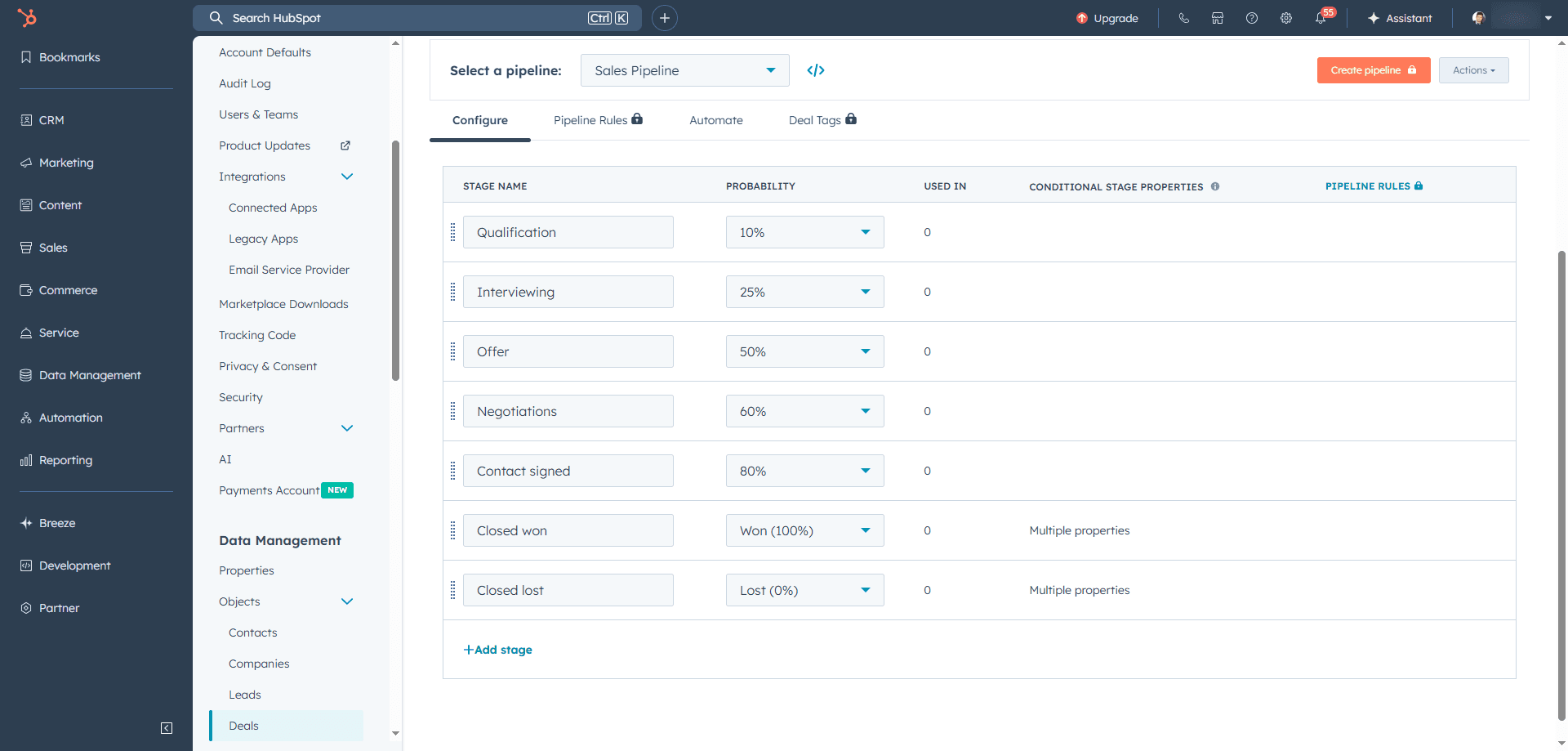
This makes forecasting more accurate and helps your team focus on deals that matter. To make setup faster and more effective, focus on:
Custom contact fields → add fields for policy type, renewal date, or coverage amount.
Pipeline stages → mirror your real sales journey, from “Initial Inquiry” to “Closed Won.”
Deal automation → trigger tasks or reminders automatically as deals move through stages.
Reporting dashboards → track conversions, revenue, and renewal opportunities at a glance.
Automation is your best pal here. You’ll want workflows that tag incoming leads by their source channel, whether it’s Facebook, your website, or LinkedIn. These workflows can then send an instant acknowledgment email or SMS to the lead (using Strada and/or Twilio for text messaging) and assign leads automatically to agents based on territory or expertise.
Here are a few practical workflow examples to implement right away:
Workflow name | Trigger | Action | Purpose |
Lead source tagging | New contact created | Automatically add a “Lead Source” tag based on form or channel | Keeps lead sources organized for better reporting |
Instant acknowledgment | Lead form submission | Send personalized thank-you email or SMS | Builds trust and boosts response rates |
Auto-assignment by territory | New lead with specific ZIP/postcode | Assign to the right sales rep or agent | Reduces manual routing and speeds follow-up |
Follow-up reminder | No contact made within 24 hours | Create task or send internal reminder | Ensures timely engagement with every lead |
Policy renewal nudge | Renewal date approaching (e.g., 30 days out) | Send automated reminder email to client | Improves retention and renewals |
Lead re-engagement | Lead inactive for 30 days | Send personalized “check-in” email | Revives cold leads and keeps your funnel warm |
You can use round robin logic or priority rules to make sure no lead slips through the cracks or sits idle too long.
Lead scoring helps you prioritize high-potential contacts quickly. You can assign points based on actions like submitting forms, opening emails, visiting your website, engaging on social, or even past purchases.
When someone hits a score threshold, HubSpot can trigger notifications or assign the lead to a sales rep automatically. This keeps your team focused on warm leads ready to convert.
You’ll get the best results when you use clear, consistent scoring rules. Here’s a simple way to set up your lead scoring model inside HubSpot:
Action or behavior | Points (+/-) | Why it matters | Next step |
Filled out a quote form | +10 | Shows strong intent | Send quote follow-up email |
Opened an email | +3 | Indicates mild interest | Add to drip campaign |
Clicked a pricing link | +5 | Shows deeper engagement | Notify assigned agent |
Visited website more than 3 times | +4 | Signals research intent | Offer consultation call |
Unsubscribed or bounced | -5 | Indicates disinterest | Suppress from next send |
No activity for 30 days | -3 | Cold lead | Trigger re-engagement workflow |
Plus, to track what’s working, HubSpot’s Campaign Analytics gives you detailed reports on lead sources, backed by integrated UTM tracking.
You can build custom dashboards that show conversion funnels, seeing how leads move from interest to quote requests or policy sales. This data helps you focus your time and marketing dollars where they bring the best return.
Here’s a quick practical checklist for daily lead management using HubSpot tools:
Use automated HubSpot forms with progressive and pop-up options across your website.
Integrate Facebook Lead Ads and LinkedIn Lead Gen Forms to sync social leads instantly.
Leverage HubSpot Conversations for real-time website chat leads.
Customize contact properties (insurance category, business line, product type).
Build pipelines and deal stages tailored to your insurance sales process.
Automate lead tagging by source, send instant email/SMS responses, and assign leads with workflow rules.
Set up lead scoring to flag your hottest prospects.
Monitor lead source performance with Campaign Analytics and custom dashboards.
Now, a game-changer for insurance agents is adding Strada AI phone agents to your lead management mix. These AI agents engage inbound callers conversationally, asking qualifying questions and capturing detailed contact info along with insurance needs.
All captured data syncs instantly with your HubSpot CRM, triggering lead assignment workflows right away. This cuts down your manual data entry and accelerates response times, helping your team jump on leads faster.
Strada also makes sure no calls go unanswered by using automated call scheduling and intelligent retry features, boosting your chance to connect with warm prospects promptly and keep your records up to date.
So, once your leads are organized, it’s time to turn those names into real relationships. You’ll learn how to nurture each one with personalized communication that actually converts.
How do you nurture leads and personalize communication?
Insurance needs vary a lot. A young family looking for personal lines insurance has very different questions and priorities than a business owner shopping for commercial coverage.
On top of that, where someone is in their buying journey influences how you should talk to them. Early leads want education. Near-closing leads need reassurance.
Segmenting your contacts lets you group leads by specific traits, like policy type, location, or lead status. You then deliver messages that speak directly to their needs and situation.
Personalization keeps your communication relevant and meaningful, increasing engagement and turning more inquiries into customers.
Let’s break down how you can do this using HubSpot for insurance companies.
HubSpot’s tools for segmented, personalized campaigns
HubSpot makes segmentation easy with Active Lists.
You can create lists based on custom contact properties like policy type (personal or commercial insurance), geography, and where the lead stands in your sales process.
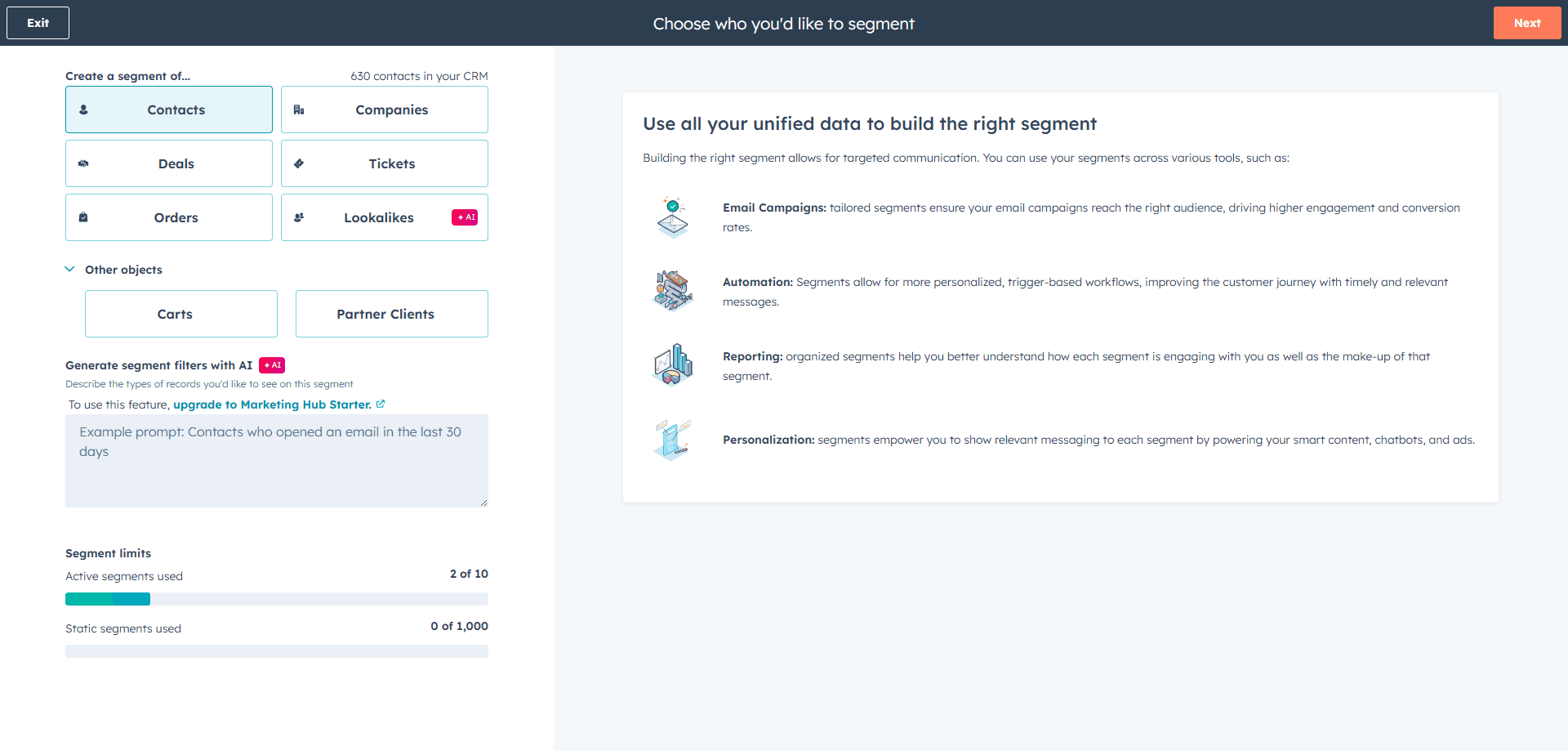
This means you can send a mailing about regional flood insurance updates only to people in flood-prone areas or drip campaigns that focus on commercial coverage to business leads.
Once you have your lists, use HubSpot’s Email Marketing to build segmented, automated drip campaigns with content tailored for each group. For example:
Start with educational emails for new leads interested in personal insurance.
Send renewal reminders for existing policyholders.
Share exclusive offers based on the region or coverage type.
This targeted approach feels personal, not salesy, which builds trust.
To keep every lead moving through the funnel, use HubSpot CRM’s task management features. Schedule follow-ups, assign calls, or log email opens and meeting notes right inside the platform.
This way, nothing slips through the cracks and every lead gets the attention they deserve.
Boost nurturing with automated workflows
HubSpot’s Marketing Automation Workflows turn your nurturing into a finely tuned engine. You can create multi-touch sequences that include emails, SMS messages (through integrations like Strada, Twilio, or Sakari), and notifications for your sales reps.
These workflows adapt to how your contacts behave. For example, if a lead clicks a link about small business insurance, the next message they receive can focus on that topic.
Dynamic content helps here too. You can set your landing pages to show different information depending on the visitor’s profile and previous interactions. This keeps your messaging consistent and relevant across channels. To put this into action, try:
Personalized headlines → show different offers for first-time visitors vs. returning customers.
Smart CTAs → adjust calls-to-action based on product interest or lifecycle stage.
Tailored visuals → display relevant images; for example, home insurance visuals for homeowners, auto for drivers.
Localized content → automatically show region-specific contact info or agent details.
Behavior-based sections → highlight renewal discounts or policy upgrades for existing clients.
Strada Workflows take things one step further. This tool uses conversational AI to understand the intent and sentiment during calls.
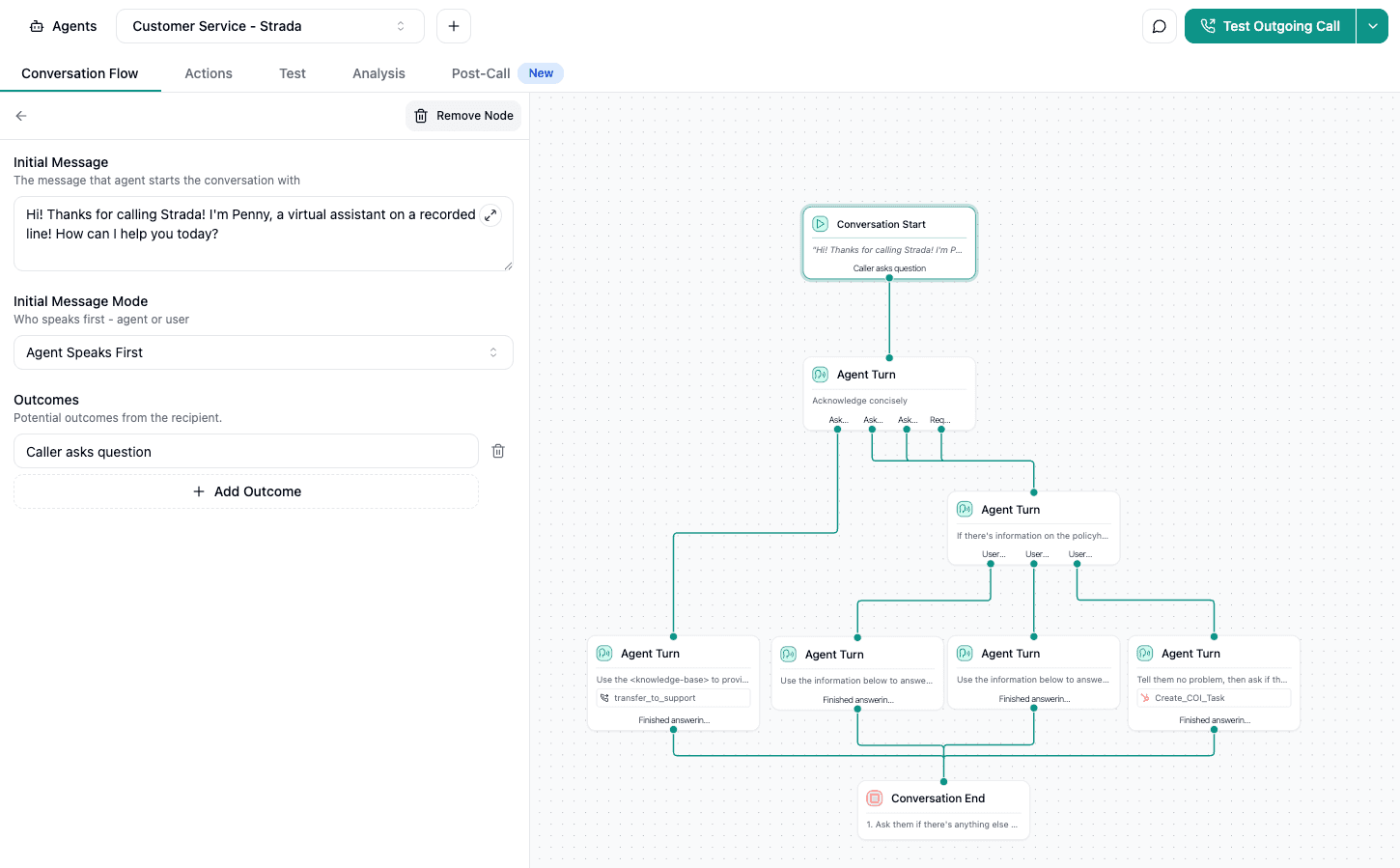
Let’s say a caller hesitates when you mention policy renewal, that insight triggers a sequence: maybe a quick follow-up email answering common concerns, an SMS reminder about a renewal deadline, and a personalized call scheduled automatically for your team.
Strada captures these in-depth insights, making your outreach smarter and more timely.
Track and optimize every step
You can’t improve what you don’t measure.
Use HubSpot’s Reporting & Analytics tools to watch email opens, click rates, website heatmaps, and conversion paths. See which subject lines or send times work best by running simple A/B tests. Adjust your messaging continuously based on what your audience responds to.
Personalization tokens make it easy to add a personal touch without extra work. Insert a contact’s name, company info, or specific policy references directly into emails and landing pages automatically. This way, every lead feels like you’re speaking directly to them.
Here’s a quick practical checklist to get started with nurturing and personalization in HubSpot:
Create Active Lists based on key contact properties (policy type, geography, lead status).
Build email drip campaigns for each segment with tailored messaging.
Set up task reminders for follow-ups, calls, and notes to keep leads moving.
Launch automated workflows that combine email, SMS, and sales notifications.
Use personalization tokens in all outreach for a custom feel.
Analyze results regularly and run A/B tests to improve.
Integrate Strada Workflows to capture call insights and trigger smart nurturing automatically.
Getting this system right means you’re not just sending bulk messages. You're nurturing relationships thoughtfully. When insurance leads feel understood and valued, they’re much more likely to convert and stay loyal.
When your nurturing starts working, you’ll see engagement rise. Now it’s time to focus on turning that interest into signed policies and loyal clients.
How can you improve converting prospects into clients?
Converting prospects into clients in insurance isn’t just about pushing a sale.
It’s about creating a smooth, personalized experience that guides them from curiosity to confident policyholder. HubSpot CRM for insurance agents offers exactly the tools you need to manage this journey efficiently and effectively. Here are the details.
Manage a multi-stage, customizable sales pipeline
Start by setting up a sales pipeline that mirrors the real steps your prospects take. Insurance sales often move through stages like Qualification, Quoting, Proposal Sent, Underwriting, and finally Closed-Won or Closed-Lost. HubSpot allows you to customize these stages for each insurance product you offer.
Tailor the deal properties to track details like:
Product type (auto, home, life, commercial)
Premium amount
This way, every deal carries the right info, making it easier to prioritize next steps and spot opportunities for cross-selling or upselling. Keeping your pipeline clear and detailed ensures you never miss important deadlines or renewal opportunities.
Simplify scheduling with HubSpot’s meetings tool
Scheduling consultations is a lot simpler when clients can book time directly based on your agents’ real availability. HubSpot’s Meetings tool syncs with Google or Office 365 calendars, so clients only see open slots.
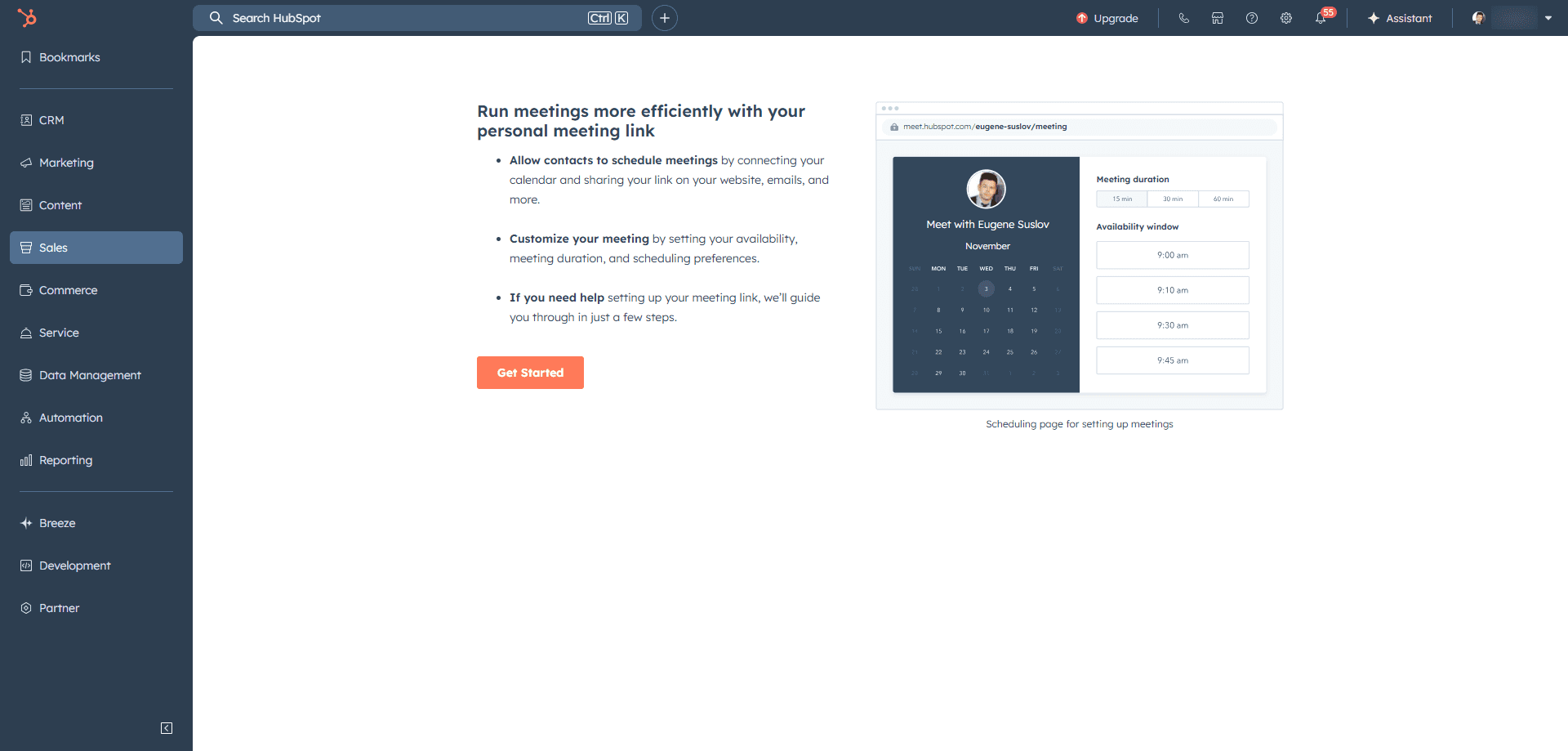
This cuts out endless back-and-forth emails, making the whole process smoother and more professional. Giving clients a direct line to book consultations builds trust and shortens the sales cycle.
Streamline document management
Sending proposals and contracts should be effortless. Integrate HubSpot Deals with document management tools like PandaDoc, DocuSign, or HelloSign. These integrations let you:
Send quotes and contracts directly from HubSpot
Track when clients open and sign documents
Store signed contracts securely within the CRM
This keeps your documents organized and your team instantly informed. Having everything in one place means you spend less time chasing paperwork and more time helping clients.
Automate onboarding and renewal workflows
Timing is everything in insurance. Use HubSpot’s automated workflows to stay on top of onboarding and renewals.
You can trigger emails like:
Welcome messages right after closing a deal
Policy service reminders before key dates
Upsell offers tailored to client profiles
Renewal notices well ahead of expiration
These workflows can be date-based, linked to the deal close date or custom renewal fields. Automation ensures no one slips through the cracks, and it keeps your communication timely, relevant, and personal.
Keep your data synced and unified
Many insurance agencies rely on Agency Management Systems (AMS) like Vertafore or Applied. HubSpot plays nicely with those through APIs or middleware solutions like Zapier and PieSync. This integration means:
Smooth syncing of contacts, policies, and deals
Importing/exporting data without manual work
Maintaining a single source of truth for your team
By consolidating info, your agents save time, avoid errors, and can focus on selling, not data entry.
Capture client preferences and communication history
Successful conversions often come down to personalization. HubSpot lets you track client preferences, communication history, and detailed policy info. Use this data to:
Customize upsell and cross-sell campaigns
Personalize renewal outreach
Build stronger, trust-driven relationships
Tailored communication shows clients you get their needs, making them more likely to choose you again and recommend you.
Here’s a quick practical list to boost conversions:
Customize your sales pipeline with tailored deal stages and properties.
Use the Meetings tool for easy client scheduling.
Send and track proposals with document integrations like PandaDoc or DocuSign.
Automate onboarding and renewal emails using date-triggered workflows.
Integrate HubSpot with your AMS for seamless data flow.
Leverage client data to personalize every touchpoint.
Harness AI with Strada’s Voice Agents
Here’s where it gets exciting: AI can take your efficiency to the next level.
Strada’s AI voice agents handle initial quote intake calls and qualification conversations. They use insurance-specific models to capture and extract policy and contact data automatically.
Imagine this: while AI gathers all necessary info and updates your HubSpot pipeline, your producers focus solely on closing deals. This reduces manual data entry and speeds up follow-ups.
Additionally, Strada’s AI analyzes calls to detect renewal risk by spotting conversation cues.

When a policy is flagged as at-risk, it automatically kicks off retention workflows in HubSpot. Agents get scheduled calls, and personalized messages go out to clients.
This proactive approach slashes renewal leakage and boosts retention rates. And here’s how you can get started with Strada in 5 easy steps:
#1 Book a demo
Start by requesting a demo from Strada’s team.
They’ll walk you through how voice AI fits into your current insurance workflows, from quote intake to renewals and claims.
#2 Define your use cases
Decide which processes to automate first. Common starting points include quote intake, renewal reminders, claim intake, or certificate issuance.
To pinpoint where to start, focus on:
Repetitive tasks → identify calls or follow-ups your team handles dozens of times per week.
High-impact workflows → target processes that directly affect revenue or retention.
Bottlenecks → look for manual steps that slow down response times or create backlogs.
Data-heavy processes → prioritize workflows where information needs to flow between multiple systems.
Customer touchpoints → automate stages where faster responses improve client satisfaction.
Choose one or two high-volume areas for the initial rollout.
#3 Connect your systems
Strada integrates natively with major CRMs and AMS platforms like HubSpot, Salesforce, and your policy systems.
These integrations ensure call outcomes sync instantly with your existing tools, no engineering lift required.
#4 Configure AI Voice Agents
Customize your AI agents to handle routine conversations using Strada’s insurance-specific language models. Set up scripts for inbound and outbound calls, SMS follow-ups, and appointment scheduling.
#5 Activate Strada Workflows
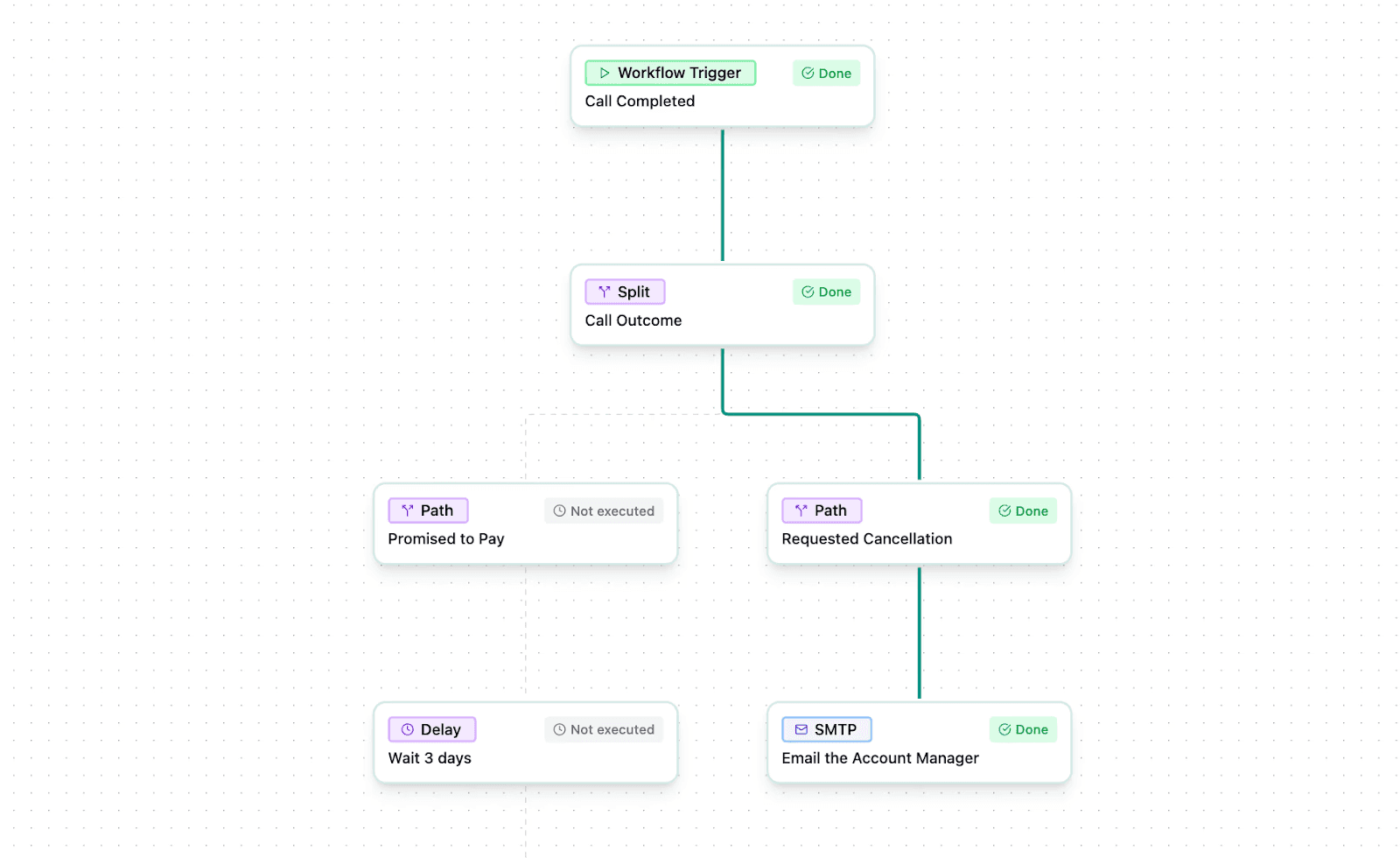
Turn on automation rules that trigger actions after every call: creating tasks, sending reminders, or updating policy records. As soon as a call ends, your CRM and AMS stay perfectly up to date, freeing your team to focus on selling and servicing, not data entry.
So, you’ve made the sale – great job! But the real success comes from keeping those clients happy and coming back. Let’s talk about how HubSpot helps you deliver top-notch service after the deal closes.
How can you enhance post-sale customer service and retention?
You’ve made the sale, but keeping your customers happy and loyal is just as important. HubSpot Service Hub is a powerful tool to help you manage post-sale support and boost retention in your insurance business.
Let’s break down how you can make it work for you.
1. Streamline support with ticket management
First up is ticket management.
With HubSpot’s Tickets and Conversations tools, you centralize all customer inquiries, claims status updates, and policy questions in one place. No matter if your clients reach out by email, phone, chat, or social media, every message flows into a single inbox.
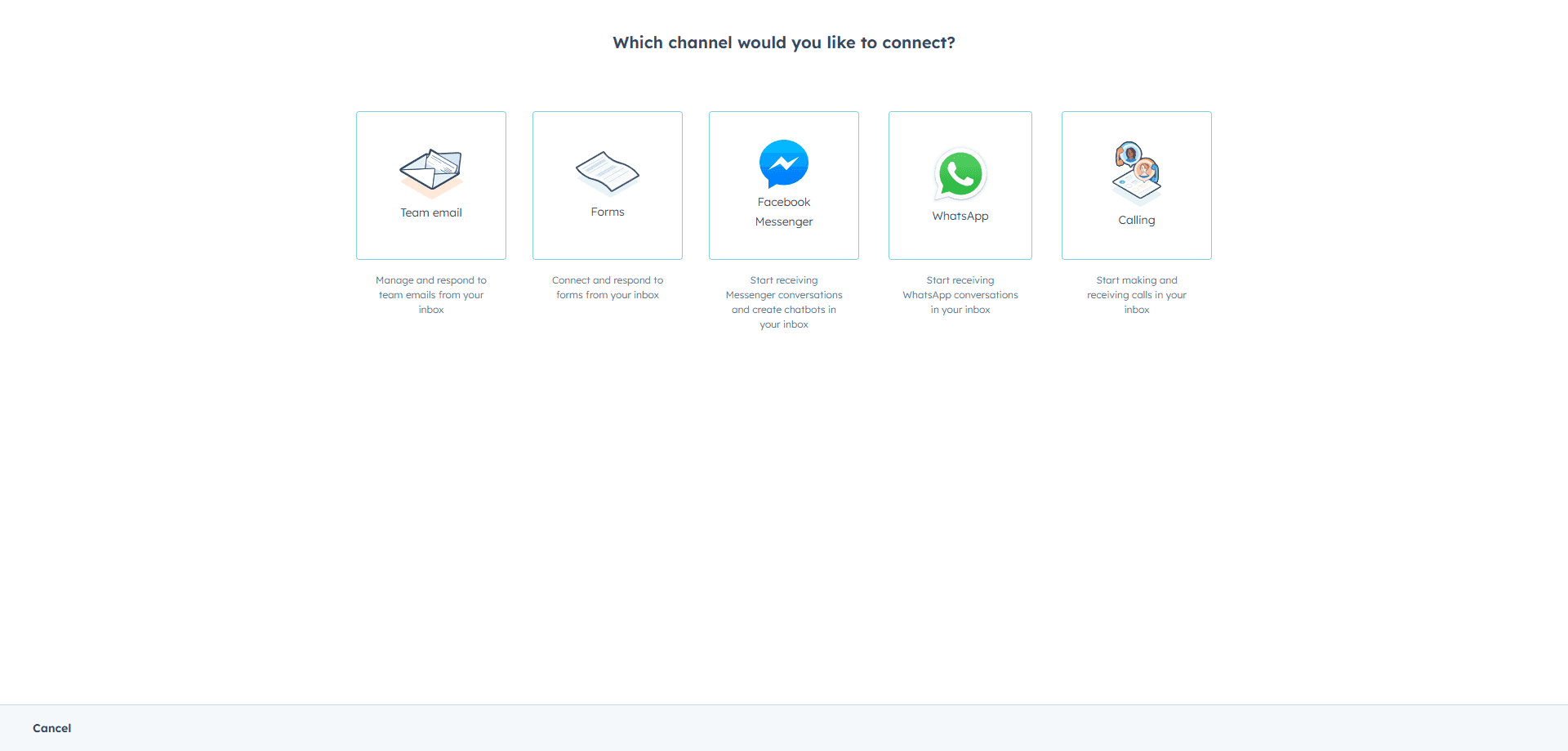
Here’s what this setup helps you manage efficiently:
Claims inquiries → track updates and status requests in one view.
Policy changes → log and assign requests for coverage adjustments or renewals.
Billing and payment questions → route finance-related messages to the right team.
New service requests → capture cross-sell or upsell opportunities directly from conversations.
General support → keep every customer touchpoint documented for consistent follow-up.
This means no question slips through the cracks, and you solve problems faster.
2. Stay connected with automated communication
Next, staying in touch is key to keeping clients engaged. HubSpot lets you automate communication like payment reminders, policy updates, or announcements about new products.
You can set up email sequences, SMS alerts, or social media posts all easily scheduled inside HubSpot workflows.
This proactive reach helps customers feel valued and reduces missed payments or lapses in coverage.
3. Gather feedback and track the customer journey
You also want to hear directly from your clients about their experience. HubSpot offers built-in survey tools like NPS and CSAT surveys, or you can connect third-party options like SurveyMonkey.
Regular feedback helps you spot issues early and improve your service based on real insights.
Tracking your clients’ journey over time is important to know where they stand and when to step in. HubSpot allows you to create custom lifecycle stages that cover everything from sale through ongoing support.
Automated follow-up tasks remind your team to check in, and SLA tracking ensures that support promises are kept. This means faster responses and happier clients.
Here’s how to make the most of these tools:
Set clear lifecycle stages → define milestones like “New Client,” “Active Policy,” “Renewal Pending,” and “At Risk.”
Automate follow-ups → trigger reminders when clients reach specific stages or deadlines.
Monitor SLAs → use HubSpot’s service metrics to ensure every inquiry meets response-time goals.
Review feedback trends → combine NPS or CSAT results with lifecycle data to spot clients needing extra attention.
Act on insights → schedule personalized outreach for clients showing churn signals or satisfaction dips.
HubSpot’s analytics dashboards then let you see the big picture: renewal rates, upsell chances, and churn risks based on client activity and survey results.
By watching these closely, you can adjust your approach and nip problems in the bud.
4. Enhance engagement with AI and automation
To make each contact meaningful, use tools like saved replies, snippets, and chatbot automation. These let you reach out before a client even realizes there might be an issue.
It’s a big win for maintaining trust and cutting down on churn.
Here’s a quick look at five practical steps to ramp up customer service with HubSpot:
Centralize all customer messages in the Conversations inbox for fast, organized replies.
Automate follow-ups (reminders, updates, and announcements) using workflows.
Collect and analyze client feedback regularly with surveys for ongoing improvements.
Track customer journey stages and use SLA tracking to keep service promises.
Personalize contact with snippets, saved replies, and chatbots for proactive engagement.
Another game-changer is integrating Strada’s conversational AI with HubSpot. Strada offers instant 24/7 phone and SMS service with zero hold time. This means common requests like claims notices (FNOL policy changes, or payment updates are handled immediately, lightening your agents’ loads and speeding up resolutions.
Strada’s AI syncs perfectly with HubSpot, automatically creating and updating service tickets from phone interactions. It even assigns follow-up tasks and kicks off personalized communication sequences to boost renewals and satisfaction.
Plus, its advanced evaluation tools help reduce errors and omissions risk by keeping detailed conversational records tied to your service data in HubSpot.
This seamless integration blends the best of automation and human touch.
So, with these tools and workflows (HubSpot Service Hub for ticket and conversation management, feedback surveys, automated follow-ups, analytics dashboards, chatbots, and Strada’s AI), you’re set up to deliver outstanding post-sale service. Your clients get faster, smarter, and more personalized support.
You reduce churn, improve policy renewals, and grow your business sustainably.
As your customer base grows, staying compliant becomes more important than ever. You’ll see how HubSpot keeps your data safe and your communication rules rock solid.
How do you ensure compliance in communications and data management?
When you’re working in insurance, staying compliant with regulations is non-negotiable.
You need to navigate rules like HIPAA for health info, TCPA for call and SMS consent, GDPR and CCPA for data privacy, plus state insurance commission guidelines.
Luckily, HubSpot CRM for insurance helps you do all this smoothly without losing your mind.
First off, HubSpot’s email template system is a lifesaver. You can set up pre-approved templates stamped for compliance right from the start.
Plus, their content approval workflows let marketing and legal teams review and sign off on all communications before anything goes out. Here’s how to make the most of approval workflows:
Set clear approvers → assign marketing for brand tone and legal for compliance checks.
Use predefined templates → standardize recurring emails, landing pages, or policy updates.
Automate notifications → ensure approvers get instant alerts when content is ready for review.
Track revisions → keep a clear audit trail of edits, approvals, and version history.
Lock final content → prevent unapproved changes after sign-off to maintain compliance.
This means you avoid accidental rule-breaking and keep messaging consistent.
HubSpot also makes logging and storing every client and prospect interaction automatic. It tracks emails, records calls (when integrated with Strada, Aircall, or Zoom Phone), saves meeting notes, and keeps versions of documents.
This automatic audit trail is there whenever you need to prove what was said or sent and that’s a big plus when regulators come knocking.
To keep things fresh and compliant, you can update all your marketing materials regularly inside HubSpot’s content management system. This ensures you reflect any regulatory changes and maintain your brand’s look and message across channels.
Plus, HubSpot CMS supports SEO-friendly content management that boosts your online presence without stepping on insurance advertising rules or creating conflicting info.
Managing social media? HubSpot’s Social tool lets you schedule posts, monitor engagement, and archive everything so you never lose track. You can control who publishes through permissions, keeping your brand’s voice safe and compliant while protecting client data.
On top of that, when you work with Strada, compliance is a built-in guarantee.
They securely store and separate data for each customer, run regular penetration tests, and never use your data to train AI models shared with others. This means your client info is protected under HIPAA, TCPA, and other privacy best practices.
Strada also logs and records every call automatically, with timestamped transcripts and recordings available inside HubSpot when using integrated services.
This creates a fully auditable record, ensuring full transparency and meeting regulatory standards. They even offer AI accuracy evaluations and content approval steps, reducing mistakes or risks during phone calls.
Once you’ve built a secure foundation, it’s time to take a step back and look at the bigger picture. Let’s explore how reports and collaboration tools help you work smarter, not harder.
How can reporting, analytics, and collaboration boost CRM efficiency?
You’ll quickly see how reporting, analytics, and collaboration can transform your HubSpot for insurance agents setup and take your CRM efficiency to a whole new level. When you harness these tools right, managing your client base, sales pipeline, and marketing efforts becomes a breeze.
Let’s dive into the core ways HubSpot makes this happen.
1. Visualize key insurance metrics with custom dashboards
First up, HubSpot’s fully customizable dashboards give you a clear, real-time picture of your key insurance metrics.
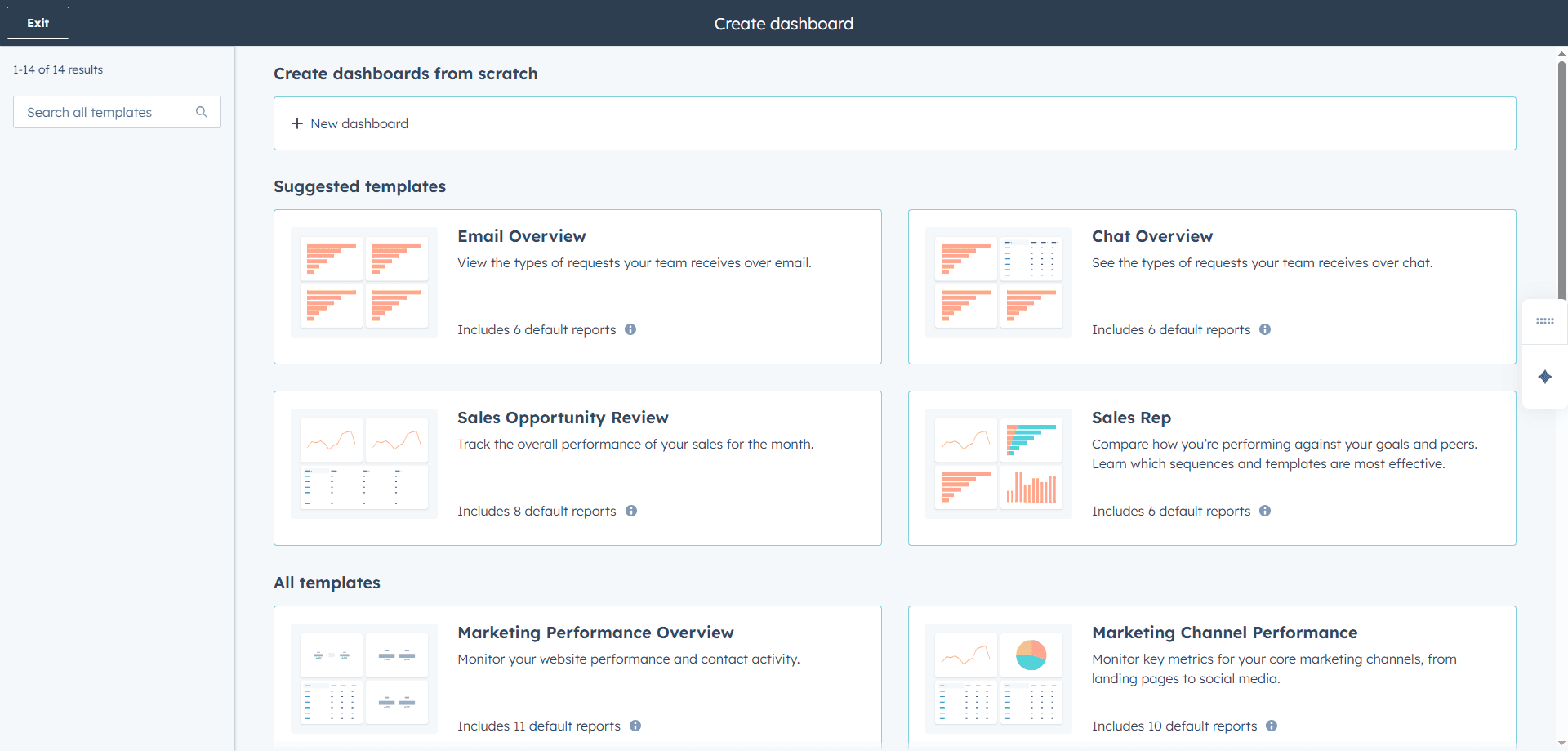
Think about tracking customer retention rates, bind ratios, average premium size, and policy lapse rates, at the level of individual agents, teams, or entire regions.
This visual insight helps you spot trends fast and focus your efforts where they matter most. You don’t have to guess anymore; the data’s right there on your screen.
2. Boost sales performance with real-time analytics
Sales performance is just as crucial. HubSpot delivers real-time sales analytics with reports on:
Report name | What it shows | Why it matters | How to use it |
Deal velocity report | Average time it takes to move deals from start to close | Reveals bottlenecks in your sales process | Identify slow stages and streamline handoffs |
Win/loss ratio report | Percentage of closed-won vs. closed-lost deals | Measures sales effectiveness and competitiveness | Spot trends by product, agent, or region |
Forecast accuracy report | Difference between projected and actual revenue | Tracks reliability of your sales forecasting | Adjust quotas and improve future predictions |
Pipeline health report | Number, value, and stage distribution of active deals | Shows overall sales momentum and conversion potential | Focus your team on high-value, late-stage deals |
Product line performance report | Sales volume and revenue by product category | Helps optimize marketing and sales focus areas | Reallocate resources to top-performing lines |
Regional performance report | Deals and revenue by territory or agent | Identifies high-performing areas or those needing support | Tailor strategies by market demand |
It breaks down this info by product lines and geography, helping you make smarter decisions around where to push and when. If you notice sales slowing in one region or product category, you can act immediately.
This proactive approach keeps your CRM clean and your sales flowing.
3. Optimize campaigns with marketing performance insights
Now, your marketing campaigns get clearer too. HubSpot offers marketing performance analytics across all your channels – here’s what to track regularly for meaningful insights:
Email performance → monitor open rates, click-throughs, and unsubscribes to refine your messaging.
Social media engagement → measure likes, comments, shares, and audience growth across platforms.
Paid ads ROI → track cost per lead, conversion rate, and return on ad spend to optimize budgets.
Website conversion paths → see which pages or forms generate the most qualified leads.
Traffic sources → identify where visitors come from (organic, paid, referral, or social) and double down on what works best.
Campaign comparisons → review multi-channel results side by side to spot trends and top performers.
These insights feed directly into optimizing your campaigns, so you get more bang for your buck and better lead quality. For instance, if email click rates dip, you can test subject lines or tweak content without losing time.
4. Personalize outreach with customer interaction data
One of the most powerful, often overlooked aspects of HubSpot for insurance agents is its ability to gather customer interaction insights.
You can pull data from web behavior tracking, chatbot transcripts, and social media conversations to fine-tune your customer segments and personalize your outreach. Imagine sending messages that truly resonate because they’re based on what your prospects do and say online.
5. Strengthen organic growth with SEO and content analytics
SEO gets a boost with HubSpot’s built-in SEO tools, designed to monitor your search engine rankings, page performance, keyword opportunities, and backlink profiles. These help increase your organic lead generation over time without extra ad spend.
So if a particular keyword is driving traffic, you can capitalize on it, or if a page isn’t performing, get it optimized fast.
6. Improve team coordination with collaboration tools
Transitioning from insights to teamwork, HubSpot’s collaboration tools play a huge role in CRM efficiency. Assign tasks quickly, access centralized client records, and use shared team inboxes and workflows to eliminate duplicate work and reduce admin overhead. Everyone stays on the same page, and nothing slips through the cracks.
On top of that, productivity gets a serious boost with useful features like:
Automated follow-ups triggered by inactivity on a lead or client.
Customizable reports emailed directly to stakeholders.
Seamless integrations with Gmail and Outlook for email, calendar, and phone activity.
The HubSpot mobile app, so agents can keep things moving even when they’re out of the office.
One standout advantage is how integrating HubSpot with Strada takes this to the next level.
Strada offers AI-driven call analytics that capture conversation outcomes, customer sentiment, and lead qualification scores. These insights sync seamlessly into your HubSpot dashboards, giving you a full 360-degree view of each interaction.
So, you know not just what the numbers say, but what your clients are really thinking.
Strada also powers automated workflows that update CRM records, create tasks, and send notifications based on call outcomes instantly. This means your team can respond with follow-ups or next steps right away, no manual data entry needed. The result? Faster response times, better client experiences, and increased deal closing rates.
By automatically syncing contact and case data between Strada and HubSpot, agents get to spend less time on paperwork and more time building relationships. This helps reduce administrative workloads and lets insurance professionals focus on what they do best, helping clients and closing deals.
Of course, great insights only matter if your data’s clean and your team knows how to use it. Here’s how to keep your CRM organized and your people confident with every click.
How to manage data effectively and train your team
You’ll find managing insurance data in HubSpot easier than you might think with the right tools and team approach.
Let’s walk through some practical steps to keep your CRM data clean, organized, and secure, while boosting your team’s confidence in using HubSpot every day.
Simplify data imports and integrations
Start by simplifying data imports.
HubSpot’s import wizards support CSV and XLS files, meaning you can quickly bring over client info without fuss. When you need to sync data with your AMS like Vertafore or Applied, and native connectors aren’t available, middleware connectors like Zapier, PieSync, or Insycle come to the rescue.
They help automate data flows between systems seamlessly.
For a smooth import of call outcome data and workflow triggers, Strada’s simple API integrations reduce the need for heavy engineering support. Plus, Strada offers onboarding help and insurance-focused guides, so your team picks up automation fast.
Automate renewal campaigns
Once your data is in HubSpot, managing renewal campaigns gets easier by importing renewal date fields. From there, you can set up automated lifecycle stage changes that trigger targeted email drip campaigns and task reminders.
These tasks can prompt your reps to make renewal calls or send notifications, keeping your customers engaged and reducing chances of missed renewals.
Here’s how to streamline your renewal automation:
Import renewal dates → add custom date fields for each client or policy to anchor your campaigns.
Create lifecycle stages → set stages like Active, Renewal Pending, and Renewed to guide automation.
Build email sequences → send timed reminders and personalized renewal offers before expiration.
Automate rep tasks → generate follow-up tasks or call reminders as renewal dates approach.
Use workflows for alerts → notify your team instantly when a policy is within a set renewal window.Track outcomes → measure renewal rates and follow-up completion to refine your strategy over time.
Maintain CRM data hygiene
Ongoing data hygiene is key to CRM efficiency.
HubSpot’s duplicate management tool makes routine deduplication straightforward, helping you avoid clutter. Regularly update your contact segments and details based on the latest client interactions.
Also, don’t forget to archive inactive contacts. This keeps your datasets clean and your team focused on active opportunities. Strada also supports data accuracy by automatically syncing conversational data with CRM fields and workflows, cutting down manual mistakes.
Here’s a simple checklist-style table to help you stay on top of data hygiene.
Task | Frequency | Why it’s important | Tool or feature |
Remove duplicates | Weekly | Avoid confusion and clutter | HubSpot Duplicate Management |
Update inactive contacts | Monthly | Keep your lists fresh | Contact filters + workflows |
Verify emails & phone numbers | Monthly | Ensure deliverability | HubSpot email validation |
Review property fields | Quarterly | Maintain accuracy | Custom property audit |
Archive outdated deals | Quarterly | Focus on active opportunities | Deal filters & pipelines |
Sync Strada call data | Daily | Keep records current | Strada API integration |
Protect data with secure access controls
Keeping your data secure is just as important. HubSpot lets you set role-based permissions, so your team only accesses what they need. Combine this with two-factor authentication to protect sensitive insurance data and stay on top of regulatory compliance.
Secure access controls mean your book of business stays private and safe.
Train and empower your team
Training your team well can make all the difference.
HubSpot Academy offers role-specific training modules tailored for marketing, sales, and service reps. These cover everything your team needs to know to use HubSpot confidently.
Alongside this, live webinars and Q&A sessions give your people a chance to get real-time answers. You’ll also find detailed user guides and video tutorials inside the HubSpot Knowledge Base, plus official support available via phone, chat, or email.
To keep skills sharp, foster a culture of continuous learning with monthly update meetings and feedback loops. Encourage team members to earn certifications whenever HubSpot rolls out new features or industry compliance rules change.
This keeps knowledge fresh and your CRM practices current.
By now, you’ve seen what HubSpot can really do for insurance teams. Let’s wrap up by helping you decide if it’s the right fit for your agency’s goals and growth plans.
Is HubSpot the right CRM for my insurance agency?
If you’ve been struggling with fragmented lead management, confusing sales pipelines, or clunky customer service tools, HubSpot CRM for insurance agents might be the game-changer you need.
It tackles common insurance pain points like personalized marketing automation, flexible sales pipeline setups, omnichannel support, compliance tracking, and deep reporting, all in one place.
What sets HubSpot apart is its easy-to-use interface combined with powerful automation and AI features like predictive lead scoring. These tools help you focus on the right leads and grow sustainably. Plus, seamless integrations mean you won’t have to switch between dozens of apps.
Here’s how to get started step by step:
Sign up and set up your HubSpot account → choose the right plan (Starter, Professional, or Enterprise) and invite your team members.
Import your data → upload contacts, companies, and deals from CSV or XLS files, or connect your existing CRM if you’re migrating.
Customize your pipelines and properties → create deal stages and contact fields tailored to your insurance lines (home, auto, life, commercial).
Connect Strada → integrate Strada’s AI voice and workflow automation tools to handle quote intake calls, capture data, and trigger CRM updates automatically.
Automate key processes → build workflows for lead assignment, renewal reminders, and customer follow-ups.
Set up dashboards and reports → track metrics like lead conversion, renewal rates, and pipeline health in real time.
Train your team → use HubSpot Academy and Strada’s onboarding guides to get everyone up to speed quickly.
Don’t forget, working with certified HubSpot partners who know insurance inside and out can make onboarding smoother, customize your setup, and keep your team on track for success.
Ready to improve your agency’s CRM efficiency? Start a free HubSpot CRM trial or book a personalized demo to see the benefits firsthand. Also, schedule a demo with Strada to explore how AI voice agents can elevate your HubSpot investment for insurance-specific automation.
Frequently Asked Questions
How long does it take to fully set up HubSpot for an insurance agency?
Most small agencies can configure HubSpot in 1–2 weeks. More advanced automation, integrations, and pipelines usually take another 2–4 weeks depending on team size.
Can HubSpot replace my AMS, or do I need both?
Framer is a design tool that allows you to design websites on a freeform canvas, and then publish them as websites with a single click.
What’s the fastest win I can get after implementing HubSpot?
Framer is a design tool that allows you to design websites on a freeform canvas, and then publish them as websites with a single click.
What type of automation brings the biggest impact for insurance agents?
Framer is a design tool that allows you to design websites on a freeform canvas, and then publish them as websites with a single click.
Do I need a developer to customize HubSpot for insurance workflows?
Framer is a design tool that allows you to design websites on a freeform canvas, and then publish them as websites with a single click.
Table of Contents
Carriers, MGAs, and brokers scale revenue-driving phone calls with Strada's conversational AI platform.
Start scaling with voice AI agents today
Join innovative carriers and MGAs transforming their calls with Strada.
HubSpot for Insurance: 7 Tips to Improve CRM Efficiency
Amir Prodensky
CEO
15 min read
Actionable steps to simplify daily tasks and improve client experiences
Insurance agencies (no matter if you’re an independent agent, producer, or agency owner) face a lot of challenges:
Your client data often sits scattered across different systems.
Tracking leads might rely on manual spreadsheets.
Compliance rules change often and can be confusing.
And keeping customers engaged consistently? That’s tough when you’re juggling sales, service, and regulation all at once.
Efficient CRM isn’t just helpful. It’s crucial.
When your lead management, sales processes, customer service, and compliance tasks run smoothly, you cut down on costly errors and speed up sales cycles.
Plus, you deliver a better experience that builds trust, while minimizing regulatory risks.
That’s where HubSpot steps in. It’s a flexible, user-friendly platform designed to fit insurance workflows and boost your digital transformation. HubSpot’s modular hubs (Marketing, Sales, Service, CMS, and Operations) scale and adapt to your agency’s size and focus.
This means you can start simple and grow without switching systems. But, before you can wow clients or close more deals, you need to organize your leads.
Let’s start by getting your daily lead management running like clockwork inside HubSpot.
How to optimize lead management daily with HubSpot CRM for insurance agents
First, capturing leads across multiple digital channels is a must. Insurance buyers might visit your agency website, respond to your social media ads, click through Google Ads, or chat with your online assistant.
To catch them all, use HubSpot’s automated forms with progressive fields that collect more info each visit without asking too much upfront. Add pop-up forms and clear call-to-action buttons across your site and social channels. To make this strategy even more effective, try these simple, actionable steps:
Use smart form logic → show or hide questions based on a visitor’s previous responses to keep the experience relevant and engaging.
Offer value for information → provide something useful in exchange for details—like a free guide, discount, or early access.
Place CTAs strategically → add clear call-to-action buttons on high-traffic pages and blog posts where visitors are already engaged.
Test different form formats → experiment with embedded forms, slide-ins, or pop-ups to see which converts best.
Track and refine → review form analytics regularly to identify drop-off points and optimize your questions and layout.
For social media, HubSpot offers native integrations with Facebook Lead Ads and LinkedIn Lead Gen Forms to sync leads automatically into your CRM. Even better, HubSpot Conversations inbox lets you capture website live chats as real-time leads.
Once leads flow in, organizing them efficiently inside HubSpot CRM makes all the difference. Set up custom contact properties tailored to insurance, like categories for home, auto, life, or commercial insurance, plus business lines or product types. This helps sort and filter prospects easily.
Next, customize your sales pipelines and deal stages so they reflect your actual sales process.
This makes forecasting more accurate and helps your team focus on deals that matter. To make setup faster and more effective, focus on:
Custom contact fields → add fields for policy type, renewal date, or coverage amount.
Pipeline stages → mirror your real sales journey, from “Initial Inquiry” to “Closed Won.”
Deal automation → trigger tasks or reminders automatically as deals move through stages.
Reporting dashboards → track conversions, revenue, and renewal opportunities at a glance.
Automation is your best pal here. You’ll want workflows that tag incoming leads by their source channel, whether it’s Facebook, your website, or LinkedIn. These workflows can then send an instant acknowledgment email or SMS to the lead (using Strada and/or Twilio for text messaging) and assign leads automatically to agents based on territory or expertise.
Here are a few practical workflow examples to implement right away:
Workflow name | Trigger | Action | Purpose |
Lead source tagging | New contact created | Automatically add a “Lead Source” tag based on form or channel | Keeps lead sources organized for better reporting |
Instant acknowledgment | Lead form submission | Send personalized thank-you email or SMS | Builds trust and boosts response rates |
Auto-assignment by territory | New lead with specific ZIP/postcode | Assign to the right sales rep or agent | Reduces manual routing and speeds follow-up |
Follow-up reminder | No contact made within 24 hours | Create task or send internal reminder | Ensures timely engagement with every lead |
Policy renewal nudge | Renewal date approaching (e.g., 30 days out) | Send automated reminder email to client | Improves retention and renewals |
Lead re-engagement | Lead inactive for 30 days | Send personalized “check-in” email | Revives cold leads and keeps your funnel warm |
You can use round robin logic or priority rules to make sure no lead slips through the cracks or sits idle too long.
Lead scoring helps you prioritize high-potential contacts quickly. You can assign points based on actions like submitting forms, opening emails, visiting your website, engaging on social, or even past purchases.
When someone hits a score threshold, HubSpot can trigger notifications or assign the lead to a sales rep automatically. This keeps your team focused on warm leads ready to convert.
You’ll get the best results when you use clear, consistent scoring rules. Here’s a simple way to set up your lead scoring model inside HubSpot:
Action or behavior | Points (+/-) | Why it matters | Next step |
Filled out a quote form | +10 | Shows strong intent | Send quote follow-up email |
Opened an email | +3 | Indicates mild interest | Add to drip campaign |
Clicked a pricing link | +5 | Shows deeper engagement | Notify assigned agent |
Visited website more than 3 times | +4 | Signals research intent | Offer consultation call |
Unsubscribed or bounced | -5 | Indicates disinterest | Suppress from next send |
No activity for 30 days | -3 | Cold lead | Trigger re-engagement workflow |
Plus, to track what’s working, HubSpot’s Campaign Analytics gives you detailed reports on lead sources, backed by integrated UTM tracking.
You can build custom dashboards that show conversion funnels, seeing how leads move from interest to quote requests or policy sales. This data helps you focus your time and marketing dollars where they bring the best return.
Here’s a quick practical checklist for daily lead management using HubSpot tools:
Use automated HubSpot forms with progressive and pop-up options across your website.
Integrate Facebook Lead Ads and LinkedIn Lead Gen Forms to sync social leads instantly.
Leverage HubSpot Conversations for real-time website chat leads.
Customize contact properties (insurance category, business line, product type).
Build pipelines and deal stages tailored to your insurance sales process.
Automate lead tagging by source, send instant email/SMS responses, and assign leads with workflow rules.
Set up lead scoring to flag your hottest prospects.
Monitor lead source performance with Campaign Analytics and custom dashboards.
Now, a game-changer for insurance agents is adding Strada AI phone agents to your lead management mix. These AI agents engage inbound callers conversationally, asking qualifying questions and capturing detailed contact info along with insurance needs.
All captured data syncs instantly with your HubSpot CRM, triggering lead assignment workflows right away. This cuts down your manual data entry and accelerates response times, helping your team jump on leads faster.
Strada also makes sure no calls go unanswered by using automated call scheduling and intelligent retry features, boosting your chance to connect with warm prospects promptly and keep your records up to date.
So, once your leads are organized, it’s time to turn those names into real relationships. You’ll learn how to nurture each one with personalized communication that actually converts.
How do you nurture leads and personalize communication?
Insurance needs vary a lot. A young family looking for personal lines insurance has very different questions and priorities than a business owner shopping for commercial coverage.
On top of that, where someone is in their buying journey influences how you should talk to them. Early leads want education. Near-closing leads need reassurance.
Segmenting your contacts lets you group leads by specific traits, like policy type, location, or lead status. You then deliver messages that speak directly to their needs and situation.
Personalization keeps your communication relevant and meaningful, increasing engagement and turning more inquiries into customers.
Let’s break down how you can do this using HubSpot for insurance companies.
HubSpot’s tools for segmented, personalized campaigns
HubSpot makes segmentation easy with Active Lists.
You can create lists based on custom contact properties like policy type (personal or commercial insurance), geography, and where the lead stands in your sales process.
This means you can send a mailing about regional flood insurance updates only to people in flood-prone areas or drip campaigns that focus on commercial coverage to business leads.
Once you have your lists, use HubSpot’s Email Marketing to build segmented, automated drip campaigns with content tailored for each group. For example:
Start with educational emails for new leads interested in personal insurance.
Send renewal reminders for existing policyholders.
Share exclusive offers based on the region or coverage type.
This targeted approach feels personal, not salesy, which builds trust.
To keep every lead moving through the funnel, use HubSpot CRM’s task management features. Schedule follow-ups, assign calls, or log email opens and meeting notes right inside the platform.
This way, nothing slips through the cracks and every lead gets the attention they deserve.
Boost nurturing with automated workflows
HubSpot’s Marketing Automation Workflows turn your nurturing into a finely tuned engine. You can create multi-touch sequences that include emails, SMS messages (through integrations like Strada, Twilio, or Sakari), and notifications for your sales reps.
These workflows adapt to how your contacts behave. For example, if a lead clicks a link about small business insurance, the next message they receive can focus on that topic.
Dynamic content helps here too. You can set your landing pages to show different information depending on the visitor’s profile and previous interactions. This keeps your messaging consistent and relevant across channels. To put this into action, try:
Personalized headlines → show different offers for first-time visitors vs. returning customers.
Smart CTAs → adjust calls-to-action based on product interest or lifecycle stage.
Tailored visuals → display relevant images; for example, home insurance visuals for homeowners, auto for drivers.
Localized content → automatically show region-specific contact info or agent details.
Behavior-based sections → highlight renewal discounts or policy upgrades for existing clients.
Strada Workflows take things one step further. This tool uses conversational AI to understand the intent and sentiment during calls.
Let’s say a caller hesitates when you mention policy renewal, that insight triggers a sequence: maybe a quick follow-up email answering common concerns, an SMS reminder about a renewal deadline, and a personalized call scheduled automatically for your team.
Strada captures these in-depth insights, making your outreach smarter and more timely.
Track and optimize every step
You can’t improve what you don’t measure.
Use HubSpot’s Reporting & Analytics tools to watch email opens, click rates, website heatmaps, and conversion paths. See which subject lines or send times work best by running simple A/B tests. Adjust your messaging continuously based on what your audience responds to.
Personalization tokens make it easy to add a personal touch without extra work. Insert a contact’s name, company info, or specific policy references directly into emails and landing pages automatically. This way, every lead feels like you’re speaking directly to them.
Here’s a quick practical checklist to get started with nurturing and personalization in HubSpot:
Create Active Lists based on key contact properties (policy type, geography, lead status).
Build email drip campaigns for each segment with tailored messaging.
Set up task reminders for follow-ups, calls, and notes to keep leads moving.
Launch automated workflows that combine email, SMS, and sales notifications.
Use personalization tokens in all outreach for a custom feel.
Analyze results regularly and run A/B tests to improve.
Integrate Strada Workflows to capture call insights and trigger smart nurturing automatically.
Getting this system right means you’re not just sending bulk messages. You're nurturing relationships thoughtfully. When insurance leads feel understood and valued, they’re much more likely to convert and stay loyal.
When your nurturing starts working, you’ll see engagement rise. Now it’s time to focus on turning that interest into signed policies and loyal clients.
How can you improve converting prospects into clients?
Converting prospects into clients in insurance isn’t just about pushing a sale.
It’s about creating a smooth, personalized experience that guides them from curiosity to confident policyholder. HubSpot CRM for insurance agents offers exactly the tools you need to manage this journey efficiently and effectively. Here are the details.
Manage a multi-stage, customizable sales pipeline
Start by setting up a sales pipeline that mirrors the real steps your prospects take. Insurance sales often move through stages like Qualification, Quoting, Proposal Sent, Underwriting, and finally Closed-Won or Closed-Lost. HubSpot allows you to customize these stages for each insurance product you offer.
Tailor the deal properties to track details like:
Product type (auto, home, life, commercial)
Premium amount
This way, every deal carries the right info, making it easier to prioritize next steps and spot opportunities for cross-selling or upselling. Keeping your pipeline clear and detailed ensures you never miss important deadlines or renewal opportunities.
Simplify scheduling with HubSpot’s meetings tool
Scheduling consultations is a lot simpler when clients can book time directly based on your agents’ real availability. HubSpot’s Meetings tool syncs with Google or Office 365 calendars, so clients only see open slots.
This cuts out endless back-and-forth emails, making the whole process smoother and more professional. Giving clients a direct line to book consultations builds trust and shortens the sales cycle.
Streamline document management
Sending proposals and contracts should be effortless. Integrate HubSpot Deals with document management tools like PandaDoc, DocuSign, or HelloSign. These integrations let you:
Send quotes and contracts directly from HubSpot
Track when clients open and sign documents
Store signed contracts securely within the CRM
This keeps your documents organized and your team instantly informed. Having everything in one place means you spend less time chasing paperwork and more time helping clients.
Automate onboarding and renewal workflows
Timing is everything in insurance. Use HubSpot’s automated workflows to stay on top of onboarding and renewals.
You can trigger emails like:
Welcome messages right after closing a deal
Policy service reminders before key dates
Upsell offers tailored to client profiles
Renewal notices well ahead of expiration
These workflows can be date-based, linked to the deal close date or custom renewal fields. Automation ensures no one slips through the cracks, and it keeps your communication timely, relevant, and personal.
Keep your data synced and unified
Many insurance agencies rely on Agency Management Systems (AMS) like Vertafore or Applied. HubSpot plays nicely with those through APIs or middleware solutions like Zapier and PieSync. This integration means:
Smooth syncing of contacts, policies, and deals
Importing/exporting data without manual work
Maintaining a single source of truth for your team
By consolidating info, your agents save time, avoid errors, and can focus on selling, not data entry.
Capture client preferences and communication history
Successful conversions often come down to personalization. HubSpot lets you track client preferences, communication history, and detailed policy info. Use this data to:
Customize upsell and cross-sell campaigns
Personalize renewal outreach
Build stronger, trust-driven relationships
Tailored communication shows clients you get their needs, making them more likely to choose you again and recommend you.
Here’s a quick practical list to boost conversions:
Customize your sales pipeline with tailored deal stages and properties.
Use the Meetings tool for easy client scheduling.
Send and track proposals with document integrations like PandaDoc or DocuSign.
Automate onboarding and renewal emails using date-triggered workflows.
Integrate HubSpot with your AMS for seamless data flow.
Leverage client data to personalize every touchpoint.
Harness AI with Strada’s Voice Agents
Here’s where it gets exciting: AI can take your efficiency to the next level.
Strada’s AI voice agents handle initial quote intake calls and qualification conversations. They use insurance-specific models to capture and extract policy and contact data automatically.
Imagine this: while AI gathers all necessary info and updates your HubSpot pipeline, your producers focus solely on closing deals. This reduces manual data entry and speeds up follow-ups.
Additionally, Strada’s AI analyzes calls to detect renewal risk by spotting conversation cues.
When a policy is flagged as at-risk, it automatically kicks off retention workflows in HubSpot. Agents get scheduled calls, and personalized messages go out to clients.
This proactive approach slashes renewal leakage and boosts retention rates. And here’s how you can get started with Strada in 5 easy steps:
#1 Book a demo
Start by requesting a demo from Strada’s team.
They’ll walk you through how voice AI fits into your current insurance workflows, from quote intake to renewals and claims.
#2 Define your use cases
Decide which processes to automate first. Common starting points include quote intake, renewal reminders, claim intake, or certificate issuance.
To pinpoint where to start, focus on:
Repetitive tasks → identify calls or follow-ups your team handles dozens of times per week.
High-impact workflows → target processes that directly affect revenue or retention.
Bottlenecks → look for manual steps that slow down response times or create backlogs.
Data-heavy processes → prioritize workflows where information needs to flow between multiple systems.
Customer touchpoints → automate stages where faster responses improve client satisfaction.
Choose one or two high-volume areas for the initial rollout.
#3 Connect your systems
Strada integrates natively with major CRMs and AMS platforms like HubSpot, Salesforce, and your policy systems.
These integrations ensure call outcomes sync instantly with your existing tools, no engineering lift required.
#4 Configure AI Voice Agents
Customize your AI agents to handle routine conversations using Strada’s insurance-specific language models. Set up scripts for inbound and outbound calls, SMS follow-ups, and appointment scheduling.
#5 Activate Strada Workflows
Turn on automation rules that trigger actions after every call: creating tasks, sending reminders, or updating policy records. As soon as a call ends, your CRM and AMS stay perfectly up to date, freeing your team to focus on selling and servicing, not data entry.
So, you’ve made the sale – great job! But the real success comes from keeping those clients happy and coming back. Let’s talk about how HubSpot helps you deliver top-notch service after the deal closes.
How can you enhance post-sale customer service and retention?
You’ve made the sale, but keeping your customers happy and loyal is just as important. HubSpot Service Hub is a powerful tool to help you manage post-sale support and boost retention in your insurance business.
Let’s break down how you can make it work for you.
1. Streamline support with ticket management
First up is ticket management.
With HubSpot’s Tickets and Conversations tools, you centralize all customer inquiries, claims status updates, and policy questions in one place. No matter if your clients reach out by email, phone, chat, or social media, every message flows into a single inbox.
Here’s what this setup helps you manage efficiently:
Claims inquiries → track updates and status requests in one view.
Policy changes → log and assign requests for coverage adjustments or renewals.
Billing and payment questions → route finance-related messages to the right team.
New service requests → capture cross-sell or upsell opportunities directly from conversations.
General support → keep every customer touchpoint documented for consistent follow-up.
This means no question slips through the cracks, and you solve problems faster.
2. Stay connected with automated communication
Next, staying in touch is key to keeping clients engaged. HubSpot lets you automate communication like payment reminders, policy updates, or announcements about new products.
You can set up email sequences, SMS alerts, or social media posts all easily scheduled inside HubSpot workflows.
This proactive reach helps customers feel valued and reduces missed payments or lapses in coverage.
3. Gather feedback and track the customer journey
You also want to hear directly from your clients about their experience. HubSpot offers built-in survey tools like NPS and CSAT surveys, or you can connect third-party options like SurveyMonkey.
Regular feedback helps you spot issues early and improve your service based on real insights.
Tracking your clients’ journey over time is important to know where they stand and when to step in. HubSpot allows you to create custom lifecycle stages that cover everything from sale through ongoing support.
Automated follow-up tasks remind your team to check in, and SLA tracking ensures that support promises are kept. This means faster responses and happier clients.
Here’s how to make the most of these tools:
Set clear lifecycle stages → define milestones like “New Client,” “Active Policy,” “Renewal Pending,” and “At Risk.”
Automate follow-ups → trigger reminders when clients reach specific stages or deadlines.
Monitor SLAs → use HubSpot’s service metrics to ensure every inquiry meets response-time goals.
Review feedback trends → combine NPS or CSAT results with lifecycle data to spot clients needing extra attention.
Act on insights → schedule personalized outreach for clients showing churn signals or satisfaction dips.
HubSpot’s analytics dashboards then let you see the big picture: renewal rates, upsell chances, and churn risks based on client activity and survey results.
By watching these closely, you can adjust your approach and nip problems in the bud.
4. Enhance engagement with AI and automation
To make each contact meaningful, use tools like saved replies, snippets, and chatbot automation. These let you reach out before a client even realizes there might be an issue.
It’s a big win for maintaining trust and cutting down on churn.
Here’s a quick look at five practical steps to ramp up customer service with HubSpot:
Centralize all customer messages in the Conversations inbox for fast, organized replies.
Automate follow-ups (reminders, updates, and announcements) using workflows.
Collect and analyze client feedback regularly with surveys for ongoing improvements.
Track customer journey stages and use SLA tracking to keep service promises.
Personalize contact with snippets, saved replies, and chatbots for proactive engagement.
Another game-changer is integrating Strada’s conversational AI with HubSpot. Strada offers instant 24/7 phone and SMS service with zero hold time. This means common requests like claims notices (FNOL policy changes, or payment updates are handled immediately, lightening your agents’ loads and speeding up resolutions.
Strada’s AI syncs perfectly with HubSpot, automatically creating and updating service tickets from phone interactions. It even assigns follow-up tasks and kicks off personalized communication sequences to boost renewals and satisfaction.
Plus, its advanced evaluation tools help reduce errors and omissions risk by keeping detailed conversational records tied to your service data in HubSpot.
This seamless integration blends the best of automation and human touch.
So, with these tools and workflows (HubSpot Service Hub for ticket and conversation management, feedback surveys, automated follow-ups, analytics dashboards, chatbots, and Strada’s AI), you’re set up to deliver outstanding post-sale service. Your clients get faster, smarter, and more personalized support.
You reduce churn, improve policy renewals, and grow your business sustainably.
As your customer base grows, staying compliant becomes more important than ever. You’ll see how HubSpot keeps your data safe and your communication rules rock solid.
How do you ensure compliance in communications and data management?
When you’re working in insurance, staying compliant with regulations is non-negotiable.
You need to navigate rules like HIPAA for health info, TCPA for call and SMS consent, GDPR and CCPA for data privacy, plus state insurance commission guidelines.
Luckily, HubSpot CRM for insurance helps you do all this smoothly without losing your mind.
First off, HubSpot’s email template system is a lifesaver. You can set up pre-approved templates stamped for compliance right from the start.
Plus, their content approval workflows let marketing and legal teams review and sign off on all communications before anything goes out. Here’s how to make the most of approval workflows:
Set clear approvers → assign marketing for brand tone and legal for compliance checks.
Use predefined templates → standardize recurring emails, landing pages, or policy updates.
Automate notifications → ensure approvers get instant alerts when content is ready for review.
Track revisions → keep a clear audit trail of edits, approvals, and version history.
Lock final content → prevent unapproved changes after sign-off to maintain compliance.
This means you avoid accidental rule-breaking and keep messaging consistent.
HubSpot also makes logging and storing every client and prospect interaction automatic. It tracks emails, records calls (when integrated with Strada, Aircall, or Zoom Phone), saves meeting notes, and keeps versions of documents.
This automatic audit trail is there whenever you need to prove what was said or sent and that’s a big plus when regulators come knocking.
To keep things fresh and compliant, you can update all your marketing materials regularly inside HubSpot’s content management system. This ensures you reflect any regulatory changes and maintain your brand’s look and message across channels.
Plus, HubSpot CMS supports SEO-friendly content management that boosts your online presence without stepping on insurance advertising rules or creating conflicting info.
Managing social media? HubSpot’s Social tool lets you schedule posts, monitor engagement, and archive everything so you never lose track. You can control who publishes through permissions, keeping your brand’s voice safe and compliant while protecting client data.
On top of that, when you work with Strada, compliance is a built-in guarantee.
They securely store and separate data for each customer, run regular penetration tests, and never use your data to train AI models shared with others. This means your client info is protected under HIPAA, TCPA, and other privacy best practices.
Strada also logs and records every call automatically, with timestamped transcripts and recordings available inside HubSpot when using integrated services.
This creates a fully auditable record, ensuring full transparency and meeting regulatory standards. They even offer AI accuracy evaluations and content approval steps, reducing mistakes or risks during phone calls.
Once you’ve built a secure foundation, it’s time to take a step back and look at the bigger picture. Let’s explore how reports and collaboration tools help you work smarter, not harder.
How can reporting, analytics, and collaboration boost CRM efficiency?
You’ll quickly see how reporting, analytics, and collaboration can transform your HubSpot for insurance agents setup and take your CRM efficiency to a whole new level. When you harness these tools right, managing your client base, sales pipeline, and marketing efforts becomes a breeze.
Let’s dive into the core ways HubSpot makes this happen.
1. Visualize key insurance metrics with custom dashboards
First up, HubSpot’s fully customizable dashboards give you a clear, real-time picture of your key insurance metrics.
Think about tracking customer retention rates, bind ratios, average premium size, and policy lapse rates, at the level of individual agents, teams, or entire regions.
This visual insight helps you spot trends fast and focus your efforts where they matter most. You don’t have to guess anymore; the data’s right there on your screen.
2. Boost sales performance with real-time analytics
Sales performance is just as crucial. HubSpot delivers real-time sales analytics with reports on:
Report name | What it shows | Why it matters | How to use it |
Deal velocity report | Average time it takes to move deals from start to close | Reveals bottlenecks in your sales process | Identify slow stages and streamline handoffs |
Win/loss ratio report | Percentage of closed-won vs. closed-lost deals | Measures sales effectiveness and competitiveness | Spot trends by product, agent, or region |
Forecast accuracy report | Difference between projected and actual revenue | Tracks reliability of your sales forecasting | Adjust quotas and improve future predictions |
Pipeline health report | Number, value, and stage distribution of active deals | Shows overall sales momentum and conversion potential | Focus your team on high-value, late-stage deals |
Product line performance report | Sales volume and revenue by product category | Helps optimize marketing and sales focus areas | Reallocate resources to top-performing lines |
Regional performance report | Deals and revenue by territory or agent | Identifies high-performing areas or those needing support | Tailor strategies by market demand |
It breaks down this info by product lines and geography, helping you make smarter decisions around where to push and when. If you notice sales slowing in one region or product category, you can act immediately.
This proactive approach keeps your CRM clean and your sales flowing.
3. Optimize campaigns with marketing performance insights
Now, your marketing campaigns get clearer too. HubSpot offers marketing performance analytics across all your channels – here’s what to track regularly for meaningful insights:
Email performance → monitor open rates, click-throughs, and unsubscribes to refine your messaging.
Social media engagement → measure likes, comments, shares, and audience growth across platforms.
Paid ads ROI → track cost per lead, conversion rate, and return on ad spend to optimize budgets.
Website conversion paths → see which pages or forms generate the most qualified leads.
Traffic sources → identify where visitors come from (organic, paid, referral, or social) and double down on what works best.
Campaign comparisons → review multi-channel results side by side to spot trends and top performers.
These insights feed directly into optimizing your campaigns, so you get more bang for your buck and better lead quality. For instance, if email click rates dip, you can test subject lines or tweak content without losing time.
4. Personalize outreach with customer interaction data
One of the most powerful, often overlooked aspects of HubSpot for insurance agents is its ability to gather customer interaction insights.
You can pull data from web behavior tracking, chatbot transcripts, and social media conversations to fine-tune your customer segments and personalize your outreach. Imagine sending messages that truly resonate because they’re based on what your prospects do and say online.
5. Strengthen organic growth with SEO and content analytics
SEO gets a boost with HubSpot’s built-in SEO tools, designed to monitor your search engine rankings, page performance, keyword opportunities, and backlink profiles. These help increase your organic lead generation over time without extra ad spend.
So if a particular keyword is driving traffic, you can capitalize on it, or if a page isn’t performing, get it optimized fast.
6. Improve team coordination with collaboration tools
Transitioning from insights to teamwork, HubSpot’s collaboration tools play a huge role in CRM efficiency. Assign tasks quickly, access centralized client records, and use shared team inboxes and workflows to eliminate duplicate work and reduce admin overhead. Everyone stays on the same page, and nothing slips through the cracks.
On top of that, productivity gets a serious boost with useful features like:
Automated follow-ups triggered by inactivity on a lead or client.
Customizable reports emailed directly to stakeholders.
Seamless integrations with Gmail and Outlook for email, calendar, and phone activity.
The HubSpot mobile app, so agents can keep things moving even when they’re out of the office.
One standout advantage is how integrating HubSpot with Strada takes this to the next level.
Strada offers AI-driven call analytics that capture conversation outcomes, customer sentiment, and lead qualification scores. These insights sync seamlessly into your HubSpot dashboards, giving you a full 360-degree view of each interaction.
So, you know not just what the numbers say, but what your clients are really thinking.
Strada also powers automated workflows that update CRM records, create tasks, and send notifications based on call outcomes instantly. This means your team can respond with follow-ups or next steps right away, no manual data entry needed. The result? Faster response times, better client experiences, and increased deal closing rates.
By automatically syncing contact and case data between Strada and HubSpot, agents get to spend less time on paperwork and more time building relationships. This helps reduce administrative workloads and lets insurance professionals focus on what they do best, helping clients and closing deals.
Of course, great insights only matter if your data’s clean and your team knows how to use it. Here’s how to keep your CRM organized and your people confident with every click.
How to manage data effectively and train your team
You’ll find managing insurance data in HubSpot easier than you might think with the right tools and team approach.
Let’s walk through some practical steps to keep your CRM data clean, organized, and secure, while boosting your team’s confidence in using HubSpot every day.
Simplify data imports and integrations
Start by simplifying data imports.
HubSpot’s import wizards support CSV and XLS files, meaning you can quickly bring over client info without fuss. When you need to sync data with your AMS like Vertafore or Applied, and native connectors aren’t available, middleware connectors like Zapier, PieSync, or Insycle come to the rescue.
They help automate data flows between systems seamlessly.
For a smooth import of call outcome data and workflow triggers, Strada’s simple API integrations reduce the need for heavy engineering support. Plus, Strada offers onboarding help and insurance-focused guides, so your team picks up automation fast.
Automate renewal campaigns
Once your data is in HubSpot, managing renewal campaigns gets easier by importing renewal date fields. From there, you can set up automated lifecycle stage changes that trigger targeted email drip campaigns and task reminders.
These tasks can prompt your reps to make renewal calls or send notifications, keeping your customers engaged and reducing chances of missed renewals.
Here’s how to streamline your renewal automation:
Import renewal dates → add custom date fields for each client or policy to anchor your campaigns.
Create lifecycle stages → set stages like Active, Renewal Pending, and Renewed to guide automation.
Build email sequences → send timed reminders and personalized renewal offers before expiration.
Automate rep tasks → generate follow-up tasks or call reminders as renewal dates approach.
Use workflows for alerts → notify your team instantly when a policy is within a set renewal window.Track outcomes → measure renewal rates and follow-up completion to refine your strategy over time.
Maintain CRM data hygiene
Ongoing data hygiene is key to CRM efficiency.
HubSpot’s duplicate management tool makes routine deduplication straightforward, helping you avoid clutter. Regularly update your contact segments and details based on the latest client interactions.
Also, don’t forget to archive inactive contacts. This keeps your datasets clean and your team focused on active opportunities. Strada also supports data accuracy by automatically syncing conversational data with CRM fields and workflows, cutting down manual mistakes.
Here’s a simple checklist-style table to help you stay on top of data hygiene.
Task | Frequency | Why it’s important | Tool or feature |
Remove duplicates | Weekly | Avoid confusion and clutter | HubSpot Duplicate Management |
Update inactive contacts | Monthly | Keep your lists fresh | Contact filters + workflows |
Verify emails & phone numbers | Monthly | Ensure deliverability | HubSpot email validation |
Review property fields | Quarterly | Maintain accuracy | Custom property audit |
Archive outdated deals | Quarterly | Focus on active opportunities | Deal filters & pipelines |
Sync Strada call data | Daily | Keep records current | Strada API integration |
Protect data with secure access controls
Keeping your data secure is just as important. HubSpot lets you set role-based permissions, so your team only accesses what they need. Combine this with two-factor authentication to protect sensitive insurance data and stay on top of regulatory compliance.
Secure access controls mean your book of business stays private and safe.
Train and empower your team
Training your team well can make all the difference.
HubSpot Academy offers role-specific training modules tailored for marketing, sales, and service reps. These cover everything your team needs to know to use HubSpot confidently.
Alongside this, live webinars and Q&A sessions give your people a chance to get real-time answers. You’ll also find detailed user guides and video tutorials inside the HubSpot Knowledge Base, plus official support available via phone, chat, or email.
To keep skills sharp, foster a culture of continuous learning with monthly update meetings and feedback loops. Encourage team members to earn certifications whenever HubSpot rolls out new features or industry compliance rules change.
This keeps knowledge fresh and your CRM practices current.
By now, you’ve seen what HubSpot can really do for insurance teams. Let’s wrap up by helping you decide if it’s the right fit for your agency’s goals and growth plans.
Is HubSpot the right CRM for my insurance agency?
If you’ve been struggling with fragmented lead management, confusing sales pipelines, or clunky customer service tools, HubSpot CRM for insurance agents might be the game-changer you need.
It tackles common insurance pain points like personalized marketing automation, flexible sales pipeline setups, omnichannel support, compliance tracking, and deep reporting, all in one place.
What sets HubSpot apart is its easy-to-use interface combined with powerful automation and AI features like predictive lead scoring. These tools help you focus on the right leads and grow sustainably. Plus, seamless integrations mean you won’t have to switch between dozens of apps.
Here’s how to get started step by step:
Sign up and set up your HubSpot account → choose the right plan (Starter, Professional, or Enterprise) and invite your team members.
Import your data → upload contacts, companies, and deals from CSV or XLS files, or connect your existing CRM if you’re migrating.
Customize your pipelines and properties → create deal stages and contact fields tailored to your insurance lines (home, auto, life, commercial).
Connect Strada → integrate Strada’s AI voice and workflow automation tools to handle quote intake calls, capture data, and trigger CRM updates automatically.
Automate key processes → build workflows for lead assignment, renewal reminders, and customer follow-ups.
Set up dashboards and reports → track metrics like lead conversion, renewal rates, and pipeline health in real time.
Train your team → use HubSpot Academy and Strada’s onboarding guides to get everyone up to speed quickly.
Don’t forget, working with certified HubSpot partners who know insurance inside and out can make onboarding smoother, customize your setup, and keep your team on track for success.
Ready to improve your agency’s CRM efficiency? Start a free HubSpot CRM trial or book a personalized demo to see the benefits firsthand. Also, schedule a demo with Strada to explore how AI voice agents can elevate your HubSpot investment for insurance-specific automation.
Frequently Asked Questions
How long does it take to fully set up HubSpot for an insurance agency?
Most small agencies can configure HubSpot in 1–2 weeks. More advanced automation, integrations, and pipelines usually take another 2–4 weeks depending on team size.
Can HubSpot replace my AMS, or do I need both?
Framer is a design tool that allows you to design websites on a freeform canvas, and then publish them as websites with a single click.
What’s the fastest win I can get after implementing HubSpot?
Framer is a design tool that allows you to design websites on a freeform canvas, and then publish them as websites with a single click.
What type of automation brings the biggest impact for insurance agents?
Framer is a design tool that allows you to design websites on a freeform canvas, and then publish them as websites with a single click.
Do I need a developer to customize HubSpot for insurance workflows?
Framer is a design tool that allows you to design websites on a freeform canvas, and then publish them as websites with a single click.
Table of Contents
Carriers, MGAs, and brokers scale revenue-driving phone calls with Strada's conversational AI platform.
Start scaling with voice AI agents today
Join innovative carriers and MGAs transforming their calls with Strada.
HubSpot for Insurance: 7 Tips to Improve CRM Efficiency
Amir Prodensky
CEO
15 min read
Actionable steps to simplify daily tasks and improve client experiences
Insurance agencies (no matter if you’re an independent agent, producer, or agency owner) face a lot of challenges:
Your client data often sits scattered across different systems.
Tracking leads might rely on manual spreadsheets.
Compliance rules change often and can be confusing.
And keeping customers engaged consistently? That’s tough when you’re juggling sales, service, and regulation all at once.
Efficient CRM isn’t just helpful. It’s crucial.
When your lead management, sales processes, customer service, and compliance tasks run smoothly, you cut down on costly errors and speed up sales cycles.
Plus, you deliver a better experience that builds trust, while minimizing regulatory risks.
That’s where HubSpot steps in. It’s a flexible, user-friendly platform designed to fit insurance workflows and boost your digital transformation. HubSpot’s modular hubs (Marketing, Sales, Service, CMS, and Operations) scale and adapt to your agency’s size and focus.
This means you can start simple and grow without switching systems. But, before you can wow clients or close more deals, you need to organize your leads.
Let’s start by getting your daily lead management running like clockwork inside HubSpot.
How to optimize lead management daily with HubSpot CRM for insurance agents
First, capturing leads across multiple digital channels is a must. Insurance buyers might visit your agency website, respond to your social media ads, click through Google Ads, or chat with your online assistant.
To catch them all, use HubSpot’s automated forms with progressive fields that collect more info each visit without asking too much upfront. Add pop-up forms and clear call-to-action buttons across your site and social channels. To make this strategy even more effective, try these simple, actionable steps:
Use smart form logic → show or hide questions based on a visitor’s previous responses to keep the experience relevant and engaging.
Offer value for information → provide something useful in exchange for details—like a free guide, discount, or early access.
Place CTAs strategically → add clear call-to-action buttons on high-traffic pages and blog posts where visitors are already engaged.
Test different form formats → experiment with embedded forms, slide-ins, or pop-ups to see which converts best.
Track and refine → review form analytics regularly to identify drop-off points and optimize your questions and layout.
For social media, HubSpot offers native integrations with Facebook Lead Ads and LinkedIn Lead Gen Forms to sync leads automatically into your CRM. Even better, HubSpot Conversations inbox lets you capture website live chats as real-time leads.
Once leads flow in, organizing them efficiently inside HubSpot CRM makes all the difference. Set up custom contact properties tailored to insurance, like categories for home, auto, life, or commercial insurance, plus business lines or product types. This helps sort and filter prospects easily.
Next, customize your sales pipelines and deal stages so they reflect your actual sales process.
This makes forecasting more accurate and helps your team focus on deals that matter. To make setup faster and more effective, focus on:
Custom contact fields → add fields for policy type, renewal date, or coverage amount.
Pipeline stages → mirror your real sales journey, from “Initial Inquiry” to “Closed Won.”
Deal automation → trigger tasks or reminders automatically as deals move through stages.
Reporting dashboards → track conversions, revenue, and renewal opportunities at a glance.
Automation is your best pal here. You’ll want workflows that tag incoming leads by their source channel, whether it’s Facebook, your website, or LinkedIn. These workflows can then send an instant acknowledgment email or SMS to the lead (using Strada and/or Twilio for text messaging) and assign leads automatically to agents based on territory or expertise.
Here are a few practical workflow examples to implement right away:
Workflow name | Trigger | Action | Purpose |
Lead source tagging | New contact created | Automatically add a “Lead Source” tag based on form or channel | Keeps lead sources organized for better reporting |
Instant acknowledgment | Lead form submission | Send personalized thank-you email or SMS | Builds trust and boosts response rates |
Auto-assignment by territory | New lead with specific ZIP/postcode | Assign to the right sales rep or agent | Reduces manual routing and speeds follow-up |
Follow-up reminder | No contact made within 24 hours | Create task or send internal reminder | Ensures timely engagement with every lead |
Policy renewal nudge | Renewal date approaching (e.g., 30 days out) | Send automated reminder email to client | Improves retention and renewals |
Lead re-engagement | Lead inactive for 30 days | Send personalized “check-in” email | Revives cold leads and keeps your funnel warm |
You can use round robin logic or priority rules to make sure no lead slips through the cracks or sits idle too long.
Lead scoring helps you prioritize high-potential contacts quickly. You can assign points based on actions like submitting forms, opening emails, visiting your website, engaging on social, or even past purchases.
When someone hits a score threshold, HubSpot can trigger notifications or assign the lead to a sales rep automatically. This keeps your team focused on warm leads ready to convert.
You’ll get the best results when you use clear, consistent scoring rules. Here’s a simple way to set up your lead scoring model inside HubSpot:
Action or behavior | Points (+/-) | Why it matters | Next step |
Filled out a quote form | +10 | Shows strong intent | Send quote follow-up email |
Opened an email | +3 | Indicates mild interest | Add to drip campaign |
Clicked a pricing link | +5 | Shows deeper engagement | Notify assigned agent |
Visited website more than 3 times | +4 | Signals research intent | Offer consultation call |
Unsubscribed or bounced | -5 | Indicates disinterest | Suppress from next send |
No activity for 30 days | -3 | Cold lead | Trigger re-engagement workflow |
Plus, to track what’s working, HubSpot’s Campaign Analytics gives you detailed reports on lead sources, backed by integrated UTM tracking.
You can build custom dashboards that show conversion funnels, seeing how leads move from interest to quote requests or policy sales. This data helps you focus your time and marketing dollars where they bring the best return.
Here’s a quick practical checklist for daily lead management using HubSpot tools:
Use automated HubSpot forms with progressive and pop-up options across your website.
Integrate Facebook Lead Ads and LinkedIn Lead Gen Forms to sync social leads instantly.
Leverage HubSpot Conversations for real-time website chat leads.
Customize contact properties (insurance category, business line, product type).
Build pipelines and deal stages tailored to your insurance sales process.
Automate lead tagging by source, send instant email/SMS responses, and assign leads with workflow rules.
Set up lead scoring to flag your hottest prospects.
Monitor lead source performance with Campaign Analytics and custom dashboards.
Now, a game-changer for insurance agents is adding Strada AI phone agents to your lead management mix. These AI agents engage inbound callers conversationally, asking qualifying questions and capturing detailed contact info along with insurance needs.
All captured data syncs instantly with your HubSpot CRM, triggering lead assignment workflows right away. This cuts down your manual data entry and accelerates response times, helping your team jump on leads faster.
Strada also makes sure no calls go unanswered by using automated call scheduling and intelligent retry features, boosting your chance to connect with warm prospects promptly and keep your records up to date.
So, once your leads are organized, it’s time to turn those names into real relationships. You’ll learn how to nurture each one with personalized communication that actually converts.
How do you nurture leads and personalize communication?
Insurance needs vary a lot. A young family looking for personal lines insurance has very different questions and priorities than a business owner shopping for commercial coverage.
On top of that, where someone is in their buying journey influences how you should talk to them. Early leads want education. Near-closing leads need reassurance.
Segmenting your contacts lets you group leads by specific traits, like policy type, location, or lead status. You then deliver messages that speak directly to their needs and situation.
Personalization keeps your communication relevant and meaningful, increasing engagement and turning more inquiries into customers.
Let’s break down how you can do this using HubSpot for insurance companies.
HubSpot’s tools for segmented, personalized campaigns
HubSpot makes segmentation easy with Active Lists.
You can create lists based on custom contact properties like policy type (personal or commercial insurance), geography, and where the lead stands in your sales process.
This means you can send a mailing about regional flood insurance updates only to people in flood-prone areas or drip campaigns that focus on commercial coverage to business leads.
Once you have your lists, use HubSpot’s Email Marketing to build segmented, automated drip campaigns with content tailored for each group. For example:
Start with educational emails for new leads interested in personal insurance.
Send renewal reminders for existing policyholders.
Share exclusive offers based on the region or coverage type.
This targeted approach feels personal, not salesy, which builds trust.
To keep every lead moving through the funnel, use HubSpot CRM’s task management features. Schedule follow-ups, assign calls, or log email opens and meeting notes right inside the platform.
This way, nothing slips through the cracks and every lead gets the attention they deserve.
Boost nurturing with automated workflows
HubSpot’s Marketing Automation Workflows turn your nurturing into a finely tuned engine. You can create multi-touch sequences that include emails, SMS messages (through integrations like Strada, Twilio, or Sakari), and notifications for your sales reps.
These workflows adapt to how your contacts behave. For example, if a lead clicks a link about small business insurance, the next message they receive can focus on that topic.
Dynamic content helps here too. You can set your landing pages to show different information depending on the visitor’s profile and previous interactions. This keeps your messaging consistent and relevant across channels. To put this into action, try:
Personalized headlines → show different offers for first-time visitors vs. returning customers.
Smart CTAs → adjust calls-to-action based on product interest or lifecycle stage.
Tailored visuals → display relevant images; for example, home insurance visuals for homeowners, auto for drivers.
Localized content → automatically show region-specific contact info or agent details.
Behavior-based sections → highlight renewal discounts or policy upgrades for existing clients.
Strada Workflows take things one step further. This tool uses conversational AI to understand the intent and sentiment during calls.
Let’s say a caller hesitates when you mention policy renewal, that insight triggers a sequence: maybe a quick follow-up email answering common concerns, an SMS reminder about a renewal deadline, and a personalized call scheduled automatically for your team.
Strada captures these in-depth insights, making your outreach smarter and more timely.
Track and optimize every step
You can’t improve what you don’t measure.
Use HubSpot’s Reporting & Analytics tools to watch email opens, click rates, website heatmaps, and conversion paths. See which subject lines or send times work best by running simple A/B tests. Adjust your messaging continuously based on what your audience responds to.
Personalization tokens make it easy to add a personal touch without extra work. Insert a contact’s name, company info, or specific policy references directly into emails and landing pages automatically. This way, every lead feels like you’re speaking directly to them.
Here’s a quick practical checklist to get started with nurturing and personalization in HubSpot:
Create Active Lists based on key contact properties (policy type, geography, lead status).
Build email drip campaigns for each segment with tailored messaging.
Set up task reminders for follow-ups, calls, and notes to keep leads moving.
Launch automated workflows that combine email, SMS, and sales notifications.
Use personalization tokens in all outreach for a custom feel.
Analyze results regularly and run A/B tests to improve.
Integrate Strada Workflows to capture call insights and trigger smart nurturing automatically.
Getting this system right means you’re not just sending bulk messages. You're nurturing relationships thoughtfully. When insurance leads feel understood and valued, they’re much more likely to convert and stay loyal.
When your nurturing starts working, you’ll see engagement rise. Now it’s time to focus on turning that interest into signed policies and loyal clients.
How can you improve converting prospects into clients?
Converting prospects into clients in insurance isn’t just about pushing a sale.
It’s about creating a smooth, personalized experience that guides them from curiosity to confident policyholder. HubSpot CRM for insurance agents offers exactly the tools you need to manage this journey efficiently and effectively. Here are the details.
Manage a multi-stage, customizable sales pipeline
Start by setting up a sales pipeline that mirrors the real steps your prospects take. Insurance sales often move through stages like Qualification, Quoting, Proposal Sent, Underwriting, and finally Closed-Won or Closed-Lost. HubSpot allows you to customize these stages for each insurance product you offer.
Tailor the deal properties to track details like:
Product type (auto, home, life, commercial)
Premium amount
This way, every deal carries the right info, making it easier to prioritize next steps and spot opportunities for cross-selling or upselling. Keeping your pipeline clear and detailed ensures you never miss important deadlines or renewal opportunities.
Simplify scheduling with HubSpot’s meetings tool
Scheduling consultations is a lot simpler when clients can book time directly based on your agents’ real availability. HubSpot’s Meetings tool syncs with Google or Office 365 calendars, so clients only see open slots.
This cuts out endless back-and-forth emails, making the whole process smoother and more professional. Giving clients a direct line to book consultations builds trust and shortens the sales cycle.
Streamline document management
Sending proposals and contracts should be effortless. Integrate HubSpot Deals with document management tools like PandaDoc, DocuSign, or HelloSign. These integrations let you:
Send quotes and contracts directly from HubSpot
Track when clients open and sign documents
Store signed contracts securely within the CRM
This keeps your documents organized and your team instantly informed. Having everything in one place means you spend less time chasing paperwork and more time helping clients.
Automate onboarding and renewal workflows
Timing is everything in insurance. Use HubSpot’s automated workflows to stay on top of onboarding and renewals.
You can trigger emails like:
Welcome messages right after closing a deal
Policy service reminders before key dates
Upsell offers tailored to client profiles
Renewal notices well ahead of expiration
These workflows can be date-based, linked to the deal close date or custom renewal fields. Automation ensures no one slips through the cracks, and it keeps your communication timely, relevant, and personal.
Keep your data synced and unified
Many insurance agencies rely on Agency Management Systems (AMS) like Vertafore or Applied. HubSpot plays nicely with those through APIs or middleware solutions like Zapier and PieSync. This integration means:
Smooth syncing of contacts, policies, and deals
Importing/exporting data without manual work
Maintaining a single source of truth for your team
By consolidating info, your agents save time, avoid errors, and can focus on selling, not data entry.
Capture client preferences and communication history
Successful conversions often come down to personalization. HubSpot lets you track client preferences, communication history, and detailed policy info. Use this data to:
Customize upsell and cross-sell campaigns
Personalize renewal outreach
Build stronger, trust-driven relationships
Tailored communication shows clients you get their needs, making them more likely to choose you again and recommend you.
Here’s a quick practical list to boost conversions:
Customize your sales pipeline with tailored deal stages and properties.
Use the Meetings tool for easy client scheduling.
Send and track proposals with document integrations like PandaDoc or DocuSign.
Automate onboarding and renewal emails using date-triggered workflows.
Integrate HubSpot with your AMS for seamless data flow.
Leverage client data to personalize every touchpoint.
Harness AI with Strada’s Voice Agents
Here’s where it gets exciting: AI can take your efficiency to the next level.
Strada’s AI voice agents handle initial quote intake calls and qualification conversations. They use insurance-specific models to capture and extract policy and contact data automatically.
Imagine this: while AI gathers all necessary info and updates your HubSpot pipeline, your producers focus solely on closing deals. This reduces manual data entry and speeds up follow-ups.
Additionally, Strada’s AI analyzes calls to detect renewal risk by spotting conversation cues.
When a policy is flagged as at-risk, it automatically kicks off retention workflows in HubSpot. Agents get scheduled calls, and personalized messages go out to clients.
This proactive approach slashes renewal leakage and boosts retention rates. And here’s how you can get started with Strada in 5 easy steps:
#1 Book a demo
Start by requesting a demo from Strada’s team.
They’ll walk you through how voice AI fits into your current insurance workflows, from quote intake to renewals and claims.
#2 Define your use cases
Decide which processes to automate first. Common starting points include quote intake, renewal reminders, claim intake, or certificate issuance.
To pinpoint where to start, focus on:
Repetitive tasks → identify calls or follow-ups your team handles dozens of times per week.
High-impact workflows → target processes that directly affect revenue or retention.
Bottlenecks → look for manual steps that slow down response times or create backlogs.
Data-heavy processes → prioritize workflows where information needs to flow between multiple systems.
Customer touchpoints → automate stages where faster responses improve client satisfaction.
Choose one or two high-volume areas for the initial rollout.
#3 Connect your systems
Strada integrates natively with major CRMs and AMS platforms like HubSpot, Salesforce, and your policy systems.
These integrations ensure call outcomes sync instantly with your existing tools, no engineering lift required.
#4 Configure AI Voice Agents
Customize your AI agents to handle routine conversations using Strada’s insurance-specific language models. Set up scripts for inbound and outbound calls, SMS follow-ups, and appointment scheduling.
#5 Activate Strada Workflows
Turn on automation rules that trigger actions after every call: creating tasks, sending reminders, or updating policy records. As soon as a call ends, your CRM and AMS stay perfectly up to date, freeing your team to focus on selling and servicing, not data entry.
So, you’ve made the sale – great job! But the real success comes from keeping those clients happy and coming back. Let’s talk about how HubSpot helps you deliver top-notch service after the deal closes.
How can you enhance post-sale customer service and retention?
You’ve made the sale, but keeping your customers happy and loyal is just as important. HubSpot Service Hub is a powerful tool to help you manage post-sale support and boost retention in your insurance business.
Let’s break down how you can make it work for you.
1. Streamline support with ticket management
First up is ticket management.
With HubSpot’s Tickets and Conversations tools, you centralize all customer inquiries, claims status updates, and policy questions in one place. No matter if your clients reach out by email, phone, chat, or social media, every message flows into a single inbox.
Here’s what this setup helps you manage efficiently:
Claims inquiries → track updates and status requests in one view.
Policy changes → log and assign requests for coverage adjustments or renewals.
Billing and payment questions → route finance-related messages to the right team.
New service requests → capture cross-sell or upsell opportunities directly from conversations.
General support → keep every customer touchpoint documented for consistent follow-up.
This means no question slips through the cracks, and you solve problems faster.
2. Stay connected with automated communication
Next, staying in touch is key to keeping clients engaged. HubSpot lets you automate communication like payment reminders, policy updates, or announcements about new products.
You can set up email sequences, SMS alerts, or social media posts all easily scheduled inside HubSpot workflows.
This proactive reach helps customers feel valued and reduces missed payments or lapses in coverage.
3. Gather feedback and track the customer journey
You also want to hear directly from your clients about their experience. HubSpot offers built-in survey tools like NPS and CSAT surveys, or you can connect third-party options like SurveyMonkey.
Regular feedback helps you spot issues early and improve your service based on real insights.
Tracking your clients’ journey over time is important to know where they stand and when to step in. HubSpot allows you to create custom lifecycle stages that cover everything from sale through ongoing support.
Automated follow-up tasks remind your team to check in, and SLA tracking ensures that support promises are kept. This means faster responses and happier clients.
Here’s how to make the most of these tools:
Set clear lifecycle stages → define milestones like “New Client,” “Active Policy,” “Renewal Pending,” and “At Risk.”
Automate follow-ups → trigger reminders when clients reach specific stages or deadlines.
Monitor SLAs → use HubSpot’s service metrics to ensure every inquiry meets response-time goals.
Review feedback trends → combine NPS or CSAT results with lifecycle data to spot clients needing extra attention.
Act on insights → schedule personalized outreach for clients showing churn signals or satisfaction dips.
HubSpot’s analytics dashboards then let you see the big picture: renewal rates, upsell chances, and churn risks based on client activity and survey results.
By watching these closely, you can adjust your approach and nip problems in the bud.
4. Enhance engagement with AI and automation
To make each contact meaningful, use tools like saved replies, snippets, and chatbot automation. These let you reach out before a client even realizes there might be an issue.
It’s a big win for maintaining trust and cutting down on churn.
Here’s a quick look at five practical steps to ramp up customer service with HubSpot:
Centralize all customer messages in the Conversations inbox for fast, organized replies.
Automate follow-ups (reminders, updates, and announcements) using workflows.
Collect and analyze client feedback regularly with surveys for ongoing improvements.
Track customer journey stages and use SLA tracking to keep service promises.
Personalize contact with snippets, saved replies, and chatbots for proactive engagement.
Another game-changer is integrating Strada’s conversational AI with HubSpot. Strada offers instant 24/7 phone and SMS service with zero hold time. This means common requests like claims notices (FNOL policy changes, or payment updates are handled immediately, lightening your agents’ loads and speeding up resolutions.
Strada’s AI syncs perfectly with HubSpot, automatically creating and updating service tickets from phone interactions. It even assigns follow-up tasks and kicks off personalized communication sequences to boost renewals and satisfaction.
Plus, its advanced evaluation tools help reduce errors and omissions risk by keeping detailed conversational records tied to your service data in HubSpot.
This seamless integration blends the best of automation and human touch.
So, with these tools and workflows (HubSpot Service Hub for ticket and conversation management, feedback surveys, automated follow-ups, analytics dashboards, chatbots, and Strada’s AI), you’re set up to deliver outstanding post-sale service. Your clients get faster, smarter, and more personalized support.
You reduce churn, improve policy renewals, and grow your business sustainably.
As your customer base grows, staying compliant becomes more important than ever. You’ll see how HubSpot keeps your data safe and your communication rules rock solid.
How do you ensure compliance in communications and data management?
When you’re working in insurance, staying compliant with regulations is non-negotiable.
You need to navigate rules like HIPAA for health info, TCPA for call and SMS consent, GDPR and CCPA for data privacy, plus state insurance commission guidelines.
Luckily, HubSpot CRM for insurance helps you do all this smoothly without losing your mind.
First off, HubSpot’s email template system is a lifesaver. You can set up pre-approved templates stamped for compliance right from the start.
Plus, their content approval workflows let marketing and legal teams review and sign off on all communications before anything goes out. Here’s how to make the most of approval workflows:
Set clear approvers → assign marketing for brand tone and legal for compliance checks.
Use predefined templates → standardize recurring emails, landing pages, or policy updates.
Automate notifications → ensure approvers get instant alerts when content is ready for review.
Track revisions → keep a clear audit trail of edits, approvals, and version history.
Lock final content → prevent unapproved changes after sign-off to maintain compliance.
This means you avoid accidental rule-breaking and keep messaging consistent.
HubSpot also makes logging and storing every client and prospect interaction automatic. It tracks emails, records calls (when integrated with Strada, Aircall, or Zoom Phone), saves meeting notes, and keeps versions of documents.
This automatic audit trail is there whenever you need to prove what was said or sent and that’s a big plus when regulators come knocking.
To keep things fresh and compliant, you can update all your marketing materials regularly inside HubSpot’s content management system. This ensures you reflect any regulatory changes and maintain your brand’s look and message across channels.
Plus, HubSpot CMS supports SEO-friendly content management that boosts your online presence without stepping on insurance advertising rules or creating conflicting info.
Managing social media? HubSpot’s Social tool lets you schedule posts, monitor engagement, and archive everything so you never lose track. You can control who publishes through permissions, keeping your brand’s voice safe and compliant while protecting client data.
On top of that, when you work with Strada, compliance is a built-in guarantee.
They securely store and separate data for each customer, run regular penetration tests, and never use your data to train AI models shared with others. This means your client info is protected under HIPAA, TCPA, and other privacy best practices.
Strada also logs and records every call automatically, with timestamped transcripts and recordings available inside HubSpot when using integrated services.
This creates a fully auditable record, ensuring full transparency and meeting regulatory standards. They even offer AI accuracy evaluations and content approval steps, reducing mistakes or risks during phone calls.
Once you’ve built a secure foundation, it’s time to take a step back and look at the bigger picture. Let’s explore how reports and collaboration tools help you work smarter, not harder.
How can reporting, analytics, and collaboration boost CRM efficiency?
You’ll quickly see how reporting, analytics, and collaboration can transform your HubSpot for insurance agents setup and take your CRM efficiency to a whole new level. When you harness these tools right, managing your client base, sales pipeline, and marketing efforts becomes a breeze.
Let’s dive into the core ways HubSpot makes this happen.
1. Visualize key insurance metrics with custom dashboards
First up, HubSpot’s fully customizable dashboards give you a clear, real-time picture of your key insurance metrics.
Think about tracking customer retention rates, bind ratios, average premium size, and policy lapse rates, at the level of individual agents, teams, or entire regions.
This visual insight helps you spot trends fast and focus your efforts where they matter most. You don’t have to guess anymore; the data’s right there on your screen.
2. Boost sales performance with real-time analytics
Sales performance is just as crucial. HubSpot delivers real-time sales analytics with reports on:
Report name | What it shows | Why it matters | How to use it |
Deal velocity report | Average time it takes to move deals from start to close | Reveals bottlenecks in your sales process | Identify slow stages and streamline handoffs |
Win/loss ratio report | Percentage of closed-won vs. closed-lost deals | Measures sales effectiveness and competitiveness | Spot trends by product, agent, or region |
Forecast accuracy report | Difference between projected and actual revenue | Tracks reliability of your sales forecasting | Adjust quotas and improve future predictions |
Pipeline health report | Number, value, and stage distribution of active deals | Shows overall sales momentum and conversion potential | Focus your team on high-value, late-stage deals |
Product line performance report | Sales volume and revenue by product category | Helps optimize marketing and sales focus areas | Reallocate resources to top-performing lines |
Regional performance report | Deals and revenue by territory or agent | Identifies high-performing areas or those needing support | Tailor strategies by market demand |
It breaks down this info by product lines and geography, helping you make smarter decisions around where to push and when. If you notice sales slowing in one region or product category, you can act immediately.
This proactive approach keeps your CRM clean and your sales flowing.
3. Optimize campaigns with marketing performance insights
Now, your marketing campaigns get clearer too. HubSpot offers marketing performance analytics across all your channels – here’s what to track regularly for meaningful insights:
Email performance → monitor open rates, click-throughs, and unsubscribes to refine your messaging.
Social media engagement → measure likes, comments, shares, and audience growth across platforms.
Paid ads ROI → track cost per lead, conversion rate, and return on ad spend to optimize budgets.
Website conversion paths → see which pages or forms generate the most qualified leads.
Traffic sources → identify where visitors come from (organic, paid, referral, or social) and double down on what works best.
Campaign comparisons → review multi-channel results side by side to spot trends and top performers.
These insights feed directly into optimizing your campaigns, so you get more bang for your buck and better lead quality. For instance, if email click rates dip, you can test subject lines or tweak content without losing time.
4. Personalize outreach with customer interaction data
One of the most powerful, often overlooked aspects of HubSpot for insurance agents is its ability to gather customer interaction insights.
You can pull data from web behavior tracking, chatbot transcripts, and social media conversations to fine-tune your customer segments and personalize your outreach. Imagine sending messages that truly resonate because they’re based on what your prospects do and say online.
5. Strengthen organic growth with SEO and content analytics
SEO gets a boost with HubSpot’s built-in SEO tools, designed to monitor your search engine rankings, page performance, keyword opportunities, and backlink profiles. These help increase your organic lead generation over time without extra ad spend.
So if a particular keyword is driving traffic, you can capitalize on it, or if a page isn’t performing, get it optimized fast.
6. Improve team coordination with collaboration tools
Transitioning from insights to teamwork, HubSpot’s collaboration tools play a huge role in CRM efficiency. Assign tasks quickly, access centralized client records, and use shared team inboxes and workflows to eliminate duplicate work and reduce admin overhead. Everyone stays on the same page, and nothing slips through the cracks.
On top of that, productivity gets a serious boost with useful features like:
Automated follow-ups triggered by inactivity on a lead or client.
Customizable reports emailed directly to stakeholders.
Seamless integrations with Gmail and Outlook for email, calendar, and phone activity.
The HubSpot mobile app, so agents can keep things moving even when they’re out of the office.
One standout advantage is how integrating HubSpot with Strada takes this to the next level.
Strada offers AI-driven call analytics that capture conversation outcomes, customer sentiment, and lead qualification scores. These insights sync seamlessly into your HubSpot dashboards, giving you a full 360-degree view of each interaction.
So, you know not just what the numbers say, but what your clients are really thinking.
Strada also powers automated workflows that update CRM records, create tasks, and send notifications based on call outcomes instantly. This means your team can respond with follow-ups or next steps right away, no manual data entry needed. The result? Faster response times, better client experiences, and increased deal closing rates.
By automatically syncing contact and case data between Strada and HubSpot, agents get to spend less time on paperwork and more time building relationships. This helps reduce administrative workloads and lets insurance professionals focus on what they do best, helping clients and closing deals.
Of course, great insights only matter if your data’s clean and your team knows how to use it. Here’s how to keep your CRM organized and your people confident with every click.
How to manage data effectively and train your team
You’ll find managing insurance data in HubSpot easier than you might think with the right tools and team approach.
Let’s walk through some practical steps to keep your CRM data clean, organized, and secure, while boosting your team’s confidence in using HubSpot every day.
Simplify data imports and integrations
Start by simplifying data imports.
HubSpot’s import wizards support CSV and XLS files, meaning you can quickly bring over client info without fuss. When you need to sync data with your AMS like Vertafore or Applied, and native connectors aren’t available, middleware connectors like Zapier, PieSync, or Insycle come to the rescue.
They help automate data flows between systems seamlessly.
For a smooth import of call outcome data and workflow triggers, Strada’s simple API integrations reduce the need for heavy engineering support. Plus, Strada offers onboarding help and insurance-focused guides, so your team picks up automation fast.
Automate renewal campaigns
Once your data is in HubSpot, managing renewal campaigns gets easier by importing renewal date fields. From there, you can set up automated lifecycle stage changes that trigger targeted email drip campaigns and task reminders.
These tasks can prompt your reps to make renewal calls or send notifications, keeping your customers engaged and reducing chances of missed renewals.
Here’s how to streamline your renewal automation:
Import renewal dates → add custom date fields for each client or policy to anchor your campaigns.
Create lifecycle stages → set stages like Active, Renewal Pending, and Renewed to guide automation.
Build email sequences → send timed reminders and personalized renewal offers before expiration.
Automate rep tasks → generate follow-up tasks or call reminders as renewal dates approach.
Use workflows for alerts → notify your team instantly when a policy is within a set renewal window.Track outcomes → measure renewal rates and follow-up completion to refine your strategy over time.
Maintain CRM data hygiene
Ongoing data hygiene is key to CRM efficiency.
HubSpot’s duplicate management tool makes routine deduplication straightforward, helping you avoid clutter. Regularly update your contact segments and details based on the latest client interactions.
Also, don’t forget to archive inactive contacts. This keeps your datasets clean and your team focused on active opportunities. Strada also supports data accuracy by automatically syncing conversational data with CRM fields and workflows, cutting down manual mistakes.
Here’s a simple checklist-style table to help you stay on top of data hygiene.
Task | Frequency | Why it’s important | Tool or feature |
Remove duplicates | Weekly | Avoid confusion and clutter | HubSpot Duplicate Management |
Update inactive contacts | Monthly | Keep your lists fresh | Contact filters + workflows |
Verify emails & phone numbers | Monthly | Ensure deliverability | HubSpot email validation |
Review property fields | Quarterly | Maintain accuracy | Custom property audit |
Archive outdated deals | Quarterly | Focus on active opportunities | Deal filters & pipelines |
Sync Strada call data | Daily | Keep records current | Strada API integration |
Protect data with secure access controls
Keeping your data secure is just as important. HubSpot lets you set role-based permissions, so your team only accesses what they need. Combine this with two-factor authentication to protect sensitive insurance data and stay on top of regulatory compliance.
Secure access controls mean your book of business stays private and safe.
Train and empower your team
Training your team well can make all the difference.
HubSpot Academy offers role-specific training modules tailored for marketing, sales, and service reps. These cover everything your team needs to know to use HubSpot confidently.
Alongside this, live webinars and Q&A sessions give your people a chance to get real-time answers. You’ll also find detailed user guides and video tutorials inside the HubSpot Knowledge Base, plus official support available via phone, chat, or email.
To keep skills sharp, foster a culture of continuous learning with monthly update meetings and feedback loops. Encourage team members to earn certifications whenever HubSpot rolls out new features or industry compliance rules change.
This keeps knowledge fresh and your CRM practices current.
By now, you’ve seen what HubSpot can really do for insurance teams. Let’s wrap up by helping you decide if it’s the right fit for your agency’s goals and growth plans.
Is HubSpot the right CRM for my insurance agency?
If you’ve been struggling with fragmented lead management, confusing sales pipelines, or clunky customer service tools, HubSpot CRM for insurance agents might be the game-changer you need.
It tackles common insurance pain points like personalized marketing automation, flexible sales pipeline setups, omnichannel support, compliance tracking, and deep reporting, all in one place.
What sets HubSpot apart is its easy-to-use interface combined with powerful automation and AI features like predictive lead scoring. These tools help you focus on the right leads and grow sustainably. Plus, seamless integrations mean you won’t have to switch between dozens of apps.
Here’s how to get started step by step:
Sign up and set up your HubSpot account → choose the right plan (Starter, Professional, or Enterprise) and invite your team members.
Import your data → upload contacts, companies, and deals from CSV or XLS files, or connect your existing CRM if you’re migrating.
Customize your pipelines and properties → create deal stages and contact fields tailored to your insurance lines (home, auto, life, commercial).
Connect Strada → integrate Strada’s AI voice and workflow automation tools to handle quote intake calls, capture data, and trigger CRM updates automatically.
Automate key processes → build workflows for lead assignment, renewal reminders, and customer follow-ups.
Set up dashboards and reports → track metrics like lead conversion, renewal rates, and pipeline health in real time.
Train your team → use HubSpot Academy and Strada’s onboarding guides to get everyone up to speed quickly.
Don’t forget, working with certified HubSpot partners who know insurance inside and out can make onboarding smoother, customize your setup, and keep your team on track for success.
Ready to improve your agency’s CRM efficiency? Start a free HubSpot CRM trial or book a personalized demo to see the benefits firsthand. Also, schedule a demo with Strada to explore how AI voice agents can elevate your HubSpot investment for insurance-specific automation.
Frequently Asked Questions
How long does it take to fully set up HubSpot for an insurance agency?
Most small agencies can configure HubSpot in 1–2 weeks. More advanced automation, integrations, and pipelines usually take another 2–4 weeks depending on team size.
Can HubSpot replace my AMS, or do I need both?
Framer is a design tool that allows you to design websites on a freeform canvas, and then publish them as websites with a single click.
What’s the fastest win I can get after implementing HubSpot?
Framer is a design tool that allows you to design websites on a freeform canvas, and then publish them as websites with a single click.
What type of automation brings the biggest impact for insurance agents?
Framer is a design tool that allows you to design websites on a freeform canvas, and then publish them as websites with a single click.
Do I need a developer to customize HubSpot for insurance workflows?
Framer is a design tool that allows you to design websites on a freeform canvas, and then publish them as websites with a single click.
Table of Contents
Carriers, MGAs, and brokers scale revenue-driving phone calls with Strada's conversational AI platform.
Start scaling with voice AI agents today
Join innovative carriers and MGAs transforming their calls with Strada.

Agentic AI for insurance operations
© 2026 Strada API, Inc.
Agentic AI for insurance operations
© 2026 Strada API, Inc.
Agentic AI for insurance operations
© 2026 Strada API, Inc.