Insurance Software Development: What You Must Know in 2026

Discover the must-know benefits, pitfalls, and trends shaping insurance software development in 2026 + learn how to choose the smartest path for your…
A few years ago, most insurers still relied on legacy systems and mountains of paperwork. But today, that world is disappearing fast.
Digital transformation isn’t just a buzzword anymore. It’s survival. I’ve watched insurance companies reinvent themselves with new software that makes everything faster, smarter, and more personal.
The numbers tell the story too: the global insurance software market is expected to climb from about $3.5 billion in 2022 to over $5 billion by 2028. Behind that growth are real pressures – tough competition from insurtech startups, rising ESG expectations, and ever-stricter regulations.
Insurers are racing to become more agile, efficient, and secure while keeping customers happy.
Now, embedded insurance and AI-driven tools are taking things even further. Imagine a drone inspecting damage remotely or an AI phone agent helping a customer in seconds. That’s not the future, it’s happening now. Companies like Strada are leading the way, proving how tech can transform the entire experience.
In this article, we’ll look at what makes insurance software so powerful today and the challenges that come with it.
But, before you build anything, you need to know what tools actually exist. Let’s look at the main types of insurance software so you can spot exactly what your business needs first.
What types of insurance software should companies know about?
If you’re diving into custom software development for the insurance business, it’s key to know the main types of software your business can benefit from. Each category plays a specific role in making insurance operations smoother, faster, and more accurate.
Here’s a straightforward rundown:
| Category | What it does | Key benefits | Examples / tools |
|---|---|---|---|
| Policy management software | Manages the full policy lifecycle, from creation to renewal. | Ensures compliance, reduces admin effort, keeps policies accurate and current. | Guidewire PolicyCenter, Sapiens Policy Administration, Duck Creek Policy |
| Claims management systems | Automates claims submission, verification, and fraud detection. | Speeds up processing, reduces errors, and prevents fraud. | Insuresoft ClaimCenter, Guidewire ClaimCenter, BriteCore |
| Underwriting solutions | Uses data analytics and predictive modeling to assess risk and price accurately. | Improves pricing precision, reduces underwriting losses. | Applied Underwriting, Earnix, ZestyAI |
| Customer Relationship Management (CRM) | Connects agents and customers across phone, email, chat, or apps. | Enhances engagement and improves customer satisfaction. | Salesforce Financial Services Cloud, Microsoft Dynamics 365, HubSpot CRM for Insurance |
| Workflow automation tools | Automates repetitive internal processes and approvals. | Boosts efficiency, minimizes manual errors, and accelerates turnaround time. | Strada, Appian, Kissflow, Nintex |
| Document management platforms | Digitizes and organizes policies, claims files, and forms. | Reduces paper use, improves accessibility, and strengthens data security. | DocuWare, M-Files, Laserfiche |
| Mobile apps & web portals | Enables customer self-service, agent mobility, and easy policy access. | Improves user convenience and reduces service costs. | Progressive Web Apps (PWAs), Mendix, OutSystems |
| e-KYC solutions | Performs digital identity verification using biometrics and AI. | Simplifies onboarding, strengthens security, and ensures compliance. | Onfido, Jumio, Trulioo |
| Enterprise Resource Planning (ERP) | Integrates finance, HR, and operations into a single system. | Improves data visibility, collaboration, and efficiency. | SAP S/4HANA, Oracle NetSuite, Microsoft Dynamics 365 ERP |
| Telematics platforms | Collects driving data to assess risk and enable usage-based insurance. | Personalizes pricing, promotes safer driving, reduces claims. | Octo Telematics, Cambridge Mobile Telematics, Trak Global |
| AI-driven phone agent platforms | Uses conversational AI to handle front-office tasks like quotes and claims intake. | Scales customer support, improves response speed, and reduces workload. | Strada |
You’ll find many of these tools are built API-first, meaning they easily plug into one another for a fluid tech stack. Plus, AI modules are becoming a game-changer – adding AI underwriting engines or chatbot-integrated CRMs enhances decision-making and customer communication without adding complexity.
Another trend worth noting is low-code/no-code configurability. Strada is a great example, letting you customize workflows and features quickly without heavy coding, helping you bring solutions to market faster.
Now that you know the landscape, let’s talk about why this software matters. You’ll see how each tool actually improves your daily work and moves your business forward.
How does insurance software help your business? (key benefits)
You’ll find that insurance software brings huge benefits across many areas of your business. From speeding up decisions to improving customer experience, it’s a game-changer.
Let’s break down the key advantages so you know exactly how smart software development for insurance can boost your operations in 2026.
Instant decision making
Insurance software uses analytics and AI tools, so instead of waiting hours or days, you get instant insights to set accurate premiums and manage funds wisely.
In plain terms, here’s what that means for your daily operations:
- Faster risk scoring → real-time data crunching gives underwriters immediate visibility into risk levels.
- Smarter pricing → predictive models help you set fair, competitive premiums without manual guesswork.
- Better fraud detection → AI flags suspicious claims early, saving time and money.
- Efficient capital allocation → automated dashboards show where your reserves are tied up and where to optimize.
- Dynamic portfolio management → adjust exposure and pricing strategies on the fly based on market or customer behavior.
- Actionable insights → get clear, data-backed recommendations instead of raw reports or endless spreadsheets.
It’s easier to understand how modern insurance software works when you see how data actually flows through it. Here’s a simple scheme that shows what happens:
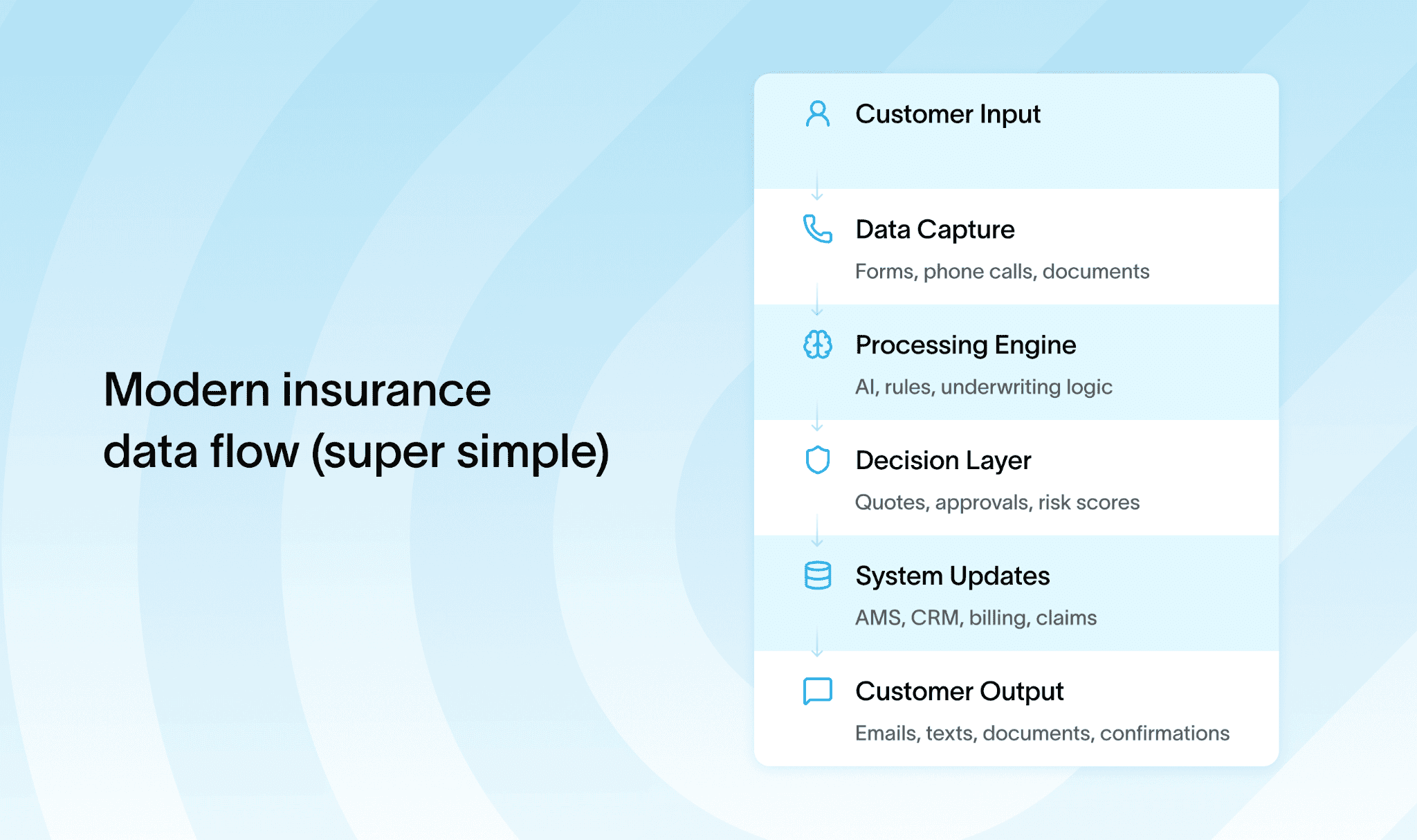
This immediate data processing helps you stay competitive and responsive.
Cost reduction
You’ll save money by cutting down administrative and marketing expenses. Digitizing records means less paper, fewer manual errors, and less storage cost. Automation reduces repetitive tasks, which lowers labor expenses too.
Overall, you spend less and get more done.
Scalability
As your business grows, your software grows with you.
Flexible systems adapt to new regulations, bigger customer bases, and changing competition. Cloud platforms like AWS and Azure support auto-scaling and disaster recovery, so you’re ready for anything without costly overhauls.
Improved data security
Storing sensitive data securely is a must. Cloud storage prevents unauthorized changes and keeps your information accurate and compliant. Tools like IBM QRadar help monitor threats, so your clients’ data is safe, earning their trust and meeting legal standards.
Enhanced customer lifecycle management
Managing customer journeys becomes a breeze. CRM systems automate onboarding, renewal reminders, and claim tracking. You keep customers informed and engaged without extra effort.
Plus, AI-powered platforms like Salesforce Einstein can recommend personalized offers, boosting retention and revenue.
Process automation
Robotic Process Automation (RPA) and Natural Language Processing (NLP) speed up workflows by handling repetitive tasks. Claims and underwriting processes become faster and less error-prone.
This means fewer delays, happier customers, and reduced manual workload.
New tech integration
Modern insurance software connects effortlessly with external tools and devices through APIs. You can integrate AI chatbots for instant customer support, computer vision for damage assessment, or IoT telematics to track policyholder behavior in real time.
Fraud prevention and risk management
Real-time fraud detection tools and predictive modeling platforms like SAS Fraud Framework and DataRobot help you spot risks early. This reduces losses and ensures your business stays secure and profitable.
To put this into practical terms, here’s a quick look at some leading tools powering these benefits:
- AWS and Azure for cloud-native infrastructure with features like AWS Lambda and Azure Functions for scalable, serverless computing.
- UiPath for RPA that streamlines claims processing and compliance reporting, cutting down manual errors.
- TensorFlow and IBM Watson for AI-driven analytics and personalized customer interactions.
- Salesforce for customer lifecycle management and upsell opportunities with AI recommendation engines.
- Splunk and IBM QRadar for monitoring security and operational data.
- BI dashboards such as Power BI and Tableau deliver clear, actionable insights to your executives for smarter decisions.
One excellent example worth mentioning is Strada’s conversational AI platform. It provides 24/7 availability for FNOL claims and renewal calls, with zero hold time and higher answer rates.
This cost-effective solution beats traditional call centers by increasing customer retention and satisfaction through intelligent, consistent communication across multiple channels.
Of course, no solution is perfect. Before you dive in, it’s smart to understand the common challenges so you can avoid the usual headaches.
What challenges and drawbacks come with insurance software?
When diving into insurance software development services in 2026, you’ll quickly see it’s not all smooth sailing. These projects come with some real challenges you need to watch out for.
First up, integrating new software with your existing legacy systems can be tricky. It often causes problems with data consistency and interoperability because old and new tech don’t always play well together.
This can slow everything down and create headaches across departments.
Regulations in the insurance world keep evolving, too. Staying compliant means your software must handle real-time monitoring and automate many checks. This regulatory burden raises both complexity and cost. Plus, those costs aren’t just one-off.
Between custom development, cloud migration, AI features, and ongoing maintenance, budget overruns are common. And costs aren’t only about invoices and licenses. They show up in time, stress, and operational slowdowns too.
Here’s a simple way to visualize the full cost picture:
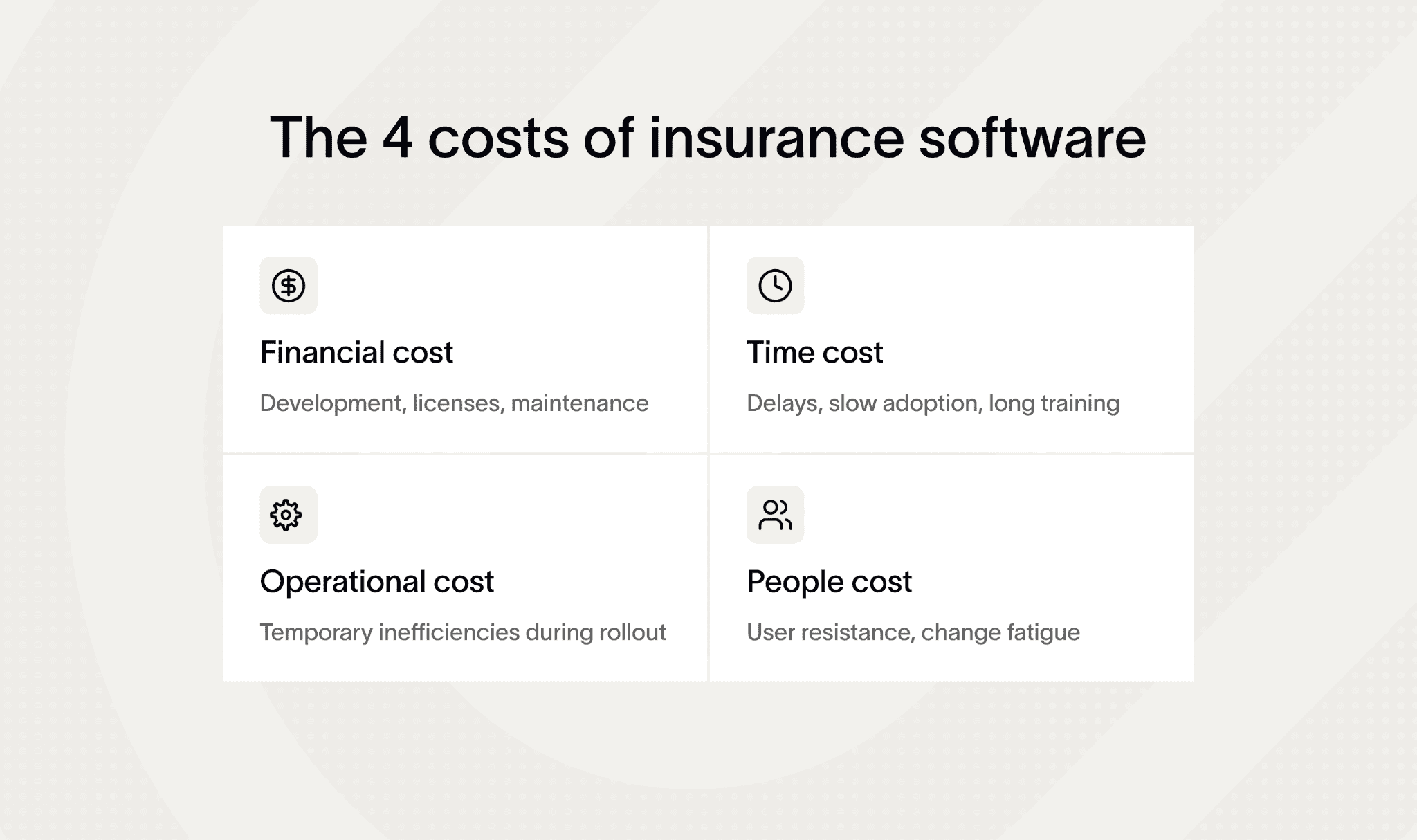
Tools like AWS Cost Explorer and Azure Cost Management help keep these expenses in check, but you need to stay hands-on.
Security is a top priority when building or integrating insurance software. Here’s what to focus on:
- Protect customer data → encrypt all sensitive data both in transit and at rest to prevent leaks or unauthorized access.
- Use strong Identity and Access Management (IAM) → control who can access what – set up multi-factor authentication (MFA) and role-based permissions.
- Monitor with SIEM tools → use Security Information and Event Management systems (like Splunk or IBM QRadar) to detect and respond to threats in real time.
- Adopt DevSecOps practices → integrate security into every stage of development instead of adding it later.
- Automate vulnerability scans → use tools like Snyk, Veracode, or Checkmarx to catch weak spots early in your CI/CD pipeline.
- Keep dependencies up to date → regularly patch frameworks, libraries, and APIs to close known security gaps.
- Educate your team → train developers and employees on secure coding and data handling best practices.
- Run regular penetration tests → simulate attacks to test your defenses before real threats do.
User adoption also poses a hurdle. Employees and customers may resist new systems without proper training and intuitive user interfaces. Having internal champions who believe in the change, coupled with training platforms like LinkedIn Learning and Pluralsight, makes a big difference.
Good UX/UI design smooths this transition and reduces frustration.
Vendor dependency is another piece to consider, especially with low-code/no-code and proprietary platforms. They speed up development but can create technical debt and lock you into a vendor’s ecosystem.
Using vendor scorecards and planning exit strategies helps avoid getting stuck down the road.
Data consolidation poses thorny ETL (Extract, Transform, Load) challenges when pulling info from multiple sources. Testing and rollback plans are non-negotiable to avoid data migration disasters. Also, continuous compliance monitoring tools, like MetricStream or ComplyAdvantage, integrate well with insurance software to ease regulatory pressures.
Once you know the benefits and challenges, the next big question appears: should you build or buy? Let’s break down both paths so you can choose the one that fits your team best.
Custom vs. out-of-the-box: which software choice helps insurers win?
When insurance teams look for new software, they usually face the same dilemma: build a custom solution or buy something that works right away. Both paths sound promising, but they come with very different realities.
Let’s break it down so you can see what drives success in 2026.
Custom insurance software development services give you full control. You can design every workflow, screen, and integration. But there’s a catch: it takes time, money, and ongoing support. Most projects stretch longer than expected, and every change request becomes another sprint, another invoice, another delay.
If your processes evolve quickly (which is common in insurance), you’re constantly chasing moving targets.
This is where ready-to-use software shines. You start using it almost instantly. No long build cycles, no guessing requirements, no six-month wait before seeing value. You get proven workflows, tested features, and predictable costs. And because the vendor handles updates, you stay ahead without touching a line of code.
But you may worry about flexibility. “What if it doesn’t fit how we work?” That used to be a valid fear. Today, modern off-the-shelf platforms solve most of that.
Take Strada, for example.
It sits in the sweet spot between custom and ready-made. You get the speed of out-of-the-box software, but also the ability to adjust it to your workflows and plug it into your existing systems – your AMS, CRM, policy admin, claims tools, and more. It’s built specifically for insurance teams, so it already understands your terminology, your processes, and your use cases.
And because Strada scales from small agencies to large carriers, you don’t outgrow it.
Here’s the practical difference at a glance:
| Attribute | Custom development | Out-of-the-box software | Strada (Hybrid) |
|---|---|---|---|
| What it is | Built from scratch for your organization. | Prebuilt tool you can use immediately. | Ready-to-go platform that adapts to your workflows. |
| Best for | Unique, complex processes that no tool supports. | Teams needing fast deployment with standard workflows. | Carriers, MGAs, and brokers wanting speed + flexibility. |
| Setup speed | Slow (months or years). | Extremely fast (days or weeks). | Fast (days), with guided configuration. |
| Flexibility | Maximum = everything is customizable. | Limited = mostly fixed features. | High = adjustable workflows, integrations, automations. |
| Integration effort | Heavy engineering work. | Varies by vendor, often limited. | No engineering lift; plug into AMS, CRM, policy & claims systems. |
| Cost | Highest: build + maintain + upgrade. | Lower, predictable subscription. | Lower than custom, scalable with usage. |
| Maintenance | Your responsibility forever. | Vendor handles it. | Vendor handles updates + AI improvements. |
| Risks | Delays, overruns, wrong requirements, technical debt. | Doesn’t fit your unique processes. | Requires prioritizing which workflows to automate first. |
| Why choose it | You need something no SaaS platform can offer. | You want fast, stable, budget-friendly tools. | You want instant value and a tailored fit without rebuilding anything. |
If you want speed without sacrificing fit, platforms like Strada give you the best of both worlds. You stay agile, save resources, and get technology that works from day one, all while still letting you evolve your processes on your terms.
How to get started with Strada (step-by-step)
Getting started with Strada is simple, even if you’re not technical. Here’s a quick, practical path you can follow to launch your first insurance-specific AI agent fast.
Step #1. Schedule a demo
Go to Strada’s site and book a demo.
You’ll see real use cases – renewals, FNOL, customer service, and more.
Use this time to ask: “What can we automate first?”
Step #2. Pick one high-value use case
Don’t try to automate everything on day one.
Choose a quick win, like:
- Renewal calls
- FNOL
- Policy servicing
- Quote intake
This keeps things simple and helps you get results fast.
Step #3. Bring your existing workflows
Share how your team handles calls today: scripts, FAQs, handoff steps, and common questions.
Strada already understands insurance terminology, so you won’t need to “over-explain.”
Step #4. Connect your systems
Strada integrates with CRMs, AMSs, policy systems, and claims tools.
You just point it to your systems; no engineering lift required.
Strada’s team helps you plug everything in.
Step #5. Configure your automations
Use Strada Workflows to decide what happens after each call.
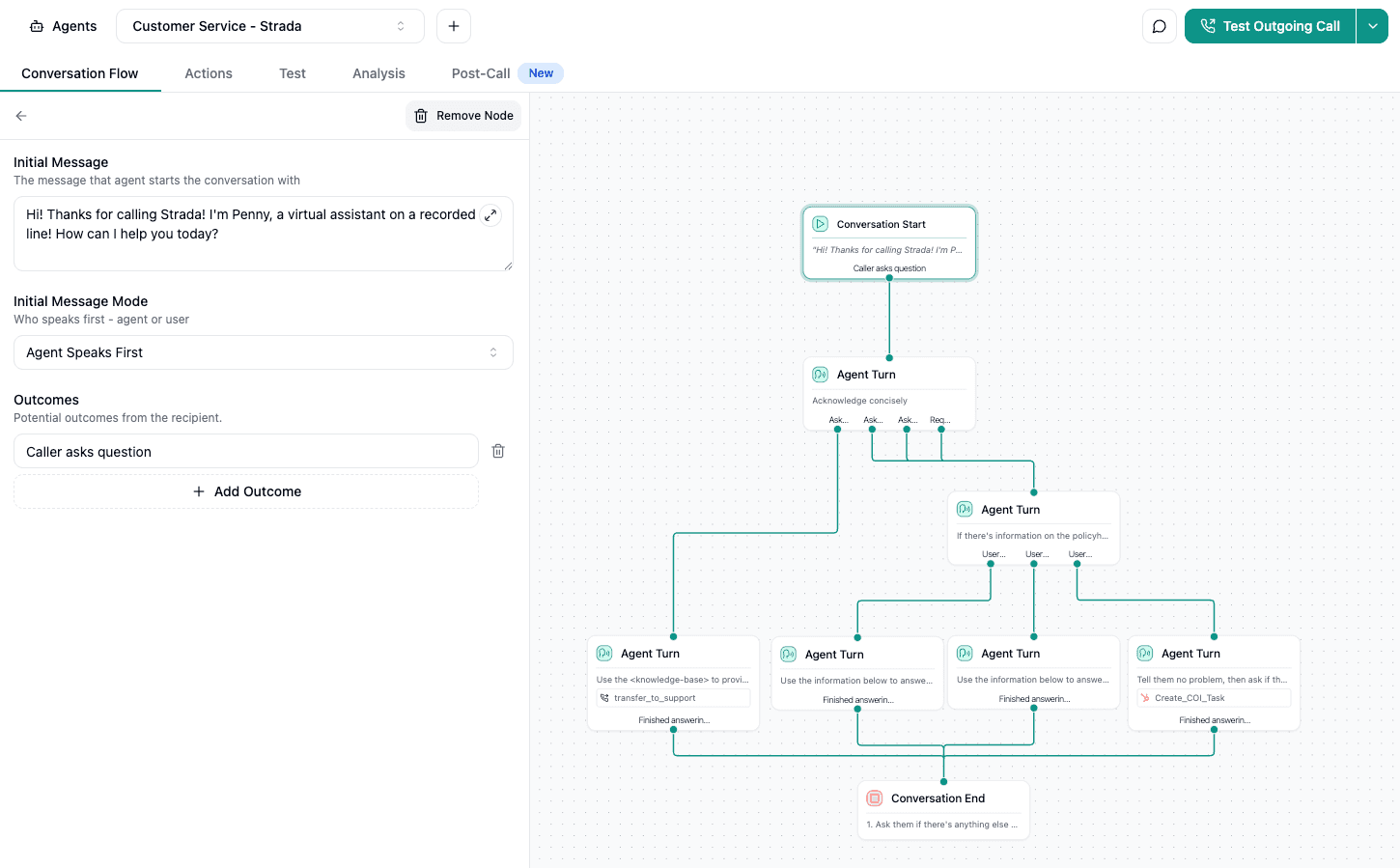
Example:
- If someone requests a COI → send to AMS → generate → email the certificate.
- If someone says they found a better rate → trigger a retention task.
You set rules once, and Strada handles them automatically.
Step #6. Test with real scenarios
Run a few mock calls.
Check how the agent handles renewals, claims, or service questions.
Adjust tone or steps as needed. Strada makes tweaking easy.
Step #7. Launch and monitor
Turn it on for real customers.
Track calls, completions, and follow-up tasks inside your Strada dashboard.
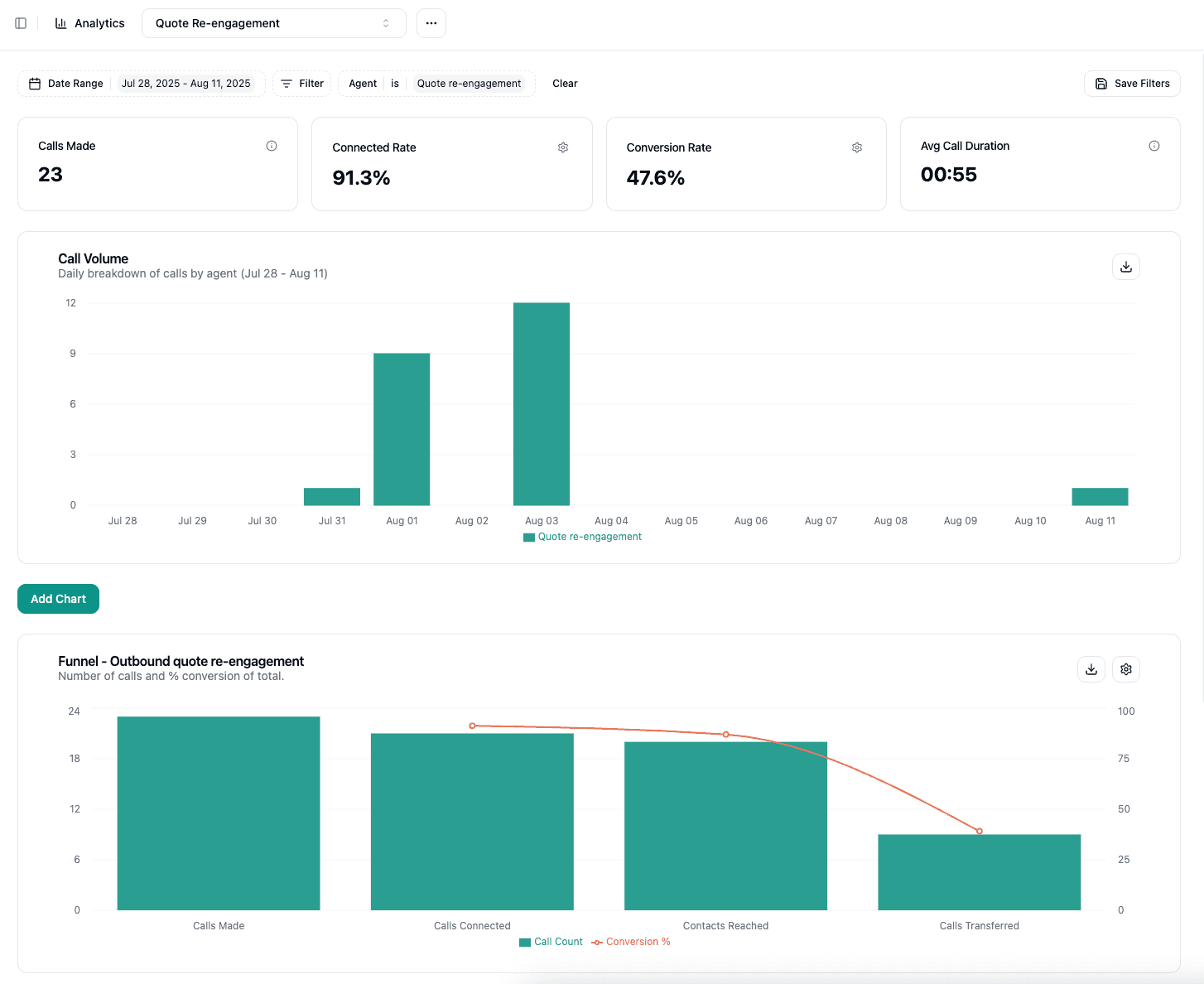
You’ll see insights instantly: connection rates, outcomes, drop-offs, and more.
Step #8. Expand to more use cases
Once the first workflow runs smoothly, add more.
Strada scales to thousands of calls, so growth is simple.
Still, if you decide to build or customize software, you’ll need a simple plan. Here’s a practical roadmap your team can follow to keep the project smooth and predictable.
How can insurance companies implement software development projects effectively?
You’re ready to start an insurance software development project, but where do you begin? The key is following a practical, step-by-step roadmap that fits your company’s size, products, and goals.
Before jumping into development, it helps to see the entire project laid out in one place. Here’s a simple roadmap you can use:
| Stage | What happens | What you should prepare | What teams feel at this stage |
|---|---|---|---|
| Discovery | Gather goals, problems, and workflows. | Business goals, pain points, sample documents. | “Okay, now we know what we’re building.” |
| Planning | Define scope, budget, and timeline. | Priorities + must-have features. | “This finally looks doable.” |
| Prototyping | Create wireframes, clickable mockups. | Screens, steps, user feedback. | “I can actually see how it will work.” |
| Development | Build features in short sprints. | Clear acceptance criteria. | “It’s coming to life week by week.” |
| Testing | Validate accuracy, integrations, UX. | Test cases, real-user feedback. | “Now we trust it enough to go live.” |
| Launch | Push to production and train users. | Training materials, FAQs. | “We’re ready. Let’s turn it on.” |
| Improvement | Add new features based on usage. | Metrics + insights from users. | “Let’s make this even better.” |
Let’s walk through how you can make your next project smooth, smart, and successful.
1. Initial consultation and requirements analysis
Begin by understanding your company’s unique needs.
No matter if you’re a small firm or a large insurer, tailor your requirements analysis accordingly. Identify products and departments that’ll benefit most from software improvements.
Gather input from stakeholders: claims teams, underwriting, customer service, compliance, and IT. This ensures the software solves real problems and meets business goals.
2. Project scoping (whole platform or department-specific?)
Decide if you want a full-scale platform or targeted department solutions. A complete platform integrates all functions but takes more time and resources. Department-specific apps are quicker to launch and easier to customize.
Align this choice with budget, timeline, and long-term strategy.
3. Selecting the right technology stack
Choose technologies that scale with your growth and keep data secure. Cloud solutions often offer flexibility and easy updates, but on-premise setups provide control and meet sensitive data requirements.
Focus on security frameworks, strong encryption, and seamless integration with your existing systems. Your tech stack should support your business goals like faster claims or better customer experience.
4. Prototyping and gathering client feedback
Before heavy development, create wireframes and clickable mock-ups.
These prototypes bring ideas to life quickly and let users interact with a working model. You’ll discover usability issues early and adjust before costly coding begins.
To keep this step simple and effective, follow this quick checklist:
- Sketch the core screens first. Focus on the main flow (quote intake, FNOL, renewals), not every possible edge case.
- Use any quick prototyping tool. Figma, Sketch, or even PowerPoint works. Speed matters more than polish.
- Add simple clickable actions. Make buttons, dropdowns, and basic steps interactive so testers can “walk through” the process.
- Test with real users. Ask insurance agents, CSRs, or adjusters to try the mock-up. Watch where they hesitate or get confused.
- Note all friction points. If someone asks, “Where do I click next?” or “Why is this here?”. That’s a sign something needs fixing.
- Refine once, not forever. Make the necessary updates, but don’t chase perfection. You simply want a clear, validated flow.
- Confirm business rules early. Make sure underwriting rules, data fields, and system handoffs match actual operations.
- Save versions. Keep snapshots of each iteration so you can track what changed and why.
- Share with leadership. A clickable mock-up makes approval faster because everyone sees the same thing.
- Lock the flow before coding. Once the team confirms, “Yes, this is how it should work,” then (and only then) start development.
Feedback loops here are key to building something people actually want and will use effectively.
5. Agile development with continuous testing
Adopt agile methods to keep projects flexible. Develop in small cycles, test often, and adjust fast. Continuous quality assurance means bugs get caught early, ensuring stable releases.
Transparency through tools like Jira and Confluence lets your teams stay aligned and respond quickly to changes.
Now, let’s look at the deployment stage and beyond.
6. Deployment strategies (cloud vs. on-premise and access management)
Deploying your software requires secure, reliable infrastructure. Cloud platforms offer scalability and ease of access from anywhere, while on-premise ensures local control and compliance with strict regulations.
Whichever path you choose, implement robust access management (role-based permissions, multi-factor authentication, and audit trails) to keep data secure.
7. Post-deployment support and iterative improvements
Your project doesn’t end at launch. Plan for ongoing support to fix issues, roll out updates, and improve features based on user feedback. Compliance monitoring should be continuous, adapting to regulatory changes like GDPR or HIPAA.
Regular updates keep your software efficient, secure, and relevant.
8. Effective change management
Change isn’t easy. Create training plans focused on users’ needs, emphasizing a smooth user experience. Communicate clearly throughout the process to encourage adoption. When people understand the benefits and feel supported, they’re more likely to embrace the new tools.
9. Choosing the right vendor partner
If you’re working with external insurance software development companies, pick partners with industry expertise. Look for firms knowledgeable about financial regulations, security requirements, and insurance workflows.
Transparency and ongoing support are non-negotiable. Your partner should provide clear communication and adapt as your needs evolve.
A practical list to keep your project on track:
- Start with Proof of Concept (PoC) or Minimum Viable Product (MVP) phases. These help validate ideas and get early feedback before a full rollout.
- Define KPIs early. Think claim processing time, customer satisfaction, cost savings. These metrics guide your efforts and measure success.
- Plan risk management thoroughly. Prepare contingency plans, schedule audits, and conduct cybersecurity drills to protect your project and company data.
- Use structured data governance aligned with laws like GDPR and HIPAA to keep privacy and compliance front and center.
To manage complex projects, collaboration tools like Microsoft Teams, Jira, and Confluence keep everyone connected. These platforms support agile workflows, document sharing, and real-time updates. For user experience testing, tools like UserTesting and Optimal Workshop are great for gathering actionable UI/UX insights. Testing with real users ensures the software is intuitive and effective.
Rolling out software in phases also works well. Start with pilot groups to gather feedback and fine-tune before wider deployment. It’s a safer, smarter way to minimize disruptions.
Don’t forget clear documentation and knowledge transfer practices. Good documentation helps teams maintain, update, and expand software without losing critical know-how. Integrate legal compliance reviews throughout development to avoid surprises and costly fixes later.
Software alone isn’t enough anymore – AI is reshaping how insurers work. Let’s see how AI boosts accuracy, speed, and customer experience across the entire workflow.
How is AI transforming insurance software today?
You’ll be amazed at how AI is reshaping software development for the insurance business to make operations faster, smarter, and more personalized. AI is no longer just a buzzword. It’s driving real improvements across the industry.
Here’s a quick look at some key AI-driven enhancements revolutionizing insurance today:
- Conversational AI and chatbots like Strada are automating customer service, helping policyholders get quick answers and manage their policies without waiting on hold.
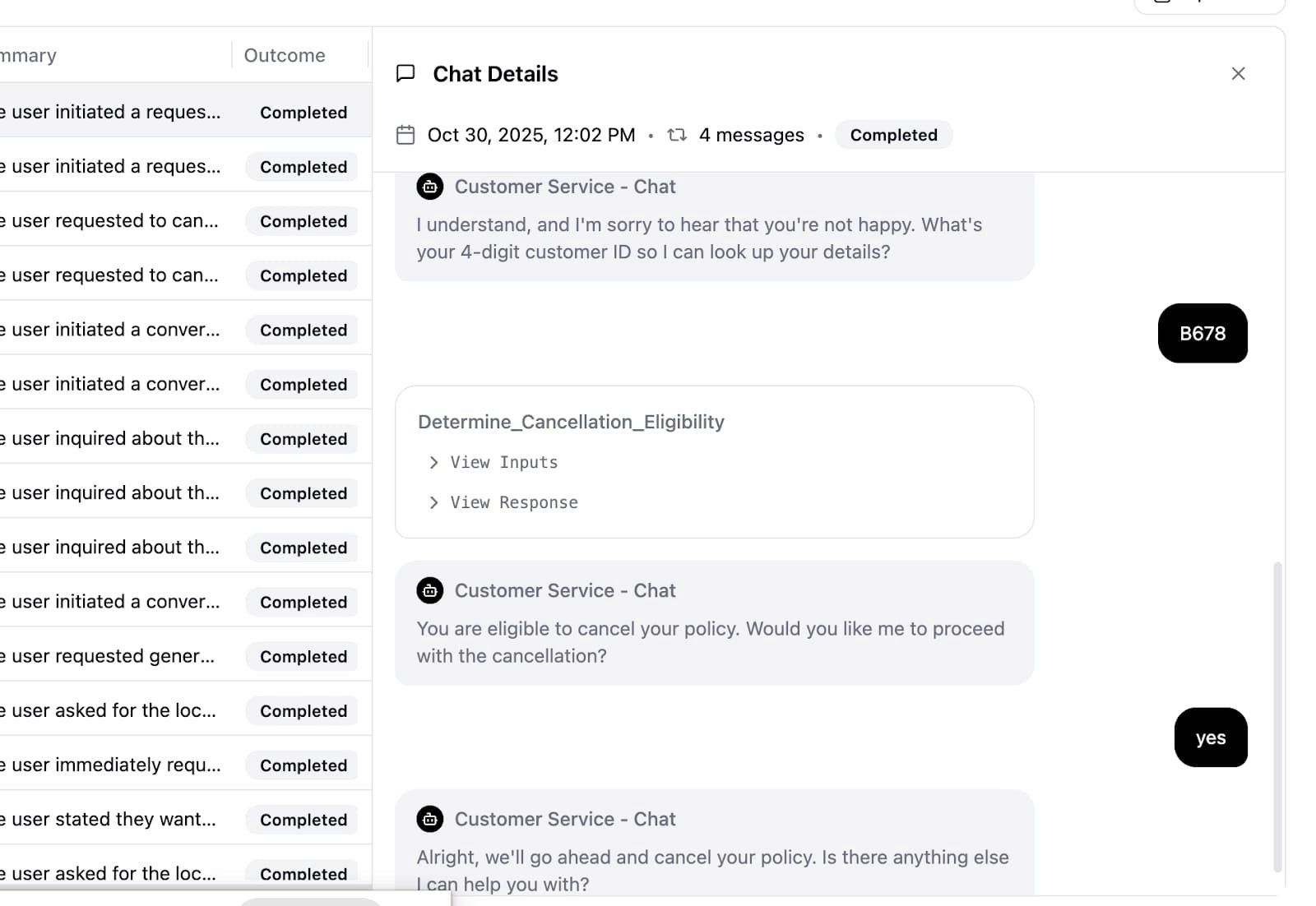
- AI fraud detection uses complex algorithms to spot suspicious activity early, saving insurers millions in false claims.
- Machine learning analyzes customer data to create personalized insurance products that fit each person's unique needs.
- Computer vision technology estimates damage and validates claims through images and videos, speeding up the approval process.
- Generative AI helps generate documents, offers underwriting recommendations, and even boosts customer engagement by crafting personalized messages.
If AI still feels abstract, here’s a simple story of how it works behind the scenes – broken down into four clear steps:
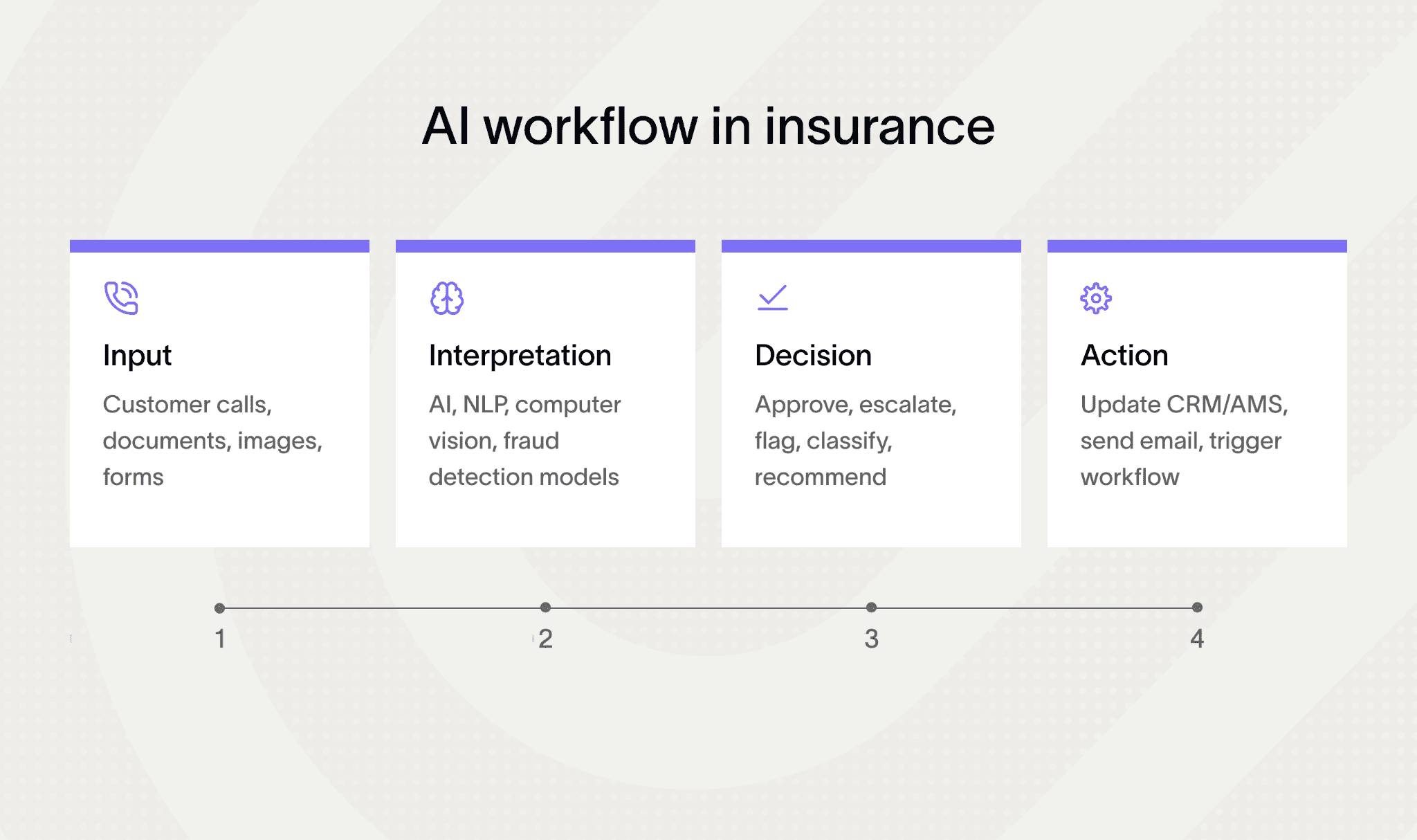
NLP is another huge trend. It simplifies complex policy documents by summarizing them for easy understanding. It also supports real-time compliance checks, keeping insurers aligned with regulations without manual effort.
Reinforcement learning steps in to optimize pricing and risk adjustments, allowing insurers to set smarter premiums based on evolving data.
Here’s a practical look at where you’ll see AI working wonders:
- Customer interactions → AI virtual assistants handle routine calls, reducing call center volume and slashing operational costs.
- Claims processing → automated damage assessment through images speeds up claim approvals.
- Risk management → AI models analyze countless risk factors in real-time, helping adjust policies dynamically.
- Document handling → generative AI quickly drafts contracts and reports, freeing teams to focus on strategy.
For instance, Strada’s conversational AI platform uses insurance-specific AI models to mimic human phone agents. It efficiently handles quote intake, FNOL, renewals, and servicing calls with high accuracy. This cuts errors and compliance risks while scaling customer engagement smoothly.
Integrating AI with IoT devices extends this further – smart sensors provide streams of data enabling predictive maintenance and proactive risk alerts, so insurers can prevent losses before they happen.
The rise of AI frameworks like OpenAI GPT is accelerating these trends. GPT models are excellent for conversational and generative tasks, making insurance workflows more interactive and efficient. However, insurers must focus on AI explainability and bias mitigation.
Regulatory bodies demand transparent AI decisions and fairness, so insurers build trust and avoid risk.
And AI is just the beginning. New trends are coming fast, and you’ll want to stay ahead of them. Here’s what to watch next.
What future trends should insurance companies prepare for?
You’ll want to keep an eye on several key trends shaping insurance software development in 2026 and beyond. First, low-code and no-code platforms are becoming game-changers. They let your team build and update apps quickly without waiting on busy IT specialists.
This speeds up delivery and cuts down bottlenecks.
Cloud migration continues to accelerate, but now with hybrid and multicloud setups to balance flexibility and control. At the same time, regulatory demands are rising, pushing companies to invest in continuous compliance automation to stay ahead easily.
Customers expect smooth, digital-first experiences, including self-service options. Leveraging big data and IoT sensors helps create better risk models and personalized insurance products. Plus, don’t forget cybersecurity – AI-powered defenses are critical to fend off growing threats.
To get ready, invest in ongoing staff training and choose vendors wisely. Avoid rushing – embrace a gradual digital transformation with clear governance to keep things on track.
Here’s a quick practical list you can act on now:
- Build or partner with innovation labs and insurtech startups to access fresh ideas.
- Setup AI ethics committees and establish strong data stewardship frameworks.
- Integrate sustainability data into underwriting and investments to meet ESG standards.
You’ll also want to explore decentralized insurance using blockchain and smart contracts for transparency and efficiency. Quantum computing is still emerging, but it promises breakthroughs in encryption security and super-fast actuarial calculations.
The rise of embedded insurance bundled with ecosystems like automotive or travel is another trend to watch. Plus, 5G will power enhanced predictive analytics by increasing IoT data speed and volume.
Strada, for example, is expanding beyond just voice calls to SMS, email, and multichannel AI workflows.
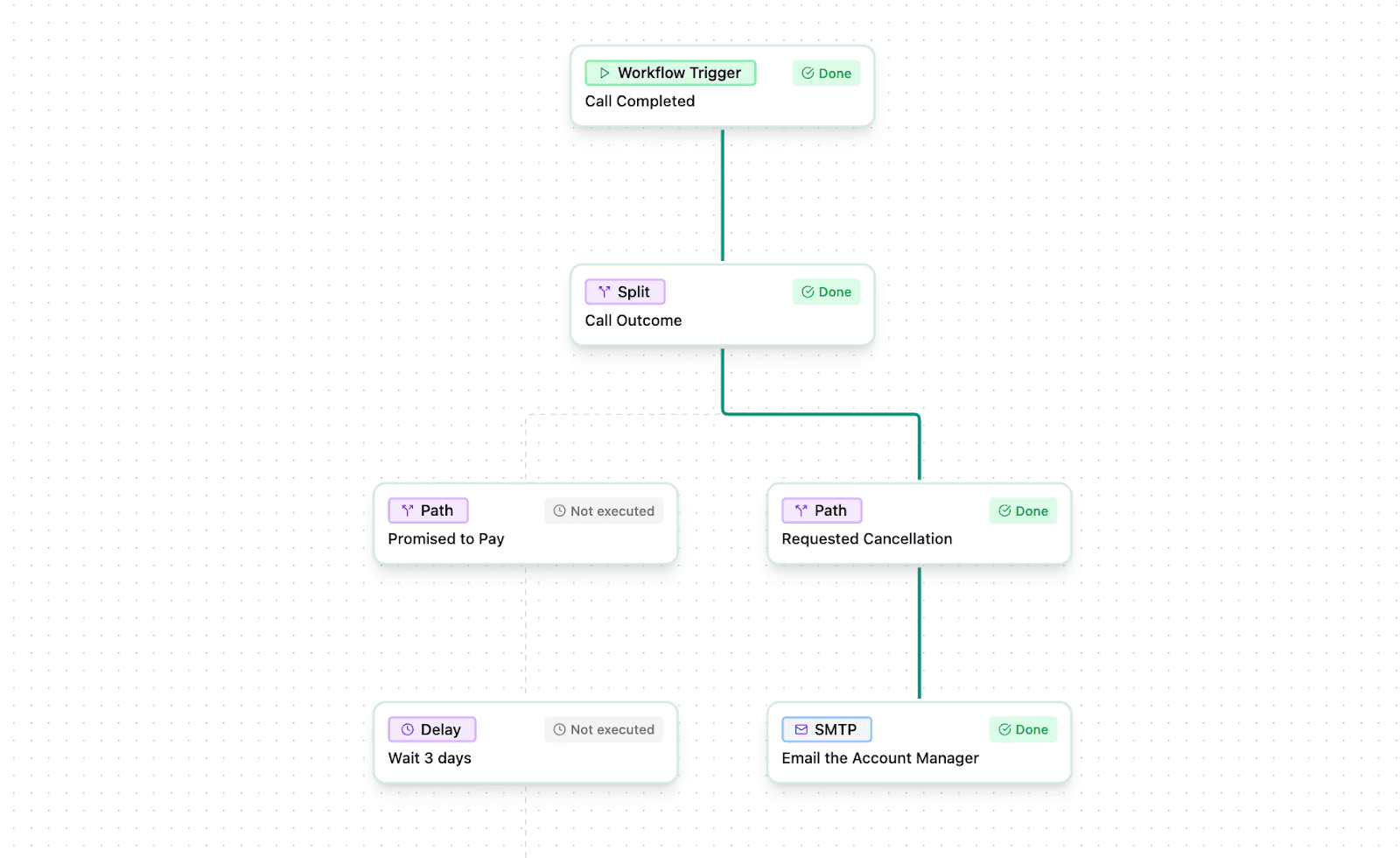
This enables seamless, automated customer engagement and scalable omnichannel communications, which all insurance software development companies should note.
With all these changes happening at once, waiting doesn’t help. Let’s wrap up by looking at why now is the smartest moment to modernize your systems.
Why now is the perfect time to modernize insurance software
If you want to tackle today’s big challenges like boosting efficiency, enhancing customer satisfaction, staying compliant, and managing risks better, modern insurance software development is the way to go.
New tech (like cloud platforms, AI, and automation) helps you get more done faster and smarter. At the same time, it’s important to balance these gains with solid integration and security to keep everything running smoothly and safely.
You’ll find that partnering with experienced insurance-focused software developers makes a big difference. They understand your unique needs and the latest industry changes. For example, Strada’s AI-driven phone agents and automated workflows are practical tools you can start using now to improve customer engagement, cut costs, and stay ahead in digital-first markets.
Remember, COVID-19 didn’t just disrupt business. It sped up customer expectations for digital solutions and tested how resilient companies are. Early adopters who embraced custom insurance software development for insurance report better agility and profitability in this shifting landscape.
To stay competitive in 2026 and beyond, focus on these three actions:
- Explore custom, scalable, and secure software solutions tailored just for your company.
- Invest continuously in upskilling your team and optimizing your vendor ecosystem.
- Adopt proven automation and AI tools like Strada to gain a clear edge.
Start now, and you’ll be well prepared for whatever the future holds.
And if you’re curious how these ideas work in real life (and you want to see what insurance-ready automation actually looks like), you can always explore Strada at your own pace.
A quick demo will show you what’s possible without any pressure or commitment.
It’s simply a chance to see whether Strada could make your team’s day-to-day work easier.
Frequently asked questions
How long does insurance software usually take to implement?
Most off-the-shelf tools go live in days or weeks. Custom systems take months. Hybrid tools like Strada sit in the middle—fast setup with room to adapt.
Do small insurance agencies really need advanced software?
Yes. Even small teams benefit from reducing admin work, improving service speed, and handling more business without hiring more staff.
How do I know which workflows to automate first?
Start with the tasks your team repeats the most—renewals, FNOL, servicing, quote intake. Automating these creates fast ROI and frees up hours instantly.
What’s the easiest way to control software costs?
Choose solutions with transparent pricing, predictable scaling, and no heavy engineering needs. Avoid long-term custom builds unless absolutely required.
When should we modernize our legacy systems?
If your team spends more time fixing issues than serving customers, you’re already late. Modernizing now helps you stay competitive and reduce long-term risk.