Document Collection Automation: Stop Chasing Policyholders in Insurance

Amir Prodensky
CEO
Dec 10, 2025
12 min read
From manual follow-ups to automated insurance document workflows
Collecting documents manually is a huge headache.
It’s slow, full of errors, and wastes time for both your team and policyholders. Plus, it costs more and leads to frustration all around. That’s where document collection automation comes in.
It helps you cut out the back-and-forth and speeds up your workflows.
So why does this matter in the first place? Let’s start with the real problems insurers face when document collection stays manual.
Why automate document collection in insurance?
Collecting documents manually in insurance is a real headache. You waste hours chasing policyholders with phone calls, emails, and even physical mail.
On top of that, errors happen a lot – misfiled or incomplete documents cause delays, compliance issues, and lots of rework. Handling paper or loosely stored digital files also opens the door to security risks like unauthorized access or data breaches.
All this slows down underwriting and claims processing because missing documents create bottlenecks.
Here’s a quick snapshot of the problem:
Insurance teams lose 21% productivity in document-heavy tasks.
Data entry errors hit 4% on average, messing with risk assessments.
It takes about 18 minutes to manually find each document, dragging out case timelines.
Each manual HR or claims entry costs around $4.70.
If this feels familiar, you’re not alone.
Most insurers get stuck in the same loop.
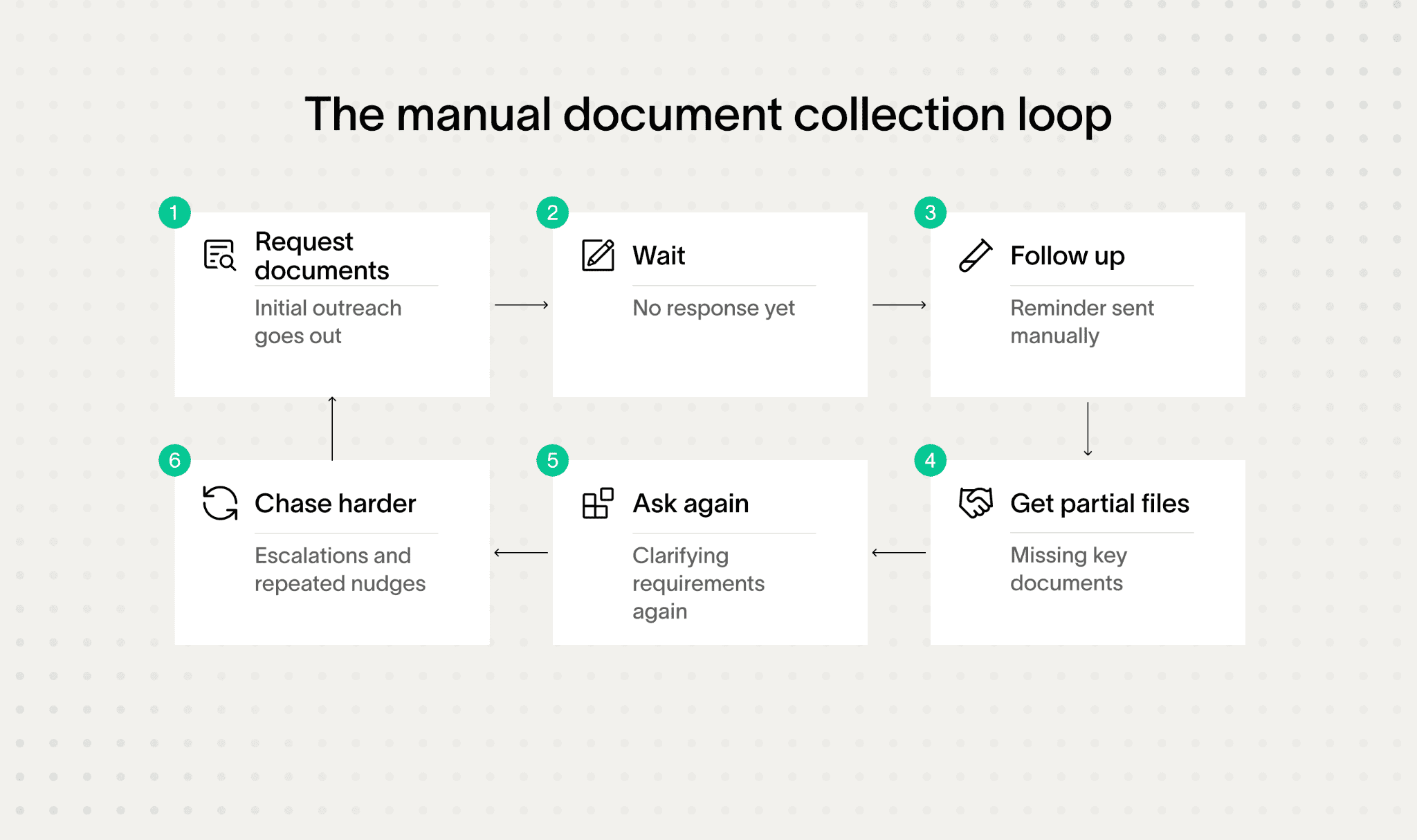
That’s where automation comes in. Using secure online portals, policyholders can upload documents anytime, saving you time.
Automated reminders via SMS, email, or apps cut down manual follow-ups. You get real-time tracking dashboards for full visibility and centralized, encrypted storage to keep everything safe.
Tools like Strada’s conversational AI phone agents even talk to policyholders 24/7 via phone or SMS, collecting documents, confirming missing items, and sending reminders. This boosts connection rates and frees your team from repetitive calls.
Once the pain is clear, the next question is obvious. How does automation actually fix this in day-to-day operations?
How does automated document collection work?
At its core, automated document collection uses secure technology to systematically gather, organize, and verify documents – saving time and reducing errors.
Here’s a quick step-by-step breakdown of how it works:
Accessing a secure portal → Policyholders log into a branded client portal via web or mobile apps (IOS/Android). Multi-factor authentication (MFA) keeps everything safe and secure.
Automated requests → Based on the policy type and where the claim or application sits in the lifecycle, automated requests for documents get triggered. These reminders come through email, SMS, or in-app notifications, with easy controls for how often and when they’re sent.
Instant uploading and secure storage → Once submitted, documents upload right away into a central system. They’re protected with bank-grade AES-256 encryption at rest and TLS encryption in transit, with role-based access ensuring only the right people see what they need to. Every action and change is logged with a full audit trail.
Real-time tracking → Both the insurer and policyholder can see the status of document submissions via dashboards. This shows what’s complete, what’s pending, and any deadlines coming up.
Smart validation → AI and Large Language Models (like Arlo by EnPowered) automatically classify documents, check for missing pages or signatures, and flag any inconsistencies. This saves tons of manual review time by catching issues early.
E-signature integration → Optional e-signatures from DocuSign or Adobe Sign let customers approve or acknowledge documents legally without leaving the workflow.
Together, these steps form a continuous, automated document flow that replaces fragmented emails, manual follow-ups, and disconnected systems.
How AI-driven platforms improve document collection in practice
Traditional methods often rely on manual tagging and data entry or basic portals that don’t go beyond simple uploads. Modern AI-driven platforms, however, adapt to many document types.
They use natural language processing to reduce mistakes and manual effort drastically.
AI isn’t replacing people here. It’s removing friction.
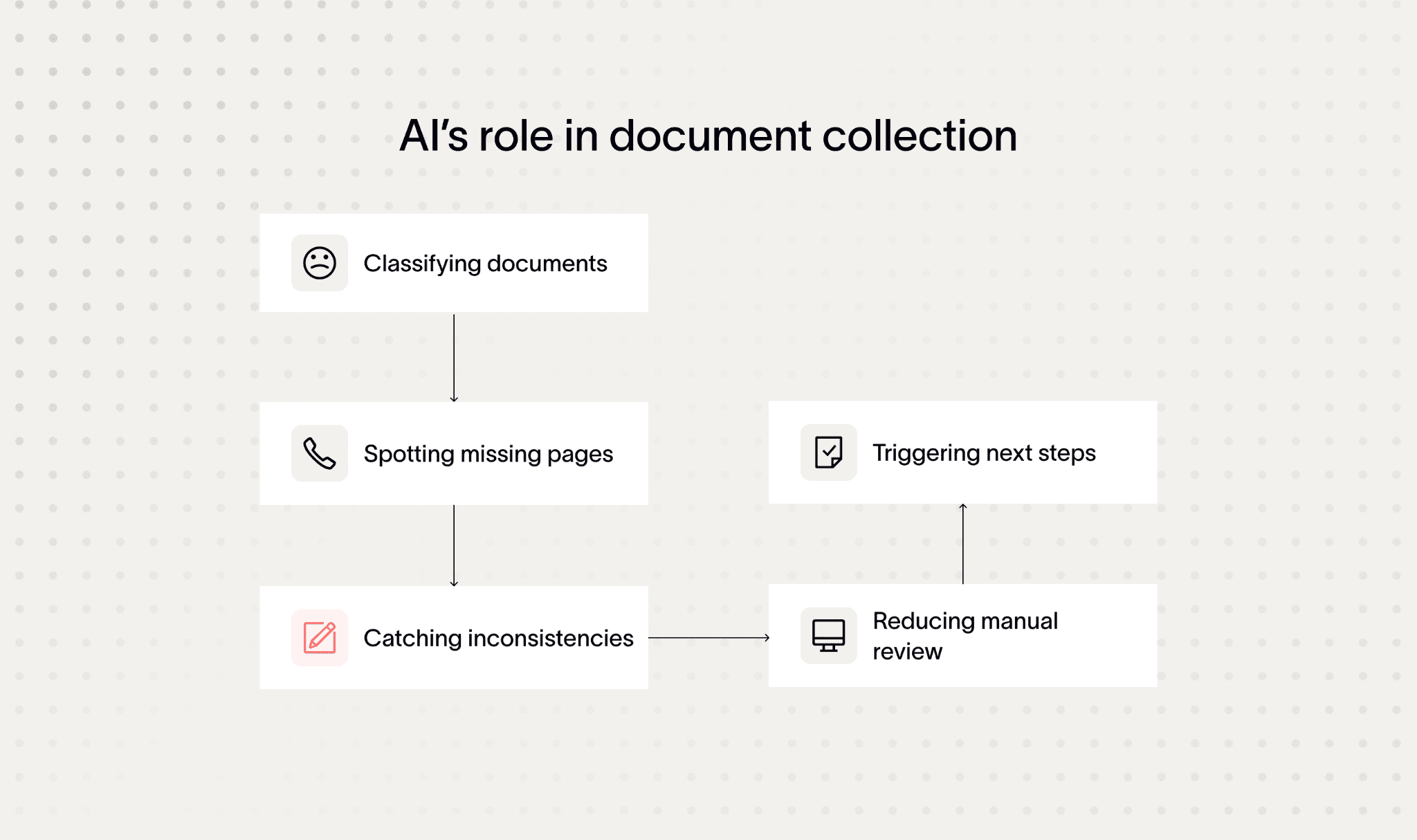
An excellent example is Strada’s solution, which goes beyond just portals. It integrates conversational AI phone agents that handle inbound and outbound calls.
These bots capture missing docs, schedule follow-ups, and trigger next workflow steps instantly after each interaction. They orchestrate processes seamlessly across CRM, AMS, and document management systems without human intervention.
By automating document collection with smart tools like these, insurers report up to 85% savings in administrative follow-up costs and cut cycle times by up to 75%.
At this point, it helps to summarize what actually changes in practice.
Area | Manual collection | Automated collection |
Process structure | Ad hoc | Clearly defined |
Request handling | Manual | Rule-based |
Follow-ups | Repetitive | Automated |
Error detection | Late | Early |
Status visibility | Limited | Real-time |
Compliance readiness | Manual checks | Built in |
Operational effort | High | Significantly lower |
Now that you’ve seen the flow, let’s break down what makes it possible. These are the core features that power automated document collection.
Key features of document collection automation systems
You’ll love how document collection automation takes the headache out of chasing policyholders.
These systems come packed with features designed to make your job easier and faster, while keeping everything secure and compliant through document collection automation software.
Here’s what to look for:
Secure document intake and access control
First, secure client portals are a must.
They let policyholders upload documents safely from anywhere. Look for portals that offer custom branding and multi-language support, perfect if you work with global or regional insurers. The best portals are mobile-friendly and intuitive, so users won’t get stuck or frustrated.
Role-based permissions keep sensitive info protected, letting underwriters, claims adjusters, policyholders, and third parties access only what they need. Plus, they use strong encryption like AES-256 and HTTPS, combined with multi-factor authentication to keep data locked down tight.
Detailed audit logs track every document upload, download, or edit with timestamps that can’t be changed – great for compliance and transparency. Tools like Collect and Moxo excel here, with Moxo offering more flexibility and specializing in insurance workflows.
At a high level, these core features usually cover:
Secure document intake through branded portals.
Controlled access with role-based permissions.
Full audit trails for compliance and traceability.
Automated follow-ups instead of manual chasing.
Faster validation using AI and OCR.
With this baseline in place, automation can move beyond secure intake and compliance toward smarter workflows and AI-driven processing.
Automated workflows, reminders, and AI-driven processing
Next up, automated workflows and reminders slash the time you spend manually chasing documents – sometimes by as much as 75%.
These systems let you set up timing rules, escalation paths, and smart conditions that skip requests if a document’s already submitted. This means policyholders get the right nudges without feeling spammed.
AI and OCR tech take things even further. Solutions like Ocrolus and ABBYY FlexiCapture auto-extract data like policy numbers, dates, names, and tables right from forms. This speeds up processing and cuts errors.
Conditional logic engines help tailor document requests. The system can change what it asks for based on who the policyholder is, the claim type, what’s been submitted before, or compliance needs. This keeps everything relevant and compliant.
Those features handle the basics well. But what happens when your volume grows and workflows get more complex?
Scaling document collection beyond basic automation
Strong integrations round out the system. That means syncing customer info with CRMs like HubSpot or Pipedrive, embedding e-signature flows with DocuSign or Adobe Sign, and storing files in Google Drive or Dropbox.
Real-time alerts pop up in Slack or Teams, and tools like Zapier connect it all for smooth automation.
On top of that, multi-user access with strict permission controls means your whole team can collaborate easily but securely. Compliance stays top of mind with automated audit trails and alerts, using Data Loss Prevention to monitor risks tied to HIPAA, GDPR, KYC, and fair lending rules.
Fraud detection features add an extra layer of security. Ocrolus Detect uses machine learning to spot forged docs or fake identities early.
At this stage, automation starts delivering value beyond basic document handling:
Seamless data flow across CRM, storage, and e-sign tools.
Real-time alerts instead of manual status checks.
Secure collaboration with clear access boundaries.
Built-in compliance and audit readiness.
Early fraud detection before issues escalate.
Now, here’s where Strada stands out. It offers AI-driven phone agents that handle insurance-specific tasks 24/7, like collecting documents, sending renewal reminders, and taking in claims.
These agents integrate seamlessly with your CRM and AMS through flexible APIs so you can automate even beyond portals using document collection automation software.
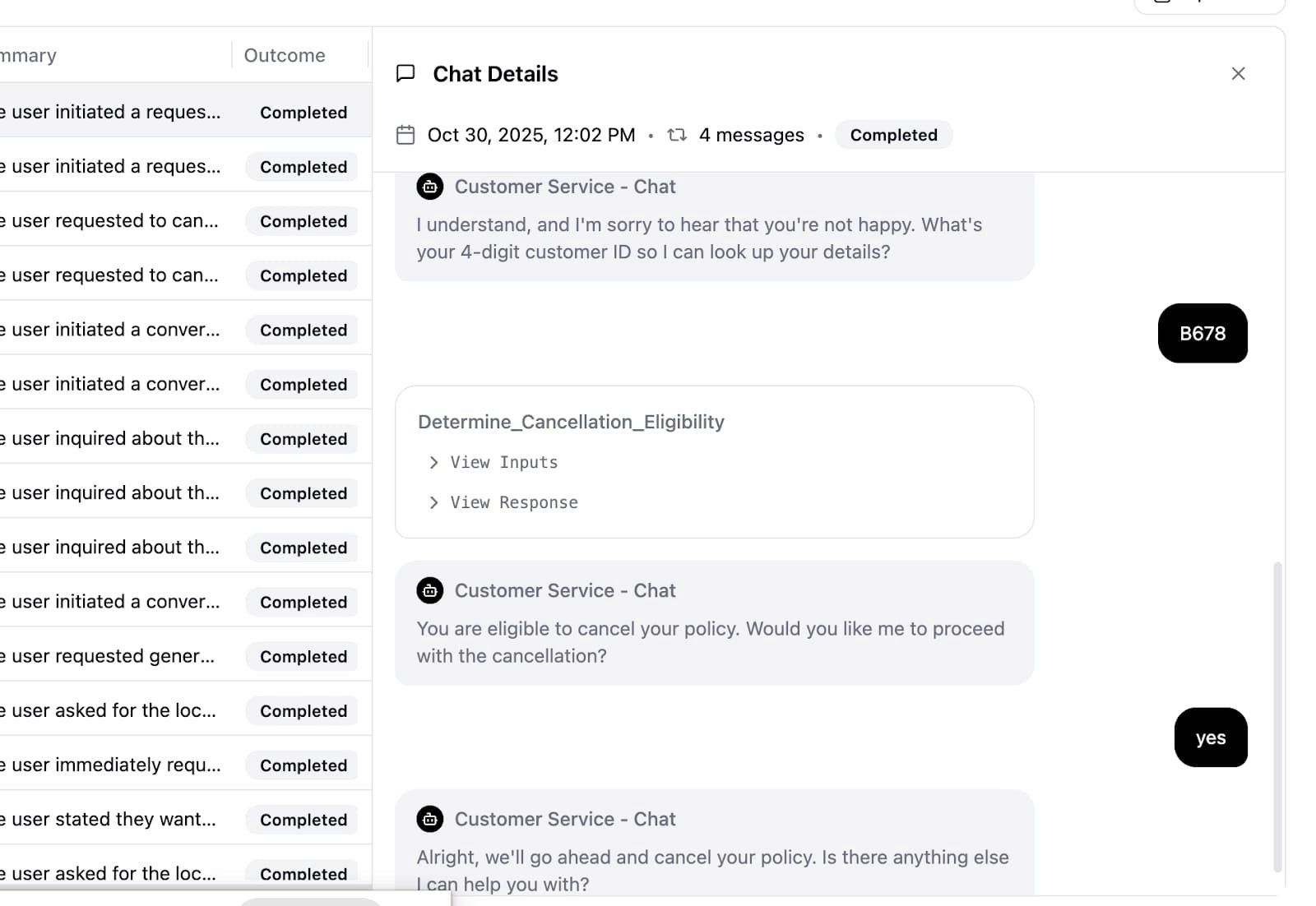
Strada Workflows then turns phone conversations into smart actions – scheduling document requests, triggering reminders, or updating cases instantly. This means no more manual data entry after calls.
With these features, document collection automation becomes a game-changer for your insurance operations.
Knowing what’s possible is one thing. Turning it into a working system is where most teams get stuck.
How to start automating document collection effectively
You’re ready to stop chasing policyholders and start automating your document collection.
Still, you don’t need to fix everything at once. The smartest teams start small.
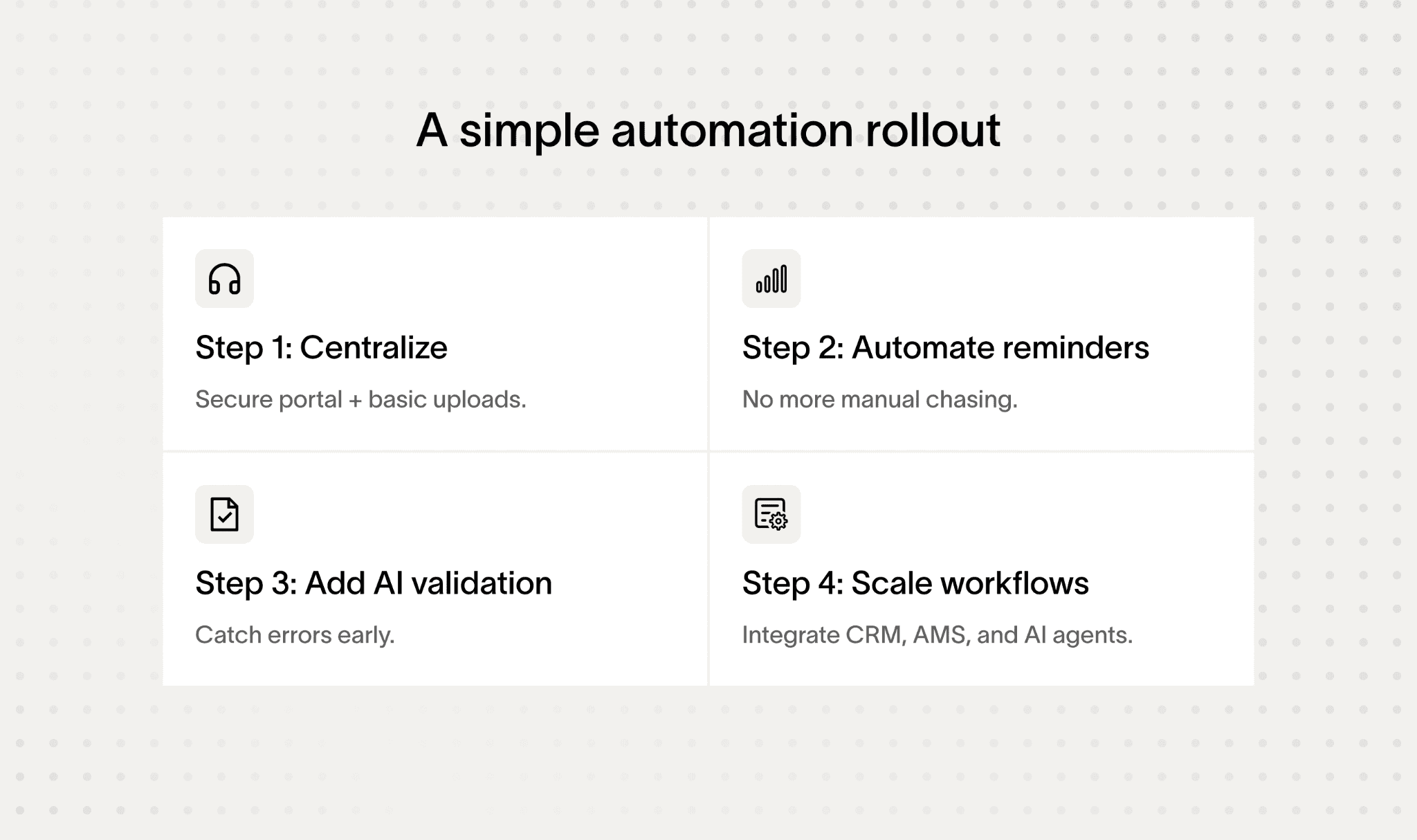
But where do you begin? Let’s break it down into clear, practical steps that get you moving quickly and confidently.
Assess your document needs and volumes
First, take a good look at your insurance product portfolio. Document exactly what types of documents you collect for each policy. These might be applications, claims, verifications, bank statements, or tax forms.
Also, note the average monthly volumes and any seasonal spikes. This helps you anticipate busy times and avoid bottlenecks when using document collection software.
Don’t forget to consider complexity factors like multilanguage needs or special regulatory documents – these affect your automation choices.
Map current workflows and identify bottlenecks
Next, map out your current manual workflows in detail. Identify every step from when the document request starts until the document is submitted, verified, and stored. Look closely for pain points – where delays or errors creep in.
Are there too many handoffs? Is verification manual and slow? Also, document who’s involved at each stage, and what technology tools you currently use. This clear picture will highlight exactly where automation can help the most.
Define automation requirements and priorities
Once you’ve mapped your processes, define what you need from document collection automation software.
Separate your must-haves from nice-to-haves based on your business goals and compliance requirements:
Must-haves might include a secure submission portal, AI-powered document classification, and compliance tracking.
Nice-to-haves could be advanced fraud detection, integrations with existing systems, or mobile app support for policyholders.
Your choice depends on your product range and workflow complexity.
Once your needs are clear, it’s time to choose the right tools. This is where planning turns into execution.
Choosing tools and rolling out automation
When it’s time to choose software, here are some options to consider, each with different strengths:
Loan Origination Systems (LOS) like Guidewire or Duck Creek cover the full insurance lifecycle. They’re powerful but costly and work best if you have fewer, stable product types that need deep customization.
Traditional document collection tools such as Collect or Moxo offer easy setup and secure portals but require policyholders to log in to portals, which can sometimes cause friction or slow follow-up.
AI and LLM-powered platforms like Arlo from EnPowered bring smart, adaptive machine learning that classifies documents and supports flexible, API-driven workflows. They minimize manual tagging and easily scale across multiple product lines.
Strada’s conversational AI platform stands out by automating calls and SMS with policyholders. It handles reminders, submissions, verification, and real-time follow-ups – boosting connection rates and providing 24/7 availability without raising your operational costs.
For example, integrating Strada’s AI along with smart classification tools creates a seamless, proactive experience that policyholders appreciate and your staff will find easier to manage.
To keep things manageable, roll out automation in phases:
Phase 1 → Launch a secure portal for document submission paired with basic automated reminders and simple status tracking.
Phase 2 → Add AI-powered document validation, conditional logic to customize requests, and integrations with CRM or e-signature platforms.
Phase 3 → Bring in advanced features like fraud detection, compliance automation, analytics dashboards, mobile app support, and Strada conversational AI agents to handle outbound and inbound communications for ongoing engagement.
Throughout this journey, don’t underestimate the power of training. Use a mix of online tutorials, live workshops, and clear documentation.
Make training friendly and focus on the benefits new processes bring. Cover security best practices well to reduce resistance and boost adoption.
Finally, plan integration testing with your current IT systems before going live. Set up ongoing monitoring with KPIs that track submission turnaround times, error rates, and customer satisfaction. These help you fine-tune your automation and keep improving.
As you train your team, try using Strada’s AI agent-driven workflows early. This shows immediate productivity gains and cuts down on manual follow-up work after calls, making the shift smoother for everyone.
But, before going live, there’s one concern you can’t ignore. Security and compliance need to be built in from day one.
What about security and compliance?
When it comes to handling insurance documents, security and compliance aren’t optional – they’re a must. You want to protect sensitive info and keep regulators happy, all while making things smoother for your team and policyholders.
Here’s a quick rundown of enterprise-grade security practices you should expect with document collection automation:
Use strong encryption like AES-256 for data at rest, and TLS 1.2 or higher for anything sent between devices, portals, and backend systems.
Secure upload portals with multi-factor authentication (MFA) and time-limited pre-signed URLs or tokens, so documents go directly to cloud storage without risk of interception.
Role-based access controls (RBAC) that strictly limit who can view or edit documents based on job functions and approval steps.
Audit logs that track every upload, edit, download, and access attempt – these logs can’t be changed and help with any investigations.
Version control that keeps every document history safe to prevent unauthorized changes or deletions.
Regular vulnerability checks, penetration testing, and ongoing cybersecurity training for staff to protect against threats from inside and outside your company.
With technical safeguards in place, the next priority is meeting regulatory requirements and managing compliance risk across different jurisdictions.
Regulatory compliance and risk mitigation
On the compliance side, you’ll want to keep these important frameworks in mind: HIPAA protects health-related info, GDPR covers European customers’ rights like consent and data erasure, KYC regulations verify identities and fight money laundering, and fair lending laws require nondiscriminatory handling of data.
Noncompliance isn’t just risky; it’s costly. Take Orange Espagne, which faced a €5 million GDPR fine due to weak data protection. Such hits cause financial pain, hurt your reputation, and break customer trust.
Automation helps offset these risks by cutting human data entry errors by up to 40%, thanks to consistent checks, standardized templates, and AI-powered verification.
Tools like OneTrust and ComplyAdvantage offer real-time gap analysis and automated regulatory reporting, keeping you ahead of compliance demands.
For a real-world example, Strada’s conversational AI platform follows top security standards including SOC 2 Type 2 compliance, strict data isolation, no customer data used for training models, continuous penetration tests, MFA access, and strong encryption.
This means your document collection automation works securely and smoothly within the insurance industry’s rules.
With the guardrails in place, let’s look under the hood. These are the technologies that make automation reliable and scalable.
What tools and technologies enable automation?
You’re probably wondering how to make document collection in insurance faster and less of a hassle. The good news is that there are plenty of smart tools and technologies built specifically to automate this process – and they work together seamlessly to save you time and headaches.
Core technologies behind document collection automation
First up, Optical Character Recognition (OCR) technologies like ABBYY FlexiCapture and Ocrolus are essential. They read scanned or photographed documents like forms, IDs, and financial statements with high accuracy.
This means data gets extracted without manual typing, whether the info is structured or comes in different formats.
On top of OCR, AI-powered engines, especially those using Large Language Models like Arlo by EnPowered, take automation a step further.
These engines understand natural language and context, spot anomalies, and easily adapt to new document types without much retraining. So they catch errors and verify documents more reliably.
If you want an all-in-one solution, SaaS platforms such as Collect by UseCollect and Moxo offer cloud-based automation designed just for document collection workflows. They come with secure portals, permission controls, and scalable pricing, making them practical for any team size.
To glue everything together, integration platforms like Zapier and Workato help you connect your CRM (think HubSpot or Pipedrive), e-signature tools (DocuSign), cloud storage (Google Drive, Dropbox), and communication apps (Slack, Microsoft Teams) with little or no code.
Automation building blocks in real workflows
At a practical level, automation usually relies on a few core building blocks:
Extracting data from documents automatically.
Understanding content and context with AI.
Centralizing uploads through secure portals.
Connecting systems without heavy custom code.
Keeping workflows moving without manual handoffs.
This means your workflows move smoothly from one step to the next without extra effort, supported by document collection software.
Robotic Process Automation (RPA) tools come into play by handling repetitive tasks. They can send reminders, route documents for approval, or update case statuses automatically based on events or schedules. It’s like having a digital assistant that never sleeps.
Fraud detection is crucial, and embedded modules like Ocrolus Detect use machine learning trained on forensic data to spot forged signatures, tampered images, synthetic identities, and unusual patterns. These tools give you an added layer of security and reduce financial risks.
Business Process Management (BPM) systems such as Camunda or IBM BPM offer advanced features to model, monitor, and audit your document workflows. They help ensure compliance and give you full visibility over every step.
Individually, these tools are powerful. The real value shows up when they start working together.
From individual tools to a connected automation system
Compliance automation software also plays a key role. It integrates directly into your workflows and handles real-time monitoring, policy enforcement, audit trails, and automated responses to suspicious activities to keep you on track.
Most modern platforms provide APIs, webhooks, and SDKs. These let you build custom integrations tailored to your workflows, automate complex routing, and sync documents and data with your back-end policy systems.
To make sense of all this, it helps to look at which tools solve which problems.
Problem | Tool type | What it does |
Reading documents | OCR | Extracts text from files |
Understanding content | AI / LLMs | Classifies and validates |
Collecting files | Secure portals | Centralized uploads |
Sending reminders | Automation / RPA | Triggers follow-ups |
Signing documents | E-signatures | Legal approvals |
Calling policyholders | Conversational AI | Collects info by voice/SMS |
Connecting systems | APIs & workflows | Syncs data across tools |
Now, a game-changer in this space is Strada’s conversational AI platform. Built with insurance-specific NLP, it understands and extracts data from phone calls and SMS in real time.
This conversational layer complements your document collection, making it easier to get information without extra effort.
To make this even smoother, Strada Workflows acts as an orchestration tool.
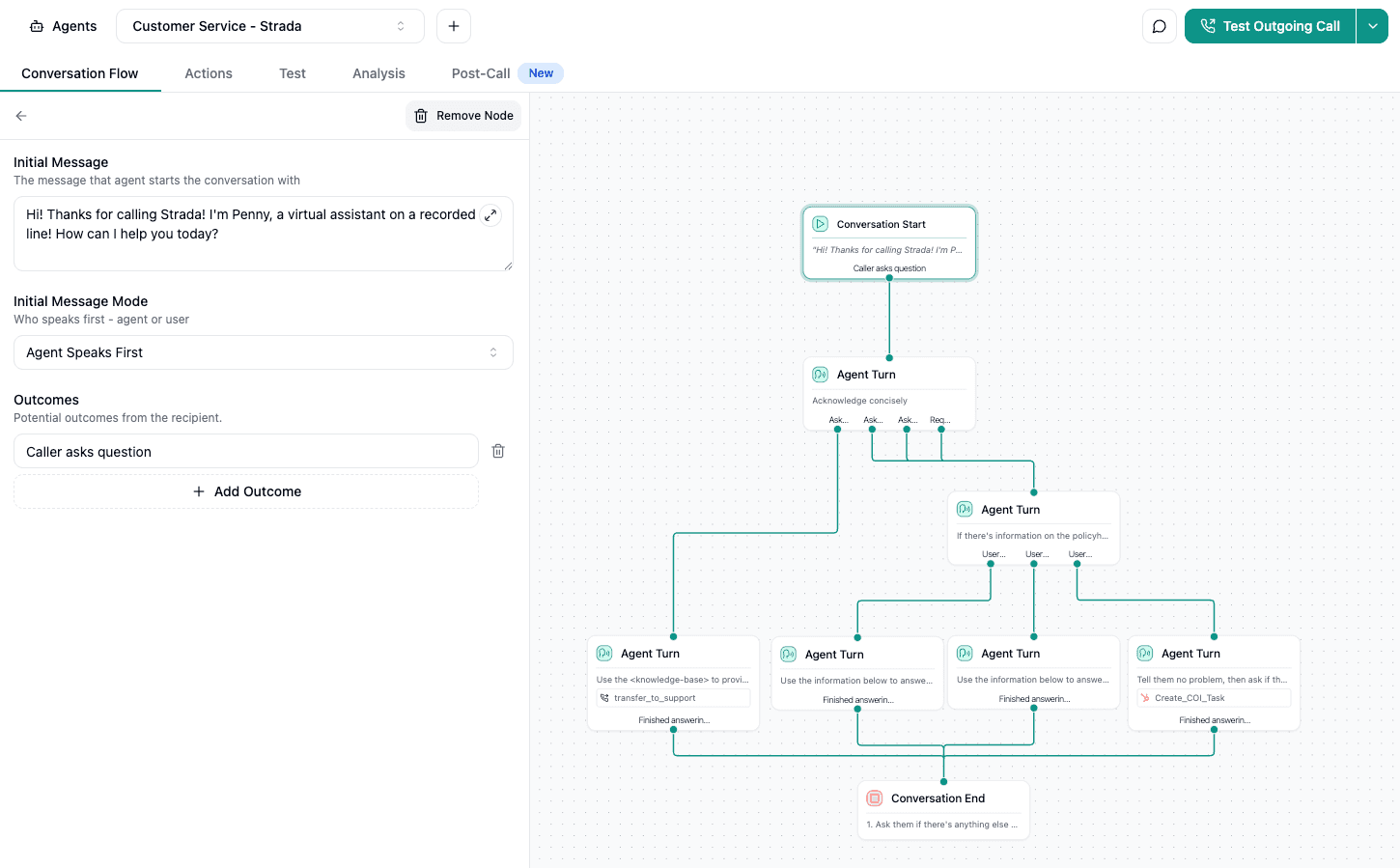
It connects AI-driven conversational data right back to insurance backend systems, triggering no-code automations like sending document requests, updating status in policy systems (AMS), or syncing with your CRM immediately after calls.
This cuts down operational friction and streamlines your entire collection process with document collection software.
Here’s a quick list to recap the main tool categories you can leverage:
Data extraction → OCR (ABBYY FlexiCapture, Ocrolus), AI-powered classification (Arlo by EnPowered).
Workflow automation → SaaS platforms (Collect, Moxo), RPA tools, BPM systems (Camunda, IBM BPM).
Integration → Zapier, Workato, APIs and SDKs for custom connections.
Security & compliance → Fraud detection (Ocrolus Detect), compliance automation software.
Conversational AI → Strada’s AI platform and Workflows for seamless phone and
Still, technology alone isn’t enough. How you use it determines whether automation actually works.
Best practices for successful document collection automation
You’re ready to automate your document collection process, but how do you make sure it actually works?
Here are practical tips to help you set up a smooth, error-free, and user-friendly system.
Building reliable and scalable automation workflows
Start with standardized templates. Use predefined naming rules, preferred PDF formats, and clear checklists. This makes it easier for policyholders to submit the right files without mistakes and helps your system validate documents faster.
Next, map out the entire document lifecycle. Identify every touchpoint – who’s involved, when approvals happen, and where delays occur. This gives you a clear picture to streamline workflows and cut out bottlenecks.
Validate workflows with real-world testing
Don’t skip thorough end-to-end testing either. Run your workflows on different devices and networks, simulating real-life hiccups like partial uploads, unsupported files, or late submissions. Catching these issues before going live saves headaches later.
Balancing automation with human oversight is key. Automated AI can speed things up, but complex or unclear cases need a human touch. Think of it as augmented intelligence.
Measure performance with the right metrics
Tracking your success is simple when you monitor key numbers across the document collection process: how long documents take to submit, adoption rates by policyholders, turnaround speed, error rates, and costs per document processed.
You can even use analytics dashboards to spot where people drop off, which documents often go missing, and where manual fixes are needed. This way, you keep improving your request templates and reminder messages.
Even the most technically sound automation won’t deliver results if people don’t actually use it. That’s why adoption and ease of use deserve the same level of attention as workflows and AI accuracy.
Driving adoption and reducing friction
Clear communication makes a big difference too. Use simple language and step-by-step guides to walk policyholders through document prep and submission. Offering instructions in multiple languages can widen your reach.
And don’t forget security – use multi-layer encryption, tight access controls, and regular staff training to keep everyone’s information safe.
You also want to automate compliance checks with tools that monitor continuously and alert you to any suspicious patterns. Collaboration improves if you centralize document storage in the cloud, complete with live status updates, comments, and notifications to keep all stakeholders on the same page.
In practice, reducing friction usually comes down to a few simple things:
Clear instructions that don’t require extra support.
Fewer steps to submit each document.
Multiple submission options for different users.
Real-time feedback instead of silence.
Confidence that data is handled securely.
Minimize hurdles for policyholders by supporting single sign-on (SSO), offering multiple ways to submit documents like mobile apps or email uploads, and simplifying each upload to just a few steps. One smart move is leveraging Strada’s AI phone agents.
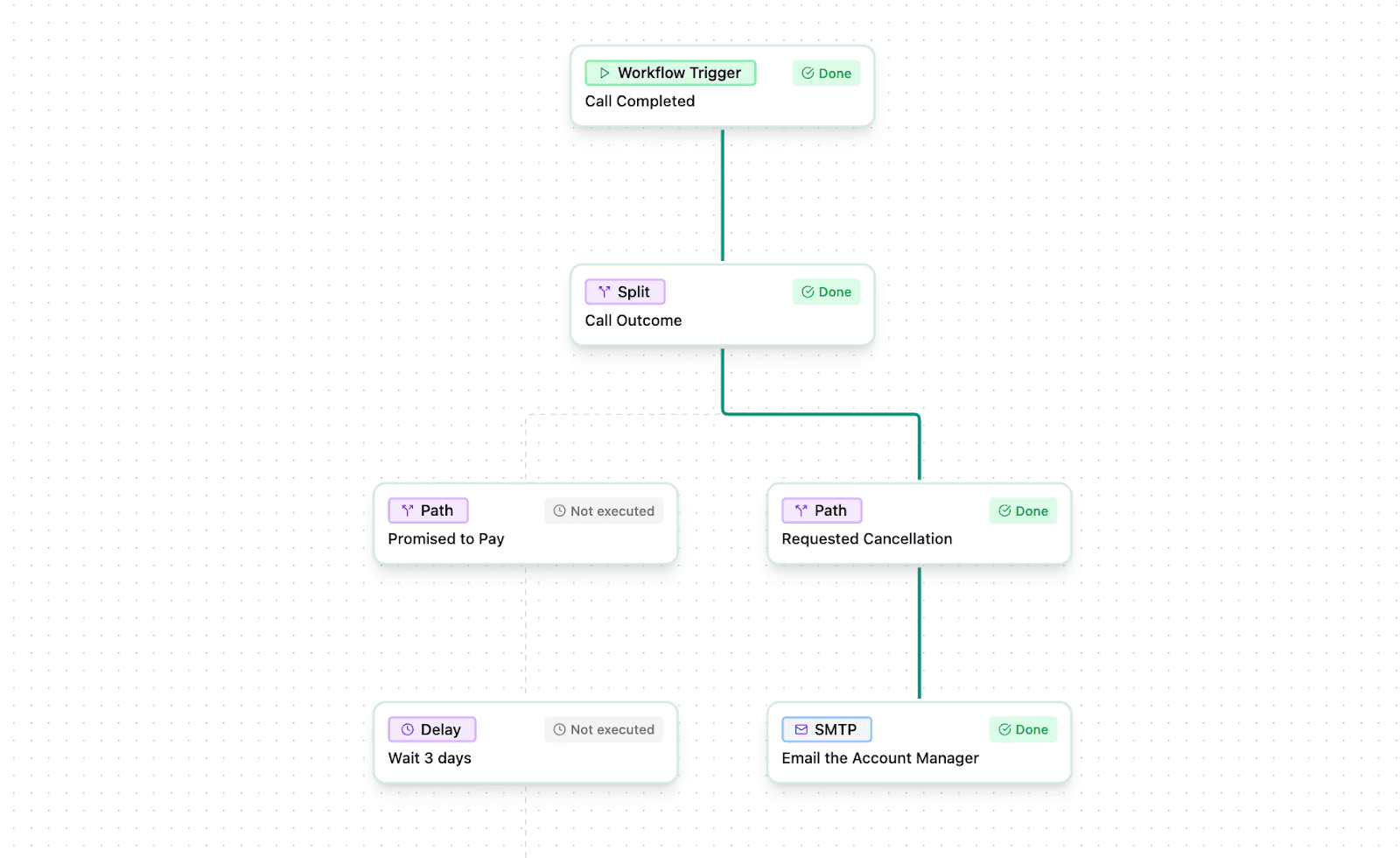
They proactively engage policyholders with conversational help, schedule callbacks, and send instant confirmations via SMS or email to reduce abandonment and boost adoption rates.
You can find ways to integrate these helpful AI tools into your process at Strada’s resource center.
Lastly, don’t forget your team. Train staff on using conversational workflows alongside your document portals so everyone’s comfortable and your automation runs smoothly.
Following these steps ensures you’re not just automating, but automating right – and making life easier for both your team and your policyholders.
When friction drops and adoption rises, the impact becomes visible fast. Here’s what insurers actually gain.
What benefits can insurers expect with automation?
You’ll be amazed at how much you can gain by automating document collection. First off, it drastically cuts down manual follow-up efforts. Studies show insurers save up to 85% on operational costs by reducing staff workloads and speeding up processing times.
That means less time chasing paperwork and more time moving business forward.
Automation also speeds up underwriting and claims processing, which directly boosts customer satisfaction. When turnaround times shrink and policyholders get clear status updates, it cuts down delays and frustrations.
Plus, automation helps prevent errors through built-in validation tools, so you lower your risk of costly penalties and pass audits with ease.
Here’s a quick look at what automation brings to your table:
Big savings on operational costs and staff time.
Faster processing that makes customers happier.
Reduced errors and stronger compliance.
Enhanced data security with end-to-end encryption and role-based access.
Scalability that grows with your business needs.
On top of those, automated systems detect fraud early by flagging suspicious documents, preventing financial losses. Your team gets a morale boost, too, since they can focus on high-value tasks instead of tedious document chasing.
And with real-time dashboards, everyone stays in the loop, improving trust and teamwork.
Don’t overlook the power of AI-driven voice agents like Strada’s, which handle document requests 24/7. This tech keeps engagement high and ensures no document slips through the cracks when your human team isn’t available.
Yet, benefits sound great, but you still need proof. Let’s look at how to measure what automation delivers.
How can insurers measure the ROI and impact of document collection automation?
You’ll want to track clear KPIs from the start to see how much document collection automation helps your insurance process.
Focus on things like how fast documents get submitted, how much manual chasing goes down, error rates, compliance audit passes, and the cost per document processed. These indicators give you a practical snapshot of efficiency.
Next, use analytics tools built into automation platforms or popular BI tools like Tableau or Power BI to watch trends over time. Comparing operations before and after automation shows improvements in underwriting and claims cycle times clearly.
It’s also wise to gauge policyholder happiness through surveys, Net Promoter Scores (NPS), or fewer customer support tickets related to document hassles.
Tracking cost savings is simple when you compare staff hours spent on manual follow-ups, paper handling, and fixing errors before and after automation.
Plus, monitoring risk reduction, including fraud detection, compliance slip-ups, and data breach prevention, gives you a fuller picture of your system’s impact.
Here’s a quick list of practical metrics to keep an eye on, especially if you use Strada’s conversational AI agents:
Call connection rates and automation adoption rates.
Reduction in call handle times.
Lift in policyholder responsiveness to document requests.
You can also leverage Strada’s real-time post-call automation dashboards to track task completion and documents collected, making ongoing measurement easy and precise.
Regularly sharing these results with your leadership keeps support strong and investments flowing into automation.
Metrics show progress, but they don’t prevent mistakes. Knowing what to avoid can save months of rework.
Challenges and pitfalls to avoid when automating document collection
When you automate document collection in insurance, you want to get it right from the start. Otherwise, you’ll end up chasing your tail with incomplete automation and frustrated policyholders.
Here’s what you should watch out for to make your automation smooth and effective.
First, don’t underestimate how complex insurance document workflows can be. Skipping over nuances often means some tasks stay manual, defeating the purpose.
Also, remember your policyholders. If your portals or submission steps are hard to use, they won’t adopt them. This leads to more calls and support headaches.
You’ll also want to avoid creating data silos by failing to integrate your new automation software properly with your CRM, policy admin, or document management systems. Disconnected systems cause duplicated work and errors.
Plus, without proper staff training and change management, your team might resist the new tools or use them inconsistently.
Here’s a quick list to keep handy:
Treat automation as an ongoing process – keep monitoring and improving workflows.
Balance AI use with human oversight to prevent errors, especially in claims and underwriting.
Prioritize security and compliance to avoid fines and protect your reputation.
Choose solutions that fit your size and product mix to avoid blown budgets and delays.
Plan for vendor support and upgrades, so your system stays current.
One often overlooked point is the role of conversational AI. Platforms like Strada can transform how you engage policyholders by reducing follow-up calls and speeding up document collection.
If you automate in silos without combining tools like Strada’s AI-driven phone agents and your online portals, you miss out on seamless efficiency from start to finish.
Keep these practical tips in mind, and you’ll build a document collection system that truly delivers – for you and your customers.
With the lessons learned, it’s time to wrap things up. Here’s what matters most as you move forward.
Conclusion
Manual document collection in insurance comes with high costs and endless frustration. Chasing policyholders wastes time, increases errors, and adds compliance risks. But you don’t have to stick with that old way.
Automation using AI-powered, cloud-based platforms changes the game. It stops the tedious back-and-forth, speeds up your document collection process, and keeps data secure. You’ll save time, reduce mistakes, and stay compliant effortlessly.
Start by looking closely at your current workflows. Then try phased automation – begin with essential features like secure document uploads and automated reminders. This approach keeps the change manageable and shows quick wins.
Leading tools like Collect, Arlo, Moxo, Ocrolus, HubSpot, DocuSign, and Zapier can help you get there.
Plus, Strada brings something special – its conversational AI works 24/7 to engage policyholders, cut down manual follow-ups, and trigger actions automatically based on customer interactions.
Together, these tools make your document collection smoother and smarter.
You can explore a demo from Strada to see how automation transforms your process and boosts efficiency. It’s time to stop chasing and start streamlining!
Frequently Asked Questions
How long does it take to implement document collection automation?
Most insurers launch a basic setup in 2–4 weeks. More advanced workflows with AI, integrations, and compliance controls usually take 1–3 months.
Do policyholders need training to use automated document collection?
Framer is a design tool that allows you to design websites on a freeform canvas, and then publish them as websites with a single click.
No. If portals and instructions are clear, most policyholders upload documents without help. The goal is fewer steps, not more explanations.
Framer is a design tool that allows you to design websites on a freeform canvas, and then publish them as websites with a single click.
What types of documents are best suited for automation?
Framer is a design tool that allows you to design websites on a freeform canvas, and then publish them as websites with a single click.
What happens if policyholders submit incorrect or incomplete documents?
Framer is a design tool that allows you to design websites on a freeform canvas, and then publish them as websites with a single click.
Table of Contents
Carriers, MGAs, and brokers scale revenue-driving phone calls with Strada's conversational AI platform.
Start scaling with voice AI agents today
Join innovative carriers and MGAs transforming their calls with Strada.
Document Collection Automation: Stop Chasing Policyholders in Insurance

Amir Prodensky
CEO
Dec 10, 2025
12 min read
From manual follow-ups to automated insurance document workflows
Collecting documents manually is a huge headache.
It’s slow, full of errors, and wastes time for both your team and policyholders. Plus, it costs more and leads to frustration all around. That’s where document collection automation comes in.
It helps you cut out the back-and-forth and speeds up your workflows.
So why does this matter in the first place? Let’s start with the real problems insurers face when document collection stays manual.
Why automate document collection in insurance?
Collecting documents manually in insurance is a real headache. You waste hours chasing policyholders with phone calls, emails, and even physical mail.
On top of that, errors happen a lot – misfiled or incomplete documents cause delays, compliance issues, and lots of rework. Handling paper or loosely stored digital files also opens the door to security risks like unauthorized access or data breaches.
All this slows down underwriting and claims processing because missing documents create bottlenecks.
Here’s a quick snapshot of the problem:
Insurance teams lose 21% productivity in document-heavy tasks.
Data entry errors hit 4% on average, messing with risk assessments.
It takes about 18 minutes to manually find each document, dragging out case timelines.
Each manual HR or claims entry costs around $4.70.
If this feels familiar, you’re not alone.
Most insurers get stuck in the same loop.

That’s where automation comes in. Using secure online portals, policyholders can upload documents anytime, saving you time.
Automated reminders via SMS, email, or apps cut down manual follow-ups. You get real-time tracking dashboards for full visibility and centralized, encrypted storage to keep everything safe.
Tools like Strada’s conversational AI phone agents even talk to policyholders 24/7 via phone or SMS, collecting documents, confirming missing items, and sending reminders. This boosts connection rates and frees your team from repetitive calls.
Once the pain is clear, the next question is obvious. How does automation actually fix this in day-to-day operations?
How does automated document collection work?
At its core, automated document collection uses secure technology to systematically gather, organize, and verify documents – saving time and reducing errors.
Here’s a quick step-by-step breakdown of how it works:
Accessing a secure portal → Policyholders log into a branded client portal via web or mobile apps (IOS/Android). Multi-factor authentication (MFA) keeps everything safe and secure.
Automated requests → Based on the policy type and where the claim or application sits in the lifecycle, automated requests for documents get triggered. These reminders come through email, SMS, or in-app notifications, with easy controls for how often and when they’re sent.
Instant uploading and secure storage → Once submitted, documents upload right away into a central system. They’re protected with bank-grade AES-256 encryption at rest and TLS encryption in transit, with role-based access ensuring only the right people see what they need to. Every action and change is logged with a full audit trail.
Real-time tracking → Both the insurer and policyholder can see the status of document submissions via dashboards. This shows what’s complete, what’s pending, and any deadlines coming up.
Smart validation → AI and Large Language Models (like Arlo by EnPowered) automatically classify documents, check for missing pages or signatures, and flag any inconsistencies. This saves tons of manual review time by catching issues early.
E-signature integration → Optional e-signatures from DocuSign or Adobe Sign let customers approve or acknowledge documents legally without leaving the workflow.
Together, these steps form a continuous, automated document flow that replaces fragmented emails, manual follow-ups, and disconnected systems.
How AI-driven platforms improve document collection in practice
Traditional methods often rely on manual tagging and data entry or basic portals that don’t go beyond simple uploads. Modern AI-driven platforms, however, adapt to many document types.
They use natural language processing to reduce mistakes and manual effort drastically.
AI isn’t replacing people here. It’s removing friction.

An excellent example is Strada’s solution, which goes beyond just portals. It integrates conversational AI phone agents that handle inbound and outbound calls.
These bots capture missing docs, schedule follow-ups, and trigger next workflow steps instantly after each interaction. They orchestrate processes seamlessly across CRM, AMS, and document management systems without human intervention.
By automating document collection with smart tools like these, insurers report up to 85% savings in administrative follow-up costs and cut cycle times by up to 75%.
At this point, it helps to summarize what actually changes in practice.
Area | Manual collection | Automated collection |
Process structure | Ad hoc | Clearly defined |
Request handling | Manual | Rule-based |
Follow-ups | Repetitive | Automated |
Error detection | Late | Early |
Status visibility | Limited | Real-time |
Compliance readiness | Manual checks | Built in |
Operational effort | High | Significantly lower |
Now that you’ve seen the flow, let’s break down what makes it possible. These are the core features that power automated document collection.
Key features of document collection automation systems
You’ll love how document collection automation takes the headache out of chasing policyholders.
These systems come packed with features designed to make your job easier and faster, while keeping everything secure and compliant through document collection automation software.
Here’s what to look for:
Secure document intake and access control
First, secure client portals are a must.
They let policyholders upload documents safely from anywhere. Look for portals that offer custom branding and multi-language support, perfect if you work with global or regional insurers. The best portals are mobile-friendly and intuitive, so users won’t get stuck or frustrated.
Role-based permissions keep sensitive info protected, letting underwriters, claims adjusters, policyholders, and third parties access only what they need. Plus, they use strong encryption like AES-256 and HTTPS, combined with multi-factor authentication to keep data locked down tight.
Detailed audit logs track every document upload, download, or edit with timestamps that can’t be changed – great for compliance and transparency. Tools like Collect and Moxo excel here, with Moxo offering more flexibility and specializing in insurance workflows.
At a high level, these core features usually cover:
Secure document intake through branded portals.
Controlled access with role-based permissions.
Full audit trails for compliance and traceability.
Automated follow-ups instead of manual chasing.
Faster validation using AI and OCR.
With this baseline in place, automation can move beyond secure intake and compliance toward smarter workflows and AI-driven processing.
Automated workflows, reminders, and AI-driven processing
Next up, automated workflows and reminders slash the time you spend manually chasing documents – sometimes by as much as 75%.
These systems let you set up timing rules, escalation paths, and smart conditions that skip requests if a document’s already submitted. This means policyholders get the right nudges without feeling spammed.
AI and OCR tech take things even further. Solutions like Ocrolus and ABBYY FlexiCapture auto-extract data like policy numbers, dates, names, and tables right from forms. This speeds up processing and cuts errors.
Conditional logic engines help tailor document requests. The system can change what it asks for based on who the policyholder is, the claim type, what’s been submitted before, or compliance needs. This keeps everything relevant and compliant.
Those features handle the basics well. But what happens when your volume grows and workflows get more complex?
Scaling document collection beyond basic automation
Strong integrations round out the system. That means syncing customer info with CRMs like HubSpot or Pipedrive, embedding e-signature flows with DocuSign or Adobe Sign, and storing files in Google Drive or Dropbox.
Real-time alerts pop up in Slack or Teams, and tools like Zapier connect it all for smooth automation.
On top of that, multi-user access with strict permission controls means your whole team can collaborate easily but securely. Compliance stays top of mind with automated audit trails and alerts, using Data Loss Prevention to monitor risks tied to HIPAA, GDPR, KYC, and fair lending rules.
Fraud detection features add an extra layer of security. Ocrolus Detect uses machine learning to spot forged docs or fake identities early.
At this stage, automation starts delivering value beyond basic document handling:
Seamless data flow across CRM, storage, and e-sign tools.
Real-time alerts instead of manual status checks.
Secure collaboration with clear access boundaries.
Built-in compliance and audit readiness.
Early fraud detection before issues escalate.
Now, here’s where Strada stands out. It offers AI-driven phone agents that handle insurance-specific tasks 24/7, like collecting documents, sending renewal reminders, and taking in claims.
These agents integrate seamlessly with your CRM and AMS through flexible APIs so you can automate even beyond portals using document collection automation software.

Strada Workflows then turns phone conversations into smart actions – scheduling document requests, triggering reminders, or updating cases instantly. This means no more manual data entry after calls.
With these features, document collection automation becomes a game-changer for your insurance operations.
Knowing what’s possible is one thing. Turning it into a working system is where most teams get stuck.
How to start automating document collection effectively
You’re ready to stop chasing policyholders and start automating your document collection.
Still, you don’t need to fix everything at once. The smartest teams start small.

But where do you begin? Let’s break it down into clear, practical steps that get you moving quickly and confidently.
Assess your document needs and volumes
First, take a good look at your insurance product portfolio. Document exactly what types of documents you collect for each policy. These might be applications, claims, verifications, bank statements, or tax forms.
Also, note the average monthly volumes and any seasonal spikes. This helps you anticipate busy times and avoid bottlenecks when using document collection software.
Don’t forget to consider complexity factors like multilanguage needs or special regulatory documents – these affect your automation choices.
Map current workflows and identify bottlenecks
Next, map out your current manual workflows in detail. Identify every step from when the document request starts until the document is submitted, verified, and stored. Look closely for pain points – where delays or errors creep in.
Are there too many handoffs? Is verification manual and slow? Also, document who’s involved at each stage, and what technology tools you currently use. This clear picture will highlight exactly where automation can help the most.
Define automation requirements and priorities
Once you’ve mapped your processes, define what you need from document collection automation software.
Separate your must-haves from nice-to-haves based on your business goals and compliance requirements:
Must-haves might include a secure submission portal, AI-powered document classification, and compliance tracking.
Nice-to-haves could be advanced fraud detection, integrations with existing systems, or mobile app support for policyholders.
Your choice depends on your product range and workflow complexity.
Once your needs are clear, it’s time to choose the right tools. This is where planning turns into execution.
Choosing tools and rolling out automation
When it’s time to choose software, here are some options to consider, each with different strengths:
Loan Origination Systems (LOS) like Guidewire or Duck Creek cover the full insurance lifecycle. They’re powerful but costly and work best if you have fewer, stable product types that need deep customization.
Traditional document collection tools such as Collect or Moxo offer easy setup and secure portals but require policyholders to log in to portals, which can sometimes cause friction or slow follow-up.
AI and LLM-powered platforms like Arlo from EnPowered bring smart, adaptive machine learning that classifies documents and supports flexible, API-driven workflows. They minimize manual tagging and easily scale across multiple product lines.
Strada’s conversational AI platform stands out by automating calls and SMS with policyholders. It handles reminders, submissions, verification, and real-time follow-ups – boosting connection rates and providing 24/7 availability without raising your operational costs.
For example, integrating Strada’s AI along with smart classification tools creates a seamless, proactive experience that policyholders appreciate and your staff will find easier to manage.
To keep things manageable, roll out automation in phases:
Phase 1 → Launch a secure portal for document submission paired with basic automated reminders and simple status tracking.
Phase 2 → Add AI-powered document validation, conditional logic to customize requests, and integrations with CRM or e-signature platforms.
Phase 3 → Bring in advanced features like fraud detection, compliance automation, analytics dashboards, mobile app support, and Strada conversational AI agents to handle outbound and inbound communications for ongoing engagement.
Throughout this journey, don’t underestimate the power of training. Use a mix of online tutorials, live workshops, and clear documentation.
Make training friendly and focus on the benefits new processes bring. Cover security best practices well to reduce resistance and boost adoption.
Finally, plan integration testing with your current IT systems before going live. Set up ongoing monitoring with KPIs that track submission turnaround times, error rates, and customer satisfaction. These help you fine-tune your automation and keep improving.
As you train your team, try using Strada’s AI agent-driven workflows early. This shows immediate productivity gains and cuts down on manual follow-up work after calls, making the shift smoother for everyone.
But, before going live, there’s one concern you can’t ignore. Security and compliance need to be built in from day one.
What about security and compliance?
When it comes to handling insurance documents, security and compliance aren’t optional – they’re a must. You want to protect sensitive info and keep regulators happy, all while making things smoother for your team and policyholders.
Here’s a quick rundown of enterprise-grade security practices you should expect with document collection automation:
Use strong encryption like AES-256 for data at rest, and TLS 1.2 or higher for anything sent between devices, portals, and backend systems.
Secure upload portals with multi-factor authentication (MFA) and time-limited pre-signed URLs or tokens, so documents go directly to cloud storage without risk of interception.
Role-based access controls (RBAC) that strictly limit who can view or edit documents based on job functions and approval steps.
Audit logs that track every upload, edit, download, and access attempt – these logs can’t be changed and help with any investigations.
Version control that keeps every document history safe to prevent unauthorized changes or deletions.
Regular vulnerability checks, penetration testing, and ongoing cybersecurity training for staff to protect against threats from inside and outside your company.
With technical safeguards in place, the next priority is meeting regulatory requirements and managing compliance risk across different jurisdictions.
Regulatory compliance and risk mitigation
On the compliance side, you’ll want to keep these important frameworks in mind: HIPAA protects health-related info, GDPR covers European customers’ rights like consent and data erasure, KYC regulations verify identities and fight money laundering, and fair lending laws require nondiscriminatory handling of data.
Noncompliance isn’t just risky; it’s costly. Take Orange Espagne, which faced a €5 million GDPR fine due to weak data protection. Such hits cause financial pain, hurt your reputation, and break customer trust.
Automation helps offset these risks by cutting human data entry errors by up to 40%, thanks to consistent checks, standardized templates, and AI-powered verification.
Tools like OneTrust and ComplyAdvantage offer real-time gap analysis and automated regulatory reporting, keeping you ahead of compliance demands.
For a real-world example, Strada’s conversational AI platform follows top security standards including SOC 2 Type 2 compliance, strict data isolation, no customer data used for training models, continuous penetration tests, MFA access, and strong encryption.
This means your document collection automation works securely and smoothly within the insurance industry’s rules.
With the guardrails in place, let’s look under the hood. These are the technologies that make automation reliable and scalable.
What tools and technologies enable automation?
You’re probably wondering how to make document collection in insurance faster and less of a hassle. The good news is that there are plenty of smart tools and technologies built specifically to automate this process – and they work together seamlessly to save you time and headaches.
Core technologies behind document collection automation
First up, Optical Character Recognition (OCR) technologies like ABBYY FlexiCapture and Ocrolus are essential. They read scanned or photographed documents like forms, IDs, and financial statements with high accuracy.
This means data gets extracted without manual typing, whether the info is structured or comes in different formats.
On top of OCR, AI-powered engines, especially those using Large Language Models like Arlo by EnPowered, take automation a step further.
These engines understand natural language and context, spot anomalies, and easily adapt to new document types without much retraining. So they catch errors and verify documents more reliably.
If you want an all-in-one solution, SaaS platforms such as Collect by UseCollect and Moxo offer cloud-based automation designed just for document collection workflows. They come with secure portals, permission controls, and scalable pricing, making them practical for any team size.
To glue everything together, integration platforms like Zapier and Workato help you connect your CRM (think HubSpot or Pipedrive), e-signature tools (DocuSign), cloud storage (Google Drive, Dropbox), and communication apps (Slack, Microsoft Teams) with little or no code.
Automation building blocks in real workflows
At a practical level, automation usually relies on a few core building blocks:
Extracting data from documents automatically.
Understanding content and context with AI.
Centralizing uploads through secure portals.
Connecting systems without heavy custom code.
Keeping workflows moving without manual handoffs.
This means your workflows move smoothly from one step to the next without extra effort, supported by document collection software.
Robotic Process Automation (RPA) tools come into play by handling repetitive tasks. They can send reminders, route documents for approval, or update case statuses automatically based on events or schedules. It’s like having a digital assistant that never sleeps.
Fraud detection is crucial, and embedded modules like Ocrolus Detect use machine learning trained on forensic data to spot forged signatures, tampered images, synthetic identities, and unusual patterns. These tools give you an added layer of security and reduce financial risks.
Business Process Management (BPM) systems such as Camunda or IBM BPM offer advanced features to model, monitor, and audit your document workflows. They help ensure compliance and give you full visibility over every step.
Individually, these tools are powerful. The real value shows up when they start working together.
From individual tools to a connected automation system
Compliance automation software also plays a key role. It integrates directly into your workflows and handles real-time monitoring, policy enforcement, audit trails, and automated responses to suspicious activities to keep you on track.
Most modern platforms provide APIs, webhooks, and SDKs. These let you build custom integrations tailored to your workflows, automate complex routing, and sync documents and data with your back-end policy systems.
To make sense of all this, it helps to look at which tools solve which problems.
Problem | Tool type | What it does |
Reading documents | OCR | Extracts text from files |
Understanding content | AI / LLMs | Classifies and validates |
Collecting files | Secure portals | Centralized uploads |
Sending reminders | Automation / RPA | Triggers follow-ups |
Signing documents | E-signatures | Legal approvals |
Calling policyholders | Conversational AI | Collects info by voice/SMS |
Connecting systems | APIs & workflows | Syncs data across tools |
Now, a game-changer in this space is Strada’s conversational AI platform. Built with insurance-specific NLP, it understands and extracts data from phone calls and SMS in real time.
This conversational layer complements your document collection, making it easier to get information without extra effort.
To make this even smoother, Strada Workflows acts as an orchestration tool.

It connects AI-driven conversational data right back to insurance backend systems, triggering no-code automations like sending document requests, updating status in policy systems (AMS), or syncing with your CRM immediately after calls.
This cuts down operational friction and streamlines your entire collection process with document collection software.
Here’s a quick list to recap the main tool categories you can leverage:
Data extraction → OCR (ABBYY FlexiCapture, Ocrolus), AI-powered classification (Arlo by EnPowered).
Workflow automation → SaaS platforms (Collect, Moxo), RPA tools, BPM systems (Camunda, IBM BPM).
Integration → Zapier, Workato, APIs and SDKs for custom connections.
Security & compliance → Fraud detection (Ocrolus Detect), compliance automation software.
Conversational AI → Strada’s AI platform and Workflows for seamless phone and
Still, technology alone isn’t enough. How you use it determines whether automation actually works.
Best practices for successful document collection automation
You’re ready to automate your document collection process, but how do you make sure it actually works?
Here are practical tips to help you set up a smooth, error-free, and user-friendly system.
Building reliable and scalable automation workflows
Start with standardized templates. Use predefined naming rules, preferred PDF formats, and clear checklists. This makes it easier for policyholders to submit the right files without mistakes and helps your system validate documents faster.
Next, map out the entire document lifecycle. Identify every touchpoint – who’s involved, when approvals happen, and where delays occur. This gives you a clear picture to streamline workflows and cut out bottlenecks.
Validate workflows with real-world testing
Don’t skip thorough end-to-end testing either. Run your workflows on different devices and networks, simulating real-life hiccups like partial uploads, unsupported files, or late submissions. Catching these issues before going live saves headaches later.
Balancing automation with human oversight is key. Automated AI can speed things up, but complex or unclear cases need a human touch. Think of it as augmented intelligence.
Measure performance with the right metrics
Tracking your success is simple when you monitor key numbers across the document collection process: how long documents take to submit, adoption rates by policyholders, turnaround speed, error rates, and costs per document processed.
You can even use analytics dashboards to spot where people drop off, which documents often go missing, and where manual fixes are needed. This way, you keep improving your request templates and reminder messages.
Even the most technically sound automation won’t deliver results if people don’t actually use it. That’s why adoption and ease of use deserve the same level of attention as workflows and AI accuracy.
Driving adoption and reducing friction
Clear communication makes a big difference too. Use simple language and step-by-step guides to walk policyholders through document prep and submission. Offering instructions in multiple languages can widen your reach.
And don’t forget security – use multi-layer encryption, tight access controls, and regular staff training to keep everyone’s information safe.
You also want to automate compliance checks with tools that monitor continuously and alert you to any suspicious patterns. Collaboration improves if you centralize document storage in the cloud, complete with live status updates, comments, and notifications to keep all stakeholders on the same page.
In practice, reducing friction usually comes down to a few simple things:
Clear instructions that don’t require extra support.
Fewer steps to submit each document.
Multiple submission options for different users.
Real-time feedback instead of silence.
Confidence that data is handled securely.
Minimize hurdles for policyholders by supporting single sign-on (SSO), offering multiple ways to submit documents like mobile apps or email uploads, and simplifying each upload to just a few steps. One smart move is leveraging Strada’s AI phone agents.

They proactively engage policyholders with conversational help, schedule callbacks, and send instant confirmations via SMS or email to reduce abandonment and boost adoption rates.
You can find ways to integrate these helpful AI tools into your process at Strada’s resource center.
Lastly, don’t forget your team. Train staff on using conversational workflows alongside your document portals so everyone’s comfortable and your automation runs smoothly.
Following these steps ensures you’re not just automating, but automating right – and making life easier for both your team and your policyholders.
When friction drops and adoption rises, the impact becomes visible fast. Here’s what insurers actually gain.
What benefits can insurers expect with automation?
You’ll be amazed at how much you can gain by automating document collection. First off, it drastically cuts down manual follow-up efforts. Studies show insurers save up to 85% on operational costs by reducing staff workloads and speeding up processing times.
That means less time chasing paperwork and more time moving business forward.
Automation also speeds up underwriting and claims processing, which directly boosts customer satisfaction. When turnaround times shrink and policyholders get clear status updates, it cuts down delays and frustrations.
Plus, automation helps prevent errors through built-in validation tools, so you lower your risk of costly penalties and pass audits with ease.
Here’s a quick look at what automation brings to your table:
Big savings on operational costs and staff time.
Faster processing that makes customers happier.
Reduced errors and stronger compliance.
Enhanced data security with end-to-end encryption and role-based access.
Scalability that grows with your business needs.
On top of those, automated systems detect fraud early by flagging suspicious documents, preventing financial losses. Your team gets a morale boost, too, since they can focus on high-value tasks instead of tedious document chasing.
And with real-time dashboards, everyone stays in the loop, improving trust and teamwork.
Don’t overlook the power of AI-driven voice agents like Strada’s, which handle document requests 24/7. This tech keeps engagement high and ensures no document slips through the cracks when your human team isn’t available.
Yet, benefits sound great, but you still need proof. Let’s look at how to measure what automation delivers.
How can insurers measure the ROI and impact of document collection automation?
You’ll want to track clear KPIs from the start to see how much document collection automation helps your insurance process.
Focus on things like how fast documents get submitted, how much manual chasing goes down, error rates, compliance audit passes, and the cost per document processed. These indicators give you a practical snapshot of efficiency.
Next, use analytics tools built into automation platforms or popular BI tools like Tableau or Power BI to watch trends over time. Comparing operations before and after automation shows improvements in underwriting and claims cycle times clearly.
It’s also wise to gauge policyholder happiness through surveys, Net Promoter Scores (NPS), or fewer customer support tickets related to document hassles.
Tracking cost savings is simple when you compare staff hours spent on manual follow-ups, paper handling, and fixing errors before and after automation.
Plus, monitoring risk reduction, including fraud detection, compliance slip-ups, and data breach prevention, gives you a fuller picture of your system’s impact.
Here’s a quick list of practical metrics to keep an eye on, especially if you use Strada’s conversational AI agents:
Call connection rates and automation adoption rates.
Reduction in call handle times.
Lift in policyholder responsiveness to document requests.
You can also leverage Strada’s real-time post-call automation dashboards to track task completion and documents collected, making ongoing measurement easy and precise.
Regularly sharing these results with your leadership keeps support strong and investments flowing into automation.
Metrics show progress, but they don’t prevent mistakes. Knowing what to avoid can save months of rework.
Challenges and pitfalls to avoid when automating document collection
When you automate document collection in insurance, you want to get it right from the start. Otherwise, you’ll end up chasing your tail with incomplete automation and frustrated policyholders.
Here’s what you should watch out for to make your automation smooth and effective.
First, don’t underestimate how complex insurance document workflows can be. Skipping over nuances often means some tasks stay manual, defeating the purpose.
Also, remember your policyholders. If your portals or submission steps are hard to use, they won’t adopt them. This leads to more calls and support headaches.
You’ll also want to avoid creating data silos by failing to integrate your new automation software properly with your CRM, policy admin, or document management systems. Disconnected systems cause duplicated work and errors.
Plus, without proper staff training and change management, your team might resist the new tools or use them inconsistently.
Here’s a quick list to keep handy:
Treat automation as an ongoing process – keep monitoring and improving workflows.
Balance AI use with human oversight to prevent errors, especially in claims and underwriting.
Prioritize security and compliance to avoid fines and protect your reputation.
Choose solutions that fit your size and product mix to avoid blown budgets and delays.
Plan for vendor support and upgrades, so your system stays current.
One often overlooked point is the role of conversational AI. Platforms like Strada can transform how you engage policyholders by reducing follow-up calls and speeding up document collection.
If you automate in silos without combining tools like Strada’s AI-driven phone agents and your online portals, you miss out on seamless efficiency from start to finish.
Keep these practical tips in mind, and you’ll build a document collection system that truly delivers – for you and your customers.
With the lessons learned, it’s time to wrap things up. Here’s what matters most as you move forward.
Conclusion
Manual document collection in insurance comes with high costs and endless frustration. Chasing policyholders wastes time, increases errors, and adds compliance risks. But you don’t have to stick with that old way.
Automation using AI-powered, cloud-based platforms changes the game. It stops the tedious back-and-forth, speeds up your document collection process, and keeps data secure. You’ll save time, reduce mistakes, and stay compliant effortlessly.
Start by looking closely at your current workflows. Then try phased automation – begin with essential features like secure document uploads and automated reminders. This approach keeps the change manageable and shows quick wins.
Leading tools like Collect, Arlo, Moxo, Ocrolus, HubSpot, DocuSign, and Zapier can help you get there.
Plus, Strada brings something special – its conversational AI works 24/7 to engage policyholders, cut down manual follow-ups, and trigger actions automatically based on customer interactions.
Together, these tools make your document collection smoother and smarter.
You can explore a demo from Strada to see how automation transforms your process and boosts efficiency. It’s time to stop chasing and start streamlining!
Frequently Asked Questions
How long does it take to implement document collection automation?
Most insurers launch a basic setup in 2–4 weeks. More advanced workflows with AI, integrations, and compliance controls usually take 1–3 months.
Do policyholders need training to use automated document collection?
Framer is a design tool that allows you to design websites on a freeform canvas, and then publish them as websites with a single click.
No. If portals and instructions are clear, most policyholders upload documents without help. The goal is fewer steps, not more explanations.
Framer is a design tool that allows you to design websites on a freeform canvas, and then publish them as websites with a single click.
What types of documents are best suited for automation?
Framer is a design tool that allows you to design websites on a freeform canvas, and then publish them as websites with a single click.
What happens if policyholders submit incorrect or incomplete documents?
Framer is a design tool that allows you to design websites on a freeform canvas, and then publish them as websites with a single click.
Table of Contents
Carriers, MGAs, and brokers scale revenue-driving phone calls with Strada's conversational AI platform.
Start scaling with voice AI agents today
Join innovative carriers and MGAs transforming their calls with Strada.
Document Collection Automation: Stop Chasing Policyholders in Insurance

Amir Prodensky
CEO
Dec 10, 2025
12 min read
From manual follow-ups to automated insurance document workflows
Collecting documents manually is a huge headache.
It’s slow, full of errors, and wastes time for both your team and policyholders. Plus, it costs more and leads to frustration all around. That’s where document collection automation comes in.
It helps you cut out the back-and-forth and speeds up your workflows.
So why does this matter in the first place? Let’s start with the real problems insurers face when document collection stays manual.
Why automate document collection in insurance?
Collecting documents manually in insurance is a real headache. You waste hours chasing policyholders with phone calls, emails, and even physical mail.
On top of that, errors happen a lot – misfiled or incomplete documents cause delays, compliance issues, and lots of rework. Handling paper or loosely stored digital files also opens the door to security risks like unauthorized access or data breaches.
All this slows down underwriting and claims processing because missing documents create bottlenecks.
Here’s a quick snapshot of the problem:
Insurance teams lose 21% productivity in document-heavy tasks.
Data entry errors hit 4% on average, messing with risk assessments.
It takes about 18 minutes to manually find each document, dragging out case timelines.
Each manual HR or claims entry costs around $4.70.
If this feels familiar, you’re not alone.
Most insurers get stuck in the same loop.

That’s where automation comes in. Using secure online portals, policyholders can upload documents anytime, saving you time.
Automated reminders via SMS, email, or apps cut down manual follow-ups. You get real-time tracking dashboards for full visibility and centralized, encrypted storage to keep everything safe.
Tools like Strada’s conversational AI phone agents even talk to policyholders 24/7 via phone or SMS, collecting documents, confirming missing items, and sending reminders. This boosts connection rates and frees your team from repetitive calls.
Once the pain is clear, the next question is obvious. How does automation actually fix this in day-to-day operations?
How does automated document collection work?
At its core, automated document collection uses secure technology to systematically gather, organize, and verify documents – saving time and reducing errors.
Here’s a quick step-by-step breakdown of how it works:
Accessing a secure portal → Policyholders log into a branded client portal via web or mobile apps (IOS/Android). Multi-factor authentication (MFA) keeps everything safe and secure.
Automated requests → Based on the policy type and where the claim or application sits in the lifecycle, automated requests for documents get triggered. These reminders come through email, SMS, or in-app notifications, with easy controls for how often and when they’re sent.
Instant uploading and secure storage → Once submitted, documents upload right away into a central system. They’re protected with bank-grade AES-256 encryption at rest and TLS encryption in transit, with role-based access ensuring only the right people see what they need to. Every action and change is logged with a full audit trail.
Real-time tracking → Both the insurer and policyholder can see the status of document submissions via dashboards. This shows what’s complete, what’s pending, and any deadlines coming up.
Smart validation → AI and Large Language Models (like Arlo by EnPowered) automatically classify documents, check for missing pages or signatures, and flag any inconsistencies. This saves tons of manual review time by catching issues early.
E-signature integration → Optional e-signatures from DocuSign or Adobe Sign let customers approve or acknowledge documents legally without leaving the workflow.
Together, these steps form a continuous, automated document flow that replaces fragmented emails, manual follow-ups, and disconnected systems.
How AI-driven platforms improve document collection in practice
Traditional methods often rely on manual tagging and data entry or basic portals that don’t go beyond simple uploads. Modern AI-driven platforms, however, adapt to many document types.
They use natural language processing to reduce mistakes and manual effort drastically.
AI isn’t replacing people here. It’s removing friction.

An excellent example is Strada’s solution, which goes beyond just portals. It integrates conversational AI phone agents that handle inbound and outbound calls.
These bots capture missing docs, schedule follow-ups, and trigger next workflow steps instantly after each interaction. They orchestrate processes seamlessly across CRM, AMS, and document management systems without human intervention.
By automating document collection with smart tools like these, insurers report up to 85% savings in administrative follow-up costs and cut cycle times by up to 75%.
At this point, it helps to summarize what actually changes in practice.
Area | Manual collection | Automated collection |
Process structure | Ad hoc | Clearly defined |
Request handling | Manual | Rule-based |
Follow-ups | Repetitive | Automated |
Error detection | Late | Early |
Status visibility | Limited | Real-time |
Compliance readiness | Manual checks | Built in |
Operational effort | High | Significantly lower |
Now that you’ve seen the flow, let’s break down what makes it possible. These are the core features that power automated document collection.
Key features of document collection automation systems
You’ll love how document collection automation takes the headache out of chasing policyholders.
These systems come packed with features designed to make your job easier and faster, while keeping everything secure and compliant through document collection automation software.
Here’s what to look for:
Secure document intake and access control
First, secure client portals are a must.
They let policyholders upload documents safely from anywhere. Look for portals that offer custom branding and multi-language support, perfect if you work with global or regional insurers. The best portals are mobile-friendly and intuitive, so users won’t get stuck or frustrated.
Role-based permissions keep sensitive info protected, letting underwriters, claims adjusters, policyholders, and third parties access only what they need. Plus, they use strong encryption like AES-256 and HTTPS, combined with multi-factor authentication to keep data locked down tight.
Detailed audit logs track every document upload, download, or edit with timestamps that can’t be changed – great for compliance and transparency. Tools like Collect and Moxo excel here, with Moxo offering more flexibility and specializing in insurance workflows.
At a high level, these core features usually cover:
Secure document intake through branded portals.
Controlled access with role-based permissions.
Full audit trails for compliance and traceability.
Automated follow-ups instead of manual chasing.
Faster validation using AI and OCR.
With this baseline in place, automation can move beyond secure intake and compliance toward smarter workflows and AI-driven processing.
Automated workflows, reminders, and AI-driven processing
Next up, automated workflows and reminders slash the time you spend manually chasing documents – sometimes by as much as 75%.
These systems let you set up timing rules, escalation paths, and smart conditions that skip requests if a document’s already submitted. This means policyholders get the right nudges without feeling spammed.
AI and OCR tech take things even further. Solutions like Ocrolus and ABBYY FlexiCapture auto-extract data like policy numbers, dates, names, and tables right from forms. This speeds up processing and cuts errors.
Conditional logic engines help tailor document requests. The system can change what it asks for based on who the policyholder is, the claim type, what’s been submitted before, or compliance needs. This keeps everything relevant and compliant.
Those features handle the basics well. But what happens when your volume grows and workflows get more complex?
Scaling document collection beyond basic automation
Strong integrations round out the system. That means syncing customer info with CRMs like HubSpot or Pipedrive, embedding e-signature flows with DocuSign or Adobe Sign, and storing files in Google Drive or Dropbox.
Real-time alerts pop up in Slack or Teams, and tools like Zapier connect it all for smooth automation.
On top of that, multi-user access with strict permission controls means your whole team can collaborate easily but securely. Compliance stays top of mind with automated audit trails and alerts, using Data Loss Prevention to monitor risks tied to HIPAA, GDPR, KYC, and fair lending rules.
Fraud detection features add an extra layer of security. Ocrolus Detect uses machine learning to spot forged docs or fake identities early.
At this stage, automation starts delivering value beyond basic document handling:
Seamless data flow across CRM, storage, and e-sign tools.
Real-time alerts instead of manual status checks.
Secure collaboration with clear access boundaries.
Built-in compliance and audit readiness.
Early fraud detection before issues escalate.
Now, here’s where Strada stands out. It offers AI-driven phone agents that handle insurance-specific tasks 24/7, like collecting documents, sending renewal reminders, and taking in claims.
These agents integrate seamlessly with your CRM and AMS through flexible APIs so you can automate even beyond portals using document collection automation software.

Strada Workflows then turns phone conversations into smart actions – scheduling document requests, triggering reminders, or updating cases instantly. This means no more manual data entry after calls.
With these features, document collection automation becomes a game-changer for your insurance operations.
Knowing what’s possible is one thing. Turning it into a working system is where most teams get stuck.
How to start automating document collection effectively
You’re ready to stop chasing policyholders and start automating your document collection.
Still, you don’t need to fix everything at once. The smartest teams start small.

But where do you begin? Let’s break it down into clear, practical steps that get you moving quickly and confidently.
Assess your document needs and volumes
First, take a good look at your insurance product portfolio. Document exactly what types of documents you collect for each policy. These might be applications, claims, verifications, bank statements, or tax forms.
Also, note the average monthly volumes and any seasonal spikes. This helps you anticipate busy times and avoid bottlenecks when using document collection software.
Don’t forget to consider complexity factors like multilanguage needs or special regulatory documents – these affect your automation choices.
Map current workflows and identify bottlenecks
Next, map out your current manual workflows in detail. Identify every step from when the document request starts until the document is submitted, verified, and stored. Look closely for pain points – where delays or errors creep in.
Are there too many handoffs? Is verification manual and slow? Also, document who’s involved at each stage, and what technology tools you currently use. This clear picture will highlight exactly where automation can help the most.
Define automation requirements and priorities
Once you’ve mapped your processes, define what you need from document collection automation software.
Separate your must-haves from nice-to-haves based on your business goals and compliance requirements:
Must-haves might include a secure submission portal, AI-powered document classification, and compliance tracking.
Nice-to-haves could be advanced fraud detection, integrations with existing systems, or mobile app support for policyholders.
Your choice depends on your product range and workflow complexity.
Once your needs are clear, it’s time to choose the right tools. This is where planning turns into execution.
Choosing tools and rolling out automation
When it’s time to choose software, here are some options to consider, each with different strengths:
Loan Origination Systems (LOS) like Guidewire or Duck Creek cover the full insurance lifecycle. They’re powerful but costly and work best if you have fewer, stable product types that need deep customization.
Traditional document collection tools such as Collect or Moxo offer easy setup and secure portals but require policyholders to log in to portals, which can sometimes cause friction or slow follow-up.
AI and LLM-powered platforms like Arlo from EnPowered bring smart, adaptive machine learning that classifies documents and supports flexible, API-driven workflows. They minimize manual tagging and easily scale across multiple product lines.
Strada’s conversational AI platform stands out by automating calls and SMS with policyholders. It handles reminders, submissions, verification, and real-time follow-ups – boosting connection rates and providing 24/7 availability without raising your operational costs.
For example, integrating Strada’s AI along with smart classification tools creates a seamless, proactive experience that policyholders appreciate and your staff will find easier to manage.
To keep things manageable, roll out automation in phases:
Phase 1 → Launch a secure portal for document submission paired with basic automated reminders and simple status tracking.
Phase 2 → Add AI-powered document validation, conditional logic to customize requests, and integrations with CRM or e-signature platforms.
Phase 3 → Bring in advanced features like fraud detection, compliance automation, analytics dashboards, mobile app support, and Strada conversational AI agents to handle outbound and inbound communications for ongoing engagement.
Throughout this journey, don’t underestimate the power of training. Use a mix of online tutorials, live workshops, and clear documentation.
Make training friendly and focus on the benefits new processes bring. Cover security best practices well to reduce resistance and boost adoption.
Finally, plan integration testing with your current IT systems before going live. Set up ongoing monitoring with KPIs that track submission turnaround times, error rates, and customer satisfaction. These help you fine-tune your automation and keep improving.
As you train your team, try using Strada’s AI agent-driven workflows early. This shows immediate productivity gains and cuts down on manual follow-up work after calls, making the shift smoother for everyone.
But, before going live, there’s one concern you can’t ignore. Security and compliance need to be built in from day one.
What about security and compliance?
When it comes to handling insurance documents, security and compliance aren’t optional – they’re a must. You want to protect sensitive info and keep regulators happy, all while making things smoother for your team and policyholders.
Here’s a quick rundown of enterprise-grade security practices you should expect with document collection automation:
Use strong encryption like AES-256 for data at rest, and TLS 1.2 or higher for anything sent between devices, portals, and backend systems.
Secure upload portals with multi-factor authentication (MFA) and time-limited pre-signed URLs or tokens, so documents go directly to cloud storage without risk of interception.
Role-based access controls (RBAC) that strictly limit who can view or edit documents based on job functions and approval steps.
Audit logs that track every upload, edit, download, and access attempt – these logs can’t be changed and help with any investigations.
Version control that keeps every document history safe to prevent unauthorized changes or deletions.
Regular vulnerability checks, penetration testing, and ongoing cybersecurity training for staff to protect against threats from inside and outside your company.
With technical safeguards in place, the next priority is meeting regulatory requirements and managing compliance risk across different jurisdictions.
Regulatory compliance and risk mitigation
On the compliance side, you’ll want to keep these important frameworks in mind: HIPAA protects health-related info, GDPR covers European customers’ rights like consent and data erasure, KYC regulations verify identities and fight money laundering, and fair lending laws require nondiscriminatory handling of data.
Noncompliance isn’t just risky; it’s costly. Take Orange Espagne, which faced a €5 million GDPR fine due to weak data protection. Such hits cause financial pain, hurt your reputation, and break customer trust.
Automation helps offset these risks by cutting human data entry errors by up to 40%, thanks to consistent checks, standardized templates, and AI-powered verification.
Tools like OneTrust and ComplyAdvantage offer real-time gap analysis and automated regulatory reporting, keeping you ahead of compliance demands.
For a real-world example, Strada’s conversational AI platform follows top security standards including SOC 2 Type 2 compliance, strict data isolation, no customer data used for training models, continuous penetration tests, MFA access, and strong encryption.
This means your document collection automation works securely and smoothly within the insurance industry’s rules.
With the guardrails in place, let’s look under the hood. These are the technologies that make automation reliable and scalable.
What tools and technologies enable automation?
You’re probably wondering how to make document collection in insurance faster and less of a hassle. The good news is that there are plenty of smart tools and technologies built specifically to automate this process – and they work together seamlessly to save you time and headaches.
Core technologies behind document collection automation
First up, Optical Character Recognition (OCR) technologies like ABBYY FlexiCapture and Ocrolus are essential. They read scanned or photographed documents like forms, IDs, and financial statements with high accuracy.
This means data gets extracted without manual typing, whether the info is structured or comes in different formats.
On top of OCR, AI-powered engines, especially those using Large Language Models like Arlo by EnPowered, take automation a step further.
These engines understand natural language and context, spot anomalies, and easily adapt to new document types without much retraining. So they catch errors and verify documents more reliably.
If you want an all-in-one solution, SaaS platforms such as Collect by UseCollect and Moxo offer cloud-based automation designed just for document collection workflows. They come with secure portals, permission controls, and scalable pricing, making them practical for any team size.
To glue everything together, integration platforms like Zapier and Workato help you connect your CRM (think HubSpot or Pipedrive), e-signature tools (DocuSign), cloud storage (Google Drive, Dropbox), and communication apps (Slack, Microsoft Teams) with little or no code.
Automation building blocks in real workflows
At a practical level, automation usually relies on a few core building blocks:
Extracting data from documents automatically.
Understanding content and context with AI.
Centralizing uploads through secure portals.
Connecting systems without heavy custom code.
Keeping workflows moving without manual handoffs.
This means your workflows move smoothly from one step to the next without extra effort, supported by document collection software.
Robotic Process Automation (RPA) tools come into play by handling repetitive tasks. They can send reminders, route documents for approval, or update case statuses automatically based on events or schedules. It’s like having a digital assistant that never sleeps.
Fraud detection is crucial, and embedded modules like Ocrolus Detect use machine learning trained on forensic data to spot forged signatures, tampered images, synthetic identities, and unusual patterns. These tools give you an added layer of security and reduce financial risks.
Business Process Management (BPM) systems such as Camunda or IBM BPM offer advanced features to model, monitor, and audit your document workflows. They help ensure compliance and give you full visibility over every step.
Individually, these tools are powerful. The real value shows up when they start working together.
From individual tools to a connected automation system
Compliance automation software also plays a key role. It integrates directly into your workflows and handles real-time monitoring, policy enforcement, audit trails, and automated responses to suspicious activities to keep you on track.
Most modern platforms provide APIs, webhooks, and SDKs. These let you build custom integrations tailored to your workflows, automate complex routing, and sync documents and data with your back-end policy systems.
To make sense of all this, it helps to look at which tools solve which problems.
Problem | Tool type | What it does |
Reading documents | OCR | Extracts text from files |
Understanding content | AI / LLMs | Classifies and validates |
Collecting files | Secure portals | Centralized uploads |
Sending reminders | Automation / RPA | Triggers follow-ups |
Signing documents | E-signatures | Legal approvals |
Calling policyholders | Conversational AI | Collects info by voice/SMS |
Connecting systems | APIs & workflows | Syncs data across tools |
Now, a game-changer in this space is Strada’s conversational AI platform. Built with insurance-specific NLP, it understands and extracts data from phone calls and SMS in real time.
This conversational layer complements your document collection, making it easier to get information without extra effort.
To make this even smoother, Strada Workflows acts as an orchestration tool.

It connects AI-driven conversational data right back to insurance backend systems, triggering no-code automations like sending document requests, updating status in policy systems (AMS), or syncing with your CRM immediately after calls.
This cuts down operational friction and streamlines your entire collection process with document collection software.
Here’s a quick list to recap the main tool categories you can leverage:
Data extraction → OCR (ABBYY FlexiCapture, Ocrolus), AI-powered classification (Arlo by EnPowered).
Workflow automation → SaaS platforms (Collect, Moxo), RPA tools, BPM systems (Camunda, IBM BPM).
Integration → Zapier, Workato, APIs and SDKs for custom connections.
Security & compliance → Fraud detection (Ocrolus Detect), compliance automation software.
Conversational AI → Strada’s AI platform and Workflows for seamless phone and
Still, technology alone isn’t enough. How you use it determines whether automation actually works.
Best practices for successful document collection automation
You’re ready to automate your document collection process, but how do you make sure it actually works?
Here are practical tips to help you set up a smooth, error-free, and user-friendly system.
Building reliable and scalable automation workflows
Start with standardized templates. Use predefined naming rules, preferred PDF formats, and clear checklists. This makes it easier for policyholders to submit the right files without mistakes and helps your system validate documents faster.
Next, map out the entire document lifecycle. Identify every touchpoint – who’s involved, when approvals happen, and where delays occur. This gives you a clear picture to streamline workflows and cut out bottlenecks.
Validate workflows with real-world testing
Don’t skip thorough end-to-end testing either. Run your workflows on different devices and networks, simulating real-life hiccups like partial uploads, unsupported files, or late submissions. Catching these issues before going live saves headaches later.
Balancing automation with human oversight is key. Automated AI can speed things up, but complex or unclear cases need a human touch. Think of it as augmented intelligence.
Measure performance with the right metrics
Tracking your success is simple when you monitor key numbers across the document collection process: how long documents take to submit, adoption rates by policyholders, turnaround speed, error rates, and costs per document processed.
You can even use analytics dashboards to spot where people drop off, which documents often go missing, and where manual fixes are needed. This way, you keep improving your request templates and reminder messages.
Even the most technically sound automation won’t deliver results if people don’t actually use it. That’s why adoption and ease of use deserve the same level of attention as workflows and AI accuracy.
Driving adoption and reducing friction
Clear communication makes a big difference too. Use simple language and step-by-step guides to walk policyholders through document prep and submission. Offering instructions in multiple languages can widen your reach.
And don’t forget security – use multi-layer encryption, tight access controls, and regular staff training to keep everyone’s information safe.
You also want to automate compliance checks with tools that monitor continuously and alert you to any suspicious patterns. Collaboration improves if you centralize document storage in the cloud, complete with live status updates, comments, and notifications to keep all stakeholders on the same page.
In practice, reducing friction usually comes down to a few simple things:
Clear instructions that don’t require extra support.
Fewer steps to submit each document.
Multiple submission options for different users.
Real-time feedback instead of silence.
Confidence that data is handled securely.
Minimize hurdles for policyholders by supporting single sign-on (SSO), offering multiple ways to submit documents like mobile apps or email uploads, and simplifying each upload to just a few steps. One smart move is leveraging Strada’s AI phone agents.

They proactively engage policyholders with conversational help, schedule callbacks, and send instant confirmations via SMS or email to reduce abandonment and boost adoption rates.
You can find ways to integrate these helpful AI tools into your process at Strada’s resource center.
Lastly, don’t forget your team. Train staff on using conversational workflows alongside your document portals so everyone’s comfortable and your automation runs smoothly.
Following these steps ensures you’re not just automating, but automating right – and making life easier for both your team and your policyholders.
When friction drops and adoption rises, the impact becomes visible fast. Here’s what insurers actually gain.
What benefits can insurers expect with automation?
You’ll be amazed at how much you can gain by automating document collection. First off, it drastically cuts down manual follow-up efforts. Studies show insurers save up to 85% on operational costs by reducing staff workloads and speeding up processing times.
That means less time chasing paperwork and more time moving business forward.
Automation also speeds up underwriting and claims processing, which directly boosts customer satisfaction. When turnaround times shrink and policyholders get clear status updates, it cuts down delays and frustrations.
Plus, automation helps prevent errors through built-in validation tools, so you lower your risk of costly penalties and pass audits with ease.
Here’s a quick look at what automation brings to your table:
Big savings on operational costs and staff time.
Faster processing that makes customers happier.
Reduced errors and stronger compliance.
Enhanced data security with end-to-end encryption and role-based access.
Scalability that grows with your business needs.
On top of those, automated systems detect fraud early by flagging suspicious documents, preventing financial losses. Your team gets a morale boost, too, since they can focus on high-value tasks instead of tedious document chasing.
And with real-time dashboards, everyone stays in the loop, improving trust and teamwork.
Don’t overlook the power of AI-driven voice agents like Strada’s, which handle document requests 24/7. This tech keeps engagement high and ensures no document slips through the cracks when your human team isn’t available.
Yet, benefits sound great, but you still need proof. Let’s look at how to measure what automation delivers.
How can insurers measure the ROI and impact of document collection automation?
You’ll want to track clear KPIs from the start to see how much document collection automation helps your insurance process.
Focus on things like how fast documents get submitted, how much manual chasing goes down, error rates, compliance audit passes, and the cost per document processed. These indicators give you a practical snapshot of efficiency.
Next, use analytics tools built into automation platforms or popular BI tools like Tableau or Power BI to watch trends over time. Comparing operations before and after automation shows improvements in underwriting and claims cycle times clearly.
It’s also wise to gauge policyholder happiness through surveys, Net Promoter Scores (NPS), or fewer customer support tickets related to document hassles.
Tracking cost savings is simple when you compare staff hours spent on manual follow-ups, paper handling, and fixing errors before and after automation.
Plus, monitoring risk reduction, including fraud detection, compliance slip-ups, and data breach prevention, gives you a fuller picture of your system’s impact.
Here’s a quick list of practical metrics to keep an eye on, especially if you use Strada’s conversational AI agents:
Call connection rates and automation adoption rates.
Reduction in call handle times.
Lift in policyholder responsiveness to document requests.
You can also leverage Strada’s real-time post-call automation dashboards to track task completion and documents collected, making ongoing measurement easy and precise.
Regularly sharing these results with your leadership keeps support strong and investments flowing into automation.
Metrics show progress, but they don’t prevent mistakes. Knowing what to avoid can save months of rework.
Challenges and pitfalls to avoid when automating document collection
When you automate document collection in insurance, you want to get it right from the start. Otherwise, you’ll end up chasing your tail with incomplete automation and frustrated policyholders.
Here’s what you should watch out for to make your automation smooth and effective.
First, don’t underestimate how complex insurance document workflows can be. Skipping over nuances often means some tasks stay manual, defeating the purpose.
Also, remember your policyholders. If your portals or submission steps are hard to use, they won’t adopt them. This leads to more calls and support headaches.
You’ll also want to avoid creating data silos by failing to integrate your new automation software properly with your CRM, policy admin, or document management systems. Disconnected systems cause duplicated work and errors.
Plus, without proper staff training and change management, your team might resist the new tools or use them inconsistently.
Here’s a quick list to keep handy:
Treat automation as an ongoing process – keep monitoring and improving workflows.
Balance AI use with human oversight to prevent errors, especially in claims and underwriting.
Prioritize security and compliance to avoid fines and protect your reputation.
Choose solutions that fit your size and product mix to avoid blown budgets and delays.
Plan for vendor support and upgrades, so your system stays current.
One often overlooked point is the role of conversational AI. Platforms like Strada can transform how you engage policyholders by reducing follow-up calls and speeding up document collection.
If you automate in silos without combining tools like Strada’s AI-driven phone agents and your online portals, you miss out on seamless efficiency from start to finish.
Keep these practical tips in mind, and you’ll build a document collection system that truly delivers – for you and your customers.
With the lessons learned, it’s time to wrap things up. Here’s what matters most as you move forward.
Conclusion
Manual document collection in insurance comes with high costs and endless frustration. Chasing policyholders wastes time, increases errors, and adds compliance risks. But you don’t have to stick with that old way.
Automation using AI-powered, cloud-based platforms changes the game. It stops the tedious back-and-forth, speeds up your document collection process, and keeps data secure. You’ll save time, reduce mistakes, and stay compliant effortlessly.
Start by looking closely at your current workflows. Then try phased automation – begin with essential features like secure document uploads and automated reminders. This approach keeps the change manageable and shows quick wins.
Leading tools like Collect, Arlo, Moxo, Ocrolus, HubSpot, DocuSign, and Zapier can help you get there.
Plus, Strada brings something special – its conversational AI works 24/7 to engage policyholders, cut down manual follow-ups, and trigger actions automatically based on customer interactions.
Together, these tools make your document collection smoother and smarter.
You can explore a demo from Strada to see how automation transforms your process and boosts efficiency. It’s time to stop chasing and start streamlining!
Frequently Asked Questions
How long does it take to implement document collection automation?
Most insurers launch a basic setup in 2–4 weeks. More advanced workflows with AI, integrations, and compliance controls usually take 1–3 months.
Do policyholders need training to use automated document collection?
Framer is a design tool that allows you to design websites on a freeform canvas, and then publish them as websites with a single click.
No. If portals and instructions are clear, most policyholders upload documents without help. The goal is fewer steps, not more explanations.
Framer is a design tool that allows you to design websites on a freeform canvas, and then publish them as websites with a single click.
What types of documents are best suited for automation?
Framer is a design tool that allows you to design websites on a freeform canvas, and then publish them as websites with a single click.
What happens if policyholders submit incorrect or incomplete documents?
Framer is a design tool that allows you to design websites on a freeform canvas, and then publish them as websites with a single click.
Table of Contents
Carriers, MGAs, and brokers scale revenue-driving phone calls with Strada's conversational AI platform.
Start scaling with voice AI agents today
Join innovative carriers and MGAs transforming their calls with Strada.
© 2025 Strada API, Inc.
