Introducing Strada Signals, our new report series on AI for insurance operations. Read our whitepaper →
Introducing Strada Signals, our new report series on AI for insurance operations.
Read our whitepaper →
Introducing Strada Signals, our new report series on AI for insurance operations. Read our whitepaper →
After Hours Insurance Support Powered by Voice AI in 2026

Amir Prodensky
CEO
12 min read
Continuous insurance call handling outside regular office hours
After hours support means helping customers outside normal business hours. Today, it’s crucial because insurance questions can arise anytime. Customers expect quick, reliable answers. Even at midnight.
That’s where Voice AI shines.
It enables insurers with after-hours customer support to offer 24/7 assistance without extra staff.
This game-changing tech improves customer satisfaction by cutting wait times and solving issues instantly. Plus, it saves money and scales easily as your business grows.
In this guide, you’ll learn practical ways to boost your after hours support with conversational AI, including tools and best practices proven in the insurance industry.
But before diving into technology, it helps to align on what after-hours support really means and why it plays such a critical role in insurance operations.
What is after hours insurance support and why does it matter?
After hours insurance support means providing help outside standard business hours: nights, weekends, and holidays. For insurance companies, this kind of support ensures customers can get assistance anytime they need it, not just during 9-to-5.
This matters more than ever because customers now expect help around the clock, especially if they live in different time zones or need urgent support during off hours.
You might be surprised to know that 83% of customers stay loyal when their complaints are resolved quickly. Fast, 24/7 access builds trust and keeps clients happy.
After hours customer support lets insurers handle critical moments like emergency claims, sudden policy questions, or crisis situations without delay.
Here are some common times when after hours support really counts:
Filing or updating claims after a car accident late at night.
Clarifying policy details during a weekend.
Responding to urgent questions during holiday closures.
Offering this support isn’t just good service – it gives insurers a competitive edge. It shows you care about your customers whenever they need you.
That’s where Strada’s Voice AI agents come in. They manage common after hours insurance tasks like taking claims and servicing policies smoothly and efficiently.
This means your team can deliver around-the-clock help without hiring extra shift workers or juggling email queues for after hours support email requests.
So, once expectations are clear, the cracks in traditional after-hours support models become easier to spot.
Challenges traditional after hours insurance support faces
You know how tricky after hours phone support can be for insurance companies. It often means juggling staffing burdens and high costs for human on-call teams. Technicians get overworked, which leads to slower responses and stressed employees.
This can cause inconsistent response times, leaving customers frustrated and risking a poor experience.
Plus, there's the challenge of documentation gaps. When information isn’t recorded promptly or accurately, it slows down issue resolution. This can cause delays that customers definitely don’t appreciate.
Where traditional after-hours models break down
Traditional staffing models rely heavily on small on-call teams or rotating shifts. Both approaches have their flaws.
Small teams get overwhelmed, while rotating shifts disrupt work-life balance and make it tough to maintain service levels outside business hours.
In practice, these issues show up in the same places again and again. They affect speed, cost, and the customer experience at the worst possible time.
Problem area | What breaks after hours | Why it matters |
Staffing coverage | Too few people available | Longer wait times |
Consistency | Different agents each shift | Uneven service quality |
Documentation | Notes delayed or missed | Lost context |
Costs | Overtime and outsourcing | Budget creep |
Scalability | Call spikes overwhelm teams | Missed calls |
Seen together, these breakdowns explain why after-hours support so often feels slow, expensive, and inconsistent, even when teams are working hard to keep up.
The cost of limited scalability and inconsistent coverage
Limited scalability turns routine after-hours spikes into service failures: missed calls, delayed responses, and frustrated customers.
Here’s a quick look at common pain points:
Overworked technicians and burnout.
Inconsistent response times harming customer satisfaction.
Risks and costs tied to manual after hours service, like missed issues and overtime pay.
For instance, relying on outsourced after-hours support might cut costs but often sacrifices consistency and accuracy.
That’s where Strada's AI shines. It offers scalable, AI-driven phone agents that handle thousands of calls simultaneously. No hold times, no burnt-out staff, just reliable, fast, and precise support.
By using AI for after hours phone support, you can cut down costly human teams and deliver a consistently great customer experience – even when your office is closed.
This is where technology steps in – not to replace teams, but to remove the pressure points causing these issues.
How can Voice AI improve after hours insurance support?
You’re probably wondering how Voice AI can really make a difference in after hours support for insurance.
Simply put, Voice AI uses natural language understanding, speech recognition, and conversational AI to interact with customers just like a human would.
How Voice AI works after hours
It listens, understands, and responds to spoken requests, making it perfect for insurance tasks outside regular business hours. Here’s what actually happens when a customer calls after hours. Step by step.
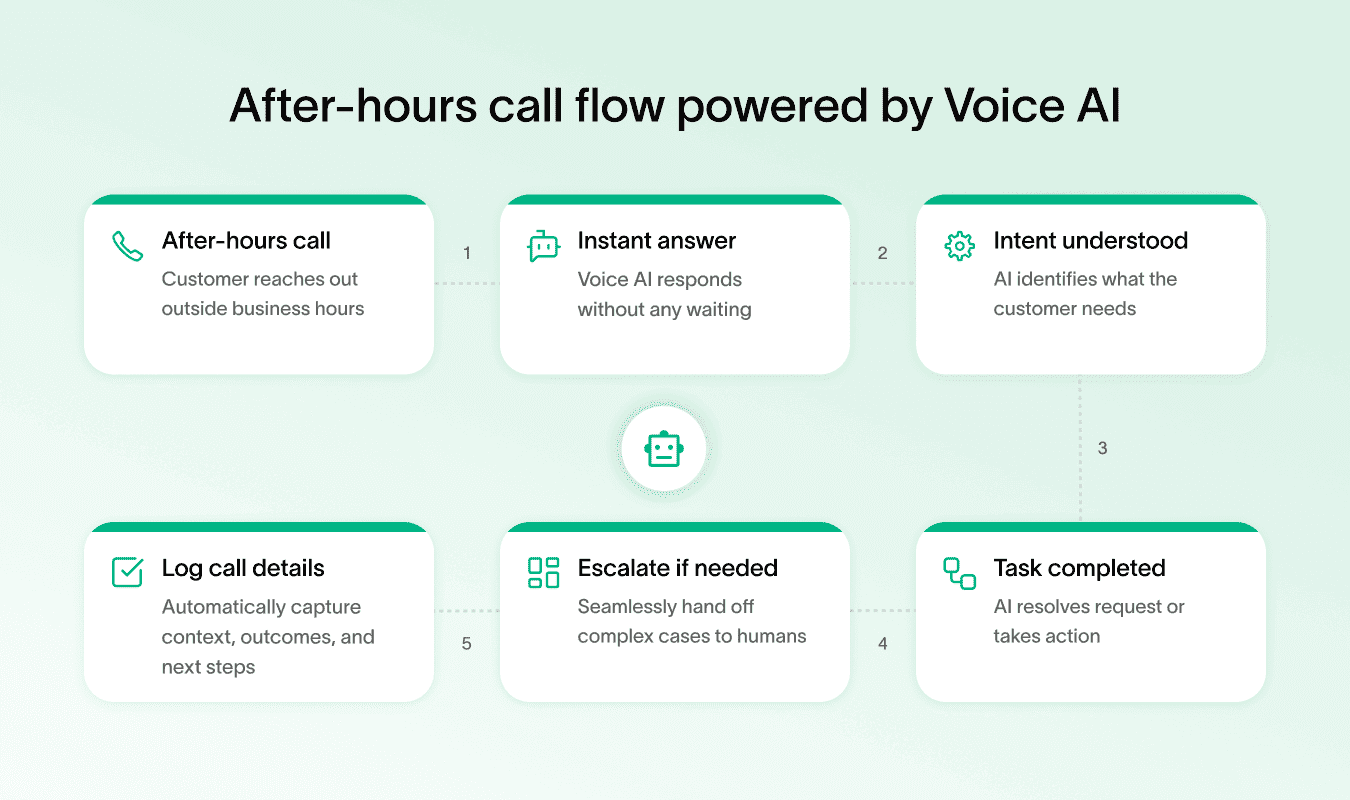
Here’s where Voice AI shines in insurance after hours support:
Claim reporting → Let customers report incidents anytime, without waiting.
FAQs and policy info → Provide instant answers on coverage, premiums, or deadlines.
Appointment scheduling → Book follow-up calls or agent visits smoothly.
Emergency screening → Quickly assess urgent needs and prioritize help.
These capabilities bring several big benefits to your team:
Instant responses keep customers happy and reduce frustration.
Human agents get freed up to handle more complex issues during office hours.
Costs drop because AI scales across unlimited calls without extra staff.
Service quality stays consistent with standardized answers 24/7.
Voice AI also plays well with your existing tools. It can integrate with CRM systems like Salesforce, Zendesk, or HubSpot, work alongside IVR platforms, and connect with policy management software. So, all customer info stays organized and up-to-date.
From generic tools to insurance-ready AI
Many providers offer solid platforms for building Voice AI, including Google Dialogflow, IBM Watson Assistant, Amazon Lex, Nuance Dragon, and Microsoft Azure Cognitive Services.
But if you want something tailored, Strada’s insurance-specific AI models are trained on industry terminology and workflows. They excel at 24/7 First Notice of Loss intake, policy servicing, and renewal calls.
Plus, Strada Workflows is an advanced AI automation engine that turns calls into instant business actions like CRM updates, task creation, and follow-ups, making after hours support truly efficient.
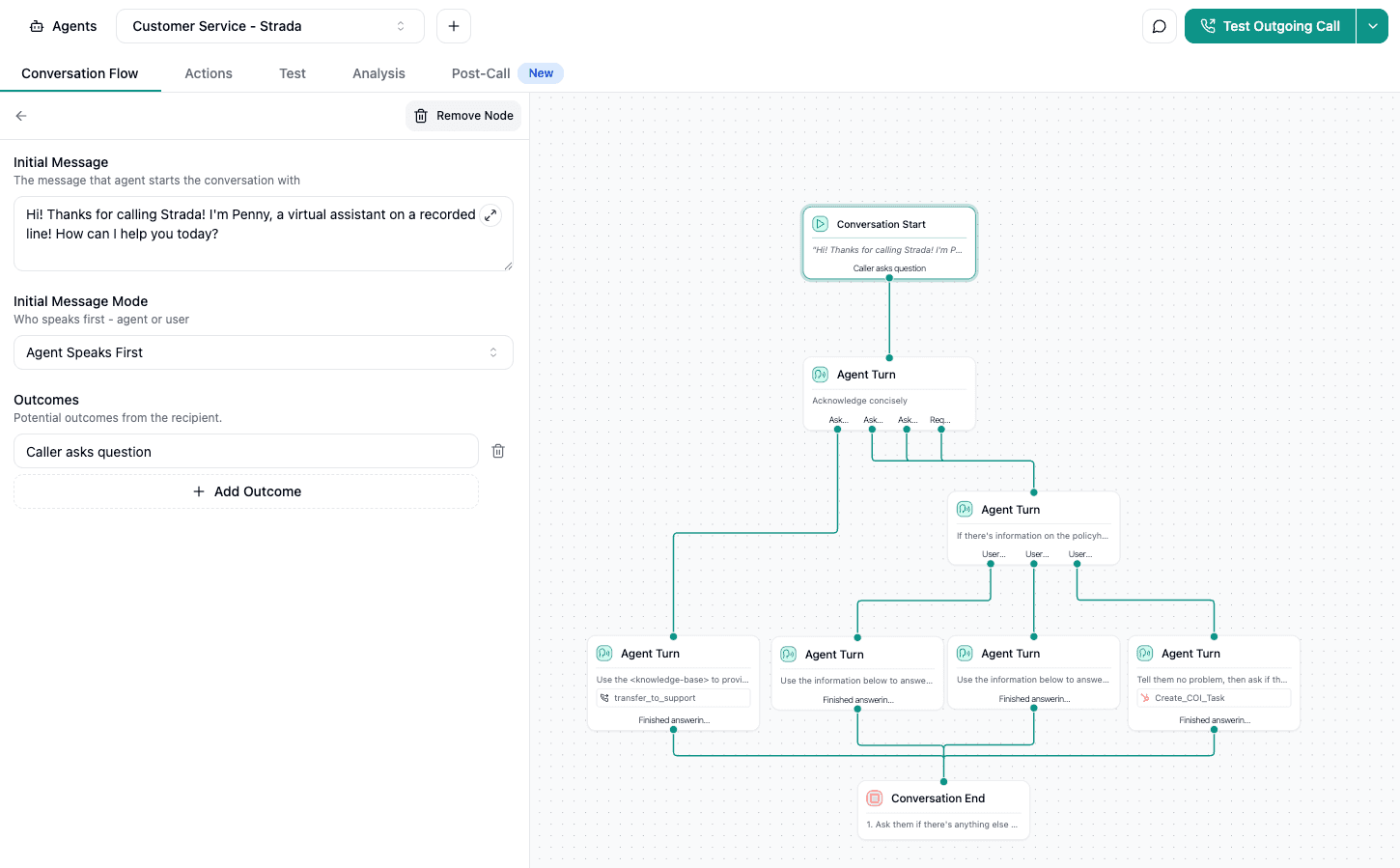
To make Voice AI work for your business, think about these building blocks:
Conversational AI platforms to manage dialogues naturally.
Natural language processing for accurate understanding.
AI receptionist setups that handle calls smoothly.
Voice AI isn’t just cool tech. It’s one of the best AI chatbots for after-hours support, transforming how your insurance team connects with customers when agents aren’t around.
Once the right type of AI is in place, the next step is turning it into something operational and reliable.
Practical strategies to implement Voice AI for after hours support
When you’re setting up after hours phone support powered by Voice AI, having solid strategies is key.
You want your customers to get quick, clear help anytime, and your team to handle calls smoothly without burnout. Let’s dive into practical steps that make it happen.
Step #1: Set up emergency hotlines with intelligent routing
Start by creating emergency hotlines that smartly separate urgent calls from routine ones. Tools like Strada, Twilio, or Genesys help you set up this kind of intelligent call routing.
To keep things simple, think of it as a short decision path:
Call comes in → system answers instantly.
AI asks one or two questions → “is this urgent right now?”
Urgent calls route immediately → sent to on-call staff or emergency line.
Non-urgent calls are deferred → logged for business hours follow-up.
Customer gets confirmation → they know what happens next.
This way, emergencies get fast attention, and routine issues don’t wake up your team at 2 a.m.
This approach prevents your agents from being overwhelmed. It also ensures urgent matters get fast attention while non-urgent calls get queued or moved to self-service options.
Step #2: Develop a comprehensive self-service knowledge base accessible via voice commands
Next, build a rich knowledge base that customers can access just by talking.
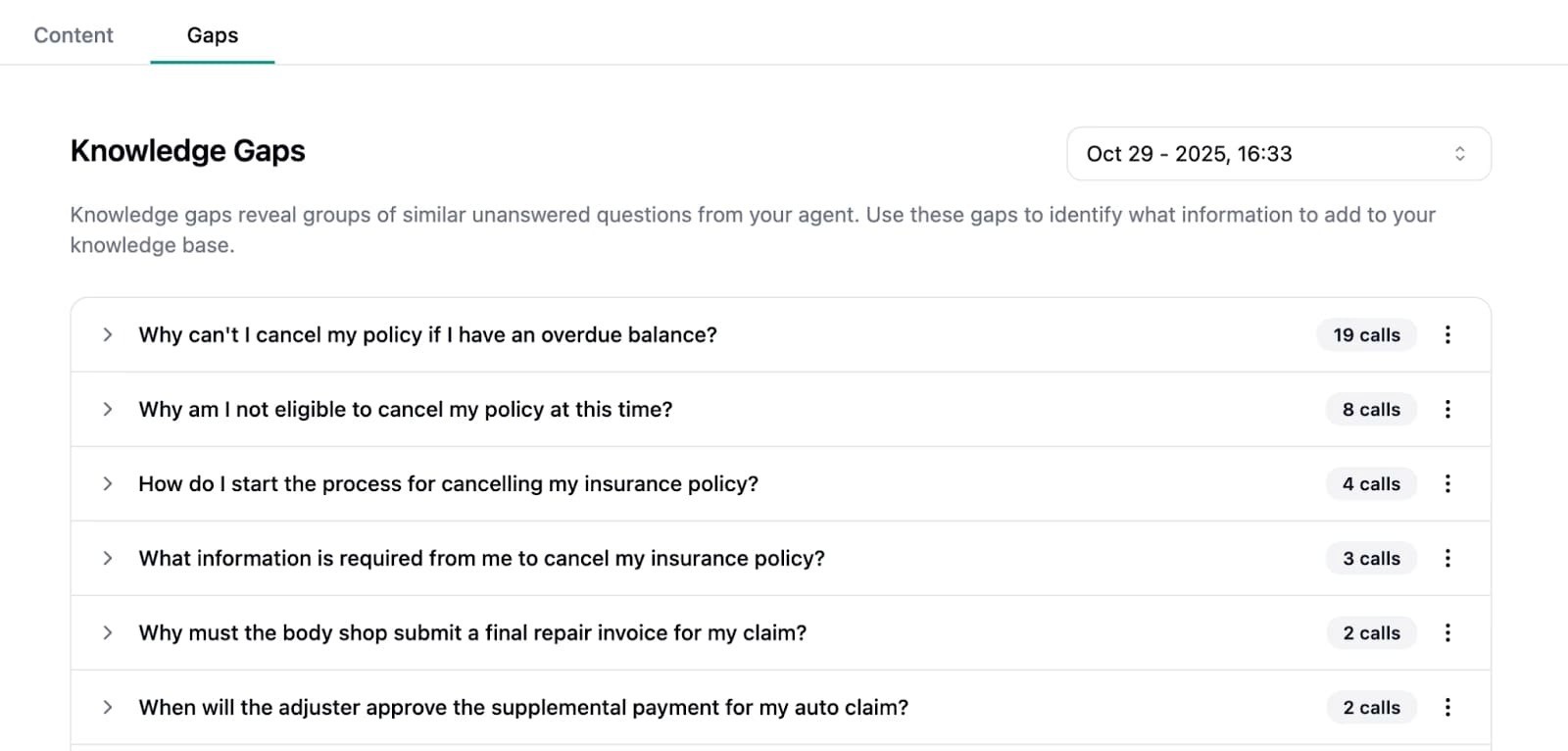
Imagine someone asking “How do I file a claim?" and the AI guiding them through the steps without a human agent needed.
Tools like HappyFox AI Knowledge or Helpjuice make it easy to create and organize this “ask me anything” resource.
Having this knowledge base tailored for voice commands means customers get instant help anytime, reducing call volume and improving satisfaction.
Step #3: Deploy AI-powered chatbots with voice interfaces to automate routine interactions
You can further reduce after-hours workload by deploying AI-powered chatbots with voice interfaces. These systems automate predictable customer interactions, keeping response times fast and consistent without relying on human agents.
Voice support makes these interactions feel natural, even outside regular business hours.
Here’s how voice-enabled chatbots are typically used after hours:
Handling common insurance questions such as coverage details, premiums, and policy terms.
Providing real-time status updates on claims, payments, or pending requests.
Delivering basic policy information without transferring calls to human agents.
Running on established platforms like Strada with built-in voice support.
By offloading these routine interactions, voice-enabled chatbots keep customers informed instantly while reducing pressure on after-hours teams.
This allows human agents to focus on complex or sensitive cases while maintaining a reliable, scalable support experience.
Step #4: Provide mobile-enabled support for 24/7 customer and agent interaction
Making support mobile-friendly is a must. With tools like HappyFox Help Desk mobile apps, both your customers and remote agents can interact anytime, anywhere.
Whether someone’s on the go or your team’s working from home, mobile capabilities keep the conversation flowing.
This flexibility improves response times and lets you maintain consistent after hours phone support.
Step #5: Structure clear escalation paths from AI to human agents
Voice AI handles a lot, but sometimes people need a real human. Set up clear escalation paths so complex or sensitive issues transfer seamlessly from AI to your agents.
Here’s a simple way to split the work:
Voice AI handles well | Human agents are needed |
Payment reminders | Emotional or upset callers |
Balance and due date checks | Complex billing disputes |
Policy status updates | Policy exceptions or edge cases |
Payment confirmation | Legal or compliance issues |
Simple rescheduling | Negotiations or custom plans |
Make sure the system identifies those cases early, so callers aren’t stuck explaining their problem multiple times.
This reduces frustration and builds trust in your after-hours support system.
Step #6: Use canned voice responses and recorded tutorials explaining insurance processes
Another powerful tactic is creating canned voice responses and recording easy-to-understand tutorials or videos. These can explain things like claims steps, policy details, or payment options.
Tools like Loom, Vimeo, or Wistia let you create and host these resources.
When combined with AI voice, customers can listen to or watch helpful content anytime. It’s like having an expert on call 24/7 who never gets tired.
Step #7: Implement voicemail with transcription for detailed after-hours issue capture
After hours, customers might leave messages. Using voicemail systems integrated with Dialpad, you get transcriptions of these messages sent right to your team. This means no detail gets lost, and agents can prioritize follow-ups based on clear notes.
It’s a simple but effective way to catch every issue, even outside regular hours.
Step #8: Integrate multi-channel support for a seamless customer experience
After hours, customers often switch between channels, starting with a call, then following up by email or chat. Without integration, this breaks context and slows resolution. A unified multi-channel setup keeps all interactions connected in one place.
Here’s what effective multi-channel integration looks like after hours:
Shared conversation history across voice, chat, and email.
Context-aware handoffs when customers switch channels.
Consistent responses regardless of entry point.
Faster resolution without repeating questions or details.
When channels work together, after-hours support stays efficient and coherent. Customers get help without friction, and teams avoid fragmented workflows that create delays and confusion.
Step #9: Leverage smart call routing prioritizing VIP clients or language preferences
Smart routing can prioritize important factors like VIP clients, agents with special skills, or language needs. This improves customer satisfaction by directing calls to the best match immediately.
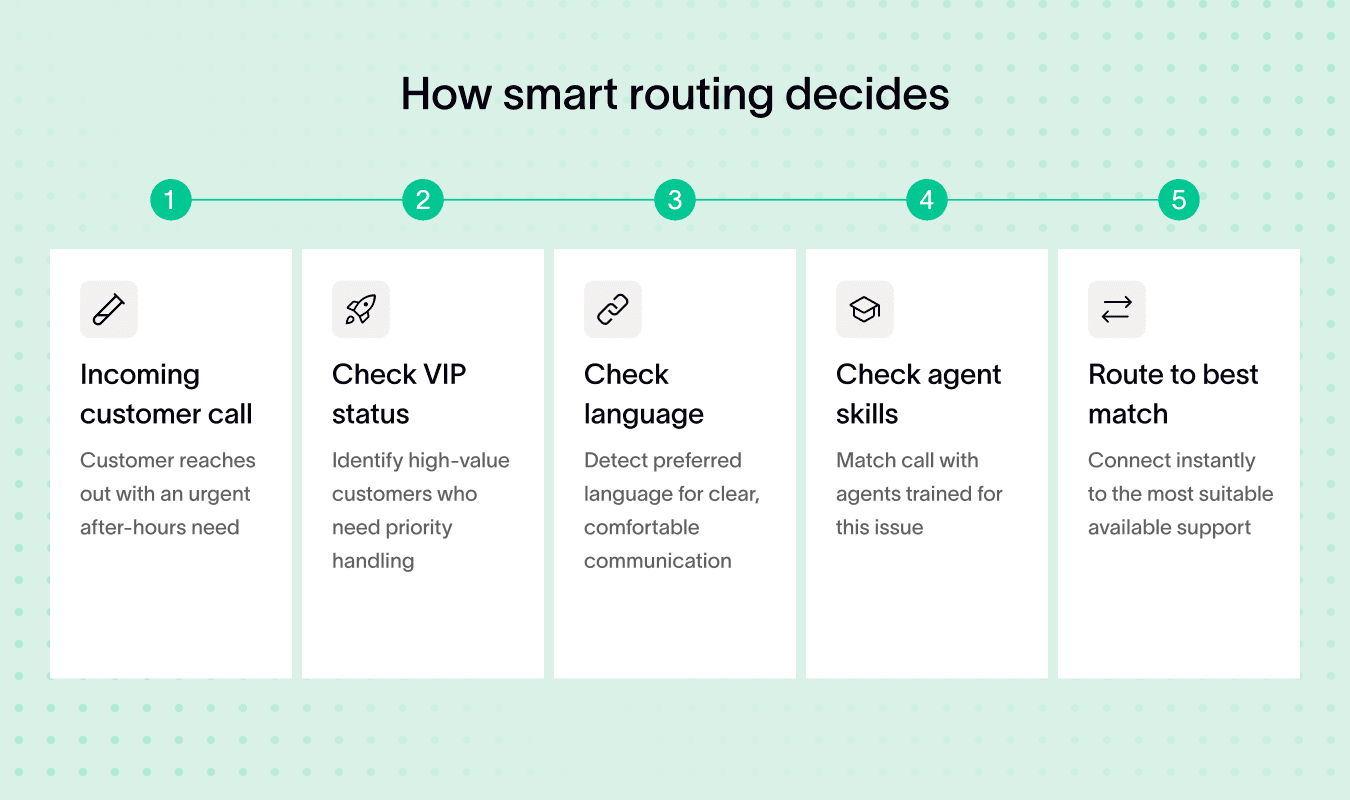
It’s a small tweak that makes big differences in how supported your customers feel when calling after hours.
Step #10: Build flexible staffing models including contract specialists and outsource partners
Since after hours support varies in volume, build staffing plans that include contract specialists or outsource partners like GlueConnect, GMS, or InBay. This flexibility helps cover busy times without overloading your core team.
Having these extras ready means you’re always prepared to handle fluctuating after-hours call volumes effectively.
Step #11: Create SOPs for AI interactions, documentation updates, and escalation protocols
Standard operating procedures matter because they remove guesswork. When everyone knows how AI should behave, support stays calm, consistent, and easy to scale.
At a minimum, your SOPs should cover:
What AI can handle → define allowed call types and tasks.
When to escalate to humans → set clear triggers and thresholds.
How escalation happens → transfer calls without friction or repeats.
What gets documented automatically → log outcomes, timestamps, and actions.
How updates are made → keep scripts and rules current.
Who owns the process → assign clear responsibility.
Clear guidelines mean faster training, fewer mistakes, and a better experience for customers and agents alike.
Plus, if you pair these SOPs with platforms like Strada, you can rapidly deploy AI voice agents with no engineering lift. Strada’s strong native integrations to AMS, CRM, and policy systems keep everything aligned operationally.
Step #12: Partner with call centers experienced in after hours insurance support
For additional backup, you can partner with call centers that specialize in outsourced after-hours insurance support.
This option helps cover situations where your internal team lacks capacity, especially during peak periods or staff shortages, which is why many insurers rely on outsourced after-hours support as a flexible capacity layer.
Here’s how these partnerships support after-hours operations:
Providing extra staffing capacity when internal teams are stretched.
Bringing insurance-specific experience to handle common after-hours requests.
Scaling support during peak times without relying solely on in-house resources.
Working with experienced partners allows you to maintain a strong customer experience when extra support is needed.
It gives your team added flexibility without changing your core operating model.
Step #13: Automate post-call tasks using Strada Workflows for greater efficiency
Lastly, automation is your friend. Strada Workflows let you automate key post-call tasks like certificate issuance, abandoned quote recovery, or payment follow-ups.
These processes keep after hours support efficient and maintain customer engagement without manual effort.
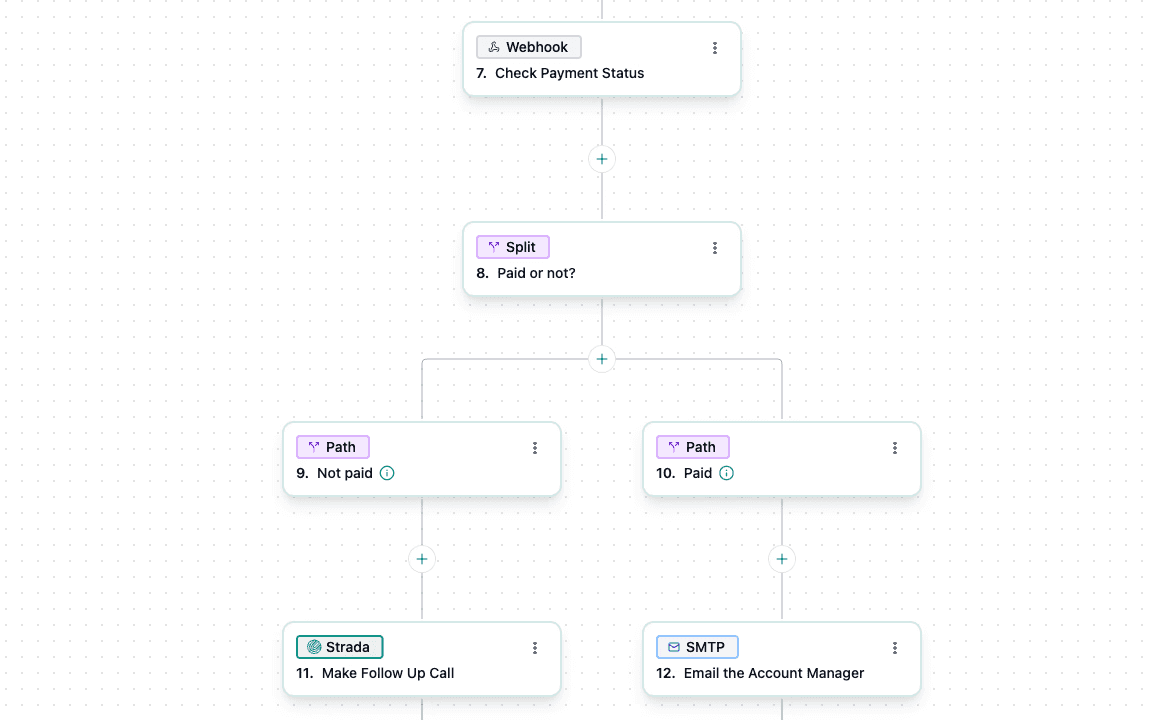
By combining these practical strategies, you create a Voice AI-driven after hours phone support system that’s responsive, scalable, and truly customer-friendly.
You’ll reduce wait times, free up agents, and deliver support that works around the clock – with ease.
With automation in place, the real challenge becomes finding the right balance between AI and human expertise.
How to balance Voice AI with human staffing and operate efficiently
You’ll learn how to blend AI and human skills to deliver top-notch after hours support without overspending or losing quality. The secret is simple: let Voice AI handle routine questions, and have real experts step in for the tricky stuff.
This way, AI can take on the easy tasks 24/7, while your team focuses on more complex needs.
To keep this balance smooth, train your team on watching over the Voice AI system. They should know how to manage, adjust, and improve it regularly.
Also, make sure you build staffing redundancy – use rotations or a distributed on-call network so someone is always ready. This avoids any gaps in after hours customer support when the unexpected happens.
Here’s a practical staffing approach that saves costs and keeps things flexible:
Use flexible contracts that let you scale hours based on demand.
Tap into shared human cloud networks to broaden your expert pool without long-term commitments.
Midway through, it’s important to keep your AI sharp. Regularly update its knowledge base and train the voice model with new policies and real feedback from calls. That ensures the AI stays relevant and handles queries confidently.
At the same time, you can’t forget about privacy and rules. Make sure both AI and humans comply with data protection standards like HIPAA and GDPR. This keeps your customers’ trust intact and avoids legal headaches.
Strada’s platform makes this mix even easier. It supports smooth AI-to-human handoffs so complicated calls quickly reach the right expert, keeping customers happy and trust high.
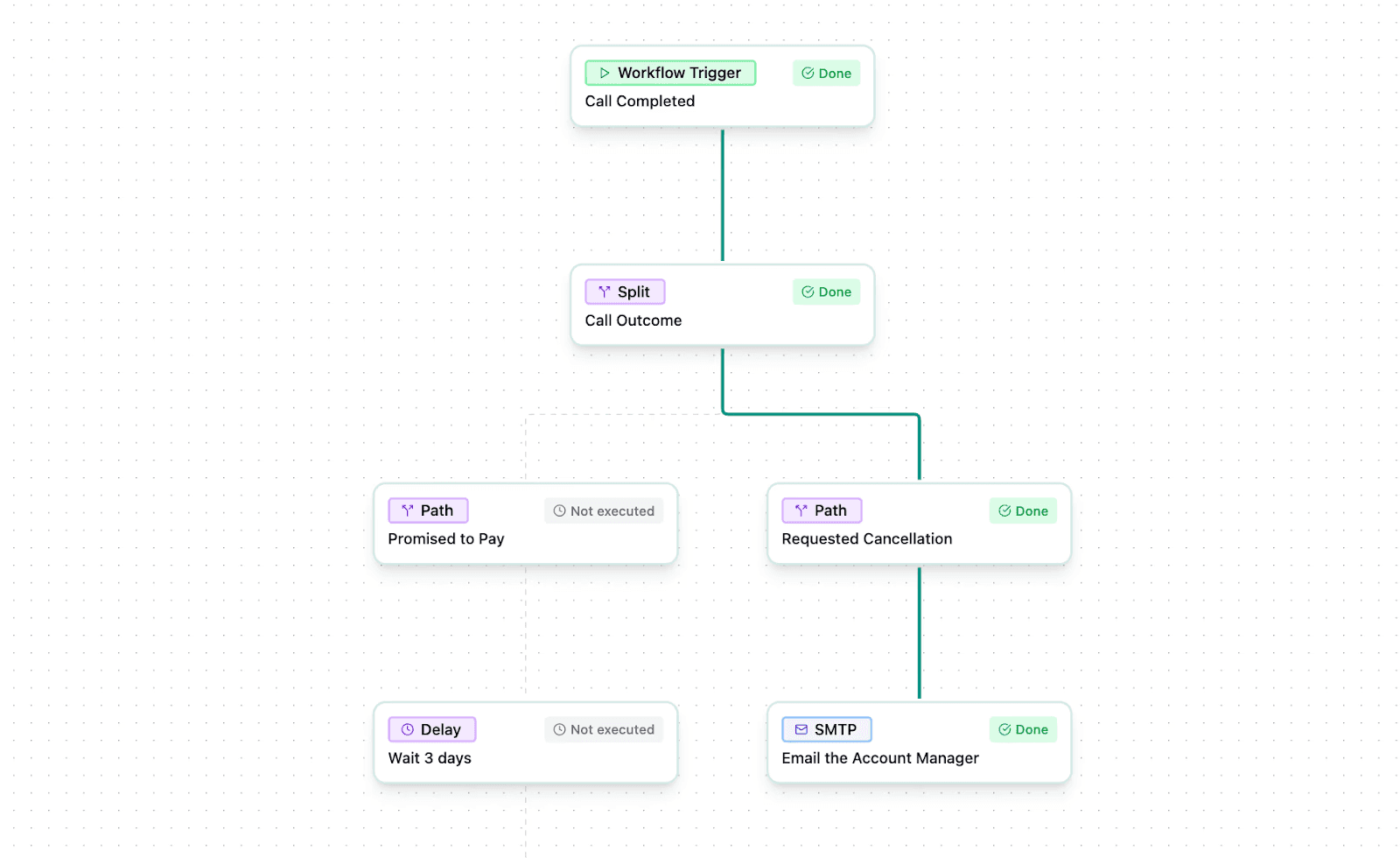
Plus, Strada offers powerful analytics and testing tools to check AI accuracy and spot areas for improvement – handy for your team’s ongoing training and optimization efforts.
In short, combining Voice AI with smart staffing, ongoing training, and strong tools like Strada’s ensures your after hours customer support runs efficiently and reliably every time.
When that balance works, the impact shows up clearly across operations and customer outcomes.
Measurable benefits of Voice AI powered after hours support
You’ll see real, practical improvements when you use Voice AI for after hours phone support. It gives your customers instant 24/7 responses, which boosts satisfaction dramatically. No waiting, no frustration.
Plus, it cuts down your operational and staffing costs by automating routine questions that usually tie up human agents. This means your team can focus on more complex needs, making better use of their time.
Here are a few key benefits you’ll experience:
Faster claims processing and fewer missed calls → Voice AI answers quickly and accurately, improving the chances of resolving issues on the first call.
Enhanced SLA fulfillment and policy transparency → All after-hours interactions are documented, so you meet service agreements consistently and clearly.
Strada’s clients report some impressive numbers. For example, 85% of calls are answered with zero hold time. Intelligent call scheduling leads to higher connection rates, and the cost savings compared to human agents are significant.
You can find more insights on how insurers with after-hours customer support are transforming their service at Strada’s guide.
The system also scales easily, handling thousands of calls and automating daily phone workflows. This means immediate ROI for your business and frees your staff to tackle higher-value tasks.
Beyond that, you can serve clients globally, across multiple time zones, without missing a beat, which gives insurers with after-hours customer support a clear advantage in responsiveness and customer trust.
To keep those gains sustainable, teams need a clear way to track what’s working and what’s not.
How to measure success and keep improving after hours Voice AI support
You want your after hours Voice AI support to keep getting better, right? The key is tracking the right metrics and using smart tools to learn from every interaction.
Start by focusing on these essential numbers:
Metric | What it measures | How to calculate it | Healthy benchmark |
First Call Resolution (FCR) | Issues solved in one interaction | Calls resolved on first contact ÷ total calls | 70–85% |
Average Handle Time (AHT) | How long calls take | Total call time ÷ number of calls | 3–6 minutes |
Customer Satisfaction (CSAT) | How customers feel | Positive responses ÷ total surveys | 80%+ |
AI Deflection Rate | Calls handled without agents | AI-resolved calls ÷ total inbound calls | 30–60% |
Escalation Rate | AI-to-human handoffs | Escalated calls ÷ AI-handled calls | Under 20% |
These show you how well your system resolves issues quickly, keeps customers happy, and handles inquiries without needing human backup.
To dig deeper, use analytics tools and dashboards integrated right into your CRM or contact center software. Platforms like Helpjuice AI Analytics and Google Analytics give you a clear picture of how your Voice AI performs over time.
They make it easy to spot patterns or problem areas you might miss otherwise.
Turning after-hours data into actionable insights
Alongside metrics, keep an eye on call transcripts and customer feedback. This info is gold for ongoing AI training and keeping your knowledge base fresh.
You can identify where the AI stumbles or what questions pop up most often during those after hours calls.
Analyzing your after hours call data regularly also reveals trends and pain points. Maybe a particular topic trips up the AI, or customers want information that isn’t available yet. Use those insights to tweak your system and improve the experience.
At this stage, the goal isn’t just to collect data. It’s to turn after-hours signals into clear, practical improvements.
What you notice after hours | What it usually means | What to improve |
Repeated questions on the same topic | Knowledge gap | Expand AI knowledge base |
Frequent escalations to agents | AI confidence too low | Refine intents and thresholds |
Long call durations | Conversations too complex | Simplify call flows |
Low CSAT after hours | Friction or tone issues | Adjust scripts and pacing |
Many follow-up calls | Issues not fully resolved | Improve first-call resolution |
Used consistently, these signals help teams catch small issues early and improve after-hours performance before customers feel the impact.
Supporting continuous improvement with the right tools
Don’t forget to stay updated on the latest Voice AI platform releases and feature upgrades. New features can help you add powerful capabilities without starting from scratch.
Strada, for example, offers built-in AI evaluation tools that boost response accuracy and reduce the risk of errors. It provides detailed call insights along with real-time analytics dashboards.
Plus, Strada Workflows delivers real-time execution and automation reporting. This combination gives you operational transparency and lets you spot opportunities for continuous improvement quickly.
If you’re balancing Voice AI with other channels like after hours support email, it’s crucial to compare performance and spot where you can lean on the best AI chatbots for after-hours support to reduce overload and speed up responses.
Even the best tools fall short without personalization that makes after-hours support feel relevant to each customer.
How to customize Voice AI experiences to different insurance customer segments
Customizing your AI is key to making after hours phone support and after hours support email feel personal and helpful.
Let’s break it down so you can create conversations that truly resonate.
Step #1: Segment customer profiles by policy type
Start by dividing your customers into clear groups based on their insurance policies – auto, health, life, and property. Each group has unique needs and terminology. For example:
Policy type | Common questions | Best Voice AI use cases |
Auto insurance | Claims after accidents, repairs | Claim status, next steps, document reminders |
Health insurance | Coverage, bills, approvals | Eligibility checks, payment reminders, status updates |
Life insurance | Beneficiaries, policy changes | Policy updates, beneficiary confirmations |
Property insurance | Damage, coverage limits | Claim intake, inspection scheduling |
Commercial insurance | Renewals, compliance | Renewal reminders, document follow-ups |
Property insurance clients might be concerned with damage reports or coverage specifics. By identifying these groups upfront, you can design AI dialogs that speak their language.
Step #2: Design personalized Voice AI scripts
Once you know your segments, create scripts that address their specific pain points and jargon. For instance, use terms like “deductible” or “premium” appropriately depending on the segment.
Auto insurance might require dialogue around accident claims and roadside assistance, while health insurance scripts might focus on doctor visits and claim reimbursements.
Tailoring scripts ensures your Voice AI provides relevant answers that make users feel understood.
Step #3: Implement language options and regional accents
Your customers might come from different regions or language backgrounds. Offering multiple language options and regional accents can make the AI feel more relatable.
This is especially helpful for property insurance customers in diverse areas where local dialects or accents could improve comfort and trust.
Here’s what this approach focuses on:
Multiple language options for customers from different language backgrounds.
Regional accents and dialects to make interactions feel more relatable.
Better comfort and trust for customers in diverse regions.
Strada’s AI supports multilingual and accent-customized interactions, allowing you to match voice experiences to your customer base and boost engagement.
Step #4: Adapt AI tone and formality by age group and preferences
Consider who you’re talking to. Younger customers might appreciate a casual, friendly tone, while older clients often prefer a respectful, formal approach. Adjust the AI’s personality to fit these preferences.
This flexibility makes your after hours phone support more welcoming, reducing frustration during off-hours queries.
Step #5: Use CRM and customer history data for context-aware conversations
Integrate your AI with CRM and policy management systems. This way, the AI can reference recent claims, payments, or policy changes during conversations.
Here’s what the AI actually sees when a customer calls.
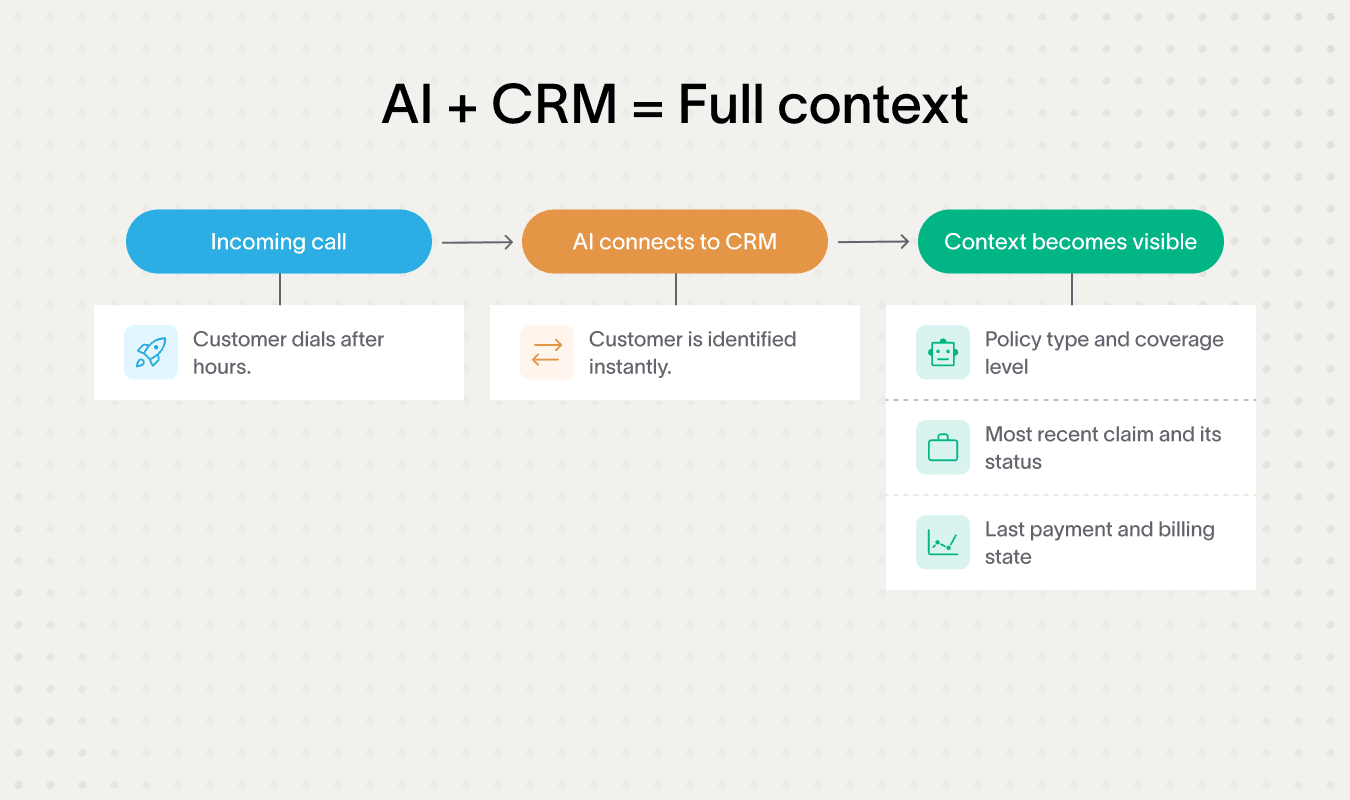
For example, a health insurance customer calling after hours might hear: “I see you recently submitted a claim for a lab test. Do you want an update on that?” These context-aware responses feel more helpful and save time.
Platforms like Google Dialogflow’s context management help keep these interactions smooth and relevant.
Step #6: Use tools and platforms for customization
You don’t have to do this alone. Use powerful tools like IBM Watson’s tone analyzer to adjust the AI’s mood during conversations. Amazon Lex’s personalization APIs let you tailor interactions based on individual customer data dynamically.
These platforms make it easier to build and maintain tailored experiences without heavy lifting or complex coding.
For example, with Strada’s insurance-specific AI models, you get a head start. Their flexible conversation design lets you rapidly adjust scripts for each insurance segment.
Plus, Strada’s API integrations pull dynamic context from your AMS and CRM systems, so your AI always has the latest customer info at hand. This makes after hours support email responses and phone interactions more personalized, fast, and effective.
Step #7: A/B test voice personas and scripts
Test different voice styles and scripts with each segment. Maybe an empathetic tone works best for life insurance calls, but a more straightforward, professional approach suits property insurance queries better.
Run A/B tests on after hours phone support conversations and email replies to learn what drives higher engagement and satisfaction. Use these insights to refine your AI scripts continually.
Here’s a super-practical checklist to guide you through customization:
Identify customer groups by policy type.
Write segment-specific dialogue addressing unique terms and concerns.
Add language and accent options for regional customer bases.
Adjust tone and formality by age and customer preference.
Integrate CRM data to enable personalized, context-aware conversations.
Leverage tools like Google Dialogflow, IBM Watson, and Amazon Lex for AI adjustments.
Use Strada’s specialized AI to streamline customization with dynamic API data.
Test different voice personas and scripts regularly to optimize engagement.
By following these steps, your after hours phone support and after hours support email powered by Voice AI will feel more human and helpful across all your insurance customer segments.
You’ll build trust, improve satisfaction, and handle inquiries effectively – no matter the time of day.
Once experiences are personalized, analytics help teams understand what’s landing – and what needs adjustment.
How to leverage analytics and reporting for proactive after hours support improvements
You’ll learn how to use analytics and reporting to make your after hours customer support smarter and more efficient.
It’s all about tracking the right data, spotting trends early, and making improvements before problems grow. Here’s a step-by-step guide to get you started.
Step #1: Set up real-time monitoring dashboards
First, create dashboards that show call volumes, wait times, drop rates, and AI fallback incidents in real time.
This helps you spot issues as they happen. For example, if wait times spike or AI falls back to a human agent more often, you’ll notice immediately.
Step #2: Configure alerts for unusual patterns
Next, set alerts for unusual activity that might signal service problems or tech glitches.
If call drop rates suddenly increase or call volume drops unexpectedly, an alert will notify your team to jump in and investigate.
Step #3: Perform trend analysis on after-hours inquiries
Over time, analyze the types of questions customers ask during after hours. This shines a light on gaps in your AI’s knowledge base or service offerings.
For example, if many customers ask about billing after hours, you might need to enrich your AI with more billing-related answers.
Step #4: Measure Voice AI’s impact on agents and customers
Track how Voice AI is reducing your agent’s workload and improving customer satisfaction over weeks or months. Watch for drops in call-back requests or better survey scores after calls. This shows the tangible benefits of your investment.
Here’s a quick list of key data points to measure regularly:
Average handle time reduction.
Customer satisfaction scores.
Number of calls routed to agents vs. AI handled.
Incident frequency when AI fails.
Interestingly, Strada’s analytics capabilities include dashboards and call evaluation tools that integrate with CRM and BI platforms, giving you cross-functional insights.
You can connect these insights with your overall customer service metrics for a bigger picture.
Step #5: Compile regular reports for leadership
Put together clear, simple reports that show ROI, adherence to service level agreements (SLAs), and customer feedback trends.
These help leadership see the value of outsourced after-hours support and make informed decisions.
Step #6: Integrate Voice AI analytics with business intelligence platforms
Bring your Voice AI data into platforms like Tableau or Power BI.
This lets you combine after hours support insights with sales, marketing, or product data, uncovering new opportunities to improve your business.
Step #7: Use speech-to-text AI for deep call analysis
Leverage tools like AWS Transcribe or Google Cloud Speech-to-Text to convert calls into text.
Then, perform sentiment and keyword analysis to understand how customers feel and what they talk about most.
Step #8: Enrich data with Strada Workflows
Lastly, Strada Workflows link conversational intelligence with automated post-call actions. This means you gain deep insight into call outcomes and how efficient your processes are, making continuous improvement easier.
By following these steps, you’ll turn analytics into action, ensuring your after hours customer support gets better every day.
With the right mix of AI, data, and people, after-hours support becomes predictable instead of reactive.
Conclusion
After hours Voice AI insurance support plays a critical role for modern insurers. It ensures customers get help anytime they need it, boosting satisfaction and trust.
To make the most of this technology, you’ll want clear SLA frameworks and comprehensive documentation.
Tools like IT Glue or Helpjuice can keep your team aligned and informed. Pairing smart AI with human support creates a seamless experience that handles routine questions and escalates complex issues effortlessly.
The business benefits are impressive. You’ll see improvements like better customer experience, significant cost savings, scalable service as you grow, and a clear competitive edge.
To get started, focus on a few practical next steps:
Run pilot demos of Voice AI platforms to find the right fit.
Build and organize your knowledge base for quick, accurate answers.
Train your teams on using AI tools effectively.
Establish partnerships that support long-term success.
For ongoing success, rely on data to fine-tune your after hours phone support and keep up with evolving AI abilities. Continuous improvement helps your service stay ahead in your industry.
Strada stands out as a proven, industry-focused Voice AI platform. It’s designed to empower insurance carriers, MGAs, and brokers to confidently scale after hours support while tracking measurable ROI.
You can learn more and explore Strada’s demo and helpful resources to jumpstart your after hours Voice AI transformation journey today.
Frequently Asked Questions
Can Voice AI handle insurance calls without human agents at night?
Yes. Voice AI can fully handle routine after-hours calls like claims intake, policy questions, and scheduling, escalating only complex or sensitive cases to human agents.
What types of insurance calls should still go to humans after hours?
Framer is a design tool that allows you to design websites on a freeform canvas, and then publish them as websites with a single click.
How fast can insurers launch after-hours support with Voice AI?
Framer is a design tool that allows you to design websites on a freeform canvas, and then publish them as websites with a single click.
Does Voice AI work during call spikes or emergencies?
Framer is a design tool that allows you to design websites on a freeform canvas, and then publish them as websites with a single click.
Will customers know they’re talking to AI?
Framer is a design tool that allows you to design websites on a freeform canvas, and then publish them as websites with a single click.
Table of Contents
Carriers, MGAs, and brokers scale revenue-driving phone calls with Strada's conversational AI platform.
Start scaling with voice AI agents today
Join innovative carriers and MGAs transforming their calls with Strada.
After Hours Insurance Support Powered by Voice AI in 2026
Amir Prodensky
CEO
12 min read
Continuous insurance call handling outside regular office hours
After hours support means helping customers outside normal business hours. Today, it’s crucial because insurance questions can arise anytime. Customers expect quick, reliable answers. Even at midnight.
That’s where Voice AI shines.
It enables insurers with after-hours customer support to offer 24/7 assistance without extra staff.
This game-changing tech improves customer satisfaction by cutting wait times and solving issues instantly. Plus, it saves money and scales easily as your business grows.
In this guide, you’ll learn practical ways to boost your after hours support with conversational AI, including tools and best practices proven in the insurance industry.
But before diving into technology, it helps to align on what after-hours support really means and why it plays such a critical role in insurance operations.
What is after hours insurance support and why does it matter?
After hours insurance support means providing help outside standard business hours: nights, weekends, and holidays. For insurance companies, this kind of support ensures customers can get assistance anytime they need it, not just during 9-to-5.
This matters more than ever because customers now expect help around the clock, especially if they live in different time zones or need urgent support during off hours.
You might be surprised to know that 83% of customers stay loyal when their complaints are resolved quickly. Fast, 24/7 access builds trust and keeps clients happy.
After hours customer support lets insurers handle critical moments like emergency claims, sudden policy questions, or crisis situations without delay.
Here are some common times when after hours support really counts:
Filing or updating claims after a car accident late at night.
Clarifying policy details during a weekend.
Responding to urgent questions during holiday closures.
Offering this support isn’t just good service – it gives insurers a competitive edge. It shows you care about your customers whenever they need you.
That’s where Strada’s Voice AI agents come in. They manage common after hours insurance tasks like taking claims and servicing policies smoothly and efficiently.
This means your team can deliver around-the-clock help without hiring extra shift workers or juggling email queues for after hours support email requests.
So, once expectations are clear, the cracks in traditional after-hours support models become easier to spot.
Challenges traditional after hours insurance support faces
You know how tricky after hours phone support can be for insurance companies. It often means juggling staffing burdens and high costs for human on-call teams. Technicians get overworked, which leads to slower responses and stressed employees.
This can cause inconsistent response times, leaving customers frustrated and risking a poor experience.
Plus, there's the challenge of documentation gaps. When information isn’t recorded promptly or accurately, it slows down issue resolution. This can cause delays that customers definitely don’t appreciate.
Where traditional after-hours models break down
Traditional staffing models rely heavily on small on-call teams or rotating shifts. Both approaches have their flaws.
Small teams get overwhelmed, while rotating shifts disrupt work-life balance and make it tough to maintain service levels outside business hours.
In practice, these issues show up in the same places again and again. They affect speed, cost, and the customer experience at the worst possible time.
Problem area | What breaks after hours | Why it matters |
Staffing coverage | Too few people available | Longer wait times |
Consistency | Different agents each shift | Uneven service quality |
Documentation | Notes delayed or missed | Lost context |
Costs | Overtime and outsourcing | Budget creep |
Scalability | Call spikes overwhelm teams | Missed calls |
Seen together, these breakdowns explain why after-hours support so often feels slow, expensive, and inconsistent, even when teams are working hard to keep up.
The cost of limited scalability and inconsistent coverage
Limited scalability turns routine after-hours spikes into service failures: missed calls, delayed responses, and frustrated customers.
Here’s a quick look at common pain points:
Overworked technicians and burnout.
Inconsistent response times harming customer satisfaction.
Risks and costs tied to manual after hours service, like missed issues and overtime pay.
For instance, relying on outsourced after-hours support might cut costs but often sacrifices consistency and accuracy.
That’s where Strada's AI shines. It offers scalable, AI-driven phone agents that handle thousands of calls simultaneously. No hold times, no burnt-out staff, just reliable, fast, and precise support.
By using AI for after hours phone support, you can cut down costly human teams and deliver a consistently great customer experience – even when your office is closed.
This is where technology steps in – not to replace teams, but to remove the pressure points causing these issues.
How can Voice AI improve after hours insurance support?
You’re probably wondering how Voice AI can really make a difference in after hours support for insurance.
Simply put, Voice AI uses natural language understanding, speech recognition, and conversational AI to interact with customers just like a human would.
How Voice AI works after hours
It listens, understands, and responds to spoken requests, making it perfect for insurance tasks outside regular business hours. Here’s what actually happens when a customer calls after hours. Step by step.
Here’s where Voice AI shines in insurance after hours support:
Claim reporting → Let customers report incidents anytime, without waiting.
FAQs and policy info → Provide instant answers on coverage, premiums, or deadlines.
Appointment scheduling → Book follow-up calls or agent visits smoothly.
Emergency screening → Quickly assess urgent needs and prioritize help.
These capabilities bring several big benefits to your team:
Instant responses keep customers happy and reduce frustration.
Human agents get freed up to handle more complex issues during office hours.
Costs drop because AI scales across unlimited calls without extra staff.
Service quality stays consistent with standardized answers 24/7.
Voice AI also plays well with your existing tools. It can integrate with CRM systems like Salesforce, Zendesk, or HubSpot, work alongside IVR platforms, and connect with policy management software. So, all customer info stays organized and up-to-date.
From generic tools to insurance-ready AI
Many providers offer solid platforms for building Voice AI, including Google Dialogflow, IBM Watson Assistant, Amazon Lex, Nuance Dragon, and Microsoft Azure Cognitive Services.
But if you want something tailored, Strada’s insurance-specific AI models are trained on industry terminology and workflows. They excel at 24/7 First Notice of Loss intake, policy servicing, and renewal calls.
Plus, Strada Workflows is an advanced AI automation engine that turns calls into instant business actions like CRM updates, task creation, and follow-ups, making after hours support truly efficient.
To make Voice AI work for your business, think about these building blocks:
Conversational AI platforms to manage dialogues naturally.
Natural language processing for accurate understanding.
AI receptionist setups that handle calls smoothly.
Voice AI isn’t just cool tech. It’s one of the best AI chatbots for after-hours support, transforming how your insurance team connects with customers when agents aren’t around.
Once the right type of AI is in place, the next step is turning it into something operational and reliable.
Practical strategies to implement Voice AI for after hours support
When you’re setting up after hours phone support powered by Voice AI, having solid strategies is key.
You want your customers to get quick, clear help anytime, and your team to handle calls smoothly without burnout. Let’s dive into practical steps that make it happen.
Step #1: Set up emergency hotlines with intelligent routing
Start by creating emergency hotlines that smartly separate urgent calls from routine ones. Tools like Strada, Twilio, or Genesys help you set up this kind of intelligent call routing.
To keep things simple, think of it as a short decision path:
Call comes in → system answers instantly.
AI asks one or two questions → “is this urgent right now?”
Urgent calls route immediately → sent to on-call staff or emergency line.
Non-urgent calls are deferred → logged for business hours follow-up.
Customer gets confirmation → they know what happens next.
This way, emergencies get fast attention, and routine issues don’t wake up your team at 2 a.m.
This approach prevents your agents from being overwhelmed. It also ensures urgent matters get fast attention while non-urgent calls get queued or moved to self-service options.
Step #2: Develop a comprehensive self-service knowledge base accessible via voice commands
Next, build a rich knowledge base that customers can access just by talking.
Imagine someone asking “How do I file a claim?" and the AI guiding them through the steps without a human agent needed.
Tools like HappyFox AI Knowledge or Helpjuice make it easy to create and organize this “ask me anything” resource.
Having this knowledge base tailored for voice commands means customers get instant help anytime, reducing call volume and improving satisfaction.
Step #3: Deploy AI-powered chatbots with voice interfaces to automate routine interactions
You can further reduce after-hours workload by deploying AI-powered chatbots with voice interfaces. These systems automate predictable customer interactions, keeping response times fast and consistent without relying on human agents.
Voice support makes these interactions feel natural, even outside regular business hours.
Here’s how voice-enabled chatbots are typically used after hours:
Handling common insurance questions such as coverage details, premiums, and policy terms.
Providing real-time status updates on claims, payments, or pending requests.
Delivering basic policy information without transferring calls to human agents.
Running on established platforms like Strada with built-in voice support.
By offloading these routine interactions, voice-enabled chatbots keep customers informed instantly while reducing pressure on after-hours teams.
This allows human agents to focus on complex or sensitive cases while maintaining a reliable, scalable support experience.
Step #4: Provide mobile-enabled support for 24/7 customer and agent interaction
Making support mobile-friendly is a must. With tools like HappyFox Help Desk mobile apps, both your customers and remote agents can interact anytime, anywhere.
Whether someone’s on the go or your team’s working from home, mobile capabilities keep the conversation flowing.
This flexibility improves response times and lets you maintain consistent after hours phone support.
Step #5: Structure clear escalation paths from AI to human agents
Voice AI handles a lot, but sometimes people need a real human. Set up clear escalation paths so complex or sensitive issues transfer seamlessly from AI to your agents.
Here’s a simple way to split the work:
Voice AI handles well | Human agents are needed |
Payment reminders | Emotional or upset callers |
Balance and due date checks | Complex billing disputes |
Policy status updates | Policy exceptions or edge cases |
Payment confirmation | Legal or compliance issues |
Simple rescheduling | Negotiations or custom plans |
Make sure the system identifies those cases early, so callers aren’t stuck explaining their problem multiple times.
This reduces frustration and builds trust in your after-hours support system.
Step #6: Use canned voice responses and recorded tutorials explaining insurance processes
Another powerful tactic is creating canned voice responses and recording easy-to-understand tutorials or videos. These can explain things like claims steps, policy details, or payment options.
Tools like Loom, Vimeo, or Wistia let you create and host these resources.
When combined with AI voice, customers can listen to or watch helpful content anytime. It’s like having an expert on call 24/7 who never gets tired.
Step #7: Implement voicemail with transcription for detailed after-hours issue capture
After hours, customers might leave messages. Using voicemail systems integrated with Dialpad, you get transcriptions of these messages sent right to your team. This means no detail gets lost, and agents can prioritize follow-ups based on clear notes.
It’s a simple but effective way to catch every issue, even outside regular hours.
Step #8: Integrate multi-channel support for a seamless customer experience
After hours, customers often switch between channels, starting with a call, then following up by email or chat. Without integration, this breaks context and slows resolution. A unified multi-channel setup keeps all interactions connected in one place.
Here’s what effective multi-channel integration looks like after hours:
Shared conversation history across voice, chat, and email.
Context-aware handoffs when customers switch channels.
Consistent responses regardless of entry point.
Faster resolution without repeating questions or details.
When channels work together, after-hours support stays efficient and coherent. Customers get help without friction, and teams avoid fragmented workflows that create delays and confusion.
Step #9: Leverage smart call routing prioritizing VIP clients or language preferences
Smart routing can prioritize important factors like VIP clients, agents with special skills, or language needs. This improves customer satisfaction by directing calls to the best match immediately.
It’s a small tweak that makes big differences in how supported your customers feel when calling after hours.
Step #10: Build flexible staffing models including contract specialists and outsource partners
Since after hours support varies in volume, build staffing plans that include contract specialists or outsource partners like GlueConnect, GMS, or InBay. This flexibility helps cover busy times without overloading your core team.
Having these extras ready means you’re always prepared to handle fluctuating after-hours call volumes effectively.
Step #11: Create SOPs for AI interactions, documentation updates, and escalation protocols
Standard operating procedures matter because they remove guesswork. When everyone knows how AI should behave, support stays calm, consistent, and easy to scale.
At a minimum, your SOPs should cover:
What AI can handle → define allowed call types and tasks.
When to escalate to humans → set clear triggers and thresholds.
How escalation happens → transfer calls without friction or repeats.
What gets documented automatically → log outcomes, timestamps, and actions.
How updates are made → keep scripts and rules current.
Who owns the process → assign clear responsibility.
Clear guidelines mean faster training, fewer mistakes, and a better experience for customers and agents alike.
Plus, if you pair these SOPs with platforms like Strada, you can rapidly deploy AI voice agents with no engineering lift. Strada’s strong native integrations to AMS, CRM, and policy systems keep everything aligned operationally.
Step #12: Partner with call centers experienced in after hours insurance support
For additional backup, you can partner with call centers that specialize in outsourced after-hours insurance support.
This option helps cover situations where your internal team lacks capacity, especially during peak periods or staff shortages, which is why many insurers rely on outsourced after-hours support as a flexible capacity layer.
Here’s how these partnerships support after-hours operations:
Providing extra staffing capacity when internal teams are stretched.
Bringing insurance-specific experience to handle common after-hours requests.
Scaling support during peak times without relying solely on in-house resources.
Working with experienced partners allows you to maintain a strong customer experience when extra support is needed.
It gives your team added flexibility without changing your core operating model.
Step #13: Automate post-call tasks using Strada Workflows for greater efficiency
Lastly, automation is your friend. Strada Workflows let you automate key post-call tasks like certificate issuance, abandoned quote recovery, or payment follow-ups.
These processes keep after hours support efficient and maintain customer engagement without manual effort.
By combining these practical strategies, you create a Voice AI-driven after hours phone support system that’s responsive, scalable, and truly customer-friendly.
You’ll reduce wait times, free up agents, and deliver support that works around the clock – with ease.
With automation in place, the real challenge becomes finding the right balance between AI and human expertise.
How to balance Voice AI with human staffing and operate efficiently
You’ll learn how to blend AI and human skills to deliver top-notch after hours support without overspending or losing quality. The secret is simple: let Voice AI handle routine questions, and have real experts step in for the tricky stuff.
This way, AI can take on the easy tasks 24/7, while your team focuses on more complex needs.
To keep this balance smooth, train your team on watching over the Voice AI system. They should know how to manage, adjust, and improve it regularly.
Also, make sure you build staffing redundancy – use rotations or a distributed on-call network so someone is always ready. This avoids any gaps in after hours customer support when the unexpected happens.
Here’s a practical staffing approach that saves costs and keeps things flexible:
Use flexible contracts that let you scale hours based on demand.
Tap into shared human cloud networks to broaden your expert pool without long-term commitments.
Midway through, it’s important to keep your AI sharp. Regularly update its knowledge base and train the voice model with new policies and real feedback from calls. That ensures the AI stays relevant and handles queries confidently.
At the same time, you can’t forget about privacy and rules. Make sure both AI and humans comply with data protection standards like HIPAA and GDPR. This keeps your customers’ trust intact and avoids legal headaches.
Strada’s platform makes this mix even easier. It supports smooth AI-to-human handoffs so complicated calls quickly reach the right expert, keeping customers happy and trust high.
Plus, Strada offers powerful analytics and testing tools to check AI accuracy and spot areas for improvement – handy for your team’s ongoing training and optimization efforts.
In short, combining Voice AI with smart staffing, ongoing training, and strong tools like Strada’s ensures your after hours customer support runs efficiently and reliably every time.
When that balance works, the impact shows up clearly across operations and customer outcomes.
Measurable benefits of Voice AI powered after hours support
You’ll see real, practical improvements when you use Voice AI for after hours phone support. It gives your customers instant 24/7 responses, which boosts satisfaction dramatically. No waiting, no frustration.
Plus, it cuts down your operational and staffing costs by automating routine questions that usually tie up human agents. This means your team can focus on more complex needs, making better use of their time.
Here are a few key benefits you’ll experience:
Faster claims processing and fewer missed calls → Voice AI answers quickly and accurately, improving the chances of resolving issues on the first call.
Enhanced SLA fulfillment and policy transparency → All after-hours interactions are documented, so you meet service agreements consistently and clearly.
Strada’s clients report some impressive numbers. For example, 85% of calls are answered with zero hold time. Intelligent call scheduling leads to higher connection rates, and the cost savings compared to human agents are significant.
You can find more insights on how insurers with after-hours customer support are transforming their service at Strada’s guide.
The system also scales easily, handling thousands of calls and automating daily phone workflows. This means immediate ROI for your business and frees your staff to tackle higher-value tasks.
Beyond that, you can serve clients globally, across multiple time zones, without missing a beat, which gives insurers with after-hours customer support a clear advantage in responsiveness and customer trust.
To keep those gains sustainable, teams need a clear way to track what’s working and what’s not.
How to measure success and keep improving after hours Voice AI support
You want your after hours Voice AI support to keep getting better, right? The key is tracking the right metrics and using smart tools to learn from every interaction.
Start by focusing on these essential numbers:
Metric | What it measures | How to calculate it | Healthy benchmark |
First Call Resolution (FCR) | Issues solved in one interaction | Calls resolved on first contact ÷ total calls | 70–85% |
Average Handle Time (AHT) | How long calls take | Total call time ÷ number of calls | 3–6 minutes |
Customer Satisfaction (CSAT) | How customers feel | Positive responses ÷ total surveys | 80%+ |
AI Deflection Rate | Calls handled without agents | AI-resolved calls ÷ total inbound calls | 30–60% |
Escalation Rate | AI-to-human handoffs | Escalated calls ÷ AI-handled calls | Under 20% |
These show you how well your system resolves issues quickly, keeps customers happy, and handles inquiries without needing human backup.
To dig deeper, use analytics tools and dashboards integrated right into your CRM or contact center software. Platforms like Helpjuice AI Analytics and Google Analytics give you a clear picture of how your Voice AI performs over time.
They make it easy to spot patterns or problem areas you might miss otherwise.
Turning after-hours data into actionable insights
Alongside metrics, keep an eye on call transcripts and customer feedback. This info is gold for ongoing AI training and keeping your knowledge base fresh.
You can identify where the AI stumbles or what questions pop up most often during those after hours calls.
Analyzing your after hours call data regularly also reveals trends and pain points. Maybe a particular topic trips up the AI, or customers want information that isn’t available yet. Use those insights to tweak your system and improve the experience.
At this stage, the goal isn’t just to collect data. It’s to turn after-hours signals into clear, practical improvements.
What you notice after hours | What it usually means | What to improve |
Repeated questions on the same topic | Knowledge gap | Expand AI knowledge base |
Frequent escalations to agents | AI confidence too low | Refine intents and thresholds |
Long call durations | Conversations too complex | Simplify call flows |
Low CSAT after hours | Friction or tone issues | Adjust scripts and pacing |
Many follow-up calls | Issues not fully resolved | Improve first-call resolution |
Used consistently, these signals help teams catch small issues early and improve after-hours performance before customers feel the impact.
Supporting continuous improvement with the right tools
Don’t forget to stay updated on the latest Voice AI platform releases and feature upgrades. New features can help you add powerful capabilities without starting from scratch.
Strada, for example, offers built-in AI evaluation tools that boost response accuracy and reduce the risk of errors. It provides detailed call insights along with real-time analytics dashboards.
Plus, Strada Workflows delivers real-time execution and automation reporting. This combination gives you operational transparency and lets you spot opportunities for continuous improvement quickly.
If you’re balancing Voice AI with other channels like after hours support email, it’s crucial to compare performance and spot where you can lean on the best AI chatbots for after-hours support to reduce overload and speed up responses.
Even the best tools fall short without personalization that makes after-hours support feel relevant to each customer.
How to customize Voice AI experiences to different insurance customer segments
Customizing your AI is key to making after hours phone support and after hours support email feel personal and helpful.
Let’s break it down so you can create conversations that truly resonate.
Step #1: Segment customer profiles by policy type
Start by dividing your customers into clear groups based on their insurance policies – auto, health, life, and property. Each group has unique needs and terminology. For example:
Policy type | Common questions | Best Voice AI use cases |
Auto insurance | Claims after accidents, repairs | Claim status, next steps, document reminders |
Health insurance | Coverage, bills, approvals | Eligibility checks, payment reminders, status updates |
Life insurance | Beneficiaries, policy changes | Policy updates, beneficiary confirmations |
Property insurance | Damage, coverage limits | Claim intake, inspection scheduling |
Commercial insurance | Renewals, compliance | Renewal reminders, document follow-ups |
Property insurance clients might be concerned with damage reports or coverage specifics. By identifying these groups upfront, you can design AI dialogs that speak their language.
Step #2: Design personalized Voice AI scripts
Once you know your segments, create scripts that address their specific pain points and jargon. For instance, use terms like “deductible” or “premium” appropriately depending on the segment.
Auto insurance might require dialogue around accident claims and roadside assistance, while health insurance scripts might focus on doctor visits and claim reimbursements.
Tailoring scripts ensures your Voice AI provides relevant answers that make users feel understood.
Step #3: Implement language options and regional accents
Your customers might come from different regions or language backgrounds. Offering multiple language options and regional accents can make the AI feel more relatable.
This is especially helpful for property insurance customers in diverse areas where local dialects or accents could improve comfort and trust.
Here’s what this approach focuses on:
Multiple language options for customers from different language backgrounds.
Regional accents and dialects to make interactions feel more relatable.
Better comfort and trust for customers in diverse regions.
Strada’s AI supports multilingual and accent-customized interactions, allowing you to match voice experiences to your customer base and boost engagement.
Step #4: Adapt AI tone and formality by age group and preferences
Consider who you’re talking to. Younger customers might appreciate a casual, friendly tone, while older clients often prefer a respectful, formal approach. Adjust the AI’s personality to fit these preferences.
This flexibility makes your after hours phone support more welcoming, reducing frustration during off-hours queries.
Step #5: Use CRM and customer history data for context-aware conversations
Integrate your AI with CRM and policy management systems. This way, the AI can reference recent claims, payments, or policy changes during conversations.
Here’s what the AI actually sees when a customer calls.
For example, a health insurance customer calling after hours might hear: “I see you recently submitted a claim for a lab test. Do you want an update on that?” These context-aware responses feel more helpful and save time.
Platforms like Google Dialogflow’s context management help keep these interactions smooth and relevant.
Step #6: Use tools and platforms for customization
You don’t have to do this alone. Use powerful tools like IBM Watson’s tone analyzer to adjust the AI’s mood during conversations. Amazon Lex’s personalization APIs let you tailor interactions based on individual customer data dynamically.
These platforms make it easier to build and maintain tailored experiences without heavy lifting or complex coding.
For example, with Strada’s insurance-specific AI models, you get a head start. Their flexible conversation design lets you rapidly adjust scripts for each insurance segment.
Plus, Strada’s API integrations pull dynamic context from your AMS and CRM systems, so your AI always has the latest customer info at hand. This makes after hours support email responses and phone interactions more personalized, fast, and effective.
Step #7: A/B test voice personas and scripts
Test different voice styles and scripts with each segment. Maybe an empathetic tone works best for life insurance calls, but a more straightforward, professional approach suits property insurance queries better.
Run A/B tests on after hours phone support conversations and email replies to learn what drives higher engagement and satisfaction. Use these insights to refine your AI scripts continually.
Here’s a super-practical checklist to guide you through customization:
Identify customer groups by policy type.
Write segment-specific dialogue addressing unique terms and concerns.
Add language and accent options for regional customer bases.
Adjust tone and formality by age and customer preference.
Integrate CRM data to enable personalized, context-aware conversations.
Leverage tools like Google Dialogflow, IBM Watson, and Amazon Lex for AI adjustments.
Use Strada’s specialized AI to streamline customization with dynamic API data.
Test different voice personas and scripts regularly to optimize engagement.
By following these steps, your after hours phone support and after hours support email powered by Voice AI will feel more human and helpful across all your insurance customer segments.
You’ll build trust, improve satisfaction, and handle inquiries effectively – no matter the time of day.
Once experiences are personalized, analytics help teams understand what’s landing – and what needs adjustment.
How to leverage analytics and reporting for proactive after hours support improvements
You’ll learn how to use analytics and reporting to make your after hours customer support smarter and more efficient.
It’s all about tracking the right data, spotting trends early, and making improvements before problems grow. Here’s a step-by-step guide to get you started.
Step #1: Set up real-time monitoring dashboards
First, create dashboards that show call volumes, wait times, drop rates, and AI fallback incidents in real time.
This helps you spot issues as they happen. For example, if wait times spike or AI falls back to a human agent more often, you’ll notice immediately.
Step #2: Configure alerts for unusual patterns
Next, set alerts for unusual activity that might signal service problems or tech glitches.
If call drop rates suddenly increase or call volume drops unexpectedly, an alert will notify your team to jump in and investigate.
Step #3: Perform trend analysis on after-hours inquiries
Over time, analyze the types of questions customers ask during after hours. This shines a light on gaps in your AI’s knowledge base or service offerings.
For example, if many customers ask about billing after hours, you might need to enrich your AI with more billing-related answers.
Step #4: Measure Voice AI’s impact on agents and customers
Track how Voice AI is reducing your agent’s workload and improving customer satisfaction over weeks or months. Watch for drops in call-back requests or better survey scores after calls. This shows the tangible benefits of your investment.
Here’s a quick list of key data points to measure regularly:
Average handle time reduction.
Customer satisfaction scores.
Number of calls routed to agents vs. AI handled.
Incident frequency when AI fails.
Interestingly, Strada’s analytics capabilities include dashboards and call evaluation tools that integrate with CRM and BI platforms, giving you cross-functional insights.
You can connect these insights with your overall customer service metrics for a bigger picture.
Step #5: Compile regular reports for leadership
Put together clear, simple reports that show ROI, adherence to service level agreements (SLAs), and customer feedback trends.
These help leadership see the value of outsourced after-hours support and make informed decisions.
Step #6: Integrate Voice AI analytics with business intelligence platforms
Bring your Voice AI data into platforms like Tableau or Power BI.
This lets you combine after hours support insights with sales, marketing, or product data, uncovering new opportunities to improve your business.
Step #7: Use speech-to-text AI for deep call analysis
Leverage tools like AWS Transcribe or Google Cloud Speech-to-Text to convert calls into text.
Then, perform sentiment and keyword analysis to understand how customers feel and what they talk about most.
Step #8: Enrich data with Strada Workflows
Lastly, Strada Workflows link conversational intelligence with automated post-call actions. This means you gain deep insight into call outcomes and how efficient your processes are, making continuous improvement easier.
By following these steps, you’ll turn analytics into action, ensuring your after hours customer support gets better every day.
With the right mix of AI, data, and people, after-hours support becomes predictable instead of reactive.
Conclusion
After hours Voice AI insurance support plays a critical role for modern insurers. It ensures customers get help anytime they need it, boosting satisfaction and trust.
To make the most of this technology, you’ll want clear SLA frameworks and comprehensive documentation.
Tools like IT Glue or Helpjuice can keep your team aligned and informed. Pairing smart AI with human support creates a seamless experience that handles routine questions and escalates complex issues effortlessly.
The business benefits are impressive. You’ll see improvements like better customer experience, significant cost savings, scalable service as you grow, and a clear competitive edge.
To get started, focus on a few practical next steps:
Run pilot demos of Voice AI platforms to find the right fit.
Build and organize your knowledge base for quick, accurate answers.
Train your teams on using AI tools effectively.
Establish partnerships that support long-term success.
For ongoing success, rely on data to fine-tune your after hours phone support and keep up with evolving AI abilities. Continuous improvement helps your service stay ahead in your industry.
Strada stands out as a proven, industry-focused Voice AI platform. It’s designed to empower insurance carriers, MGAs, and brokers to confidently scale after hours support while tracking measurable ROI.
You can learn more and explore Strada’s demo and helpful resources to jumpstart your after hours Voice AI transformation journey today.
Frequently Asked Questions
Can Voice AI handle insurance calls without human agents at night?
Yes. Voice AI can fully handle routine after-hours calls like claims intake, policy questions, and scheduling, escalating only complex or sensitive cases to human agents.
What types of insurance calls should still go to humans after hours?
Framer is a design tool that allows you to design websites on a freeform canvas, and then publish them as websites with a single click.
How fast can insurers launch after-hours support with Voice AI?
Framer is a design tool that allows you to design websites on a freeform canvas, and then publish them as websites with a single click.
Does Voice AI work during call spikes or emergencies?
Framer is a design tool that allows you to design websites on a freeform canvas, and then publish them as websites with a single click.
Will customers know they’re talking to AI?
Framer is a design tool that allows you to design websites on a freeform canvas, and then publish them as websites with a single click.
Table of Contents
Carriers, MGAs, and brokers scale revenue-driving phone calls with Strada's conversational AI platform.
Start scaling with voice AI agents today
Join innovative carriers and MGAs transforming their calls with Strada.
After Hours Insurance Support Powered by Voice AI in 2026
Amir Prodensky
CEO
12 min read
Continuous insurance call handling outside regular office hours
After hours support means helping customers outside normal business hours. Today, it’s crucial because insurance questions can arise anytime. Customers expect quick, reliable answers. Even at midnight.
That’s where Voice AI shines.
It enables insurers with after-hours customer support to offer 24/7 assistance without extra staff.
This game-changing tech improves customer satisfaction by cutting wait times and solving issues instantly. Plus, it saves money and scales easily as your business grows.
In this guide, you’ll learn practical ways to boost your after hours support with conversational AI, including tools and best practices proven in the insurance industry.
But before diving into technology, it helps to align on what after-hours support really means and why it plays such a critical role in insurance operations.
What is after hours insurance support and why does it matter?
After hours insurance support means providing help outside standard business hours: nights, weekends, and holidays. For insurance companies, this kind of support ensures customers can get assistance anytime they need it, not just during 9-to-5.
This matters more than ever because customers now expect help around the clock, especially if they live in different time zones or need urgent support during off hours.
You might be surprised to know that 83% of customers stay loyal when their complaints are resolved quickly. Fast, 24/7 access builds trust and keeps clients happy.
After hours customer support lets insurers handle critical moments like emergency claims, sudden policy questions, or crisis situations without delay.
Here are some common times when after hours support really counts:
Filing or updating claims after a car accident late at night.
Clarifying policy details during a weekend.
Responding to urgent questions during holiday closures.
Offering this support isn’t just good service – it gives insurers a competitive edge. It shows you care about your customers whenever they need you.
That’s where Strada’s Voice AI agents come in. They manage common after hours insurance tasks like taking claims and servicing policies smoothly and efficiently.
This means your team can deliver around-the-clock help without hiring extra shift workers or juggling email queues for after hours support email requests.
So, once expectations are clear, the cracks in traditional after-hours support models become easier to spot.
Challenges traditional after hours insurance support faces
You know how tricky after hours phone support can be for insurance companies. It often means juggling staffing burdens and high costs for human on-call teams. Technicians get overworked, which leads to slower responses and stressed employees.
This can cause inconsistent response times, leaving customers frustrated and risking a poor experience.
Plus, there's the challenge of documentation gaps. When information isn’t recorded promptly or accurately, it slows down issue resolution. This can cause delays that customers definitely don’t appreciate.
Where traditional after-hours models break down
Traditional staffing models rely heavily on small on-call teams or rotating shifts. Both approaches have their flaws.
Small teams get overwhelmed, while rotating shifts disrupt work-life balance and make it tough to maintain service levels outside business hours.
In practice, these issues show up in the same places again and again. They affect speed, cost, and the customer experience at the worst possible time.
Problem area | What breaks after hours | Why it matters |
Staffing coverage | Too few people available | Longer wait times |
Consistency | Different agents each shift | Uneven service quality |
Documentation | Notes delayed or missed | Lost context |
Costs | Overtime and outsourcing | Budget creep |
Scalability | Call spikes overwhelm teams | Missed calls |
Seen together, these breakdowns explain why after-hours support so often feels slow, expensive, and inconsistent, even when teams are working hard to keep up.
The cost of limited scalability and inconsistent coverage
Limited scalability turns routine after-hours spikes into service failures: missed calls, delayed responses, and frustrated customers.
Here’s a quick look at common pain points:
Overworked technicians and burnout.
Inconsistent response times harming customer satisfaction.
Risks and costs tied to manual after hours service, like missed issues and overtime pay.
For instance, relying on outsourced after-hours support might cut costs but often sacrifices consistency and accuracy.
That’s where Strada's AI shines. It offers scalable, AI-driven phone agents that handle thousands of calls simultaneously. No hold times, no burnt-out staff, just reliable, fast, and precise support.
By using AI for after hours phone support, you can cut down costly human teams and deliver a consistently great customer experience – even when your office is closed.
This is where technology steps in – not to replace teams, but to remove the pressure points causing these issues.
How can Voice AI improve after hours insurance support?
You’re probably wondering how Voice AI can really make a difference in after hours support for insurance.
Simply put, Voice AI uses natural language understanding, speech recognition, and conversational AI to interact with customers just like a human would.
How Voice AI works after hours
It listens, understands, and responds to spoken requests, making it perfect for insurance tasks outside regular business hours. Here’s what actually happens when a customer calls after hours. Step by step.
Here’s where Voice AI shines in insurance after hours support:
Claim reporting → Let customers report incidents anytime, without waiting.
FAQs and policy info → Provide instant answers on coverage, premiums, or deadlines.
Appointment scheduling → Book follow-up calls or agent visits smoothly.
Emergency screening → Quickly assess urgent needs and prioritize help.
These capabilities bring several big benefits to your team:
Instant responses keep customers happy and reduce frustration.
Human agents get freed up to handle more complex issues during office hours.
Costs drop because AI scales across unlimited calls without extra staff.
Service quality stays consistent with standardized answers 24/7.
Voice AI also plays well with your existing tools. It can integrate with CRM systems like Salesforce, Zendesk, or HubSpot, work alongside IVR platforms, and connect with policy management software. So, all customer info stays organized and up-to-date.
From generic tools to insurance-ready AI
Many providers offer solid platforms for building Voice AI, including Google Dialogflow, IBM Watson Assistant, Amazon Lex, Nuance Dragon, and Microsoft Azure Cognitive Services.
But if you want something tailored, Strada’s insurance-specific AI models are trained on industry terminology and workflows. They excel at 24/7 First Notice of Loss intake, policy servicing, and renewal calls.
Plus, Strada Workflows is an advanced AI automation engine that turns calls into instant business actions like CRM updates, task creation, and follow-ups, making after hours support truly efficient.
To make Voice AI work for your business, think about these building blocks:
Conversational AI platforms to manage dialogues naturally.
Natural language processing for accurate understanding.
AI receptionist setups that handle calls smoothly.
Voice AI isn’t just cool tech. It’s one of the best AI chatbots for after-hours support, transforming how your insurance team connects with customers when agents aren’t around.
Once the right type of AI is in place, the next step is turning it into something operational and reliable.
Practical strategies to implement Voice AI for after hours support
When you’re setting up after hours phone support powered by Voice AI, having solid strategies is key.
You want your customers to get quick, clear help anytime, and your team to handle calls smoothly without burnout. Let’s dive into practical steps that make it happen.
Step #1: Set up emergency hotlines with intelligent routing
Start by creating emergency hotlines that smartly separate urgent calls from routine ones. Tools like Strada, Twilio, or Genesys help you set up this kind of intelligent call routing.
To keep things simple, think of it as a short decision path:
Call comes in → system answers instantly.
AI asks one or two questions → “is this urgent right now?”
Urgent calls route immediately → sent to on-call staff or emergency line.
Non-urgent calls are deferred → logged for business hours follow-up.
Customer gets confirmation → they know what happens next.
This way, emergencies get fast attention, and routine issues don’t wake up your team at 2 a.m.
This approach prevents your agents from being overwhelmed. It also ensures urgent matters get fast attention while non-urgent calls get queued or moved to self-service options.
Step #2: Develop a comprehensive self-service knowledge base accessible via voice commands
Next, build a rich knowledge base that customers can access just by talking.
Imagine someone asking “How do I file a claim?" and the AI guiding them through the steps without a human agent needed.
Tools like HappyFox AI Knowledge or Helpjuice make it easy to create and organize this “ask me anything” resource.
Having this knowledge base tailored for voice commands means customers get instant help anytime, reducing call volume and improving satisfaction.
Step #3: Deploy AI-powered chatbots with voice interfaces to automate routine interactions
You can further reduce after-hours workload by deploying AI-powered chatbots with voice interfaces. These systems automate predictable customer interactions, keeping response times fast and consistent without relying on human agents.
Voice support makes these interactions feel natural, even outside regular business hours.
Here’s how voice-enabled chatbots are typically used after hours:
Handling common insurance questions such as coverage details, premiums, and policy terms.
Providing real-time status updates on claims, payments, or pending requests.
Delivering basic policy information without transferring calls to human agents.
Running on established platforms like Strada with built-in voice support.
By offloading these routine interactions, voice-enabled chatbots keep customers informed instantly while reducing pressure on after-hours teams.
This allows human agents to focus on complex or sensitive cases while maintaining a reliable, scalable support experience.
Step #4: Provide mobile-enabled support for 24/7 customer and agent interaction
Making support mobile-friendly is a must. With tools like HappyFox Help Desk mobile apps, both your customers and remote agents can interact anytime, anywhere.
Whether someone’s on the go or your team’s working from home, mobile capabilities keep the conversation flowing.
This flexibility improves response times and lets you maintain consistent after hours phone support.
Step #5: Structure clear escalation paths from AI to human agents
Voice AI handles a lot, but sometimes people need a real human. Set up clear escalation paths so complex or sensitive issues transfer seamlessly from AI to your agents.
Here’s a simple way to split the work:
Voice AI handles well | Human agents are needed |
Payment reminders | Emotional or upset callers |
Balance and due date checks | Complex billing disputes |
Policy status updates | Policy exceptions or edge cases |
Payment confirmation | Legal or compliance issues |
Simple rescheduling | Negotiations or custom plans |
Make sure the system identifies those cases early, so callers aren’t stuck explaining their problem multiple times.
This reduces frustration and builds trust in your after-hours support system.
Step #6: Use canned voice responses and recorded tutorials explaining insurance processes
Another powerful tactic is creating canned voice responses and recording easy-to-understand tutorials or videos. These can explain things like claims steps, policy details, or payment options.
Tools like Loom, Vimeo, or Wistia let you create and host these resources.
When combined with AI voice, customers can listen to or watch helpful content anytime. It’s like having an expert on call 24/7 who never gets tired.
Step #7: Implement voicemail with transcription for detailed after-hours issue capture
After hours, customers might leave messages. Using voicemail systems integrated with Dialpad, you get transcriptions of these messages sent right to your team. This means no detail gets lost, and agents can prioritize follow-ups based on clear notes.
It’s a simple but effective way to catch every issue, even outside regular hours.
Step #8: Integrate multi-channel support for a seamless customer experience
After hours, customers often switch between channels, starting with a call, then following up by email or chat. Without integration, this breaks context and slows resolution. A unified multi-channel setup keeps all interactions connected in one place.
Here’s what effective multi-channel integration looks like after hours:
Shared conversation history across voice, chat, and email.
Context-aware handoffs when customers switch channels.
Consistent responses regardless of entry point.
Faster resolution without repeating questions or details.
When channels work together, after-hours support stays efficient and coherent. Customers get help without friction, and teams avoid fragmented workflows that create delays and confusion.
Step #9: Leverage smart call routing prioritizing VIP clients or language preferences
Smart routing can prioritize important factors like VIP clients, agents with special skills, or language needs. This improves customer satisfaction by directing calls to the best match immediately.
It’s a small tweak that makes big differences in how supported your customers feel when calling after hours.
Step #10: Build flexible staffing models including contract specialists and outsource partners
Since after hours support varies in volume, build staffing plans that include contract specialists or outsource partners like GlueConnect, GMS, or InBay. This flexibility helps cover busy times without overloading your core team.
Having these extras ready means you’re always prepared to handle fluctuating after-hours call volumes effectively.
Step #11: Create SOPs for AI interactions, documentation updates, and escalation protocols
Standard operating procedures matter because they remove guesswork. When everyone knows how AI should behave, support stays calm, consistent, and easy to scale.
At a minimum, your SOPs should cover:
What AI can handle → define allowed call types and tasks.
When to escalate to humans → set clear triggers and thresholds.
How escalation happens → transfer calls without friction or repeats.
What gets documented automatically → log outcomes, timestamps, and actions.
How updates are made → keep scripts and rules current.
Who owns the process → assign clear responsibility.
Clear guidelines mean faster training, fewer mistakes, and a better experience for customers and agents alike.
Plus, if you pair these SOPs with platforms like Strada, you can rapidly deploy AI voice agents with no engineering lift. Strada’s strong native integrations to AMS, CRM, and policy systems keep everything aligned operationally.
Step #12: Partner with call centers experienced in after hours insurance support
For additional backup, you can partner with call centers that specialize in outsourced after-hours insurance support.
This option helps cover situations where your internal team lacks capacity, especially during peak periods or staff shortages, which is why many insurers rely on outsourced after-hours support as a flexible capacity layer.
Here’s how these partnerships support after-hours operations:
Providing extra staffing capacity when internal teams are stretched.
Bringing insurance-specific experience to handle common after-hours requests.
Scaling support during peak times without relying solely on in-house resources.
Working with experienced partners allows you to maintain a strong customer experience when extra support is needed.
It gives your team added flexibility without changing your core operating model.
Step #13: Automate post-call tasks using Strada Workflows for greater efficiency
Lastly, automation is your friend. Strada Workflows let you automate key post-call tasks like certificate issuance, abandoned quote recovery, or payment follow-ups.
These processes keep after hours support efficient and maintain customer engagement without manual effort.
By combining these practical strategies, you create a Voice AI-driven after hours phone support system that’s responsive, scalable, and truly customer-friendly.
You’ll reduce wait times, free up agents, and deliver support that works around the clock – with ease.
With automation in place, the real challenge becomes finding the right balance between AI and human expertise.
How to balance Voice AI with human staffing and operate efficiently
You’ll learn how to blend AI and human skills to deliver top-notch after hours support without overspending or losing quality. The secret is simple: let Voice AI handle routine questions, and have real experts step in for the tricky stuff.
This way, AI can take on the easy tasks 24/7, while your team focuses on more complex needs.
To keep this balance smooth, train your team on watching over the Voice AI system. They should know how to manage, adjust, and improve it regularly.
Also, make sure you build staffing redundancy – use rotations or a distributed on-call network so someone is always ready. This avoids any gaps in after hours customer support when the unexpected happens.
Here’s a practical staffing approach that saves costs and keeps things flexible:
Use flexible contracts that let you scale hours based on demand.
Tap into shared human cloud networks to broaden your expert pool without long-term commitments.
Midway through, it’s important to keep your AI sharp. Regularly update its knowledge base and train the voice model with new policies and real feedback from calls. That ensures the AI stays relevant and handles queries confidently.
At the same time, you can’t forget about privacy and rules. Make sure both AI and humans comply with data protection standards like HIPAA and GDPR. This keeps your customers’ trust intact and avoids legal headaches.
Strada’s platform makes this mix even easier. It supports smooth AI-to-human handoffs so complicated calls quickly reach the right expert, keeping customers happy and trust high.
Plus, Strada offers powerful analytics and testing tools to check AI accuracy and spot areas for improvement – handy for your team’s ongoing training and optimization efforts.
In short, combining Voice AI with smart staffing, ongoing training, and strong tools like Strada’s ensures your after hours customer support runs efficiently and reliably every time.
When that balance works, the impact shows up clearly across operations and customer outcomes.
Measurable benefits of Voice AI powered after hours support
You’ll see real, practical improvements when you use Voice AI for after hours phone support. It gives your customers instant 24/7 responses, which boosts satisfaction dramatically. No waiting, no frustration.
Plus, it cuts down your operational and staffing costs by automating routine questions that usually tie up human agents. This means your team can focus on more complex needs, making better use of their time.
Here are a few key benefits you’ll experience:
Faster claims processing and fewer missed calls → Voice AI answers quickly and accurately, improving the chances of resolving issues on the first call.
Enhanced SLA fulfillment and policy transparency → All after-hours interactions are documented, so you meet service agreements consistently and clearly.
Strada’s clients report some impressive numbers. For example, 85% of calls are answered with zero hold time. Intelligent call scheduling leads to higher connection rates, and the cost savings compared to human agents are significant.
You can find more insights on how insurers with after-hours customer support are transforming their service at Strada’s guide.
The system also scales easily, handling thousands of calls and automating daily phone workflows. This means immediate ROI for your business and frees your staff to tackle higher-value tasks.
Beyond that, you can serve clients globally, across multiple time zones, without missing a beat, which gives insurers with after-hours customer support a clear advantage in responsiveness and customer trust.
To keep those gains sustainable, teams need a clear way to track what’s working and what’s not.
How to measure success and keep improving after hours Voice AI support
You want your after hours Voice AI support to keep getting better, right? The key is tracking the right metrics and using smart tools to learn from every interaction.
Start by focusing on these essential numbers:
Metric | What it measures | How to calculate it | Healthy benchmark |
First Call Resolution (FCR) | Issues solved in one interaction | Calls resolved on first contact ÷ total calls | 70–85% |
Average Handle Time (AHT) | How long calls take | Total call time ÷ number of calls | 3–6 minutes |
Customer Satisfaction (CSAT) | How customers feel | Positive responses ÷ total surveys | 80%+ |
AI Deflection Rate | Calls handled without agents | AI-resolved calls ÷ total inbound calls | 30–60% |
Escalation Rate | AI-to-human handoffs | Escalated calls ÷ AI-handled calls | Under 20% |
These show you how well your system resolves issues quickly, keeps customers happy, and handles inquiries without needing human backup.
To dig deeper, use analytics tools and dashboards integrated right into your CRM or contact center software. Platforms like Helpjuice AI Analytics and Google Analytics give you a clear picture of how your Voice AI performs over time.
They make it easy to spot patterns or problem areas you might miss otherwise.
Turning after-hours data into actionable insights
Alongside metrics, keep an eye on call transcripts and customer feedback. This info is gold for ongoing AI training and keeping your knowledge base fresh.
You can identify where the AI stumbles or what questions pop up most often during those after hours calls.
Analyzing your after hours call data regularly also reveals trends and pain points. Maybe a particular topic trips up the AI, or customers want information that isn’t available yet. Use those insights to tweak your system and improve the experience.
At this stage, the goal isn’t just to collect data. It’s to turn after-hours signals into clear, practical improvements.
What you notice after hours | What it usually means | What to improve |
Repeated questions on the same topic | Knowledge gap | Expand AI knowledge base |
Frequent escalations to agents | AI confidence too low | Refine intents and thresholds |
Long call durations | Conversations too complex | Simplify call flows |
Low CSAT after hours | Friction or tone issues | Adjust scripts and pacing |
Many follow-up calls | Issues not fully resolved | Improve first-call resolution |
Used consistently, these signals help teams catch small issues early and improve after-hours performance before customers feel the impact.
Supporting continuous improvement with the right tools
Don’t forget to stay updated on the latest Voice AI platform releases and feature upgrades. New features can help you add powerful capabilities without starting from scratch.
Strada, for example, offers built-in AI evaluation tools that boost response accuracy and reduce the risk of errors. It provides detailed call insights along with real-time analytics dashboards.
Plus, Strada Workflows delivers real-time execution and automation reporting. This combination gives you operational transparency and lets you spot opportunities for continuous improvement quickly.
If you’re balancing Voice AI with other channels like after hours support email, it’s crucial to compare performance and spot where you can lean on the best AI chatbots for after-hours support to reduce overload and speed up responses.
Even the best tools fall short without personalization that makes after-hours support feel relevant to each customer.
How to customize Voice AI experiences to different insurance customer segments
Customizing your AI is key to making after hours phone support and after hours support email feel personal and helpful.
Let’s break it down so you can create conversations that truly resonate.
Step #1: Segment customer profiles by policy type
Start by dividing your customers into clear groups based on their insurance policies – auto, health, life, and property. Each group has unique needs and terminology. For example:
Policy type | Common questions | Best Voice AI use cases |
Auto insurance | Claims after accidents, repairs | Claim status, next steps, document reminders |
Health insurance | Coverage, bills, approvals | Eligibility checks, payment reminders, status updates |
Life insurance | Beneficiaries, policy changes | Policy updates, beneficiary confirmations |
Property insurance | Damage, coverage limits | Claim intake, inspection scheduling |
Commercial insurance | Renewals, compliance | Renewal reminders, document follow-ups |
Property insurance clients might be concerned with damage reports or coverage specifics. By identifying these groups upfront, you can design AI dialogs that speak their language.
Step #2: Design personalized Voice AI scripts
Once you know your segments, create scripts that address their specific pain points and jargon. For instance, use terms like “deductible” or “premium” appropriately depending on the segment.
Auto insurance might require dialogue around accident claims and roadside assistance, while health insurance scripts might focus on doctor visits and claim reimbursements.
Tailoring scripts ensures your Voice AI provides relevant answers that make users feel understood.
Step #3: Implement language options and regional accents
Your customers might come from different regions or language backgrounds. Offering multiple language options and regional accents can make the AI feel more relatable.
This is especially helpful for property insurance customers in diverse areas where local dialects or accents could improve comfort and trust.
Here’s what this approach focuses on:
Multiple language options for customers from different language backgrounds.
Regional accents and dialects to make interactions feel more relatable.
Better comfort and trust for customers in diverse regions.
Strada’s AI supports multilingual and accent-customized interactions, allowing you to match voice experiences to your customer base and boost engagement.
Step #4: Adapt AI tone and formality by age group and preferences
Consider who you’re talking to. Younger customers might appreciate a casual, friendly tone, while older clients often prefer a respectful, formal approach. Adjust the AI’s personality to fit these preferences.
This flexibility makes your after hours phone support more welcoming, reducing frustration during off-hours queries.
Step #5: Use CRM and customer history data for context-aware conversations
Integrate your AI with CRM and policy management systems. This way, the AI can reference recent claims, payments, or policy changes during conversations.
Here’s what the AI actually sees when a customer calls.
For example, a health insurance customer calling after hours might hear: “I see you recently submitted a claim for a lab test. Do you want an update on that?” These context-aware responses feel more helpful and save time.
Platforms like Google Dialogflow’s context management help keep these interactions smooth and relevant.
Step #6: Use tools and platforms for customization
You don’t have to do this alone. Use powerful tools like IBM Watson’s tone analyzer to adjust the AI’s mood during conversations. Amazon Lex’s personalization APIs let you tailor interactions based on individual customer data dynamically.
These platforms make it easier to build and maintain tailored experiences without heavy lifting or complex coding.
For example, with Strada’s insurance-specific AI models, you get a head start. Their flexible conversation design lets you rapidly adjust scripts for each insurance segment.
Plus, Strada’s API integrations pull dynamic context from your AMS and CRM systems, so your AI always has the latest customer info at hand. This makes after hours support email responses and phone interactions more personalized, fast, and effective.
Step #7: A/B test voice personas and scripts
Test different voice styles and scripts with each segment. Maybe an empathetic tone works best for life insurance calls, but a more straightforward, professional approach suits property insurance queries better.
Run A/B tests on after hours phone support conversations and email replies to learn what drives higher engagement and satisfaction. Use these insights to refine your AI scripts continually.
Here’s a super-practical checklist to guide you through customization:
Identify customer groups by policy type.
Write segment-specific dialogue addressing unique terms and concerns.
Add language and accent options for regional customer bases.
Adjust tone and formality by age and customer preference.
Integrate CRM data to enable personalized, context-aware conversations.
Leverage tools like Google Dialogflow, IBM Watson, and Amazon Lex for AI adjustments.
Use Strada’s specialized AI to streamline customization with dynamic API data.
Test different voice personas and scripts regularly to optimize engagement.
By following these steps, your after hours phone support and after hours support email powered by Voice AI will feel more human and helpful across all your insurance customer segments.
You’ll build trust, improve satisfaction, and handle inquiries effectively – no matter the time of day.
Once experiences are personalized, analytics help teams understand what’s landing – and what needs adjustment.
How to leverage analytics and reporting for proactive after hours support improvements
You’ll learn how to use analytics and reporting to make your after hours customer support smarter and more efficient.
It’s all about tracking the right data, spotting trends early, and making improvements before problems grow. Here’s a step-by-step guide to get you started.
Step #1: Set up real-time monitoring dashboards
First, create dashboards that show call volumes, wait times, drop rates, and AI fallback incidents in real time.
This helps you spot issues as they happen. For example, if wait times spike or AI falls back to a human agent more often, you’ll notice immediately.
Step #2: Configure alerts for unusual patterns
Next, set alerts for unusual activity that might signal service problems or tech glitches.
If call drop rates suddenly increase or call volume drops unexpectedly, an alert will notify your team to jump in and investigate.
Step #3: Perform trend analysis on after-hours inquiries
Over time, analyze the types of questions customers ask during after hours. This shines a light on gaps in your AI’s knowledge base or service offerings.
For example, if many customers ask about billing after hours, you might need to enrich your AI with more billing-related answers.
Step #4: Measure Voice AI’s impact on agents and customers
Track how Voice AI is reducing your agent’s workload and improving customer satisfaction over weeks or months. Watch for drops in call-back requests or better survey scores after calls. This shows the tangible benefits of your investment.
Here’s a quick list of key data points to measure regularly:
Average handle time reduction.
Customer satisfaction scores.
Number of calls routed to agents vs. AI handled.
Incident frequency when AI fails.
Interestingly, Strada’s analytics capabilities include dashboards and call evaluation tools that integrate with CRM and BI platforms, giving you cross-functional insights.
You can connect these insights with your overall customer service metrics for a bigger picture.
Step #5: Compile regular reports for leadership
Put together clear, simple reports that show ROI, adherence to service level agreements (SLAs), and customer feedback trends.
These help leadership see the value of outsourced after-hours support and make informed decisions.
Step #6: Integrate Voice AI analytics with business intelligence platforms
Bring your Voice AI data into platforms like Tableau or Power BI.
This lets you combine after hours support insights with sales, marketing, or product data, uncovering new opportunities to improve your business.
Step #7: Use speech-to-text AI for deep call analysis
Leverage tools like AWS Transcribe or Google Cloud Speech-to-Text to convert calls into text.
Then, perform sentiment and keyword analysis to understand how customers feel and what they talk about most.
Step #8: Enrich data with Strada Workflows
Lastly, Strada Workflows link conversational intelligence with automated post-call actions. This means you gain deep insight into call outcomes and how efficient your processes are, making continuous improvement easier.
By following these steps, you’ll turn analytics into action, ensuring your after hours customer support gets better every day.
With the right mix of AI, data, and people, after-hours support becomes predictable instead of reactive.
Conclusion
After hours Voice AI insurance support plays a critical role for modern insurers. It ensures customers get help anytime they need it, boosting satisfaction and trust.
To make the most of this technology, you’ll want clear SLA frameworks and comprehensive documentation.
Tools like IT Glue or Helpjuice can keep your team aligned and informed. Pairing smart AI with human support creates a seamless experience that handles routine questions and escalates complex issues effortlessly.
The business benefits are impressive. You’ll see improvements like better customer experience, significant cost savings, scalable service as you grow, and a clear competitive edge.
To get started, focus on a few practical next steps:
Run pilot demos of Voice AI platforms to find the right fit.
Build and organize your knowledge base for quick, accurate answers.
Train your teams on using AI tools effectively.
Establish partnerships that support long-term success.
For ongoing success, rely on data to fine-tune your after hours phone support and keep up with evolving AI abilities. Continuous improvement helps your service stay ahead in your industry.
Strada stands out as a proven, industry-focused Voice AI platform. It’s designed to empower insurance carriers, MGAs, and brokers to confidently scale after hours support while tracking measurable ROI.
You can learn more and explore Strada’s demo and helpful resources to jumpstart your after hours Voice AI transformation journey today.
Frequently Asked Questions
Can Voice AI handle insurance calls without human agents at night?
Yes. Voice AI can fully handle routine after-hours calls like claims intake, policy questions, and scheduling, escalating only complex or sensitive cases to human agents.
What types of insurance calls should still go to humans after hours?
Framer is a design tool that allows you to design websites on a freeform canvas, and then publish them as websites with a single click.
How fast can insurers launch after-hours support with Voice AI?
Framer is a design tool that allows you to design websites on a freeform canvas, and then publish them as websites with a single click.
Does Voice AI work during call spikes or emergencies?
Framer is a design tool that allows you to design websites on a freeform canvas, and then publish them as websites with a single click.
Will customers know they’re talking to AI?
Framer is a design tool that allows you to design websites on a freeform canvas, and then publish them as websites with a single click.
Table of Contents
Carriers, MGAs, and brokers scale revenue-driving phone calls with Strada's conversational AI platform.
Start scaling with voice AI agents today
Join innovative carriers and MGAs transforming their calls with Strada.

Agentic AI for insurance operations
© 2026 Strada API, Inc.
Agentic AI for insurance operations
© 2026 Strada API, Inc.
Agentic AI for insurance operations
© 2026 Strada API, Inc.